

If you need the visitor's time zone in the browser, JavaScript gives it to you in one line. This guide covers the modern one-liner, the older getTimezoneOffset approach and when to use each, how to get UTC time, how to format a date in any time zone, the edge cases that trip people up, and why the browser time zone is also a useful fraud and device fingerprinting signal.
TL;DR: getting the browser time zone in JavaScript
- The modern way:
Intl.DateTimeFormat().resolvedOptions().timeZonereturns the IANA name (for exampleAmerica/New_York). It works in every current browser and needs no library. - The offset method:
new Date().getTimezoneOffset()returns the offset from UTC in minutes, but the sign is inverted and it changes with daylight saving time, so prefer the IANA name for storage. - One signal among many: The reported time zone can be spoofed, so fraud and bot-detection systems treat it as one signal among many, compared against IP geolocation and the TLS fingerprint.
Short on time? See cside's account-takeover detection. It covers everything below in one deployment.
How to get the browser time zone in JavaScript (the one-liner)
The modern, reliable way to read the browser's time zone is the Intl API:
const timeZone = Intl.DateTimeFormat().resolvedOptions().timeZone;
// "America/New_York", "Europe/London", "Asia/Tokyo", ...
Intl.DateTimeFormat().resolvedOptions() returns the locale and formatting options the browser resolved for the current environment, and its timeZone property is the IANA time zone name. This is the value you almost always want: it is stable, human-readable, and independent of the current daylight saving offset. It is supported in every modern browser (Chrome, Firefox, Safari, Edge).
How to get the UTC offset with getTimezoneOffset()
Before Intl was widely supported, the common approach was Date.prototype.getTimezoneOffset():
const offsetMinutes = new Date().getTimezoneOffset();
// New York in summer (EDT, UTC-4): 240
// London in winter (GMT, UTC+0): 0
Two things surprise people here. First, the sign is inverted: a zone that is behind UTC returns a positive number. getTimezoneOffset returns the minutes you add to local time to reach UTC, so UTC-4 is 240, not -240. Second, the offset is not the time zone. It changes twice a year with daylight saving time, and several different zones share the same offset, so you cannot recover the IANA name from it. Use the offset for quick UTC math; use the IANA name to identify or store the zone.
With the basics covered, the next two sections handle UTC time and formatting in a specific zone, and then we get to why this value matters for fraud detection.
How to get the current UTC time in JavaScript
UTC is independent of the visitor's time zone, which is why it is the right format to send to a server or store in a database:
const now = new Date();
now.toISOString();   // "2026-07-27T14:03:00.000Z" (always UTC)
now.getTime();       // epoch milliseconds, UTC-based
Date.now();          // epoch milliseconds, shorthand
toISOString() always returns UTC (the trailing Z), regardless of where the user is. Store timestamps in UTC and convert to the user's zone only for display.
Formatting a date in a specific time zone
To show a date in a chosen zone, pass timeZone to Intl.DateTimeFormat:
new Intl.DateTimeFormat("en-US", {
  timeZone: "America/New_York",
  dateStyle: "medium",
  timeStyle: "short",
}).format(new Date());
// "Jul 27, 2026, 10:03 AM"
This converts and formats in one step and handles daylight saving automatically for the named zone. There is no need for a date library for this common case.
Edge cases: DST, older browsers, and spoofed time zones
A few things to keep in mind before you rely on the value:
- Daylight saving time. The offset changes through the year. Always store the IANA name, not a fixed offset, and let the platform resolve the offset for a given date.
- Very old environments. In legacy browsers where
Intlis unavailable,resolvedOptions().timeZonecan beundefined. Fall back togetTimezoneOffset()for a rough offset, or feature-detect and degrade gracefully. - The value can be changed. The time zone JavaScript reports comes from the operating system and browser, and a user can change it. Anti-detect browsers and automation frameworks can override it outright.
That last point is where this crosses from a formatting detail into a security signal.
Why the browser time zone is a fraud and fingerprinting signal
The time zone is one of the signals that go into device fingerprinting. On its own it is low-entropy, but it becomes powerful in combination with, and in contradiction to, other signals:
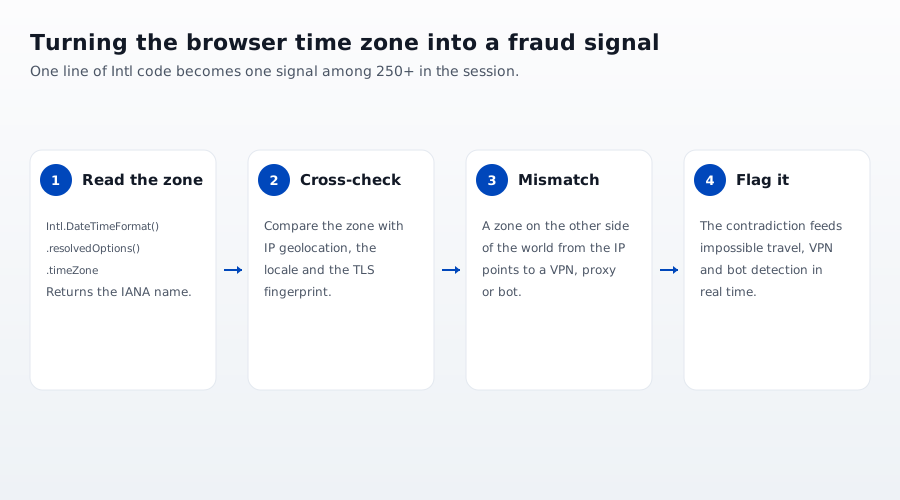
- Time zone versus IP geolocation. If the connection's IP geolocates to one country but the browser reports a time zone on the other side of the world, that mismatch is a classic sign of a VPN, proxy, or a bot running on rented infrastructure. This is a core input to impossible travel detection and VPN detection.
- Time zone versus language and TLS. A consistent human profile has a coherent set of signals. A reported
Europe/Londonzone paired with a locale and a TLS fingerprint that do not fit is the kind of contradiction automated fraud produces. - A spoofed value is itself a signal. When the time zone reported to JavaScript disagrees with other timing measurements, that inconsistency flags an anti-detect browser rather than a real user.
This is why a stolen credential used from an attacker's machine, or an AI agent driving a headless browser, often gives itself away at the time zone: the value either contradicts the network or is too clean to be real. cside reads the browser time zone alongside 250+ other signals to catch exactly these mismatches, feeding account takeover and bot-detection decisions in real time.



