

TL;DR: PHP2Shell (CVE-2026-109618, CVE-2026-109619)
- What happened: On 2026-10-21 PHP shipped 8.5.12, 8.4.27, 8.3.36 and 8.2.35 to fix two CVSS 9.2 flaws in the engine itself. Both can give an attacker with no account code execution on any PHP web server, below WordPress, Magento or Laravel.
- Attacks started before the fix: The CVE IDs leaked about 23 hours before release. Cloudflare saw attack traffic before the patch, and watchTowr reported exploitation attempts 19 minutes after it.
- Patched is not clean: Updating PHP closes the door but evicts nobody. On online stores, server access often ends in a checkout skimmer, and that only shows up in the browser.
Short on time? See cside's client-side script monitoring. It helps you monitor the browser-side script changes and behavior described below.
On 2026-10-21 the PHP project released emergency fixes for two critical flaws in the PHP engine, tracked as CVE-2026-109618 and CVE-2026-109619 and nicknamed PHP2Shell. Because the bugs live in the runtime and not in any CMS or plugin, every WordPress, WooCommerce, Magento, Shopware and Drupal site on an unpatched PHP build was at risk at the same time.
Most of the coverage so far is about the server, and rightly so: update PHP and restart every worker. This post covers the part that tends to get skipped. When an attacker gets code execution on an online store, the server is rarely the prize. The prize is a few lines of JavaScript added to the checkout, served to every shopper until someone looks at what the browser actually runs.
What happened: an old bug and a disclosure that leaked
The root cause was not new. According to the PHP Foundation, a core developer first spotted signs of the out-of-memory problem behind CVE-2026-109618 during PHP's 2024 external audit. Nobody found a working route to code execution at the time, every candidate fix carried compatibility or denial-of-service trade-offs, and the work stalled. The Foundation calls that delay a structural failure of its own process.
That changed in August 2026, when audits by Calif, OpenAI and Wiz turned the old bug into working exploits. The coordinated release was set for 2026-10-22. It did not hold.
| When (UTC) | What happened |
|---|---|
| 2024 | Signs of the out-of-memory flaw found during PHP's external audit; no exploit path identified, fix stalls |
| 2026-08-11 | Calif and OpenAI independently report remote code execution with the same root cause |
| 2026-08-24 and 2026-09-18 | Wiz and OpenAI report further attack vectors |
| 2026-10-20, ~15:00 | The two CVE IDs leak on forums and social media, with a wrong release date and a wrong CVSS 10.0 score |
| 2026-10-20, 19:30 | PHP pre-announces the fix and pulls the release forward one day |
| 2026-10-20, ~20:00 | A research firm mistakenly posts a video of a working proof of concept; copies spread |
| 2026-10-21, 03:02 | Cloudflare turns on default WAF rules for all plans, including Free |
| 2026-10-21, 07:41 | Chainguard publishes patched images early, letting anyone diff the fix |
| 2026-10-21, 14:00 | PHP releases 8.5.12, 8.4.27, 8.3.36 and 8.2.35 |
| 2026-10-21, 14:19 | watchTowr reports active exploitation attempts against both CVEs |
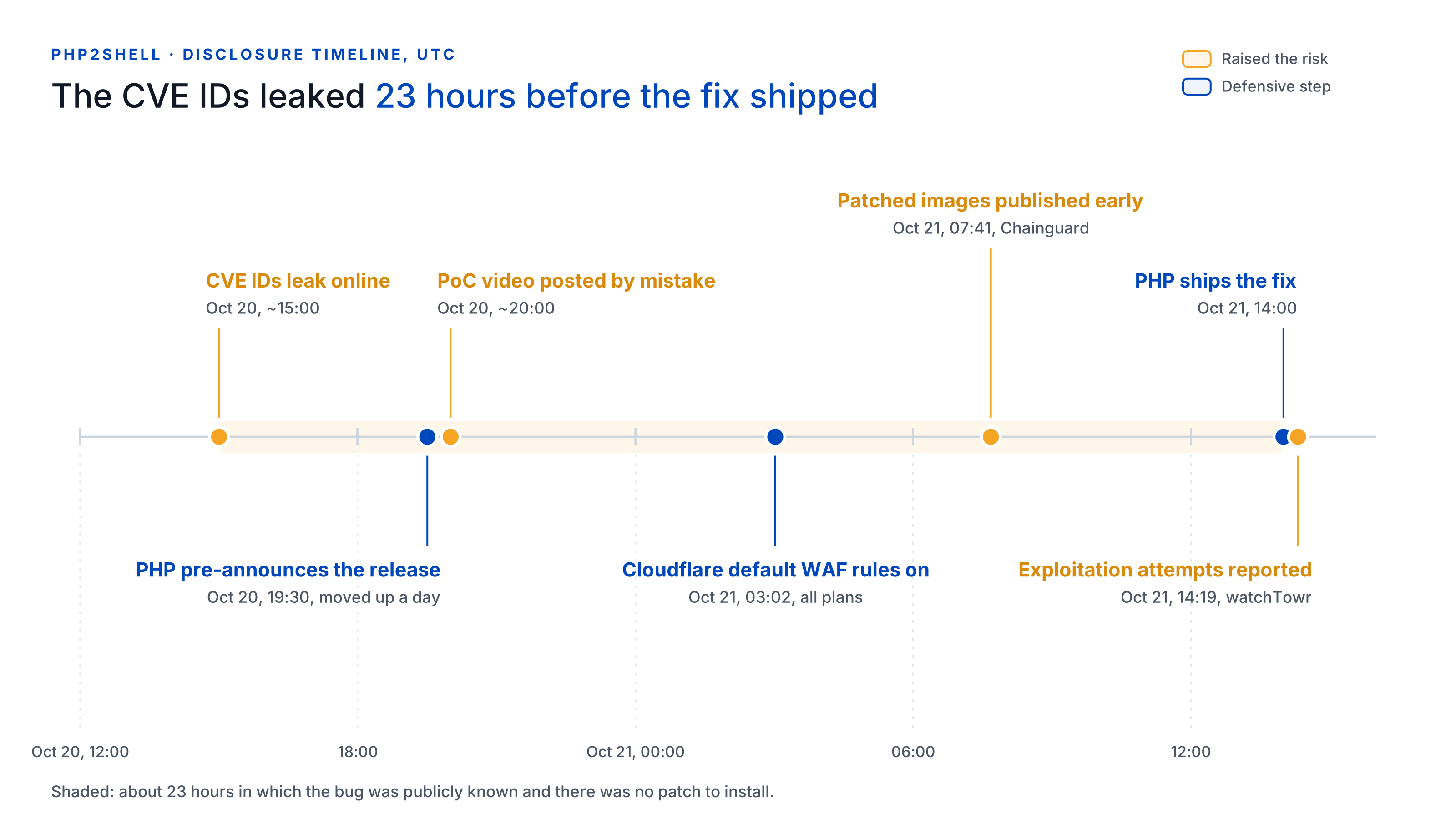
The gap that matters for defenders is the roughly 23 hours between the leak and the release. Anyone running PHP spent that window exposed to a bug attackers already knew existed, with no patch to install.
The two vulnerabilities, in plain terms
Both bugs sit in code that nearly every PHP request touches: memory management and error handling. Both are rated 9.2 on CVSS v4.0, and both can give an unauthenticated attacker code execution with the web worker's privileges.
| CVE-2026-109618 | CVE-2026-109619 | |
|---|---|---|
| Short name | RCE via out-of-memory corruption | RCE via stale state across requests |
| What goes wrong | A request hits the memory limit at exactly the wrong moment. PHP abandons work on half-initialized internal data, then treats it as valid during cleanup. | A fatal error leaves internal state pointing at memory freed at the end of a request. The next request on the same worker uses it (a use-after-free). |
| Typical trigger | Crafted multipart/form-data requests (forms and file uploads) that exhaust memory while appearing to stay within limits | A fatal error, followed by a later request that reads the stale state, for example through session upload progress, which is on by default |
| Worst case shown | RCE on Apache mod_php from one request, before any application code runs, with default settings | RCE on mod_php and PHP-FPM; on FPM the path depends on an operation inside the application |
Two details make this worse than a typical CMS bug. First, it runs below your application, so a fully patched WordPress or Magento install on a vulnerable PHP build is still exposed, and security plugins never get a chance to see the request. Second, according to the researchers, an attacker can also read memory from the PHP worker without first getting code execution. That memory can hold other users' session tokens, passwords, API keys and certificates.
The official write-ups are the out-of-memory corruption advisory and the stale state advisory.
Who is affected, and is it being exploited?
Any PHP installation that serves web requests is in scope, whatever the server API: PHP-FPM, Apache mod_php, php-cgi, FrankenPHP and LiteSpeed. Researchers showed unauthenticated code execution against stock installs of Magento 2.4.9, WordPress, Drupal, Joomla, Nextcloud, phpMyAdmin, Laravel and others. Sansec singles out Magento, Shopware and WooCommerce stores.
| PHP branch | Vulnerable | Fixed in |
|---|---|---|
| 8.5 | below 8.5.12 | 8.5.12 |
| 8.4 | below 8.4.27 | 8.4.27 |
| 8.3 | below 8.3.36 | 8.3.36 |
| 8.2 | below 8.2.35 | 8.2.35 (branch reaches end of life on 2026-12-31) |
| 8.1, 8.0, 7.4 | all | No official release. PHP published source backports; get a vendor build or upgrade |
| 7.3 and older | all | Upgrade |
Three things trip people up. Distribution packages received the patch in advance and may carry it under an old-looking version number, so check the package changelog for the CVE rather than the version string. Remi's repository, common on RHEL-based servers, did not publish updates on 2026-10-21. And updating WordPress, Magento or Laravel does nothing here: the fix comes from your server package, your host or your container image.
On exploitation, the picture moved fast. Cloudflare says it saw attack traffic against its customers before the patch shipped, and watched attackers mutate payloads to get around its rules. watchTowr reported active exploitation attempts against both CVEs at 14:19 UTC. As of publishing, no source has publicly confirmed a successful compromise of a specific server. Several organizations, including Dutch government services and BambooHR, went offline as a precaution rather than wait.
If you could not patch inside that window, assume you were probed.
Why a server bug becomes a checkout problem
On an online store, a shell is a means, not an end. This has played out after every mass-exploitation wave against PHP commerce platforms, CosmicSting in 2024 being the best known: attackers get code execution, drop a backdoor, and then change what the store sends to shoppers' browsers. The money is in the card numbers typed into the checkout, and those only exist in the browser.
The chain usually looks like this:
- Exploit. A crafted request hits an unpatched PHP worker.
- Code execution. Attacker code runs as the web user, with no login.
- Persistence. The attacker plants a webshell, a cron job or a new admin account. This survives your PHP update, because patching closes the door but does not evict anyone already inside.
- Injection. The attacker changes what the browser receives: a
<script>tag in a checkout template, an edited first-party JavaScript bundle, or, very commonly on Magento and WordPress, a snippet stored in the database (theme header settings, CMS blocks, widget options) where file integrity checks never look. - Collection. Every shopper's browser runs the skimmer. It reads the card fields, or swaps in a fake payment form, and sends the data to a domain that looks like an analytics or CDN host.
The merchant usually finds out from a card brand's common point of purchase notice, weeks or months after the first card was taken.
Each defense covers a different slice of that chain:
| Defense | Covers | Misses |
|---|---|---|
| PHP update | Step 1, for every request after you install it | Anything planted before you patched |
| WAF | Step 1, the inbound exploit request | Mutated payloads; everything after the request |
| Server forensics and file integrity | Steps 2 to 4, in files and logs | Scripts stored in the database; what the page does in the browser |
| Browser-layer script monitoring | Steps 4 and 5, what checkout pages actually run and where they send data | The server-side compromise itself |
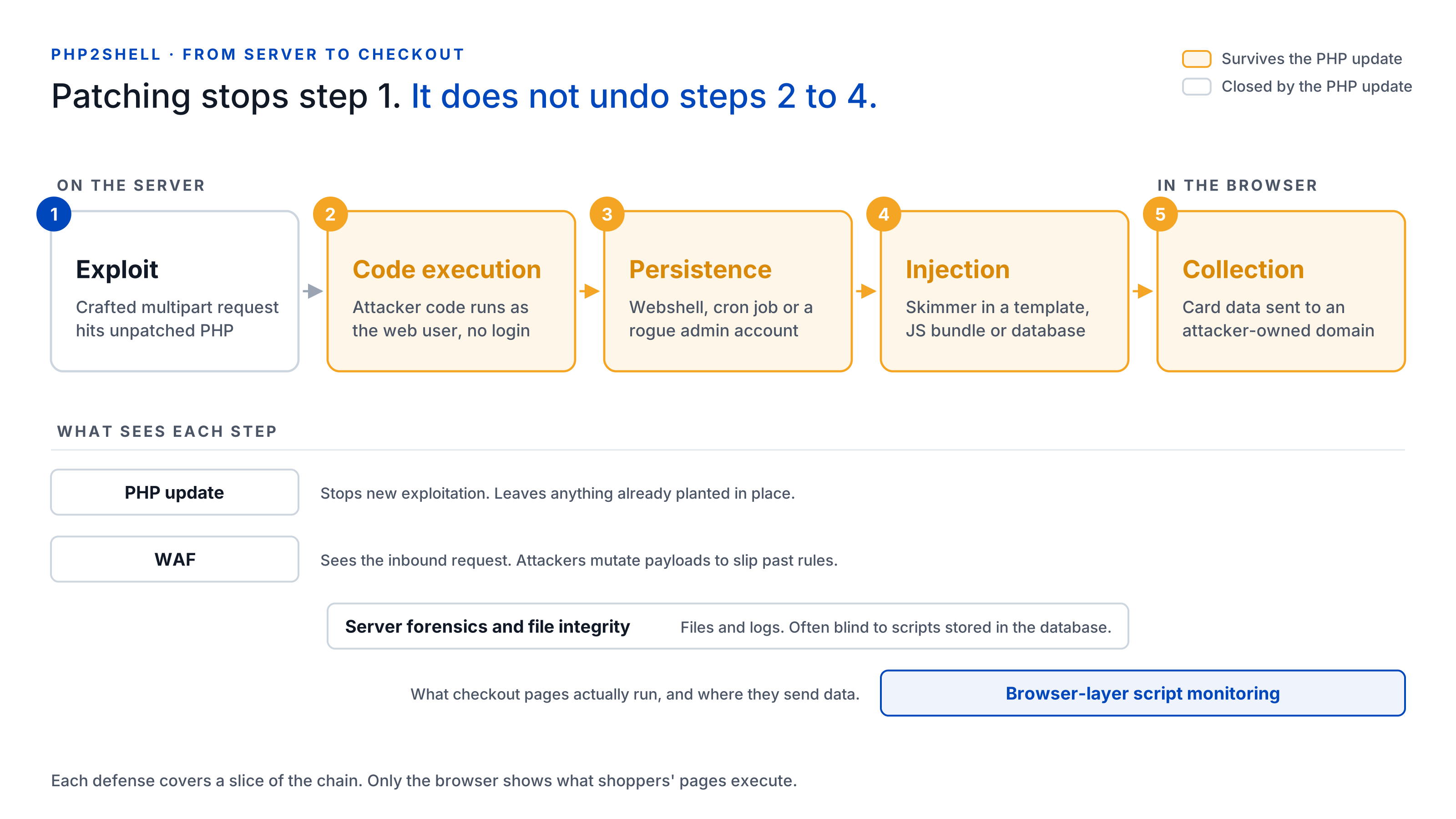
Modern skimmers are built to stay invisible to the tools that check the server side. They fire only on the checkout route, only once per session, only for certain countries, or only when no developer tools are open, so a crawler visiting from a data center gets a clean page. We saw the once-per-session trick a few days ago in the HulkApps checkout hijack. A WAF sees the inbound exploit, not the script your page serves three weeks later. The only place the skimmer reliably shows itself is in a real customer's browser session.
Patched is not the same as clean: what to check now
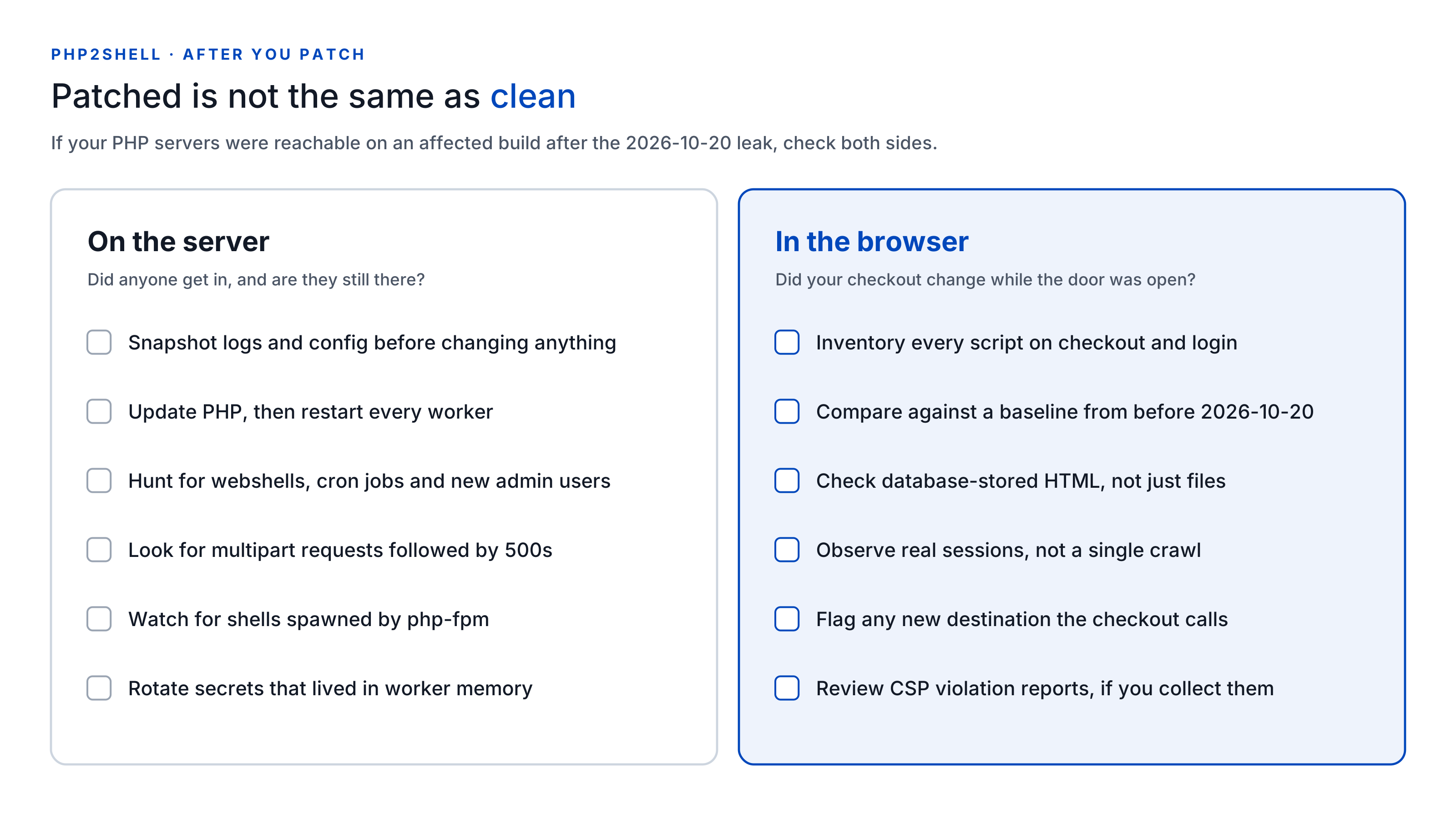
If your PHP servers were internet-facing on an affected version at any point after the 2026-10-20 leak, work through both lists below. The first is about the server. The second is about what your customers' browsers receive, and it is the one most incident checklists leave out.
On the server
- Preserve evidence first. Snapshot PHP and web server logs, configuration and any suspicious files before you change anything.
- Update and restart. Install the fixed PHP build, then restart Apache, PHP-FPM and every long-running worker. An updated package with old workers still running is still vulnerable.
- Hunt for persistence. Look for new or modified PHP files in web roots and upload directories, unexpected cron jobs, and admin users nobody created.
- Read the logs for the exploit's fingerprints. The researchers suggest looking for unusual multipart requests followed by memory-limit errors or bursts of HTTP 500s, oddly large
PHPSESSIDresponse cookies, and unexplained PHP worker restarts. - Watch process behavior. Outbound connections from PHP workers, or
sh,curlorwgetspawned byphp-fpm, are strong signals. - Rotate what lived in memory. Because worker memory could be read without code execution, rotate API keys, database credentials and payment gateway secrets that PHP processes held, and consider invalidating active sessions.
In the browser
- Inventory every script on your sensitive pages. Checkout, payment, login and account pages first. Include first-party bundles, not only third-party tags.
- Compare against a baseline from before 2026-10-20. Any new script, any changed file hash and any new domain the checkout talks to deserves an explanation.
- Check the places skimmers hide outside your codebase. In Magento, the HTML head "Scripts and Style Sheets" and footer "Miscellaneous HTML" settings, CMS blocks and widgets. In WordPress, header and footer injection plugins, widgets and theme options stored in the database.
- Do not trust a single crawl. A skimmer that fires once per session or skips data-center IP addresses will pass a scan. You need observations from real sessions, over time.
- Watch outbound requests from checkout. Card data has to leave the page somehow: a
fetch, an image beacon, a WebSocket. A new destination on the payment page is the clearest signal you will get. - Review CSP violation reports, if you collect them. A report naming a domain you have never used is worth chasing even when the page looks normal.
None of this replaces the patch. It answers the question the patch cannot: did anything change while the door was open?
What this means for PCI DSS 6.4.3 and 11.6.1
PHP2Shell is a textbook case for the two PCI DSS 4.0.1 requirements that became mandatory on 2025-03-31.
- Requirement 6.4.3 asks you to manage every script that loads and runs on a payment page in the consumer's browser: confirm each one is authorized, assure its integrity, and keep an inventory with a written justification for each. A skimmer injected after a server compromise is, by definition, an unauthorized script.
- Requirement 11.6.1 asks for a change- and tamper-detection mechanism that alerts you to unauthorized changes to payment page scripts and security-relevant HTTP headers, as the browser receives them. That is precisely the change an attacker makes in step 4 of the chain above.
Two practical questions for your next assessment. How often does your 11.6.1 mechanism actually evaluate the page? If the answer is weekly, a skimmer injected on 2026-10-21 could run for days before anyone hears about it. And does your evidence cover the window from 2026-10-20 onward? If you can show the script inventory on your payment pages did not change, you have a clean answer. If you cannot, that gap is worth closing now.
Merchants on SAQ A who embed a payment provider's iframe are not off the hook either. Since the January 2025 SAQ A revision, eligibility depends on confirming that your site is not susceptible to script attacks that could affect your e-commerce systems. A compromised parent page can still swap or overlay that iframe.
Where cside fits
To be clear about scope: cside does not patch PHP and does not stop the exploit request. That is the job of your PHP update and your WAF. cside covers the layer that comes after: what your pages actually run in your customers' browsers.
Real sessions, not synthetic crawls. cside monitors scripts in real shopper sessions rather than relying on a periodic scan, so a skimmer that fires once per session or hides from data centers still runs in front of us.
Changes and behavior, not just file names. A new script on checkout, a modified first-party bundle, or a script that starts reading card fields and sending them to a domain your store has never used raises an alert, with the script's content available to inspect.
Stopped in the session. With Script Method, cside fetches each third-party script server-side to hash, archive and analyse it, and blocks are enforced at runtime in the browser, alongside CSP. An unauthorized script, or a specific capability it tries to use, is stopped in the session instead of being reported after the fact.
PCI evidence. PCI Shield keeps the 6.4.3 script inventory and the 11.6.1 change alerts, with weekly reports your assessor can read.
Details above reflect public reporting and vendor statements as of 2026-10-21. We will update this post as exploitation reports change.
If cside was already monitoring your checkout on 2026-10-20, review the data recorded since then, or book a demo to walk through it with our team. Start for free to begin monitoring from deployment onward. New deployments cannot reconstruct earlier browser sessions.
Sources
- PHP security advisory: RCE via out-of-memory corruption (GHSA-w8hw-w9fx-j79w)
- PHP security advisory: RCE via stale state (GHSA-6wmf-4rv5-p3rp)
- PHP announcement, 2026-10-21
- The PHP Foundation: Today's PHP security release, and how we're strengthening PHP security
- Cloudflare: Cloudflare deploys protections against php2shell vulnerability
- watchTowr: PHP Remote Code Execution (PHP2Shell)
- Rapid7: CVE-2026-109618 and CVE-2026-109619
- The Hacker News: PHP issues emergency patches for two critical PHP2Shell RCE flaws
- Sansec: PHP2Shell critical PHP RCE
- CERT-EU Security Advisory 2026-018



