

TL;DR: HulkApps Shopify checkout hijack
- What happened: From 2026-10-10, shoppers on several Shopify stores who clicked Checkout were sent to a lookalike payment page on biliing[.]top, which took their card details and then forwarded them to the real checkout.
- How it got in: The Hulk Product Options app file on cdn.shopify.com was clean. The attack code came back from HulkApps' configuration API in a custom JavaScript field and was injected at runtime. Swym Wishlist Plus and Selleasy were hit the same way.
- Why it was missed: It only fired on a real Checkout click, once per browser session, on domains no blocklist knew. Scanners, CSP and most manual retests saw a normal store.
Short on time? See cside's client-side script monitoring. It covers everything below in one deployment.
On 2026-10-10, developer Roman Zipp was shopping on a popular Shopify store. He added a keyboard to his cart, pressed Checkout, and landed on what looked like a normal Shopify checkout. The only tell was his password manager offering to fill the "First name" field with the name on his credit card. He looked at the address bar: biliing[.]top/check-out/.
The order would have gone through. Once the fake page had the card details, it sent him straight on to the store's genuine checkout. The card would have been gone, and nothing in the merchant's order data would have looked wrong.
The code behind it did not live in the store's theme, and Shopify's own checkout was never touched. It arrived through Hulk Product Options, a widely installed product customization app from HulkApps, as a block of "custom JavaScript" returned by the vendor's own API. Within days, merchants who had never installed a HulkApps product were reporting the same fake checkout, traced to other vendors' apps. This is a client-side supply chain attack in its purest form: a third party that merchants had legitimately allowed into their customers' browsers became the delivery channel.
How the attack worked
Every link in this chain looked legitimate on its own. Zipp traced it step by step in Chrome DevTools.
- A trusted file loads. Hulk Product Options ships a theme app extension that loads
hulkcode.json storefront pages. The file is served fromcdn.shopify.comas part of the app's extension bundle. It was not modified. - The file asks for its configuration. On page load,
hulkcode.jssends one POST request toproductoption.hulkapps.com/api/v2/store/get_all_relationshipswith the store ID and the product being viewed. - The configuration carries code. The JSON response includes an
advanced_users.custom_jsfield, a feature that lets merchants add their own JavaScript. On affected stores it held about 22.7 KB of unminified attack code. - The code is injected at runtime. The app writes that string into the page as a script. In DevTools it shows up as an anonymous VM script with no source file, which is exactly why it is hard to spot.
- The checkout click is hijacked. The script registers a click listener. When the shopper presses Checkout, a function literally named
hijackcancels the real navigation and redirects to a lookalike checkout on an attacker domain. - The fake checkout collects the card. The lookalike page imitates a Shopify checkout and asks for payment and personal details.
- The data leaves. The form posts everything to
/api/submissionson the attacker's domain, which answers with a record ID. - The shopper is sent back. The fake page forwards the shopper to the genuine Shopify checkout, where the order completes as normal. The script also sets
__ctf_shim_handoff_done_v1in session storage so it never fires twice in the same session.
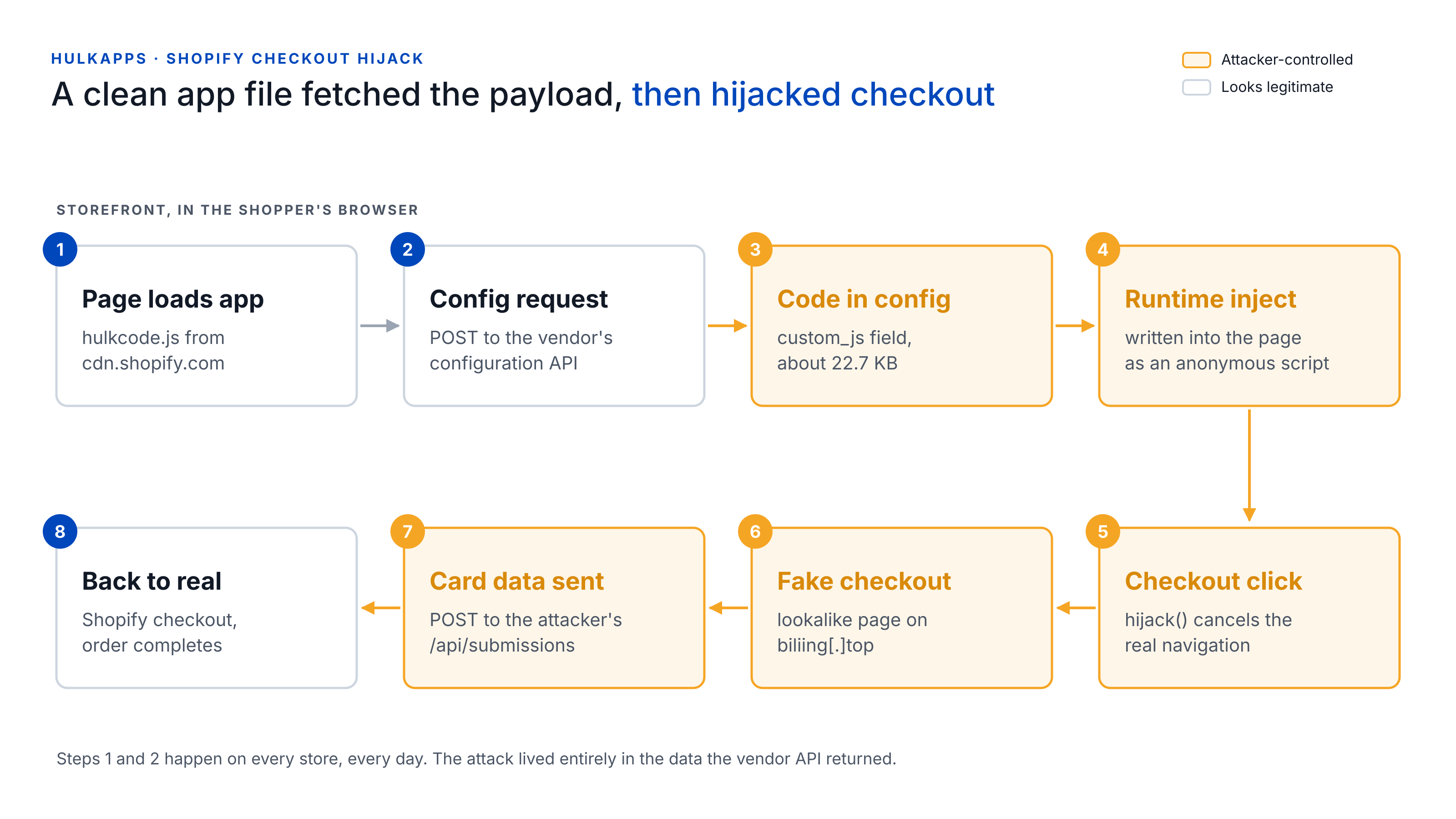
Steps 1 and 2 are exactly what the app does on every store, every day. The entire attack lived in the data the vendor's API returned.
The design choices are deliberate. Redirecting only on the checkout click means passive page loads look clean. Firing once per session means the merchant, the app vendor and anyone triaging a customer complaint will usually see a normal checkout when they try to reproduce it. And because the stolen order still completes on the real checkout, revenue dashboards show nothing unusual.
It was never just HulkApps
HulkApps was the first name attached to this campaign, but it is not where the story ends. Several popular apps from different vendors delivered the same redirect to the same family of domains, and in every case the payload sat inside settings data the app pulled from its vendor's servers.
| App | Vendor | When | What has been said |
|---|---|---|---|
| Selleasy | Logbase | 2026-10-13 | Logbase says an unauthorized party reached an internal Selleasy tool and added a script to some stores' settings. Removed the same day; Custom JS was temporarily disabled. |
| Swym Wishlist Plus | Swym | Reported 2026-10-15 | A developer traced the payload to Swym's configuration, reportedly a malicious wishlist button label. An update around 2026-10-14 appears to escape that text. No public Swym statement found. |
| Hulk Product Options | HulkApps | 2026-10-10 | HulkApps says an exploit introduced unauthorized configurations into the app's theme extension, and that its sweep found no other Hulk apps delivering redirects. Shopify temporarily disabled the extension; HulkApps has hired an outside security firm. |
| Hextom apps | Hextom | August 2026 | Listed by Zipp as an earlier, resolved incident. No public vendor notice found. |
| Sticky Add to Cart, Mega Menu | Qikify | 2026-07-22 | Qikify says code was injected into HTML fields in app settings. Fixed the same day; the apps returned to the App Store on 2026-08-21. |
It is tempting to read this as one vendor's breach. The evidence points somewhere more uncomfortable: someone systematically working through Shopify apps that let configuration data become executable code in the storefront. Whether that happened through one shared weakness, stolen credentials or several separate intrusions is still unknown. As of 2026-10-16, the App Store listings for Hulk Product Options, Swym Wishlist Plus and Selleasy all showed as unavailable, and an Australian merchant told iTnews that Shopify had advised her to keep her store closed.
Why it slipped past the usual defenses
The attack was not sophisticated code. It was sophisticated placement. Almost every control a merchant might have relied on was looking at the wrong layer.
- The script file never changed.
hulkcode.jscame fromcdn.shopify.comwith the same contents as always. File hash checks and Subresource Integrity would have passed, because the malicious part arrived as data, not as a file. - The origins were already trusted. The CDN and the vendor API are exactly the hosts a store's Content Security Policy would allow. Nothing new appeared in the script or connect lists. Allowlisting those hosts does not by itself let a store run a code string fetched from an API: a strict
script-srcwithout'unsafe-inline'or'unsafe-eval'would have refused it. But storefront themes and apps lean heavily on inline scripts, so few stores can run a policy that strict. - The theft happened off-site. The card form lived on the attacker's domain, so no data left the store's own page. CSP does not govern top-level navigation, and the store's own
connect-srcnever saw the exfiltration request. - The trigger needed a real click. Synthetic scanners that crawl pages, or even load the cart, do not press Checkout the way a shopper does. The payload stayed dormant for them.
- It ran once per session. Manual retests by merchants and support teams often came back clean, which delayed reports and made early complaints look like one-off flukes.
- Blocklists were slow. On 2026-10-10, none of the three domains Zipp found were on Google Safe Browsing or URLhaus, and his ad blockers and DNS filters let them through. A Reddit post had reported the same domain about 18 days earlier.
- Shopify's checkout was fine. Shopify's checkout was never compromised, and that is the point. The attack ran on the storefront, before the payment page, where platform protections do not reach.
| Who is looking | What they load | Do they click Checkout? | What they see |
|---|---|---|---|
| Synthetic scanner (periodic crawl) | The same scripts from the same hosts | No real click | A clean store |
| Real shopper, first session | The same scripts from the same hosts | Yes | The fake checkout |
| Merchant retesting in the same session | The same scripts from the same hosts | Yes | The real checkout |
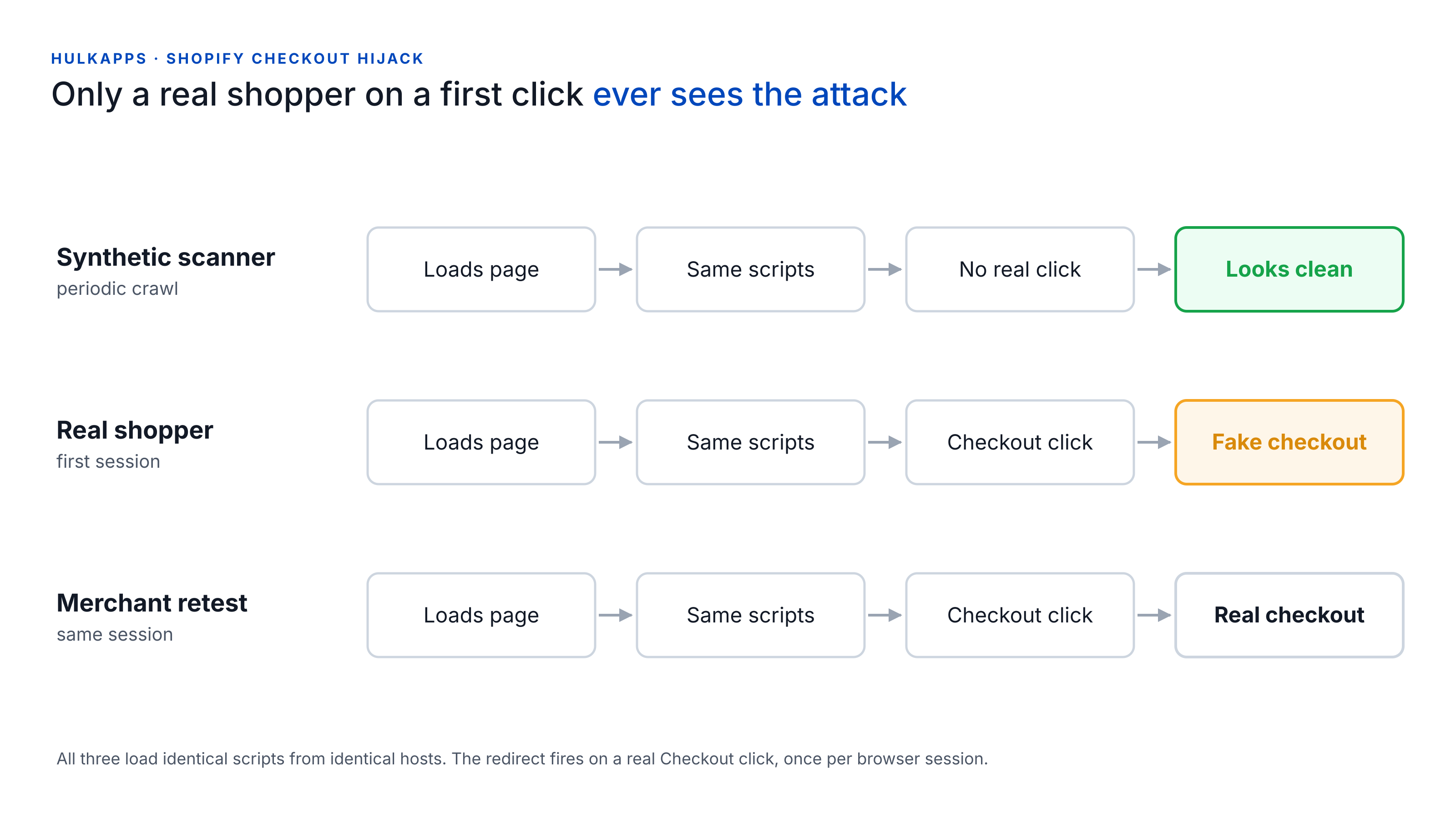
The only reliable place to see this attack is where it actually ran: inside a real shopper's browser, at the moment the script rewired the checkout button.
Indicators of compromise
Domains are defanged. Do not visit them.
| Indicator | Type | Context |
|---|---|---|
biliing[.]top | Domain | Fake checkout at /check-out/, data sent to /api/submissions |
checkout-confirm[.]top | Domain | In the payload's domain configuration |
order-confirm[.]top | Domain | In the payload's domain configuration |
account-confirm[.]top | Domain | Reported by a developer on a second affected store |
billing-confirm[.]top | Domain | Reported by a developer on a second affected store |
45.197.2.217 (AS54801) | Hosting | Where the biliing[.]top phishing site resolved |
__ctf_shim_handoff_done_v1 | Session storage key | Marks that the shopper has already been redirected |
__ctf_checkout_txn_v1 | Session storage key | Set alongside the redirect; purpose unclear |
hijack | Function name | Click handler that cancels the real checkout navigation |
advanced_users.custom_js | API field | Where the payload sat in the Hulk Product Options config response |
If you find any __ctf_ key in session storage on your store, treat it as a confirmed hit for this campaign.
What merchants should do now
If you run a Shopify store with third-party apps, assume you need to check, even if you never installed anything from HulkApps.
- Test checkout in a fresh session, more than once. Open a new private window, add a product, press the plain Checkout button and watch the address bar. Close the window and repeat. Do it from the cart drawer and on a phone too. Your checkout should stay on your own domain or your
myshopify.comaddress. - Look for the session marker. After a test, open DevTools, go to Application, then Session storage, and look for keys starting with
__ctf_. - Audit app settings that accept code. Any app with a "custom JavaScript" or "custom HTML" field is a place where code can hide. Open each one and confirm you recognize everything in it.
- Inventory your app embeds. In the theme editor, list every enabled app embed. Disable and uninstall anything you do not actively need, then check the theme for leftover snippets.
- Rotate credentials. Change your Shopify password and your password on each app vendor's dashboard, and turn on two-factor authentication everywhere it is offered. Review collaborator access.
- If you find it, preserve evidence first. Screenshot the fake page with the URL visible, save a HAR file from the Network tab and note the time. Then disable the app, contact the vendor in writing, open a case with Shopify Support and tell your payment processor.
- Get advice on notification. Card data entered on a fake page reached from your store may create obligations to customers or card brands. Talk to your processor and counsel.
One caution from the affected merchants in the Shopify Community thread: confirmation from the vendor that the code is gone has not always been enough for Shopify to clear a store to reopen. Keep everything in writing.
The PCI DSS 4.0.1 angle
Requirements 6.4.3 and 11.6.1 of PCI DSS 4.0.1 exist for exactly this class of attack. 6.4.3 asks merchants to inventory every script on payment pages, justify each one and confirm it is authorized and intact. 11.6.1 asks for a mechanism that detects unauthorized changes to those pages as the shopper's browser receives them. Both became mandatory on 2025-03-31.
Many Shopify merchants assume these requirements are Shopify's problem. For the checkout itself, they largely are, as we covered in does Shopify make you PCI compliant. But since January 2025, merchants validating with SAQ A must confirm their site is not susceptible to script attacks that could affect their e-commerce systems. A storefront script that silently swaps your checkout for someone else's is exactly that. Check with your acquirer which obligations apply to you.
This incident also shows why a static script inventory is not enough on its own. The inventory would have listed hulkcode.js, correctly, as authorized. What changed was its behavior: it fetched new code, injected it, attached a click handler and navigated the shopper to a domain the store had never used. Seeing that requires watching what scripts actually do in real sessions, not just which files load.
How cside approaches this class of attack
Real sessions, not synthetic crawls. cside monitors third-party scripts in real shopper sessions rather than relying on a periodic scan. A payload that only fires on a genuine Checkout click, once per session, still runs in front of us.
Behavior, not just source. We track what each script does: the code it injects, the listeners it attaches, the data it reads and where it sends it. A trusted app script that suddenly writes new code into the page and navigates shoppers to a domain your store has never used is a signal in itself, not something hidden behind an allowlisted hostname.
Stopped in the session. With Script Method, cside fetches each third-party script server-side to hash, archive and analyse it, and blocks are enforced at runtime in the browser, alongside CSP. An unauthorized script, or a specific capability it tries to use, is stopped in the session instead of being reported after the fact.
No single control would have stopped every version of this campaign. But the lesson is consistent across every vendor caught up in it: if third-party code runs in your customers' browsers, you need eyes in your customers' browsers. This is the same lesson the Polymarket supply chain attack taught earlier this year, delivered through a different vendor to a different kind of victim.
What we still don't know
- How the attackers got in. HulkApps describes an exploit and Logbase describes access to an internal tool. Neither has published a root cause.
- Whether the incidents are linked. Shared domains and identical
__ctf_markers suggest the same operator, but no vendor or Shopify has said so. - How many stores and shoppers were affected. Shopify has not published numbers.
We will update this post as vendors and Shopify publish more. Credit for the discovery, the reverse engineering and the public timeline goes to Roman Zipp.
Details above reflect public reporting and vendor statements as of 2026-10-16.
Want to see what is actually running in your shoppers' browsers? Start for free or book a demo to talk with our team.



