

TL;DR: TLS fingerprinting
- Before HTTP decrypts: Identifies the client library from the ClientHello before any HTTP is decrypted. Your WAF cannot do this. Your CDN can.
- One hash lookup: One hash lookup catches 40-70% of naive bots: curl, requests, headless Playwright without stealth. Sophisticated bots forge theirs.
- A layer-one filter: On its own it is partial. Paired with browser fingerprint and behavioral analysis it is your cheap layer-one filter.
Short on time? See cside's AI-agent detection. It covers everything below in one deployment.
Why TLS fingerprinting exists at all
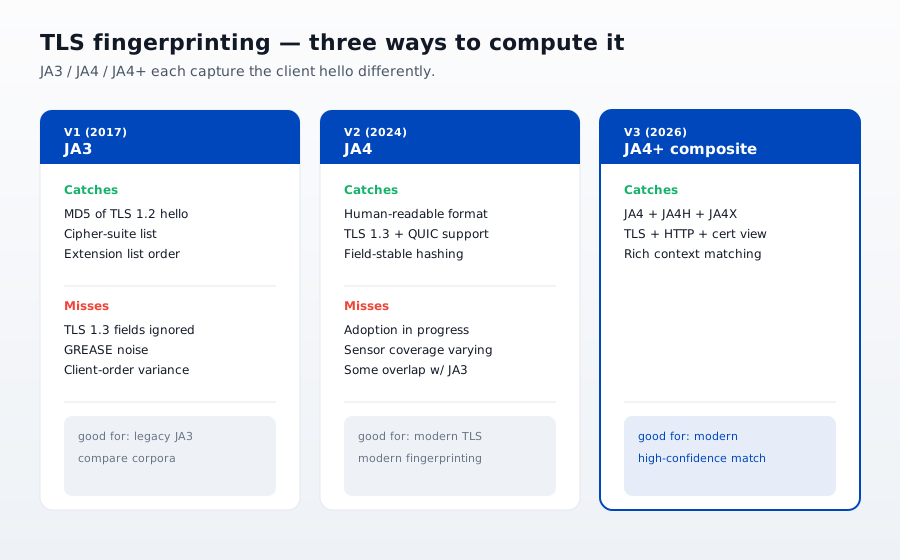
Every TLS 1.2 or 1.3 handshake starts with the client sending a ClientHello message. The ClientHello contains:
- A list of cipher suites the client supports
- A list of TLS extensions (SNI, ALPN, session tickets, elliptic curves, and dozens more)
- The order the client presents them in
- The TLS version, curves, and signature algorithms
Different HTTP client libraries and different browsers ship with different defaults. Chrome's ClientHello looks different from Firefox's. Firefox looks different from Safari. Python's requests library looks different from all three. Go's net/http looks different again. Headless Playwright looks like Chromium but with a subtly different extension ordering (until you configure otherwise).
If you hash the ClientHello into a short string, you get an identifier that persists across IP addresses, across user agents, and across cookies. That is a TLS handshake fingerprint.
What TLS fingerprinting actually catches
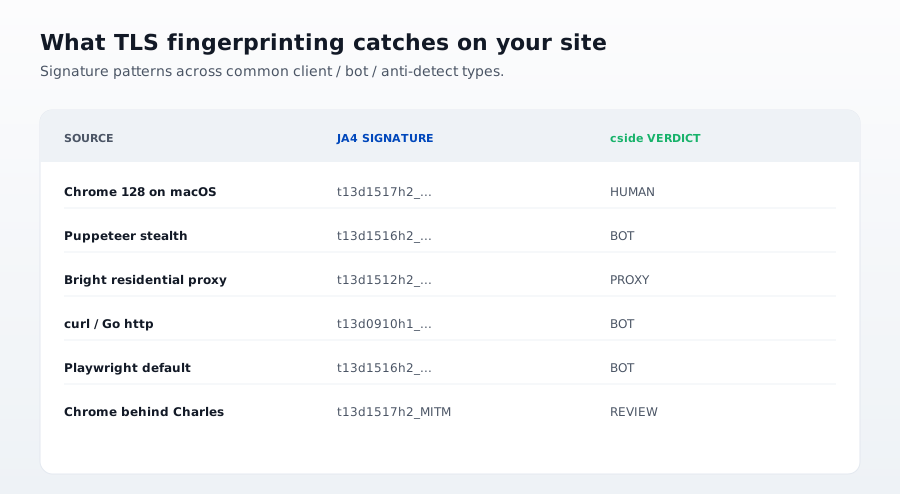
The single biggest use case: identifying non browser clients that pretend to be browsers via the User-Agent header. curl and Python requests are the classic examples. Both are trivial to configure to send a Chrome user agent string. Neither can lie about their TLS handshake fingerprint without significant additional work.
Concrete signals TLS fingerprinting lights up:
- Vanilla curl,
curl/8.4.0shipped by default: hash unique to the curl OpenSSL stack. Cannot pass for Chrome without recompilation. - Python
requests: uses the operating system's OpenSSL. Hash unique per Python version and OS. Nothing like Chrome's. - Go
net/http(unforged): distinctivecrypto/tlshandshake pattern. Widely used in scraper and API abuse bots. - Headless Playwright with default settings: sends a Chrome ClientHello but with a subtle extension ordering difference. Detectable in the handshake hash.
- Legacy scraper stacks (Scrapy default, Puppeteer without stealth): distinct enough hashes to sink 90 percent of the naive bot layer.
For sites without behavioral detection, TLS fingerprinting alone catches 40 to 70 percent of automated traffic depending on the site's popularity as a scraping target. Popular targets attract more sophisticated attackers who forge their fingerprints, which pushes the catch rate down.
Where TLS fingerprinting fails
Three failure modes matter in 2026.
1. Fingerprint spoofing tools are commodity
utls is a Go library that lets an attacker send an arbitrary ClientHello. curl-impersonate is a patched curl build that ships preset ClientHello templates for Chrome 116, Chrome 119, Safari 17, and so on. Multiple public forge and impersonation projects on GitHub cover every real browser version.
An attacker who uses any of these sends a TLS handshake hash indistinguishable from real Chrome. A defender looking at TLS fingerprints alone sees Chrome and lets the request through. This is not a hypothetical. The tooling is public, actively maintained, and used at scale.
2. Fingerprint entropy has a hard ceiling
There are only so many TLS client library variants in circulation. Chrome accounts for roughly 65 percent of desktop browser traffic in 2026. Safari another 20. Firefox 5. Edge 8 (also Chromium based). Real browser fingerprints cluster into a few dozen buckets at most, because major browsers ship the same crypto stack for months at a time.
That means every legitimate user shares a TLS handshake hash with millions of others. TLS fingerprinting can flag NOT Chrome. It cannot flag "which Chrome." It is a coarse filter, not a per user identifier.
3. TLS terminators strip the signal
By the time an HTTPS request reaches your application server, TLS has been decrypted. If the terminator (nginx, HAProxy, ALB, CDN) does not export the handshake hash as a request header, your application never sees it.
Cloudflare and Fastly both expose TLS handshake identifiers to their customers via custom request headers. Native AWS ALB does not currently expose a TLS handshake hash as of 2026. Native nginx requires a module. If you terminate TLS yourself with plain nginx or HAProxy in front of your origin, you need to install the module and configure the header explicitly.
How TLS fingerprinting fits into a full detection stack
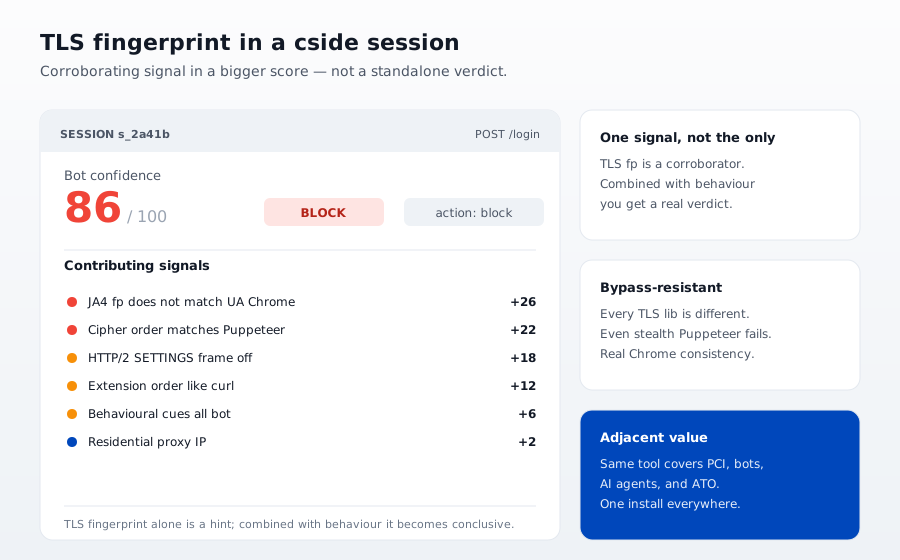
TLS fingerprinting is one signal. On its own it is a cheap dismissal of unsophisticated bots. In combination with the other three detection layers it is a piece of a coherent detection stack:
- Network layer (TLS fingerprint, IP reputation, ASN): cheap, catches the bulk of naive traffic.
- Browser layer (device fingerprint,
navigator.webdriver, CDP artifacts): catches headless Chrome, Playwright, and Selenium even when TLS fingerprints are forged. - Behavioral layer (mouse dynamics, timing, action sequence): the only layer that catches LLM driven agents and stealth Playwright with forged everything.
See our bot detection layers guide for the full pattern.
The honest recommendation
If you are terminating TLS behind Cloudflare or Fastly and not using TLS handshake fingerprinting, turn it on. It costs nothing and eliminates a large fraction of your bot traffic in one hash lookup.
If you are terminating TLS yourself and not using it, install the module (nginx has one, HAProxy has one). Same reason.
If you are already using TLS fingerprinting and you think it is a complete bot defense, you are wrong. The other 30 to 60 percent of automated traffic is either forging its handshake or using a real browser under automation. Behavioral detection is the layer that catches those.
TLS fingerprinting is a cheap, fast, well engineered layer one filter. Treat it as that. Do not treat it as an oracle.
How cside uses TLS fingerprinting
We use TLS handshake fingerprinting as one of the five signals in our VPN and proxy detection stack, and as an early filter in our AI agent detection platform. The signal is cheap enough to compute on every request. The value is in dismissing 40 to 70 percent of unsophisticated bot traffic before any application logic runs. The remaining sophisticated bots are what our behavioral detection stack catches. Around that handshake signal, cside reads a baseline of 250+ browser, device, and network signals per session and ties them to a persistent device fingerprint, so a proxy or VPN surfaces from how the device and connection behave rather than from the IP alone.
If your stack ends at TLS fingerprinting, you have a partial defense. If your stack starts at TLS fingerprinting, you have an efficient one.
Related reading
- Browser fingerprint spoofing: how attackers bypass detection and how to stop them
- How to detect bots on your website in 2026
- How to detect VPN traffic on your website
- Browser fingerprinting for fraud prevention: how it works and why it matters
- Why CAPTCHAs are no longer reliable bot defense
- AI agent security: why traditional bot detection cannot see the new threat



