

VPN detection works by cross-checking five signals: IP block ownership, TLS handshake fingerprint (JA4), device timezone vs. IP geolocation, WebRTC local address, and behavioral patterns. Each signal is individually weak (VPN providers can counter any one in isolation), but three or more matching signals gives high-confidence detection. The cheapest check is IP block ownership; JA4 TLS fingerprinting is the most stable signal that VPN providers cannot trivially rotate around.
TL;DR: how to detect VPN traffic
- Five detection layers: One-off IP lookups miss modern VPNs. Real detection stacks five layers: IP block ownership, timezone drift, WebRTC local address, TLS fingerprint, behavioral mismatch.
- Score across all five: Score across all five. Three of five matching gives you high-confidence VPN or proxy.
- Cheapest versus costliest: Cheapest layer is IP block ownership. Behavioral mismatch costs the most but catches the sophisticated proxies.
Short on time? See cside's VPN detection. It covers everything below in one deployment.
Why VPN detection matters in 2026
VPN detection has evolved from a niche technical challenge to a business imperative. As age verification laws sweep across US states and the UK Online Safety Act takes effect, website owners now face legal liability when minors access restricted content, even if those web visitors use VPNs to bypass geographic restrictions.
From Texas to Wisconsin to the United Kingdom, the message from legislators is clear: detecting and managing VPN traffic is your responsibility. In this blogpost we'll examine why VPN detection matters, review the legislative drivers creating legal pressure, explore technical detection methods, and help you determine the right approach for your business. Whether you're subject to age verification laws, geographic content restrictions, or contractual distribution agreements, this guide will help you navigate the complex landscape of VPN detection in 2026.
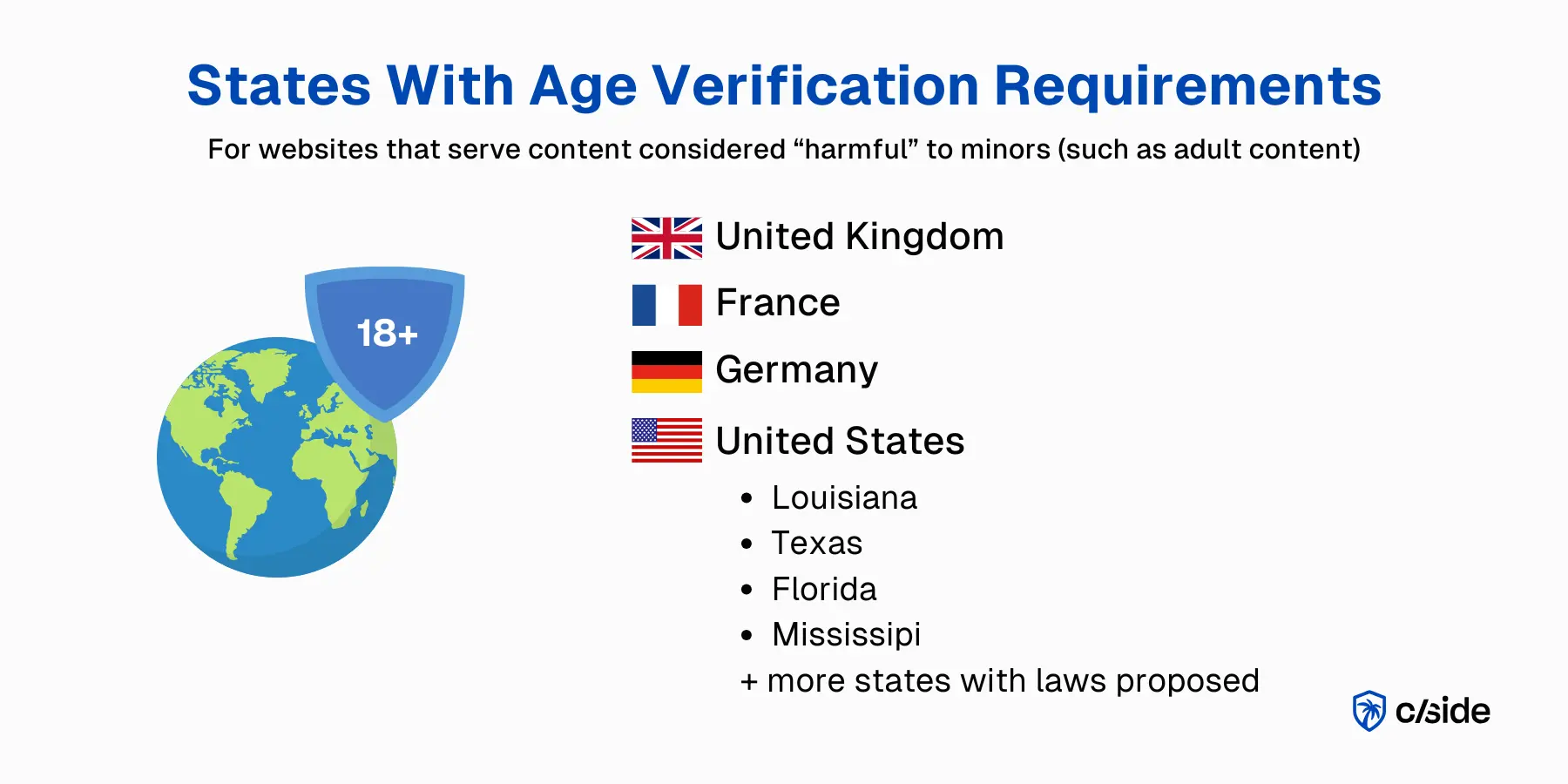
Failing to detect VPNs may violate local legislations
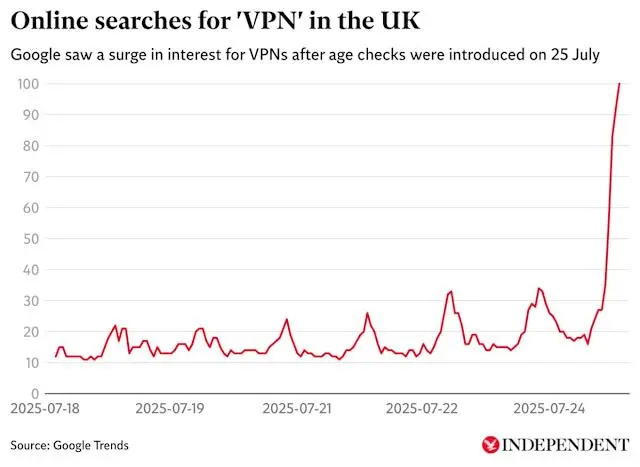
When the Online Safety Act came into force in the UK, overnight a surge of over 700% took place on the VPN search term.
Proton VPN reported a 1,400% jump in signups.
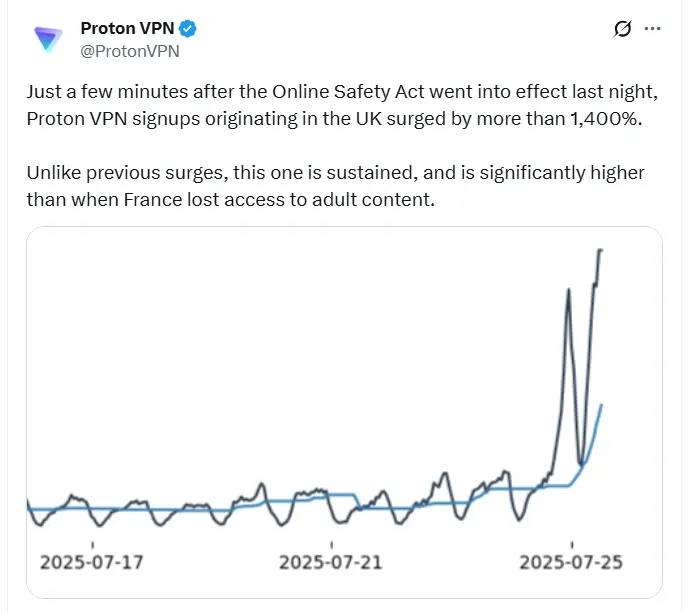
For a few weeks, this sudden surge was all over the news.
This inevitably triggered a counter response from legislators. The US state of Wisconsin was the first to react by Announcing Wisconsin Assembly Bill 105. The bill aims to force adult content sites to block VPN access.
The bill states: "A business entity that knowingly and intentionally publishes or distributes material harmful to minors on the Internet from a website that contains a substantial portion of such material shall prevent persons from accessing the website from an internet protocol address or internet protocol address range that is linked to or known to be a virtual private network system or virtual private network provider."
Under Louisiana's Act 440, failing to verify age (such as allowing VPN access) opens the door to civil lawsuits. The parents of a minor that was able to access "harmful content" through a VPN can sue the site owner for damages, court costs and attorney fees.
Other US states like Michigan and Indiana are pursuing similar action. With Indiana pursuing legal action against over 50 websites.
In the UK, government officials are calling VPNs "a loophole that needs closing".
The conclusion here is clear: as a website owner it is your job to detect VPN traffic and prevent circumvention of age verification or state level blocks.
Failing to detect VPNs breaks contractual obligations on distribution rights
When content distributors purchase rights to certain content it is usually geographically limited. When users travel abroad VPN usage is commonly used to continue watching their favourite series from home.When users want to watch a series that is not available in their country, they frequently use a VPN to gain access to that content.
While the user mostly does this out of convenience, this is a breach of distribution rights and in 2026 it is growing increasingly common for film studios to enforce strict VPN prevention techniques to prevent breaches.
Why Age Verification Became A Legal Requirement
There has always been really 2 versions of the internet:
- The open, unauthenticated internet. Relatively anonymous with the exception of some tracking techniques.
- The authenticated internet. Users logging in with their credentials. They are known visitors and their access is conditional to them.
Over the years regulators identified that certain content types on the open and unauthenticated internet can be harmful at developing ages. This led to the legislation we see today, requiring companies to perform age verification on visitors.Age verification is currently being performed in a number of ways:
- Facial age estimation using Machine Learning.
- Credit Card Verification, to verify a user has a credit card, which means they are likely adults.
- Photo ID Verification
- Digital ID Wallets, sharing only an 'over 18' credential without further context
- Open Banking API to verify the age of the bank account holder
- Mobile Network Operator, allowing to verify the age of a visitor using the contract with the mobile provider.
- Email-Based estimation, verifying the email history of a user across the internet to estimate their age.
Some of these methods are seen as privacy intrusive and as a result website visitors end up using a VPN to work around the restriction instead of complying.
Ways to detect VPNs
There are a few methods that can be used to detect VPNs. Some are quick and dirty, others are more invested in being accurate.
1. Detections on the network and application level
Technical readers may be aware of the OSI stack. There are 7 layers of a network application in the OSI stack.
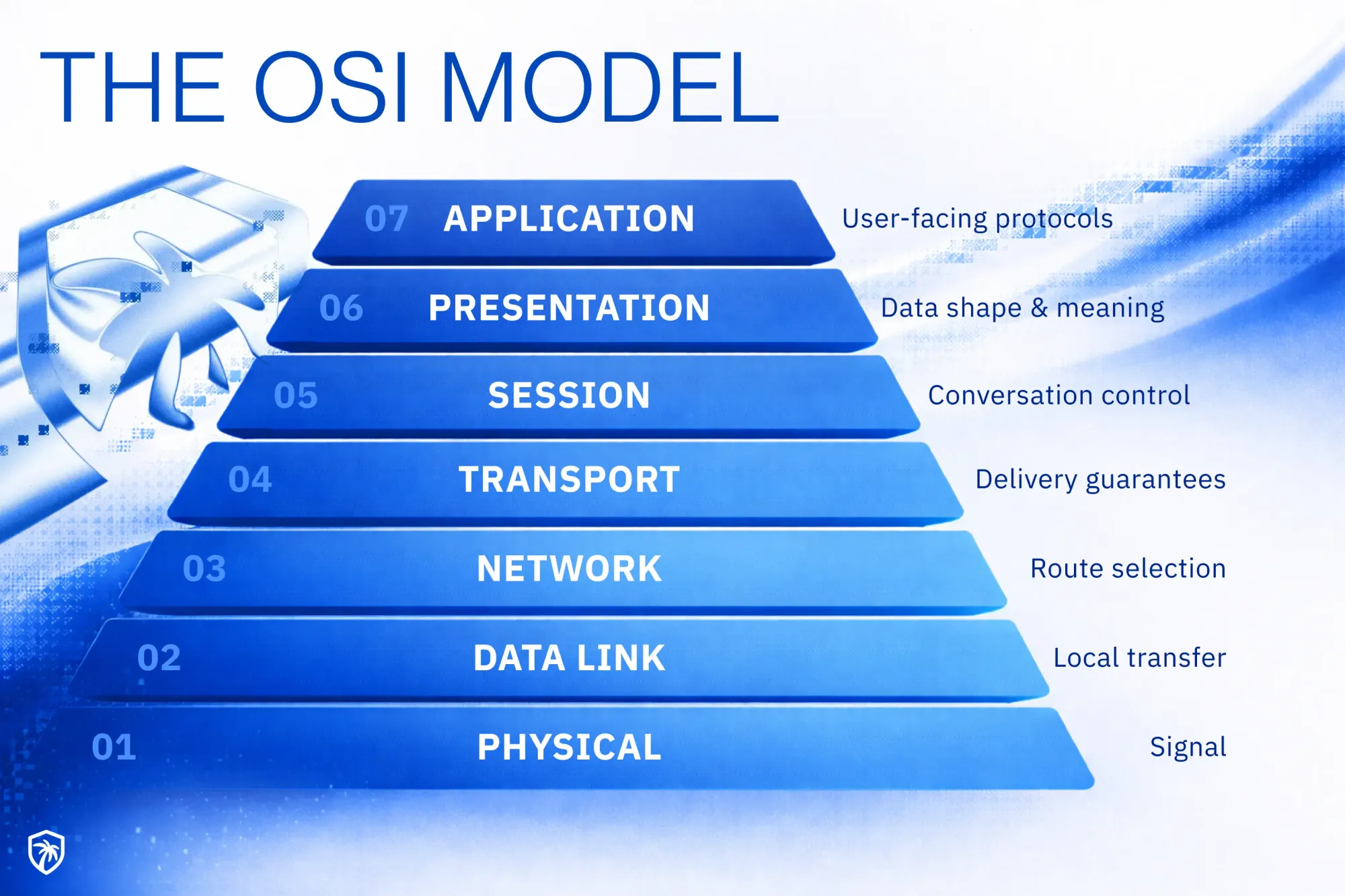
Across layer 3, 4 and 7 various elements differ between direct human connections and connections routed through VPN infrastructure. Investigating these layers yields evidence of VPN usage. For example - mismatching machine level timezones to claimed locations, or suspicious network packets.
An independent scientific review of VPN detection methods found this to be the most effective approach.
JA4 TLS fingerprinting
The TLS handshake happens before any HTTP data is exchanged. When a browser connects over HTTPS, it sends a ClientHello message that lists the cipher suites, TLS version, extensions, and elliptic curve groups it supports. JA4 (the 2023 successor to the earlier JA3 standard, developed by FoxIO) hashes these parameters into a short, stable fingerprint.
What matters is which software opens the TLS connection. Transparent tunnel VPNs (WireGuard, OpenVPN in routing mode) forward packets at the network layer and never touch the handshake, so the browser generates the ClientHello itself and the JA4 hash is indistinguishable from an unproxied session. The signal appears when non-browser software originates the request instead: a residential proxy SDK, scraping runtime, or automation client using Go net/tls, Python ssl, or curl produces a ClientHello that deviates structurally from Chrome BoringSSL or Firefox NSS. This is why the scientific review above identifies TLS-level analysis as one of the most durable signals for proxy-originated traffic: an operator can rotate exit IPs cheaply, but cannot cheaply make a non-browser runtime imitate a browser TLS stack.
For deeper background on JA4 mechanics and where TLS fingerprinting can fail, see our TLS fingerprinting guide.
2. IP lists
A simple, quick approach is purchasing or obtaining an open-source list of IP addresses flagged as VPNs. This approach can cover some basic VPNs, but the cat and mouse game is often stronger. Internet users look for VPNs that don't get flagged. VPN providers know when they get flagged and look for alternative measures. Using IP lists can be a start, it can show you made an effort to detect VPNs, but we fundamentally don't believe this approach works in the real world.
If you really need to stop VPN access, you must be willing to face the fact that there are more people looking for ways around your detections than there are maintaining them. So a simple list of IP addresses will not pass the test of the real world.
Especially in a world where regulators have already shown intent to retaliate against checkbox oriented approaches, it's best to recognize how an invested user will seek to bypass the detection efforts.
Detection method comparison
| Method | How it works | Accuracy | Bypass difficulty |
|---|---|---|---|
| IP blocklist (MaxMind, IPQualityScore) | Matches exit IP against known VPN/datacenter CIDR ranges | Low (exits rotate hourly) | Easy: residential proxies bypass entirely |
| TLS fingerprint (JA4/JA3) | Hashes ClientHello to identify the runtime that originated the request | Medium-high (proxy-originated only) | Hard: requires utls or curl-impersonate |
| Timezone vs. IP geolocation | Compares JS-reported device timezone to IP country | Medium | Easy: users can change system timezone |
| WebRTC local IP (desktop only) | Reads RFC 1918 local address via WebRTC API | Medium | Partly mitigated in modern browsers |
| Behavioral analysis | Timing, cursor/scroll, session patterns | High | Very hard: requires human simulation |
How do websites detect VPN usage?
Websites detect VPN usage by layering server-side IP checks with browser-level signals collected through JavaScript:
IP block ownership is checked server-side. The server inspects the visitor's exit IP against CIDR databases (MaxMind GeoIP2 Anonymous IP, IPQualityScore, or similar). Datacenter ASNs flag reliably; residential ISP IPs rented by commercial VPN services are harder to catch this way.
TLS fingerprint (JA4) is checked at the TLS terminator, before HTTP decryption. Cloudflare and Fastly expose this signal natively to their customers. If you terminate TLS yourself with nginx or HAProxy, you can enable JA4 logging at the edge. The resulting hash is compared against a database of known browser baselines and known non-browser runtime fingerprints.
Timezone mismatch is collected via JavaScript: Intl.DateTimeFormat().resolvedOptions().timeZone. If a device reports America/Chicago while the exit IP resolves to the Netherlands, that mismatch is a strong proxy or VPN signal.
WebRTC local IP leak (desktop browsers only) uses a WebRTC RTCPeerConnection to read the device's LAN address. A user behind a VPN will show a public exit IP for their network connection but their local RFC 1918 address via WebRTC. Most mobile browsers and iOS Safari block this signal; do not rely on it for mobile traffic.
Behavioral signals are the final layer: cursor movement, scroll speed, typing cadence, and page dwell time. These are the hardest for automated or tunnelled sessions to fake.
cside's VPN detection and Privacy Watch combine network and application-layer signals so website operators do not need to build and maintain each check independently.
How to detect VPNs on mobile devices
Mobile VPN detection follows the same layered approach, but two signals behave differently:
WebRTC local IP does not apply. iOS Safari has blocked WebRTC local address exposure since 2018, and most Android browsers follow the same policy. Remove this check from your mobile detection stack or treat a missing WebRTC signal as neutral.
TLS fingerprinting still works, for proxy-originated traffic. iOS Safari, Chrome for Android, and Firefox for Android each produce distinct JA4 baseline fingerprints, so a session originated by non-browser software deviates from the expected baseline even when the exit IP is clean. A mobile VPN app that only tunnels packets leaves the browser's own fingerprint intact, so treat a matching JA4 as neutral rather than as evidence of a direct connection.
Timezone mismatch remains reliable. The JavaScript timezone API works identically on mobile. VPN users often forget to update their device timezone when connecting to a server in a different region.
Behavioral signals shift from mouse to touch. Tap patterns, pinch-to-zoom, scroll inertia, and gyroscope data replace cursor movement. The signals differ from desktop but remain distinguishable from scripted or tunnelled sessions.
Age verification laws such as Texas HB1181 and Florida HB3 apply to mobile visitors. A compliant VPN detection solution must cover both desktop and mobile traffic paths.
Tools to detect VPNs
With new age verification laws introduced in 2025 and 2026, companies are looking for ways to detect VPNs to prove that reasonable measures are in place. You can evaluate these solutions that offer rapid implementation:
cside VPN detection
cside detects VPN usage by inspecting network behavior and fingerprint signals which traditional web security tools miss. Specialized client-side visibility set this solution apart from other fingerprinting tools.
- Approach: Network and application level detection
- Use case: For companies under strict age verification laws that need to demonstrate compliance, cside offers advanced detection and evidence gathering to demonstrate adequate measures for regulators.
Fingerprint
Related reading: our full guide to detecting AI agent traffic on your website · headless browser detection techniques
Detects VPN and proxy usage with device, browser, and network behavior across sessions.
- Approach: Network and application level detection
- Use case: For security teams monitoring abuse patterns where users rotate IPs but reuse the same device or browser.
IPQualityScore
Maintains an updated databases of known VPNs, proxies, TOR exit nodes, and hosting providers.
- Approach: IP list
- Use case: Fast setup for VPN risk scoring using IP reputation.
MaxMind
GeoIP and Anonymous IP databases that flag VPNs and proxies.
- Approach: IP list
- Use case: Fast setup for VPN risk scoring using IP reputation.
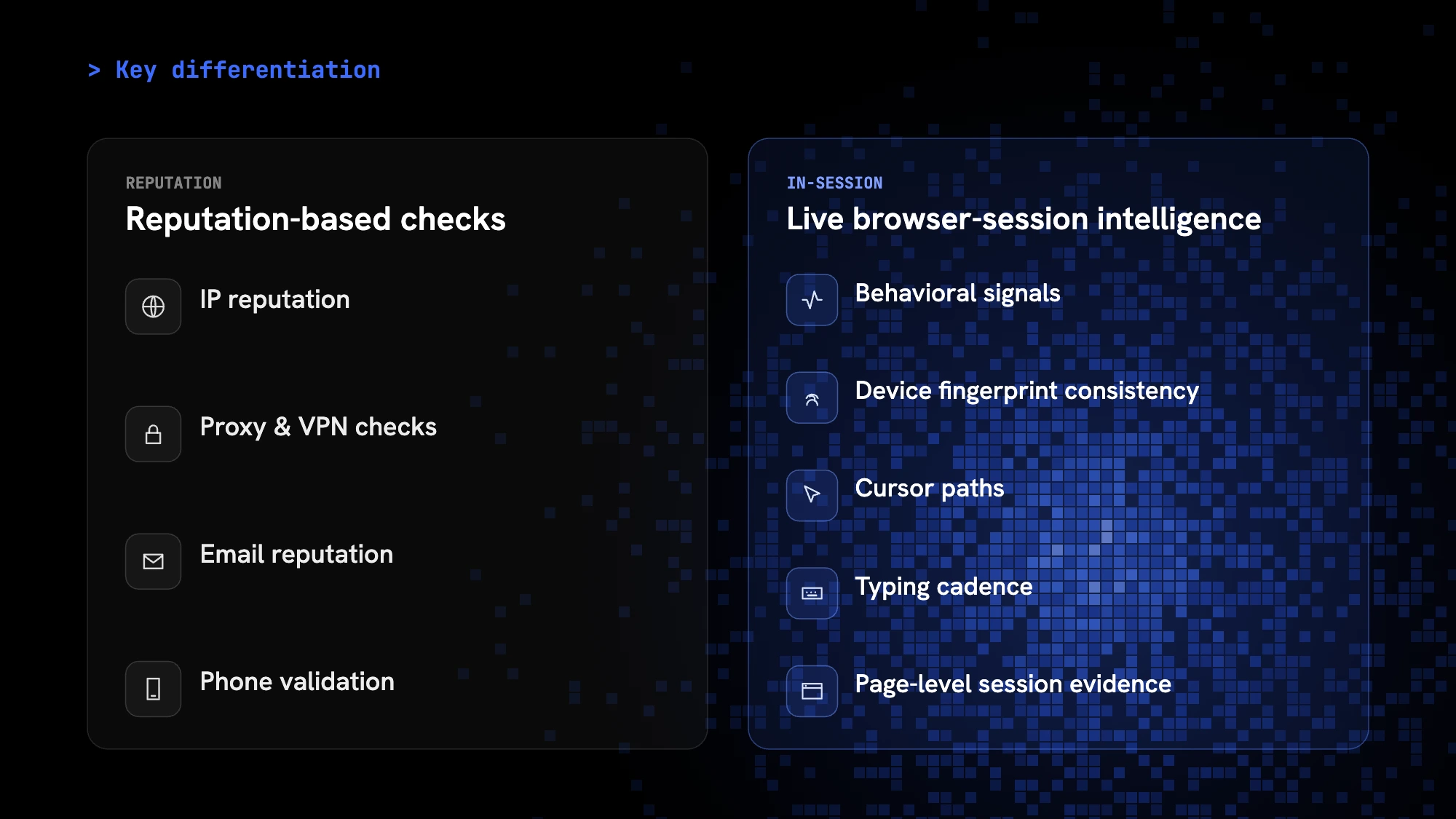
IP reputation tools are useful for quick VPN scoring, but their evidence stops at lists and reputation checks. Browser-session intelligence adds behavior, fingerprint consistency, cursor paths, typing cadence, and page-level evidence that survive cleaner IP infrastructure.
How to respond to VPNs
Many websites may be tempted to simply block all requests from VPNs. While this would be easy to do, the issue is that it has become easy for a user to recognize they were caught. In some applications, blocking all VPN requests is the right approach. But in others, this will only trigger the user to look further for methods to avoid the detection.
In VPN detection along with bot detection it's often better to customize the webpage response or make the webpages artificially slow to trigger the visitor to go elsewhere. In some cases, you may want to allow VPN traffic, but only if a user authenticates. That can be a fair compromise.
Not all VPN traffic is bad
VPNs are widely used by many users for legitimate cases:
- VPNs can be used to protect connections on public Wi-Fi
- Remote workers may be required to route traffic through corporate VPNs
- Travellers using VPNs to legitimately access the internet in a familiar environment (search results, language translations)
There is also the possibility of false positives picked up by detection tools. Aggressively blocking all VPN traffic can break functionality for benevolent users or harm customers. Age verification laws do not typically require outright blocking VPNs. They expect to see reasonable measures to protect audiences from harmful content.
What approach works best for you?
If your business is:
- subject to age verification laws
- subject to regional content restrictions
- subject to contractual agreements limiting distribution of media to specific geographies
Use cside's VPN detection to handle the cat and mouse game. We'll detect VPNs for you.
Conclusion
Implementing VPN detection may be a necessary task for your business to avoid liability, risk of fines and potential contract breaches. Use a solution that leverages deep fingerprints on the request level instead of IP lists.
How cside VPN detection works beyond IP lists
The rules changed fast. Texas HB1181, Florida HB3, and the UK's age-verification law all pushed non-compliant sites to detect and act on VPN usage, or face attorney-general fines of up to $10,000 per violation and, in some US states, ISP-level blocks. Static IP lists cannot keep up because VPN providers rotate exit nodes hourly.
cside's VPN detection takes a different approach:
- Multi-level analysis on every request. cside looks at the technology used to access your site, not the address the request came from. VPN indicators show up in signals a blocklist cannot see.
- Over 100 million daily requests across the cside network feed the detection model, so new VPN patterns are caught as they emerge rather than after a blocklist update.
- Custom response workflows through the cside SDK. Block, throttle, require age verification, or route to a fallback experience based on VPN indicators, without a hard block that upsets legitimate users.
The result: compliance with location-restriction and age-verification laws without the false-positive tax that comes with IP-only VPN blocking.



