

TL;DR: what is e-skimming
- What e-skimming is: E-skimming is a cyber attack where code is injected onto a merchant's website. Users that visit a payment page have their information stolen by malicious code that watches and "skims" the card details typed in.
- Stolen before encryption: E-skimming captures data before or during payment submission. Information is stolen before it reaches the perimeter of encryption or server security.
- How cside helps: To prevent e-skimming, use a tool like cside that watches third-party script behavior and alerts you of suspicious activity.
- Manual browser controls: Alternatively, use browser controls like CSP and SRI to manually limit which third party scripts can access payment pages.
- The compliance angle: PCI DSS 4.0.1 Requirements 6.4.3 and 11.6.1 (mandatory since March 31, 2025) require merchants to inventory every script on payment pages and monitor for unauthorized changes, direct regulatory pressure to address e-skimming.
Short on time? See cside's in-browser Magecart and skimmer blocking. It covers everything below in one deployment.
What is e-skimming?
- E-skimming
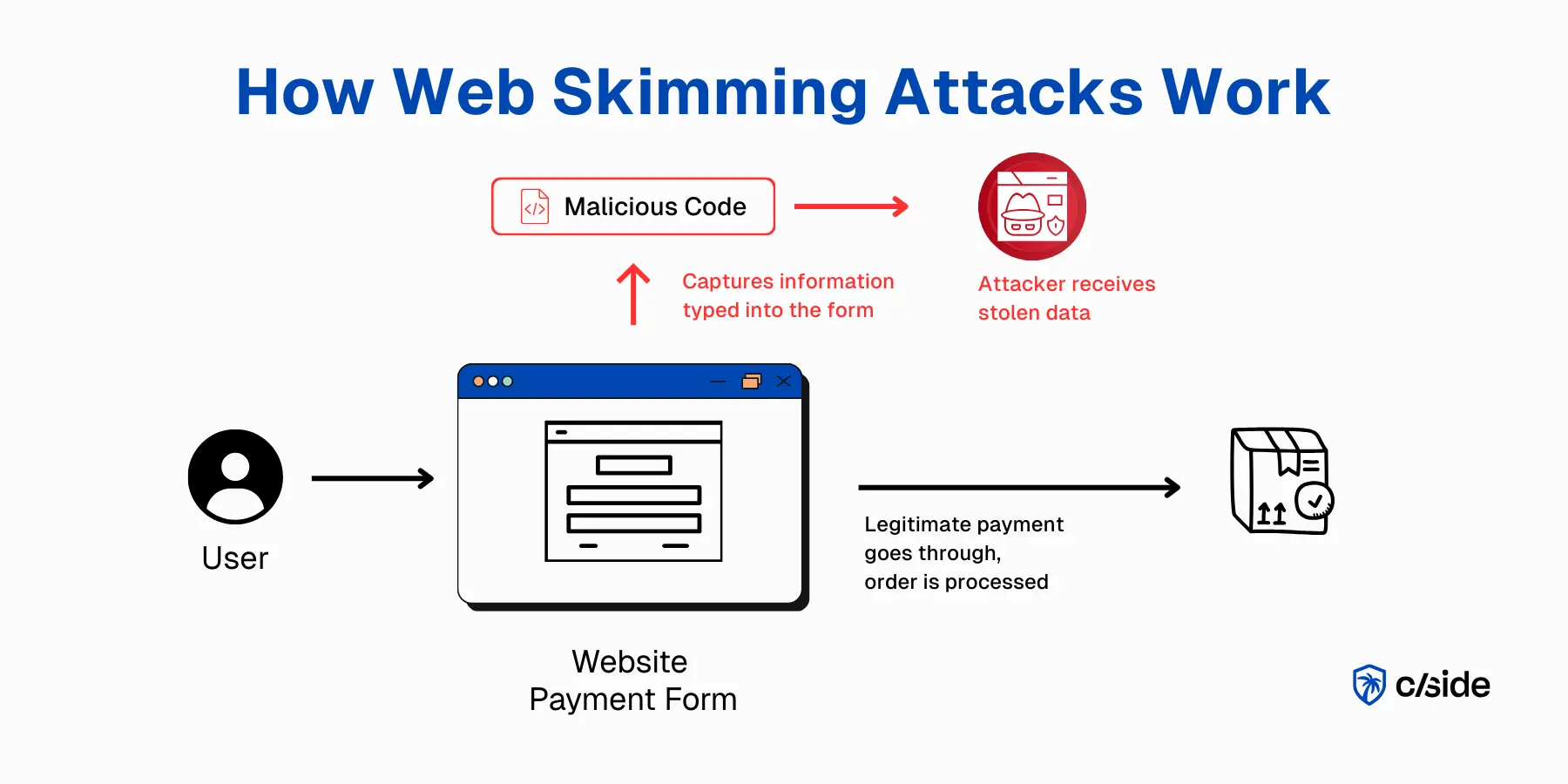
- E-skimming (also referred to as "web skimming") is a cyber attack where a bad actor injects a snippet of code onto a merchant's website. When a user visits the payment page, the malicious code monitors form inputs to skim card details, which are then sent to an attacker-controlled server for fraudulent use.
E-skimming is a client-side attack where malicious JavaScript injected into a merchant's checkout page captures payment card numbers, expiry dates, CVCs, and billing addresses as users type them, before the data reaches any server-side encryption. The stolen data is sent in real time to an attacker-controlled server and sold on dark-web markets or used directly for card fraud. E-skimming is the digital equivalent of a physical card skimmer attached to an ATM, except it is invisible, software-only, and can run undetected for months.
For contrast, physical card skimming is when a device is placed on an ATM or payment keypad. An innocent customer uses their card to make a purchase, the device captures the credit card information and PIN entered. The device is built to go unnoticed by company staff.
Similarly, e-skimming code injections are designed to be invisible. They often stay on payment pages for weeks (and in some cases months) before website owners realize.
What data is targeted in e-skimming attacks
| Data Type | Average Price on the Dark Web |
|---|---|
| U.S. Credit Card | $10 to $100 |
| Gmail Account | $60 |
| Bank Login Credentials | $200 to $1,000 |
| Corporate Login Credentials | $100 to $10,000 |
While e-skimming most commonly refers to credit card information being stolen, web skimming can also broadly refer to attacks that target this information:
- Login credentials (username, email, password)
- Personal information (address, legal name, phone numbers)
Is e-skimming a client-side attack?
Yes. Web skimming, e-skimming, or digital skimming (different names for the same threat vector) is a form of client-side attack.
These are often well-prepared, sophisticated attacks, a specialty of certain hacker communities that carry out Magecart attacks.
There are other client-side attacks such as phishing with UI overlays or fake checkout pages.
During web skimming, attackers funnel stolen data to their own server, usually via a domain that closely resembles the legitimate merchant's. This style of attack was used against Ticketmaster and British Airways, among others.
What websites are vulnerable to e-skimming?
Any website that works with third-party scripts, especially when they run on login or checkout pages. Sites built on Magento, WooCommerce, or other low-code platforms are especially vulnerable.
While the platforms themselves are safe and their security teams actively try to patch known vulnerabilities, those platforms are frequently used by non-technical users that are less likely to realize an attack is occurring.
Real-world e-skimming attacks
Three documented cases show how quickly e-skimming damage accumulates and how long attacks stay hidden.
British Airways (2018): Magecart Group 6 injected 22 lines of JavaScript onto ba.com's payment page. The skimmer ran silently for 15 days, capturing data from 380,000 bookings: names, addresses, travel details, and full payment card information. The UK Information Commissioner's Office issued a £20 million fine for failing to implement adequate security measures (reduced from the initially announced £183 million).
Ticketmaster (2018): Magecart compromised Inbenta, a third-party AI chatbot vendor whose widget Ticketmaster loaded directly on payment pages. The injected script intercepted payment data for months before Ticketmaster identified the breach through a customer fraud report, not its own monitoring. An estimated 40,000 UK customers were affected.
Macy's (2019): Attackers modified two JavaScript files on macys.com to capture form field data from both the checkout page and the "My Wallet" saved cards page. The skimmer ran undetected for six days, exfiltrating card details to an attacker-controlled server.
All three attacks shared one characteristic: the malicious code ran inside the victim's own site, with the same browser permissions as first-party scripts, invisible to server-side security controls and logs.
Prevent e-skimming with cside automated client-side security
How does e-skimming work and where things go wrong
To understand how e-skimmers operate, we need to look at how online payments work.
When shoppers have loaded up their cart and are ready to order, they land on the payment page. There they fill in the form fields. After the payment is submitted, data is encrypted and sent to the merchant and card issuer. If the transaction is approved, fulfillment begins.
As soon as the payment is submitted, the information is protected by encryption, server controls, API security, and other defense layers. Unfortunately, e-skimming captures information before/during the payment submission. The malicious code listens for keystrokes as the user enters the information. This specific technique, hooking form inputs to capture data as it is typed, is known as formjacking.
How hackers inject e-skimming code
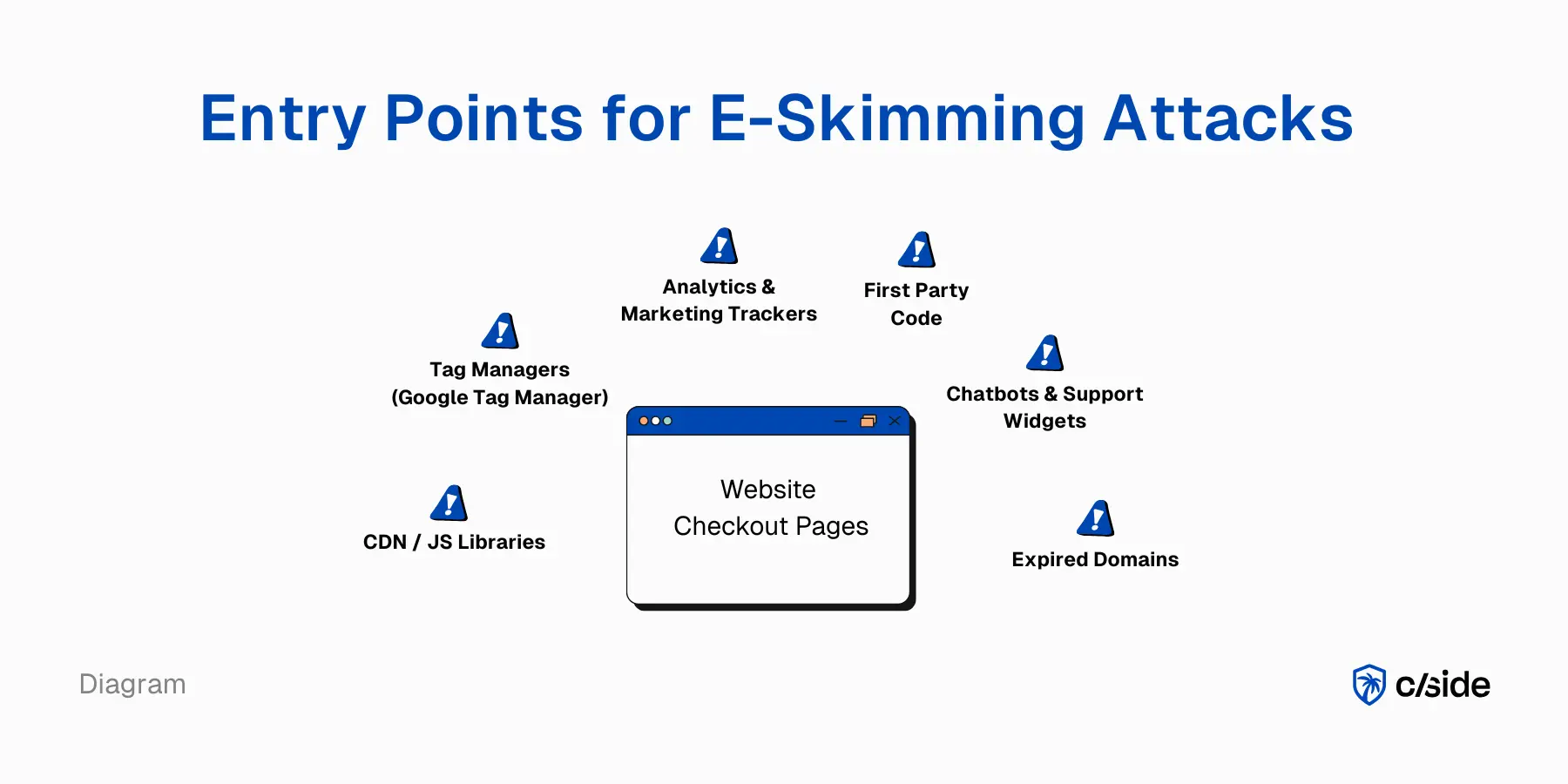
When a user visits your website page, their browser loads a mix of code. Some first-party code that your team created (or written by the platform you are using like Shopify or WooCommerce). But your website also serves third-party code.
For e-commerce sites this includes plugins and third party scripts:
- Analytics tools (like Amplitude)
- Promotional tools (like newsletter email captures)
- Bundle builders
- Ad tracking (Meta, Google)
And many other third party tools that are essential for e-commerce sites.
Third-party scripts are an entry point for web skimming
Each third party script is an entry point for attackers. They can be infiltrated through a variety of methods:
- Expired domains: When an old domain isn't renewed, attackers can purchase the domain and change the code. If your website is fetching code from that domain, the malicious code will be pulled in.
- Supply chain attacks: If a trusted third-party gets hacked, their script can spread malicious code to your site.
- Through tag managers: If attackers gain access to Google Tag Manager, they can inject code that will go straight to your live website without any review. The activity of that script will be hidden as it is bundled with multiple other scripts.
- Exposed credentials: Stolen credentials may grant attackers internal access to your systems. Instead of trying to break into the vault (your servers) they may choose to inject code on your website.
Individually, established third party tools are safe and carry minimal risk. But modern websites have dozens of third-party scripts. A report from Web Almanac found the median number of third party domains on a website to be 23. And those third-party scripts pull in more scripts (4th party scripts) to help them with data processing.
A chatbot (third party script) might load in a document analysis tool to help customers with support tickets by analyzing their PDFs. You never directly authorized that document analysis tool but it gets served on your site (and accesses sensitive information).
You might start to see the problem: your website ends up with dozens of scripts that can inject code on your site without anyone watching them.
How a typical Magento store gets hit: a step-by-step scenario
- The store installs a popular free analytics plugin from the Magento marketplace.
- The plugin vendor's infrastructure is compromised. Attackers insert 15 lines of JavaScript into the plugin's next update bundle.
- The store owner applies the routine update. The malicious code ships to the live site alongside the legitimate plugin logic.
- The injected script attaches an event listener to the payment form. On each checkout, it copies the card number, CVV, expiry date, and billing address fields.
- The data is sent to an attacker-controlled domain registered to look like a legitimate analytics endpoint, such as
analytics-track.net/collect. - The store receives zero server-side alerts. The exfiltration is invisible to WAF rules and server access logs, because it happens entirely inside the customer's browser.
- Weeks later, the store owner notices a chargeback spike or receives a card-network fraud alert. That is the first signal that something went wrong.
This scenario reflects how Visa's Spring 2025 Biannual Threats Report described digital skimming: "one of the most prolific and consistent threats" in the payments ecosystem, with attacks typically discovered long after the initial compromise.
What attackers do with e-skimmed data
What's the danger, really? In an optimal scenario for the attacker: they create a script that lets them see what users enter in the payment form. Bingo. They now see PII and the card number, expiration date, and CVC code.
If they manage to copy and exfiltrate that to their own server, the loot is secured. They can sell that info on the dark web or use the card details themselves for fraud.
How online merchants can prevent e-skimming
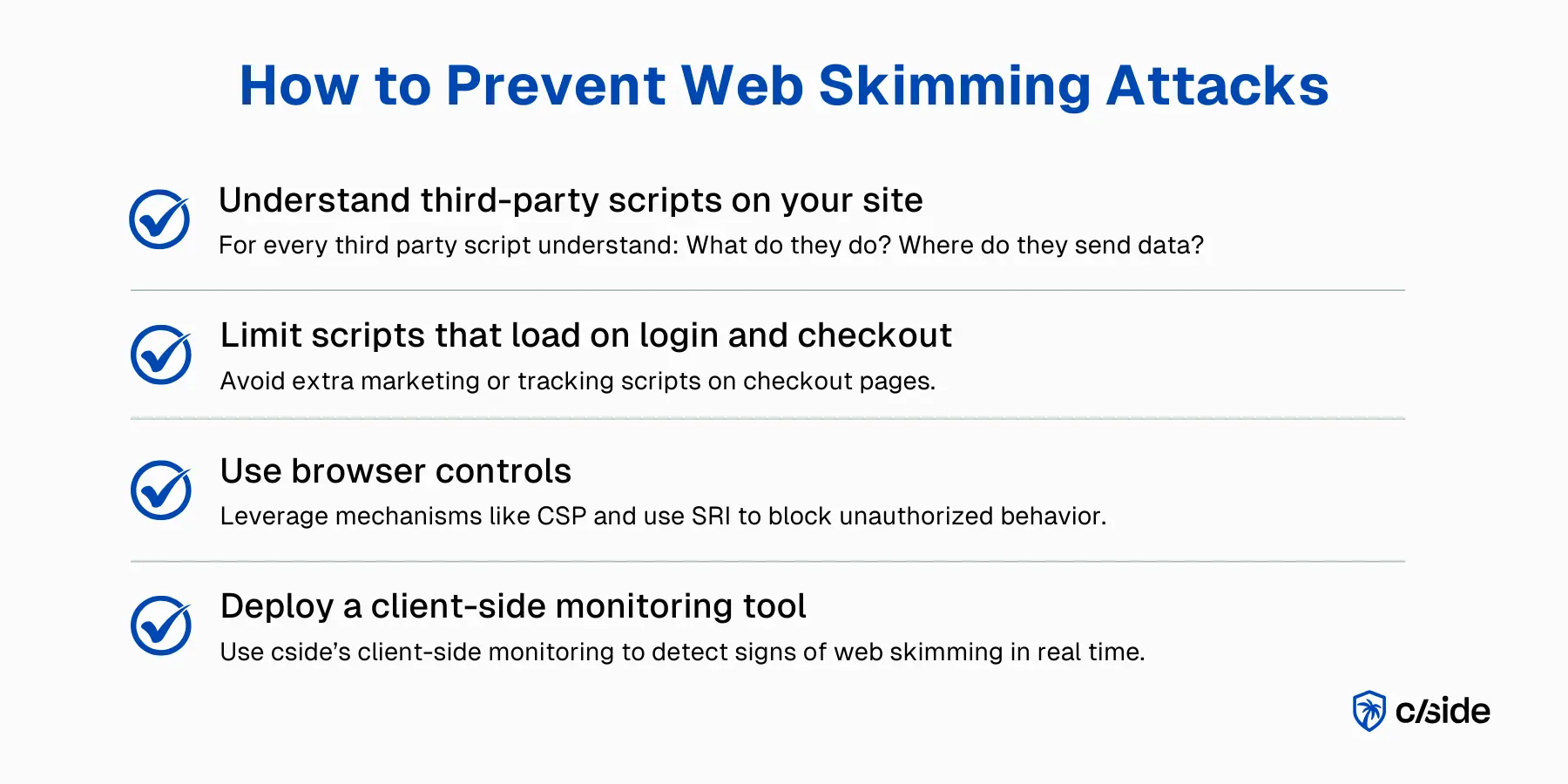
1. Monitor third party scripts: what data do they access and where do they send it?
Real-time script monitoring is essential. Tools that watch third party scripts and how they behave will sound an alarm when suspicious activity is identified. For example, if an analytics script suddenly starts reading form data and sending it to a server in Russia, you may be facing a client-side attack.
The cside platform monitors third party scripts to see what data they have access to and immediately alerts you if data access changes.
2. Limit what scripts run on payment pages
For merchants, the first step is knowing which scripts run on payment pages. As a precaution, make sure only necessary scripts run there. Anything not strictly needed for payment or fraud prevention: get rid of it.
3. Use cside for third-party script governance
Many websites default to allowing third party scripts to go straight to the live site. Marketing teams and developers want quick updates for improved functionality. Even companies that do check each script approve them once and rarely review them.
It might seem like enormous manual labor to review every single script that is added, but a tool like cside automatically tracks every new script added and provides an AI-written summary and risk score for you to quickly approve. All scripts are kept in a "live inventory" that privacy compliance or security teams can easily manage.
4. Deploy browser security controls: CSP and SRI
E-skimming attacks play out in the browser, so we can use a defensive layer there. CSP and SRI provide that. Granted, they don't solve everything but they do create more visibility.
A strict CSP determines which sources can load scripts and which endpoints they can reach. The script content itself isn't checked, but unwanted data flows get noticed and can be blocked. Start with Content-Security-Policy-Report-Only to test whether everything still works properly.
SRI adds a hash to files: that's how you check whether a script was modified at the source or during transfer. This makes it much harder to spread malicious code through an update or compromised vendor. This works mainly for static scripts. But automatically updating third-party scripts breaks the hash check.
Why legacy web security doesn't catch e-skimming
The malware doesn't run on the merchant's server. It runs in the customer's browser with the same rights and privileges as the merchant's own code.
JavaScript is accepted and executed in the DOM. Traditional web security tools often have no visibility into this. Even client-side defense tools like Content Security Policy only look at the source of each script. If a trusted source is serving malicious code, content security policies will not catch or block that attack.
What PCI DSS 4.0.1 requires to prevent e-skimming
PCI DSS 4.0.1 introduced two requirements that directly target e-skimming, both mandatory since March 31, 2025:
Requirement 6.4.3: Script inventory and authorization for payment pages. Every script loaded on a payment page must be documented in an inventory, authorized with a business justification, and its integrity protected. Merchants must be able to confirm that no unauthorized script runs on checkout. Manual reviews fail this test in practice: scripts are often added by marketing teams through tag managers and never reviewed by security.
Requirement 11.6.1: Tamper-detection mechanism for payment pages. Merchants must deploy a mechanism that detects unauthorized changes to HTTP headers and the contents of payment pages. The mechanism must alert on changes and must evaluate the page at least once every seven days (or as defined by a targeted risk analysis). A compromised third-party script that modifies form behavior satisfies the definition of "unauthorized change."
Together these requirements mean that manual script reviews and periodic audits are no longer sufficient. Automated, continuous client-side monitoring (the kind cside provides) is what PCI DSS 4.0.1 was written to mandate.
What does compliance with 6.4.3 and 11.6.1 look like in practice?
Compliance requires three things running continuously on every payment page:
- A live script inventory that captures every first-party and third-party script, its source domain, and its business justification.
- Integrity verification that confirms each script has not been modified since it was authorized.
- Tamper detection that alerts within the required evaluation window whenever an unauthorized change to page content or headers is detected.
Manual spreadsheets and monthly reviews cannot meet these requirements at scale. Automated tools that monitor real browser execution (watching what scripts actually do, not just what their source code says) are the practical path to compliance.
| PCI DSS 4.0.1 Requirement | What it mandates | Effective date |
|---|---|---|
| 6.4.3 | Script inventory, authorization, and integrity on payment pages | March 31, 2025 |
| 11.6.1 | Tamper-detection mechanism with alerts for payment-page changes | March 31, 2025 |
Related reading:



