
TL;DR: top client-side security tools
- The browser blind spot: Legacy web security tools (WAFs, endpoint detection) don’t see what happens inside the browser. This keeps client-side code execution as an unmonitored layer with hidden security risks.
- A new tool category: Client-side security tools have emerged to fill this gap and detect threats including Magecart, data exfiltration, and manipulation of browser elements.
- Five tools, four approaches: Purpose-built client-side security tools fall into a few approaches: server-side payload analysis, client-side JavaScript agents, remote scanners, and CSP reporting. This guide compares five of them.
- How to evaluate: Solution evaluation should take into account: protection depth, ease of implementation, and pricing (which many vendors keep hidden behind sales calls, resulting in wildly different estimates for similar functionality)
- For compliance reporting: For compliance reporting and security audits, prioritize tools that turn browser-runtime evidence into exportable reports mapped to PCI DSS 4.0.1 requirements 6.4.3 and 11.6.1.
Short on time? See cside's in-browser Magecart and skimmer blocking. It covers everything below in one deployment.
For where server-side runtime protection fits alongside these tools, see what is RASP.
Comparison Table: Client-side Security Tools
Most large web security vendors market a “client-side security” or “page protection” feature, but these are often limited in capability and exist to be a sales add-on.
Below is a curated list of companies that are genuinely advancing this space and tackling the obscurity of browser-layer visibility.
| Tool | Protection approach | Payload analysis & forensic archive | PCI DSS 4.0.1 (6.4.3 & 11.6.1) | Public pricing & free tier |
|---|---|---|---|---|
| cside | Server-side payload analysis (downloads every script) plus client-side Script Method and Scan Method; runs in 100% of real user sessions with no sampling; can block before execution | Immutable archive of every script payload with full version history | QSA-validated (VikingCloud) for 6.4.3 and 11.6.1 | Public, from $99/month, free tier |
| Feroot | Client-side JS agents (PageGuard allow-list) plus Inspector synthetic-user crawler; behavioral detection after scripts execute; samples a fraction of sessions | Behavioral alerts and logs; does not archive raw payloads | Not documented in this comparison; allow-list checks script source, not the served content | Not documented in this comparison |
| Jscrambler | First-party JS obfuscation plus runtime/anti-tamper and trap-based detection (decoy objects); all detections run client-side; monitoring relies on periodic scanning | Does not track script contents; no raw payload archive | Not documented in this comparison | No public pricing; no free trial or free plan |
| Reflectiz | Remote "agentless" scanner; periodic cloud crawler; no real-user browser visibility | Exposure risk ratings and inventory reports; no runtime payload archive | Not documented in this comparison | No public pricing; no free trial or free plan |
| DomDog | CSP reporting and violation triage plus a JavaScript agent dashboard review; single header script; only sees what CSP is configured to observe | Does not analyze payloads or archive attack code | Purpose-built for 6.4.3 and 11.6.1; no SOC 2 or PCI DSS certification found | Public, from $999/year |
Comparison of client-side security tools: cside vs Feroot vs Jscrambler vs Reflectiz vs DomDog
Which client-side security tools provide compliance reporting for security audits?
Short answer: these tools all market compliance reporting, but they do not produce the same audit evidence. Require browser-runtime evidence from real user sessions, QSA-validated PCI DSS 4.0.1 support for requirements 6.4.3 and 11.6.1, exportable reports, and a forensic history of script changes across the frameworks you report against. Score each tool against those evidence types using the table below.
What changed in this 2026 update: this section now separates compliance reporting into four audit evidence types: framework coverage, runtime script evidence, exportable reporting, and PCI DSS validation.
For security audits, ask each vendor to show:
- Current inventory of first-, third-, and fourth-party scripts
- Approval owner and business justification for each sensitive script
- Script-change history with timestamps and alert context
- Runtime behavior evidence, including data destinations and DOM access
- Exportable reports mapped to PCI DSS 4.0.1 requirements 6.4.3 and 11.6.1
| Tool | Frameworks reported | Audit evidence & reports | PCI DSS 4.0.1 (6.4.3 / 11.6.1) |
|---|---|---|---|
| cside | PCI DSS, GDPR, CCPA/CPRA, HIPAA | Immutable payload archive, forensic script-change history, AI-assisted documentation, automated reports | QSA-validated |
| Feroot | Not documented in this comparison | Behavioral alerts & change logs; no raw payload archive | Not documented in this comparison |
| Jscrambler | Not documented in this comparison | Trap alerts & integrity monitoring; does not track script contents | Not documented in this comparison |
| Reflectiz | General web-exposure risk | Exposure risk ratings & inventory reports (remote scan) | Limited; no published QSA/SOC 2 Type II |
| DomDog | PCI DSS 6.4.3 & 11.6.1 only | CSP violation reports & dashboard script review; no payload analysis or archive | Built for 6.4.3/11.6.1; no SOC 2/PCI cert found |
For audit-heavy programs, the practical differentiators are framework coverage, whether the tool is QSA-validated for PCI DSS 4.0.1, whether it captures browser-runtime evidence, and whether it keeps a forensic record of script changes that auditors can review after an incident. Remote-only scanning can help with exposure management, but it is weaker as primary audit evidence because it does not prove what executed in real user browsers.
Why Client-side Security Matters
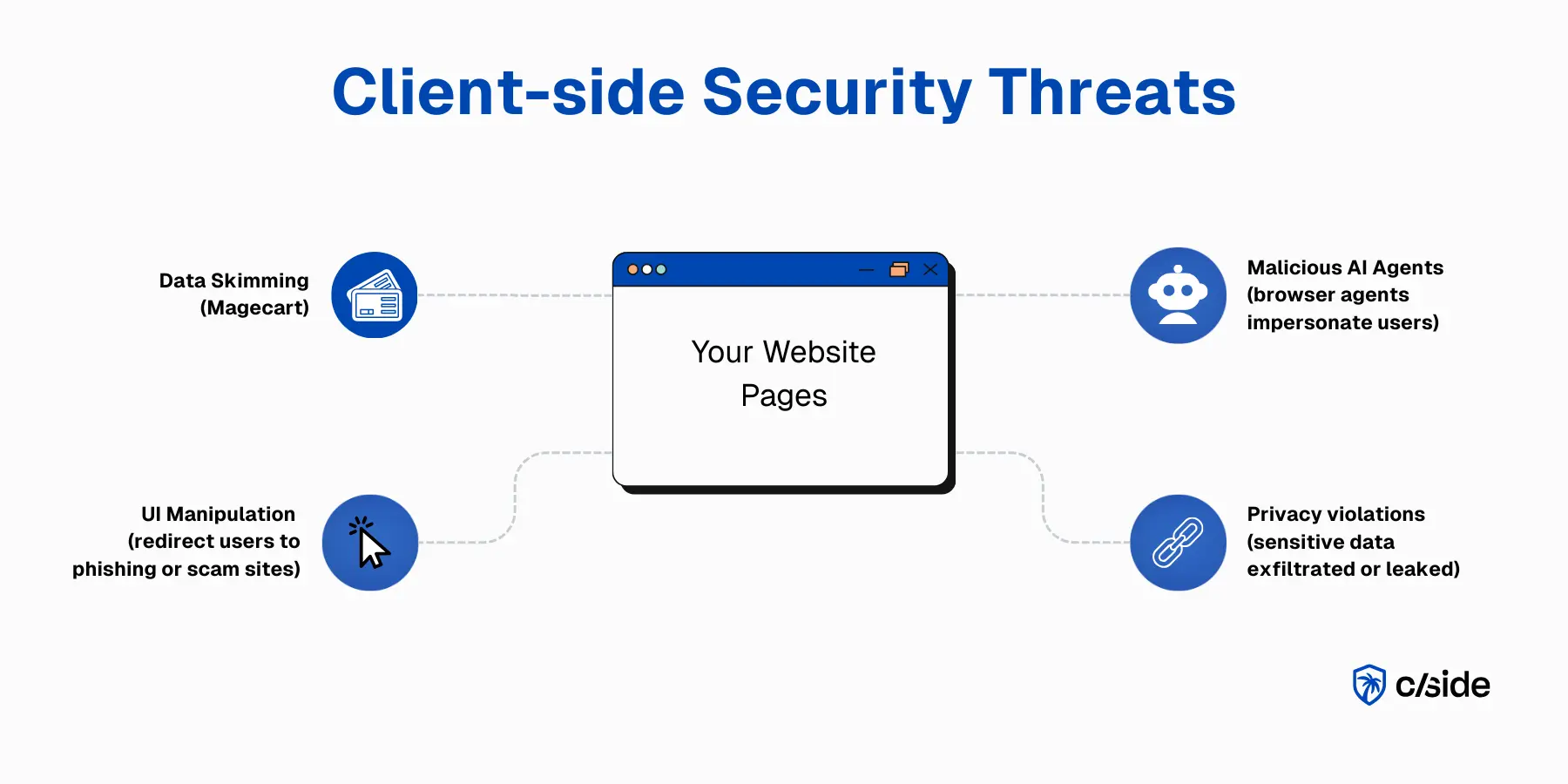
Websites and web applications contain a mix of code - most written internally, and some code pulled in from third parties. Think of third party scripts like chatbots, analytics tools, and accessibility libraries. Every single one of these introduces security risks to your website. These scripts are typically approved once, frequently changed, and rarely reviewed. That’s why attackers love this surface as an entry point. For example, once an attacker gains access to Google Tag Manager, they can inject code that makes it straight to the live website.
The consequences of a client-side breach extend beyond the immediate incident. According to a Ping Identity survey covered by Security Magazine, 66% of consumers say they would not trust a company after a data breach, a reputational cost that persists long after the technical response is complete.
What is client-side security:
- Client-side security
- Client-side security protects everything executed in a user’s browser, including front-end code, JavaScript, CSS stylesheets, and third-party scripts. These browser-loaded elements can be abused to steal data, redirect users, or run fraud. Client-side security solutions monitor and, in some cases, block suspicious browser-layer behavior to protect web visitors.
Who needs client-side security
Sensitive data is increasingly processed in the browser, making client-side visibility a company wide necessity.
- Security teams: Detecting client-side threats like script injections, data exfiltration, and malicious code that exists outside of the server & AppSec perimeter.
- Privacy & compliance teams: Demonstrating safety controls for frameworks like PCI DSS, GDPR, CCPA/CPRA, HIPAA and more.
- E-commerce teams: Maintaining checkout integrity by detecting modified scripts (Magecart) before they steal user payment data.
- Fraud teams: Catching signs of fraud earlier with client-side signals including chargeback abuse, malicious AI agents, and card testing bots.
Public research on the rise of client-side attacks
- cside detects 72,000 compromised websites in Q2 2025
- Client-side attacks detected byInsikt Groupclimbs by 3x in 2024 compared to 2023
Comparison of the Best Client-side Security Tools (Features, Reviews)
1. cside Client-side Security
cside was founded by veteran security engineers that noticed the client-side visibility gap in web security.As a pioneer in bringing AI into client-side protection, cside has won multiple industry awards for their unique multi-layer approach.
cside regularly publishesclient-side security research and contributes to bodies like theW3C. Their engineers regularly speak at industry events to educate business leaders on modern web attacks. Alongside client-side security, the cside platform suite includes AI agent detection, payment fraud detection, and website privacy compliance automation.
The cside team's specific credentials come from browser and client-side security work at Cloudflare (firewall, bot detection, and the client-side dependency tool Page Shield) and Vercel (V8 internals and JavaScript framework security). Engineers have also contributed to browser projects including Servo, the Rust-based browser engine. cside contributes to standards bodies including the W3C AppSec team, the Fraud Detection Community Group and the Web Payment Security Interest Group, and presents unique client-side attack findings at TPAC and BSidesSF.
Security features
- Detection of client-side attacks such as formjacking, magecart, and data exfiltration. Covers first, third, and fourth party scripts.
- Script payload & runtime analysis to identify signs of malicious JavaScript behavior (keylogging, iframe injections, suspicious redirects, DOM manipulation)
- Advanced protection on payment pages against credit card e-skimming
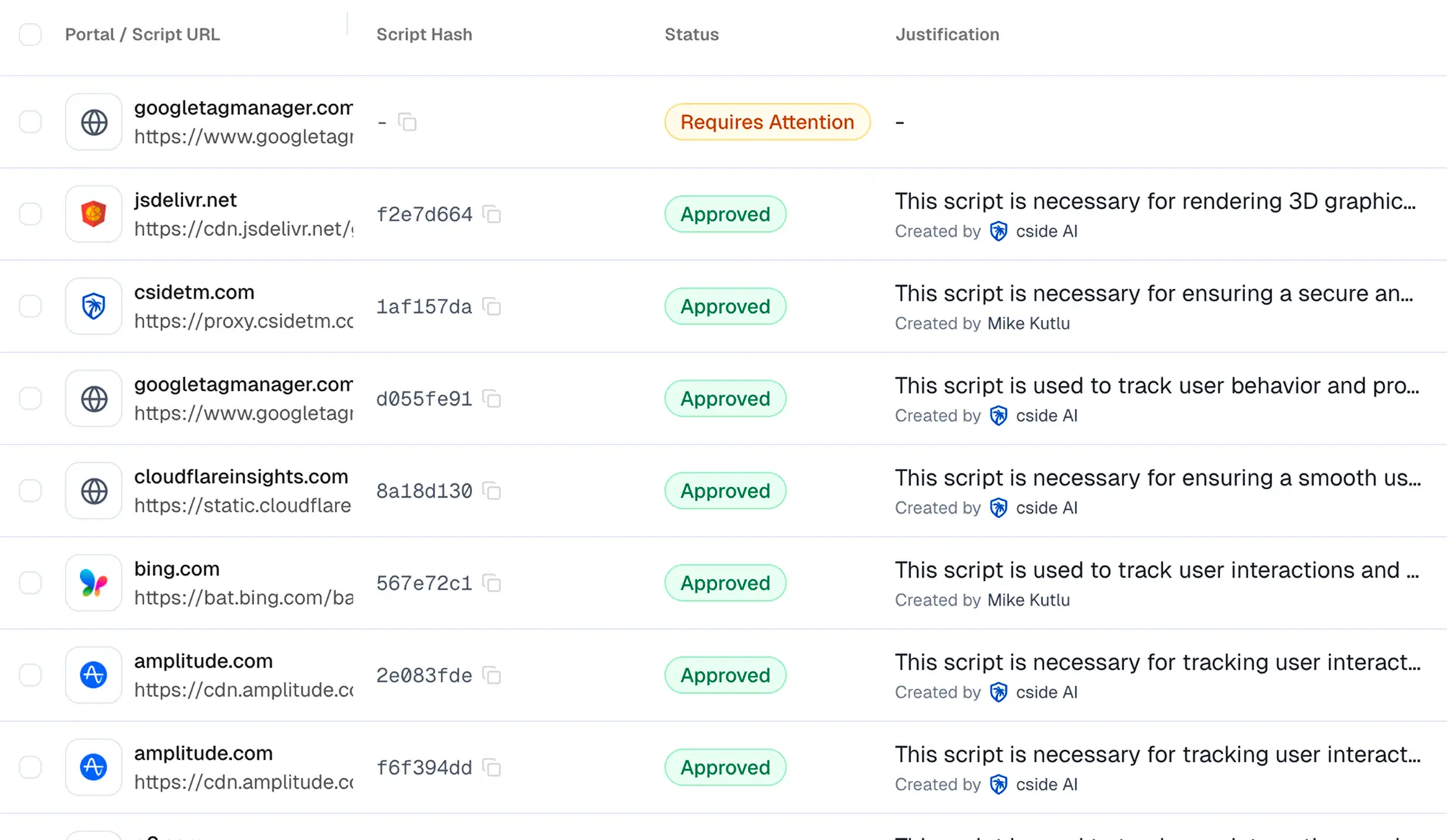
- Automatic tracking of third-party scripts. Get alerted of suspicious signals when new scripts are added or existing script code changes.
- AI-enhanced review engine to reduce manual security assessments
- Threat feed to identify JavaScript supply chain exposures. If a vendor tool on your website (chatbot, analytics tool) is compromised you can take action before you are impacted.
- Integrates with SIEMs and existing security tools.
Compliance features
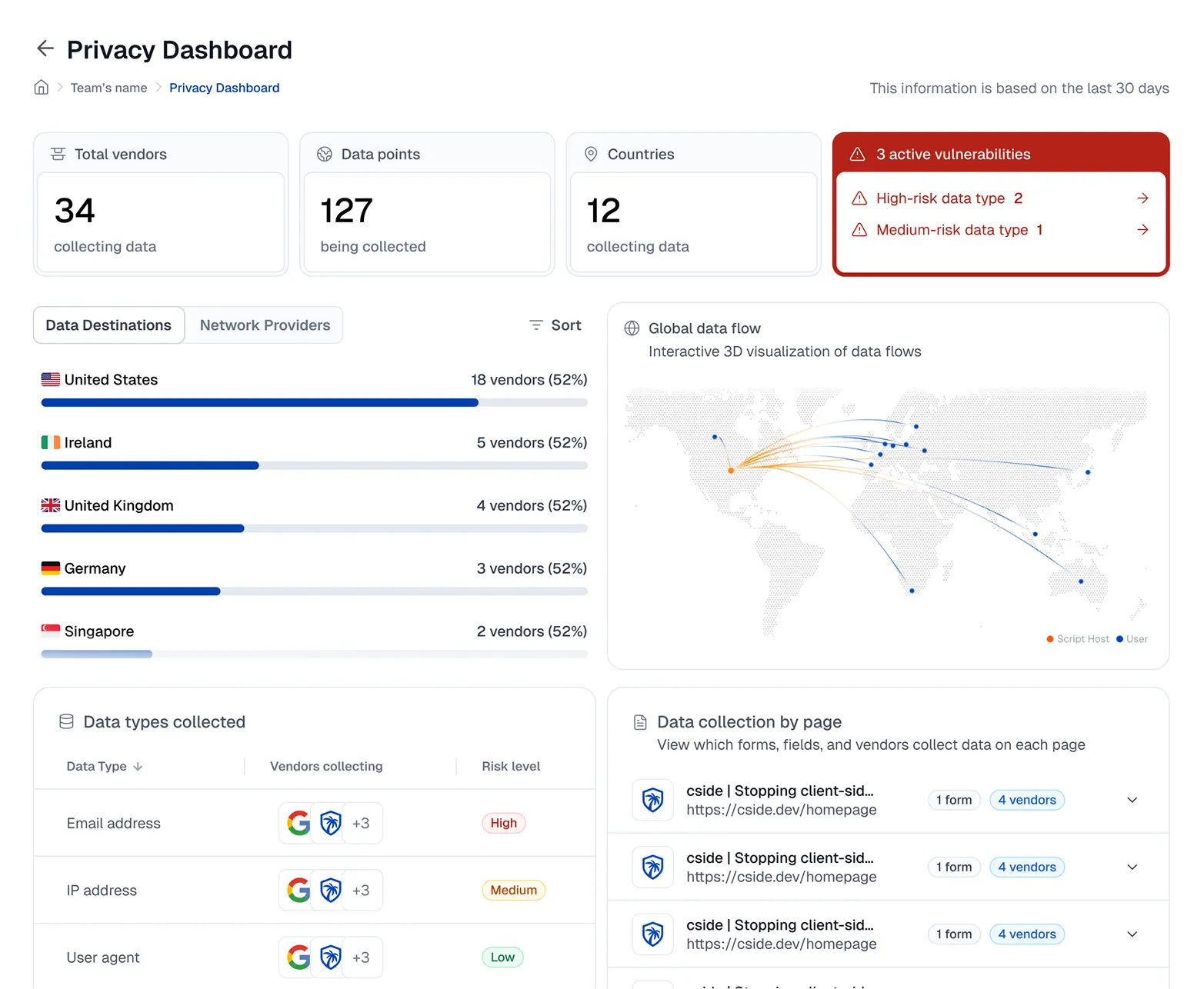
- AI-assisted script reviews, justifications, and mapping to legal categories
- AI-assisted documentation prep for PCI DSS, GDPR, CCPA/CPRA, and more compliance frameworks
- Forensic history of scripts for incident investigations
- Proof of security safeguards against client-side attacks to satisfy requirements under PCI DSS, GDPR, CPRA, and more
- QSA validated solution for PCI DSS 4.0.1 requirements 6.4.3 & 11.6.1
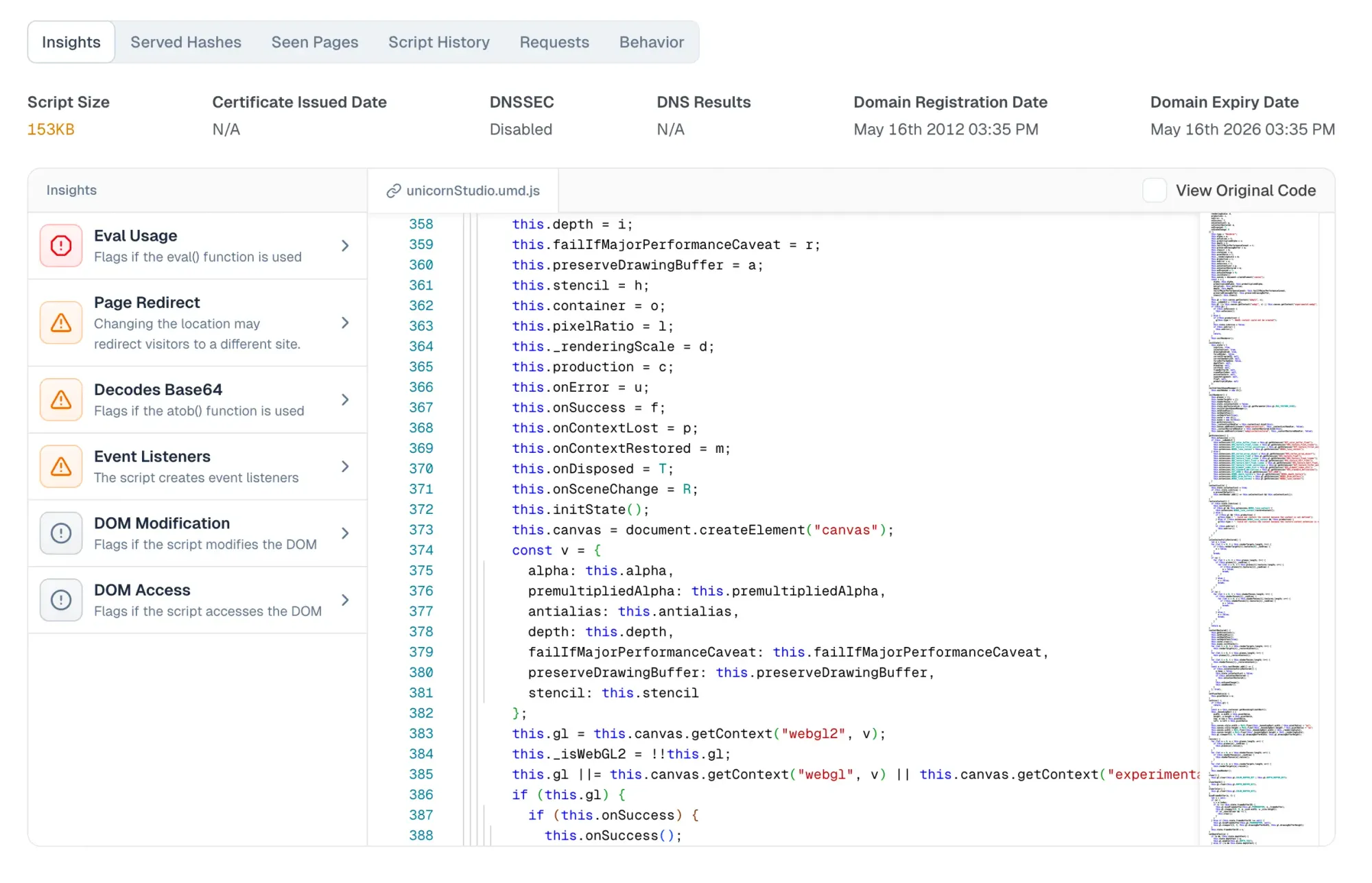
Protection approach used
Multi-layer, configurable approach so that organizations can select appropriate measures based on data risk.
- Scanners
- Client-side agents (JS agents) for runtime analysis
- AI-enhanced script risk analysis
Pricing
- cside pricing is public on the pricing page, starting at $99/month.
- cside pricing is based on protected pageviews for relevant pages, giving buyers a predictable baseline before procurement conversations begin.
- A free tier is available for users to tour the platform, set up basic protection, and upgrade any time for full coverage.
Reviews
cside is highly rated across public review platforms, including a 5/5 rating on Google Maps and consistently top ratings on its SourceForge and G2 pages.
“The detection capabilities we got with cside were unlike anything we saw in other products we tested in the past. We would definitely recommend the product for PCI and more.” - Mark D., (Quote from G2 Review of cside)
Ease of implementation
cside offers multiple deployment options, allowing teams to balance security depth with ease of implementation. The cside script takes a few minutes to add to your site and will instantly collect data and protect your pages. For larger enterprises, setting up deployment with help from a guided support typically takes days to weeks.
cside allows users to set up protection through a fully self-service model. This makes it easy for organizations to tour the platform before initiating a sales process, or fully deploying on their own for a rapid set up.
Pros
- Flexible deployment options that adapt to different security and operational needs
- Cost-effective compared to traditional enterprise client-side tools (starting at $99/month)
- QSA validated to pass PCI DSS 4.0.1 requirements 6.4.3 and 11.6.1
- A differentiated layer for deeper client-side visibility and control than legacy scanners and agents
- Self service option for small teams that don’t require hands-on support
- Client-side product suite includes website privacy compliance, AI agent detection, and fingerprinting offerings
2. Feroot
Feroot was founded in 2017 as a client-side security solution focused on protecting third-party dependencies. Its offering is split into two products: PageGuard and Inspector. Together they detect malicious or unauthorized client-side script activity by flagging behavioral anomalies after scripts have loaded and executed.
Security features
- PageGuard deploys security permissions and policies to JavaScript-based web applications and overwrites certain core JavaScript to protect pages from client-side threats, malware, and risky third-party scripts.
- An allow-list where you pre-approve which scripts are permitted to run on which pages. This checks the source of a script, not the code that is actually served.
- Inspector deploys synthetic users disguised as honeypot customers to simulate real user behavior and identify malicious scripts and unauthorized actions on JavaScript assets, effectively a scanner/crawler that runs periodic checks.
- Behavioral detection through client-side agents that flag anomalies after scripts have loaded and executed.
Protection approach used
- Client-side agents (JS agents) for runtime behavioral monitoring
- Synthetic-user scanner/crawler (Inspector) for periodic checks
Pricing
- Not documented in this comparison.
Reviews
Per the cside vs Feroot comparison, Feroot is rated 4.6/5 on G2, 2.3/5 on Google Maps, and has no SourceForge reviews.
Ease of Implementation
Feroot uses a monitoring-first deployment that involves adding a script to your web pages. Free-tier and self-service availability are not documented in this comparison.
Limitations vs cside
- Because the allow-list only validates a script's source and not its served content, it would not have caught the Polyfill attack of 2024, where a trusted domain changed ownership and began serving different code.
- Inspector is a crawler, and a crawler can be served clean scripts based on IP or user agent, so a scanner alone cannot satisfy the PCI DSS requirement to implement a mechanism that prevents unauthorized scripts.
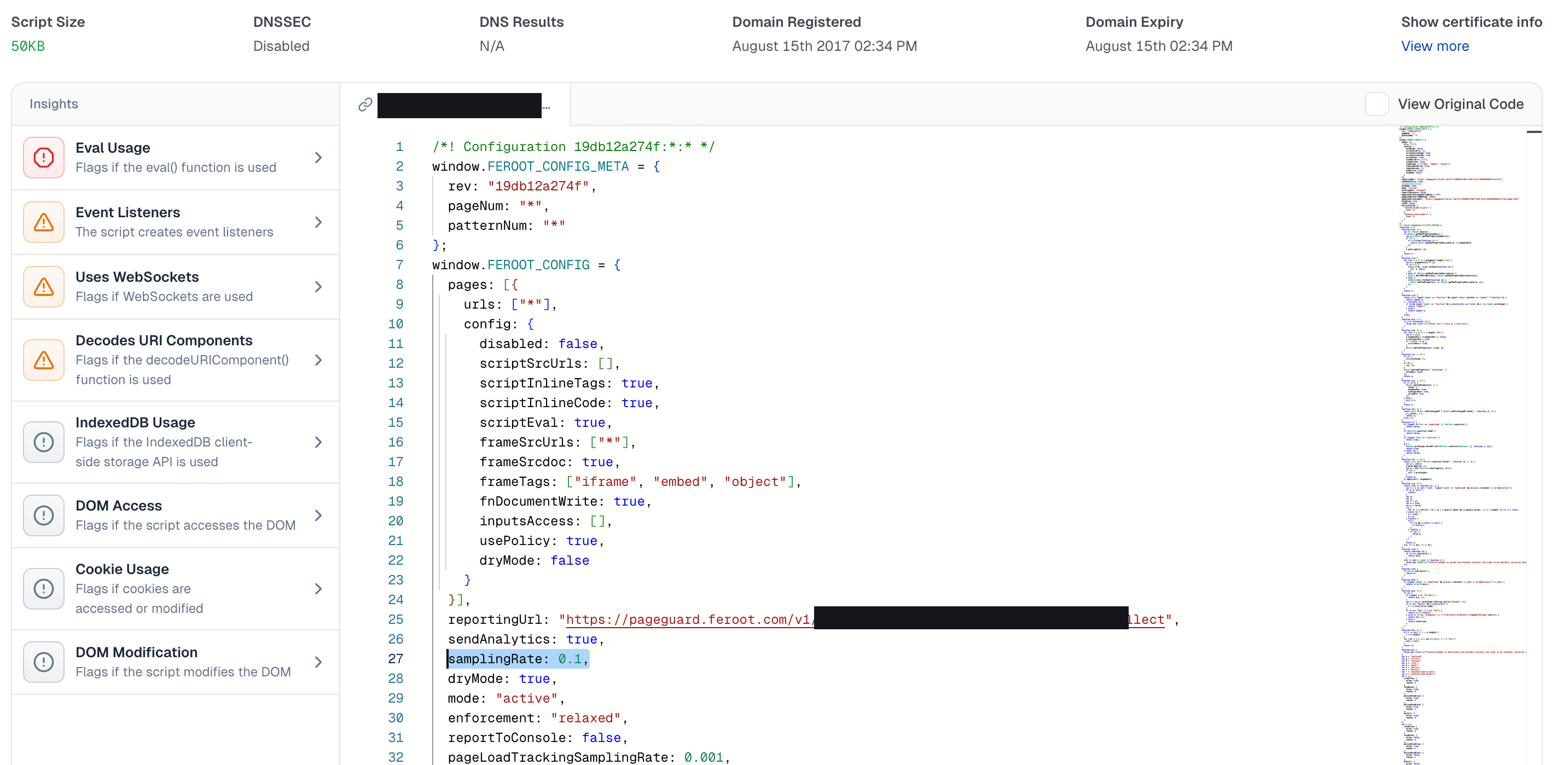
- Feroot's agents run in the browser, where sophisticated attackers can detect, analyze, and potentially disable them. It also samples only a fraction of real user sessions rather than observing 100% of them, so the unsampled majority, including attacks targeted at specific geographies, device classes, or logged-in users, goes unobserved. Feroot's own PageGuard configuration sets samplingRate: 0.1, roughly 10% of real user sessions, so about 90% run unmonitored.
- Feroot provides behavioral alerts and monitoring data, but does not archive the exact malicious code that was blocked, so it lacks the forensic-grade payload evidence that cside preserves for QSA review.
3. Jscrambler
Jscrambler is a cybersecurity tool that protects JavaScript code through obfuscation, runtime protection, and anti-tampering techniques. It started in JavaScript obfuscation and added webpage integrity later. Its core product centers on protecting first-party JavaScript by transforming it through obfuscation, making it harder to reverse-engineer or steal, useful for scripts with sensitive logic such as proprietary algorithms, licensing enforcement, or in-browser app logic.
Security features
- First-party JavaScript obfuscation to resist reverse-engineering and tampering.
- "Code locks" that restrict where and when code can run (for example, a specific domain or time window).
- Runtime protections that aim to detect tampering and debugging, though they are self-contained.
- Trap-based detection: Jscrambler injects decoy objects and monitoring code into pages, expecting malicious scripts to interact with these traps after they have loaded.
- Limited AI functionality that relies on the APIs of large AI companies and is opt-in only.
Protection approach used
- First-party JavaScript obfuscation and anti-tampering
- Trap-based client-side detection (decoy objects)
- Periodic scanning of pages
Pricing
- Jscrambler pricing is not listed publicly.
- Jscrambler does not offer a free trial or free plan.
Reviews
Per the cside vs Jscrambler comparison, Jscrambler is rated 4.3/5 on G2 and has no SourceForge reviews. In the 2026 Globee® Cybersecurity Awards Client-Side Security category, Jscrambler received the Silver award while cside received the Gold (Best of Category).
Ease of Implementation
Jscrambler does not publish pricing or a free tier, so access requires engaging the vendor.
Limitations vs cside
- All of Jscrambler's detections run client-side, which makes the browser an ideal sandbox for an attacker to develop and test a bypass, and in JavaScript, bypasses are common.
- Obfuscation is not a silver bullet: deobfuscation tools and communities exist, and LLMs are increasingly good at deobfuscating JavaScript or contextualizing what it does. cside uses LLMs in real time to analyze both obfuscated and deobfuscated script contents for malicious patterns.
- Jscrambler cannot show you script contents because it does not track them, and its monitoring relies on periodic scanning that does not preserve raw payloads. That makes forensics after a sampled attack hard or impossible.
- Its AI functionality is limited and depends on third-party AI company APIs (which can use the data for training), whereas cside runs open-source LLMs on infrastructure it controls. Jscrambler integrates with Jira but not Linear, and its status page is password-gated with no public uptime SLA.
4. Reflectiz
Reflectiz is a web exposure and client-side risk management platform. It uses a periodic remote scanning model (sometimes referred to as "agentless"). A cloud crawler visits your pages on a schedule, so coverage is limited to what it happens to see at scan time. A point-in-time scanner like this sees even less than a sampled in-page agent, because it runs in no real user session at all, only what loads during its scheduled crawl.
Security features
- A periodic remote ("agentless") scanner. A cloud crawler visits your pages on a schedule, so coverage is limited to what it happens to see at scan time.
- Script and component inventory assembled from those outside-in scans, useful for periodic review.
- No real-user browser visibility. Because it relies only on externally available data, the scanner can be fingerprinted and evaded, with clean pages served to the crawler while real users receive different code.
Protection approach used
- Remote scanner ("agentless"), periodic cloud crawler
Pricing
- Reflectiz does not publish pricing.
Reviews
Per the cside vs Reflectiz comparison, Reflectiz is rated 4.7/5 on G2 across 31 reviews. On SourceForge it has 0 native reviews (a tooltip aggregates 33 third-party ratings), and it has 0 reviews on Gartner Peer Insights. Recurring themes in its own G2 reviews include rudimentary reporting, a cluttered interface, false positives on common payment and tracking providers, and the cost of required training.
Ease of Implementation
Reflectiz operates remotely and does not require installing a script on the monitored website. That convenience comes with limitations: it relies only on externally available data and can be evaded by attackers.
Limitations vs cside
- A browser running from a cloud provider IP, with a predictable user agent, is not equivalent to a script running inside the actual DOM of a real user session. Attackers can serve clean JavaScript to scanner infrastructure while real users receive malicious code, varying the payload by IP, geography, device, login state, checkout state, or time window.
- cside is QSA-validated by VikingCloud for PCI DSS 4.0.1 requirements 6.4.3 and 11.6.1, and publishes its SOC 2 Type II report and its PCI DSS SAQ D self-assessment through its Trust Center.
- Reflectiz publishes no public status page or uptime SLA, so buyers cannot independently verify availability.
5. DomDog
DomDog is tailor-made for PCI DSS 4.0.1 requirements 6.4.3 and 11.6.1. Its founders have a long history and track record in client-side security, and, unusually for this space, all product and pricing information is fully visible and easy to find. At its core, DomDog is CSP tooling for reporting and violation triage: it collects data, shows the scripts in a dashboard, and asks the user to review them.
Security features
- A JavaScript agent that scans which data various scripts are collecting and lets you black- or whitelist scripts on certain websites or pages.
- A dashboard that surfaces the scripts on your pages for manual review, tailored to PCI DSS 6.4.3 and 11.6.1.
- A Content Security Policy (CSP) layer that acts like a firewall, trusting pre-approved script sources.
Protection approach used
- CSP reporting and violation triage
- JavaScript agent (dashboard review)
Pricing
- DomDog pricing is public and easy to find, starting at $999 per year, similar to cside.
Reviews
Its founders have a long track record in client-side security, and its product and pricing details are openly available.
Ease of Implementation
Setup requires adding a single script to the header tag of your website, similar to cside, though the two scripts function very differently.
Limitations vs cside
- DomDog only sees what CSP is configured to observe, and it does not analyze payloads or archive attack code. A CSP allow-list trusts a script's source, not its content, so a source that stays the same while its content changes, as in the Polyfill attack of 2024, will not be caught.
- Its JavaScript agent operates only within the JavaScript layer and does not sit in the delivery flow, so a stored XSS script that turns malicious can go undetected. Detection after delivery means an attacker can exfiltrate data before any alert fires.
- DomDog focuses narrowly on PCI DSS 6.4.3 and 11.6.1 and does not cover HIPAA, GDPR, or CPRA, whereas cside spans all of them.
- No SOC 2 or PCI DSS certification could be found for DomDog, and it publishes no public status page, trust portal, or uptime SLA.
Legacy Web Security Tools Don't Monitor the Client-side
Web security has been around for decades, and the website security software category now spans firewalls, scanners, and endpoint tools. Unfortunately the focus has stayed on protecting servers, APIs, and networks. All valid attack surfaces. But this has left the browser layer as an obscure black box.
- WAFs: Web Application Firewalls (WAFs) filter inbound and outbound traffic between users and the application server. They’re effective but they stop at the network edge. Once the page loads in a user’s browser, the WAF has no visibility into what scripts execute, what data they access, or how they might change at runtime.
- Remote scanners: External scanners crawl websites from the outside. This is great for getting a quick snapshot. However, this approach misses true runtime behavior and is evaded by scripts that load conditionally.
“Traditional security tools, such as firewalls, intrusion detection systems, and endpoint detection and response (EDR) systems are limited by their perspective of application and infrastructure runtime states from a provider’s point of view … these tools may overlook unintentional data leaks between client browsers and third-party services, as well as Magecart attacks that could exploit these trusted third-party services.” ISACA Report, Traditional Security Solutions Fall Short in Protecting Against Web Client Runtime Risk, Sergei Vasilevsky and Kamal Govindaswamy
Approaches to Client-side Security
Several widely used approaches exist to add client-side security to your website. Each comes with different levels of visibility, protection, and ease of implementation. Ultimately it is recommended to layer different approaches together as each method observes a different part of the problem.
1. CSP and SRI
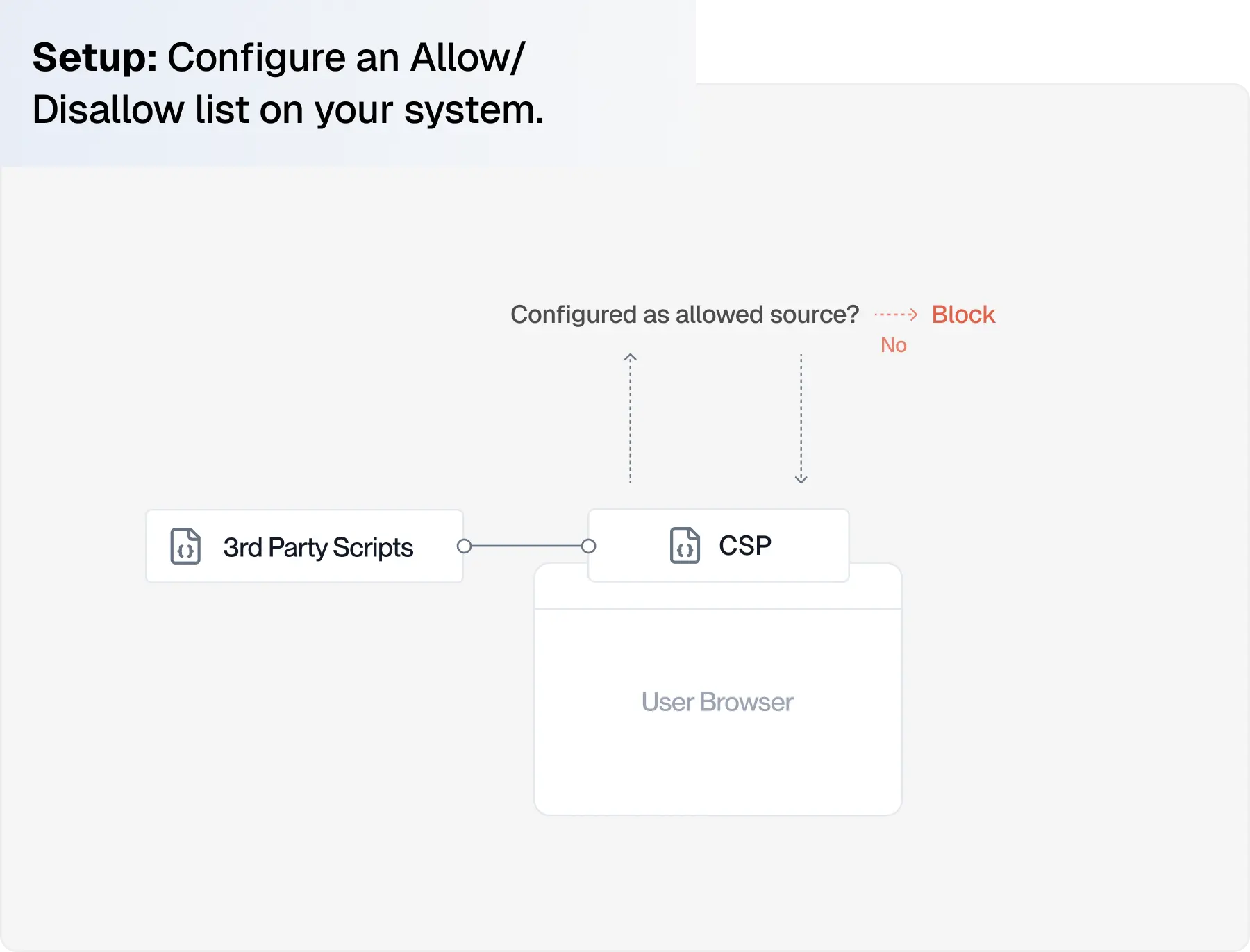
CSP
Content Security Policy is a browser mechanism that allows site owners (usually web developers) to define a list of external domains that are authorized to load scripts and other resources. This limits access to “trusted” sources.
CSP Limitations:
- CSPs require manual maintenance, which becomes difficult on modern sites with dozens of scripts that change frequently
- If a “trusted” vendor is compromised, code injections can pass right through CSPs without being detected.
SRI
Subresource Integrity (SRI) uses cryptographic hashes to verify that external resources haven’t been modified since deployment. This is another control mechanism that can be implemented by web developers on a site.
SRI Limitations:
- Subresource Integrity is effective for static, version-controlled scripts, but it breaks down with dynamic scripts. Most modern websites rely on dynamic scripts.
2. Remote Scanners
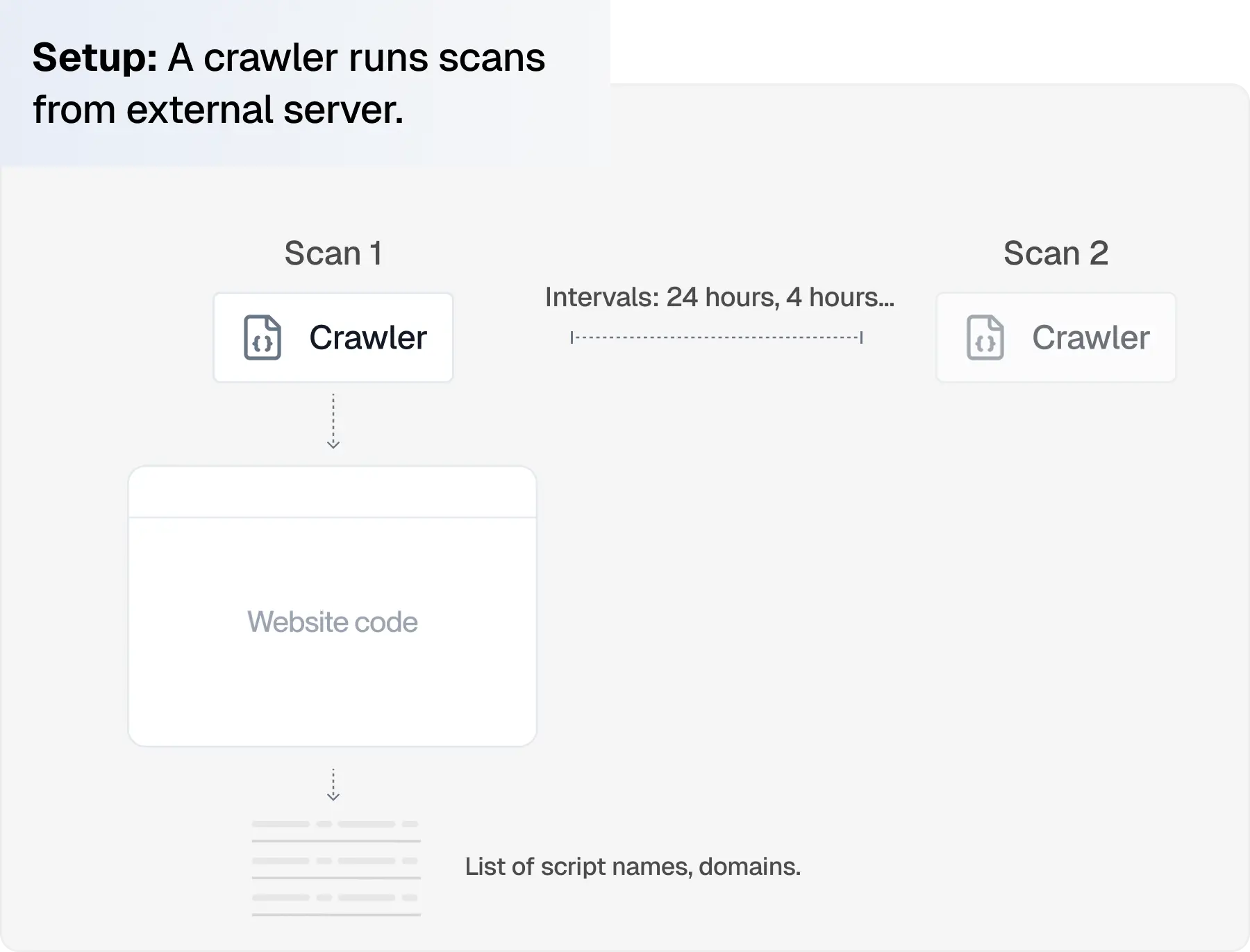
Remote scanners or “agentless” solutions crawl a website from the outside. They can inventory scripts, detect newly added resources, and flag differences that might suggest malicious changes. These solutions are the easiest to implement since they operate externally.
Limitations of scanners:
- This approach is evaded by scripts that load conditionally or mutate after execution.
- Industry analysis published by ISACA argues that scheduled scanning gives a limited view of what runs client-side
3. Client-side Agents
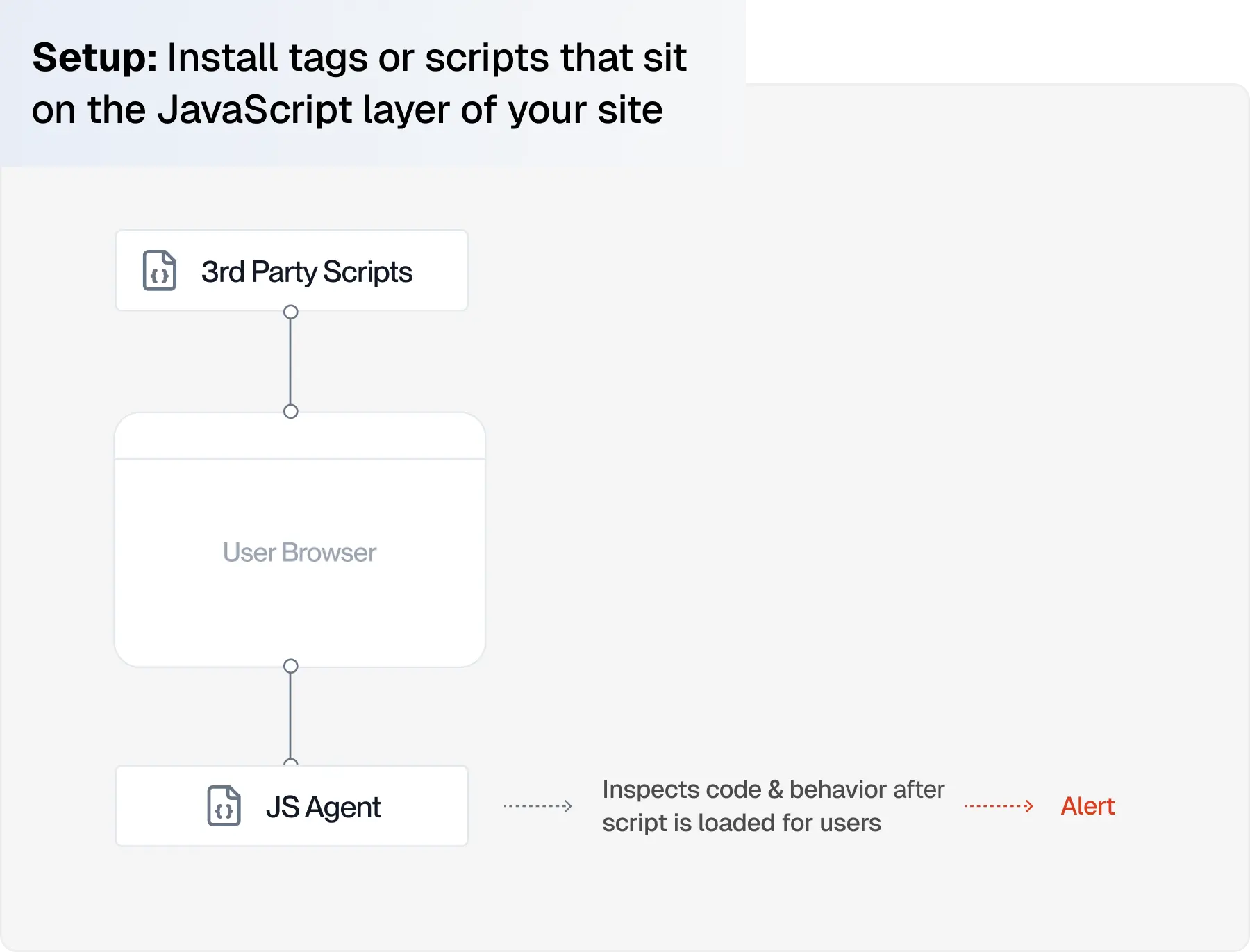
Client-side agents work by adding a JavaScript tag onto a protected website. Script execution, data flows, and user interactions are continuously monitored. Unlike remote scanners these tools observe real runtime behavior that occurs on user browser sessions.
Limitations of Client-side Agents
- Since client-side agents are visible in browser code, attackers can see their presence and carry out sophisticated attacks to avoid them.
4. Multi-layer Approach with AI Analysis
cside combines remote scanning, client-side monitoring, and AI-enhanced detection to give teams deep visibility into browser activity. Policy controls can be informed by script behaviors instead of script source alone. Teams can allow approved scripts (that are behaving as expected) to access sensitive data. Other unauthorized scripts or trusted code that is suspiciously changed can be blocked. Each of these layers feeds into a centralized dashboard that connects to the rest of your environment (like CSPs and SIEMs).
Limitations of a multi-layer approach
- A multi-layer requires additional configuration before reaching full coverage. Most teams can still deploy this approach within days or weeks.
What client-side security protect against:
cside CEO Simon Wijckmans speaking on client-side security at PCI DSS industry event
Client-side security tools watch happens inside the user’s browser after the page loads. It protects against attacks that manipulate browser elements or inject code served to users:
- Malicious or injected JavaScript from compromised vendors or supply chain attacks
- Data exfiltration through hidden form captures or outbound network calls
- Checkout and form manipulation such as Magecart or formjacking
- Unauthorized script changes or new scripts introduced through tag managers
Client-side intelligence tools like cside add visibility that patches gaps in other fraud/website monitoring software:
- Privacy violations from unauthorized scripts collecting personal data beyond intended scope
- Signals of chargeback abuse or card testing bots
- VPN detection to adhere with age verification laws
- Governance controls for AI agents, allowing commercial agents to purchase while blocking malicious AI agents.
What tools can detect digital skimming in real time?
Real-time digital skimming detection requires observing script behaviour inside the visitor's browser as scripts execute, not on a schedule. Require a platform that downloads every third-party script to its own infrastructure for server-side analysis while also observing browser-runtime behaviour, so a payload that only fires on a checkout page for a specific user segment is caught the moment it executes, not on the next remote scan. Client-side agents provide runtime monitoring but run where attackers can see them; remote-only scanners see only what a scheduled crawler encounters and can miss dynamic skimmer payloads entirely; CSP-only tools trust a source rather than the code it serves. Check each tool's approach against the comparison table above.
Which vendor has the strongest client-side protection platform for stopping malicious scripts?
Strength here is measured by three things: whether the platform can see conditional payloads that only fire for real users, whether it can block a malicious script before it executes rather than only alerting after, and whether it produces the QSA-grade evidence that PCI DSS 4.0.1 requirements 6.4.3 and 11.6.1 expect. Require a platform that combines browser-runtime observation with server-side script analysis and policy-based blocking, and that is QSA-validated against 6.4.3 and 11.6.1. Runtime-only agents can be reverse-engineered inside the browser by sophisticated attackers; scanner-only tools can be fingerprinted and served clean copies; CSP-only tools trust a source rather than its served content. The strongest posture layers these approaches, use the comparison table above to see which tool meets all three criteria.
Who offers the most complete client-side protection for a SaaS app?
SaaS applications typically expose multiple attack surfaces at once: authenticated dashboards, marketing pages that share third-party tags with the app, and payment flows subject to PCI DSS. To cover all three from a single deployment, require a platform that works with any CDN with no lock-in, runs in 100% of real user sessions with no sampling, ships PCI DSS 4.0.1 dashboards alongside GDPR and CCPA/CPRA controls, and publishes transparent pricing so a SaaS team can evaluate coverage without a sales cycle. Score the options in the comparison table against those requirements.
Do web applications require different client-side security tools?
Modern web applications, server-rendered PHP frameworks, React and Vue SPAs, and hybrid frameworks like Next.js, all execute a mix of first-party and third-party JavaScript in the browser. Regardless of the rendering model, third-party scripts fetched from analytics vendors, tag managers, chatbots, and A/B testing tools introduce the same client-side attack surface. What varies is the depth of dependency: SPAs and hybrid apps typically load more third-party scripts, but the tools that protect them do not need to differ from the tools that protect static or server-rendered sites. Browser-native controls (CSP, SRI) work identically across app types; layered platforms apply the same detection engines regardless of how the page is rendered.
Why do crawler-based scanners miss real client-side attacks?
Crawler-based scanners visit a website on a schedule with a headless browser, usually Playwright or a similar automation tool. Attackers detect and fingerprint these scanners, and modern client-side attacks are designed to serve clean content to any request that looks like a bot. Scanners also sample traffic, so a payload that only fires for one geography, one device class, or logged-in users can sit inside the unsampled majority for weeks. Industry analysis published by ISACA argues that static scanners are systematically bypassed by dynamic client-side scripts. Runtime observation of real user sessions is the only reliable way to catch these payloads.
Client-side security with cside
As a pioneer in bringing AI into client-side protection, cside is on a mission to solve obscurity in web security that has blocked security teams for decades.
cside’s client side security solution helps organizations:
- Comply with PCI DSS 4.0.1 requirements 6.4.3 and 11.6.1
- Demonstrate client-side data protection controls for GDPR, CCPA/CPRA, and HIPAA.
- Protect payment pages from Magecart, formjacking, and other JavaScript-based data skimming attacks.
- Prevent exposure of sensitive user data from misconfigured or malicious third-party scripts
- Govern AI agents operating in the browser
Try cside before you buy. cside has a free plan, so you can sign up, deploy, and explore the platform yourself, with no sales calls or procurement process. And our support team is one message away whenever you need a hand.
You can start with ourfree plan orbook a demo to see how client-side security supports your defense stack.



