

TL;DR: PCI DSS 6.4.3 practical compliance checklist for payment scripts
- SRI is not enough: Most teams treat Subresource Integrity as the 6.4.3 answer. It is not enough on its own: SRI does not inventory all scripts automatically, does not apply to dynamically loaded scripts, and does not detect behavior changes in an authorized script, which is the primary Magecart attack vector.
- Scope and deadline: 6.4.3 has been mandatory since 31 March 2025 and covers first-party bundles, third-party tags, analytics pixels, chat widgets, and CDN libraries. cside PCI Shield deploys as a single script tag on the payment page, and most teams complete the technical integration in under 30 minutes.
- Match to your stack: If your checkout runs a handful of static scripts, SRI plus CSP might hold as foundational controls. If a tag manager injects scripts dynamically, add runtime integrity monitoring, cside is validated by VikingCloud for both 6.4.3 and 11.6.1.
Short on time? See cside PCI Shield. It covers everything below in one deployment.
PCI DSS 4.0.1 Requirement 6.4.3 asks you to do three things for every script that runs on a payment page: confirm it is authorized, keep a written justification for why it belongs there, and protect it with an integrity control that catches unauthorized changes. The requirement has been mandatory since 31 March 2025, and it covers first-party code, third-party tags, analytics pixels, chat widgets, and anything else that executes in a payment page context.
It exists to address payment page skimming, the Magecart-style attacks where malicious JavaScript is slipped into a checkout page to harvest card data as customers type it. Requirement 6.4.3 is one of two new client-side controls in PCI DSS 4.0.1, and its companion, 11.6.1, handles the monitoring side. This checklist walks through what 6.4.3 asks for and how to get there.
What Requirement 6.4.3 actually requires
The PCI Security Standards Council defines three specific controls under Requirement 6.4.3:
1. A method to confirm that each script is authorized. You need documented authorization for every script present on payment pages. That means not only the scripts your team wrote, but every third-party tag, analytics pixel, chat widget, A/B testing tool, and CDN-loaded library that runs in a payment page context. Authorization means you know the script is there and you have a business reason for it.
2. A method to assure the integrity of each script. Each script has to be protected against unauthorized modification. You can do this with Subresource Integrity (SRI) hashes for externally loaded scripts, Content Security Policy controls, or a runtime monitoring tool that alerts when a script's content or behavior changes. SRI on its own does not cover scripts that are loaded dynamically or served from CDNs whose content rotates without a URL change.
3. A written justification for each script. Every authorized script needs a documented business reason for being on the payment page. A tag that is present only because marketing added it three years ago, and nobody removed it, has no justification. Your assessor will ask for this documentation.
The companion requirement, 11.6.1, adds change and tamper detection: an automated mechanism that alerts when payment page scripts or HTTP headers are modified. Between them, 6.4.3 and 11.6.1 require both a static inventory with integrity controls and a live monitoring capability.
Step 1: Inventory every script on your payment pages
Start with a full audit of every script that loads on the payment page. That list includes:
- First-party scripts your team controls
- Third-party tags loaded via tag managers (Google Tag Manager, Tealium, Segment)
- Analytics pixels (Google Analytics, Meta Pixel, any marketing attribution tags)
- Chat and support widgets (Intercom, Drift, Zendesk)
- A/B testing and personalization scripts
- Fraud detection tools
- Any CDN-loaded libraries
Most teams are surprised by how many scripts actually run on payment pages. Tag managers are the usual culprit, loading extra scripts that never went through security review. A monitoring tool that discovers and lists every script present is the fastest way to build an accurate inventory.
Step 2: Authorize and justify each script
For each script in the inventory, record:
- Who authorized the script on this page
- The business purpose it serves
- Whether the payment page is the right scope for it (many analytics scripts do not need to run on payment pages and should be excluded)
Any script that cannot produce a clear business justification should be pulled off the payment page. Fewer scripts means a smaller compliance burden and a smaller attack surface.
Step 3: Implement integrity controls
For each authorized script, put an integrity mechanism in place. Your options:
Subresource Integrity (SRI). For scripts loaded from external URLs, an SRI hash in the script tag tells the browser to reject the script if its content has changed. SRI works well for scripts served from stable, versioned CDN URLs. It does not help with scripts loaded dynamically, scripts whose content changes without the URL changing, or inline scripts.
Content Security Policy. A CSP allowlist stops unauthorized scripts from loading. It does not catch behavior changes in a script that is already on the allowlist.
Runtime integrity monitoring. A tool that watches script behavior in real time catches the case where an authorized script starts doing something new, like reading a form field it never touched before or calling an endpoint it never called. That behavior change is the Magecart vector, and it is the one SRI and CSP miss.
For full 6.4.3 and 11.6.1 coverage, runtime monitoring is the layer that does the work. SRI and CSP are foundational controls that sit underneath it.
How cside satisfies both 6.4.3 and 11.6.1
cside PCI Shield uses a single script tag on the payment page and then:
- Discovers and inventories every script present, updated continuously
- Watches each script's behavior in real time and alerts when that behavior changes
- Produces the evidence a PCI assessment needs: a script inventory with authorization status, plus tamper detection events with timestamps
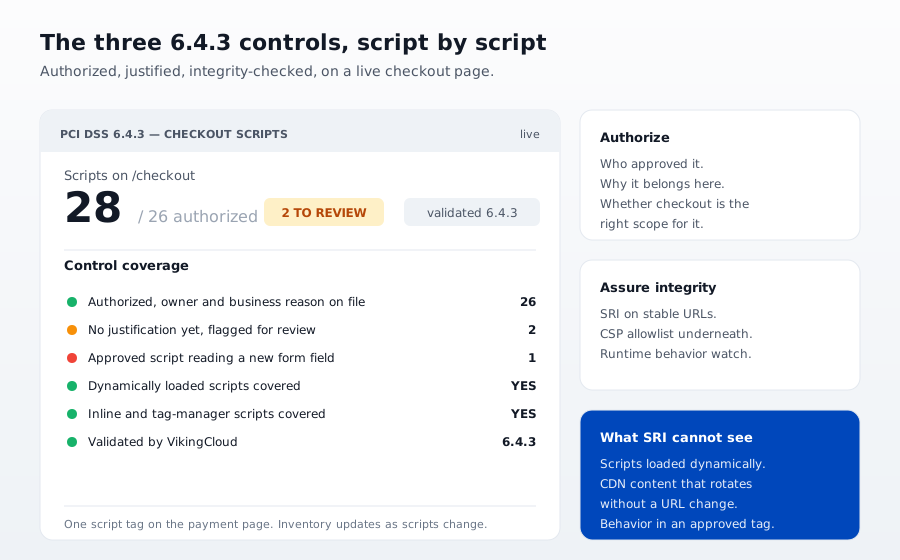
cside is validated by VikingCloud for PCI DSS 4.0.1 Requirements 6.4.3 and 11.6.1. That validation means a qualified security assessor has reviewed the tool and confirmed it meets the specific evidence requirements of both controls, not just their general intent.
What Is a PCI Assessment?
A PCI assessment is the formal review that confirms a business meets the Payment Card Industry Data Security Standard (PCI DSS). Depending on your transaction volume and how you handle card data, it is either a Self-Assessment Questionnaire (SAQ) you complete yourself or a Report on Compliance (ROC) signed off by a Qualified Security Assessor (QSA). For Requirements 6.4.3 and 11.6.1, the assessment looks for a maintained inventory of authorized payment-page scripts and evidence that unauthorized changes are detected. cside produces that evidence continuously, so the client-side portion of your next PCI assessment is ready before the assessor asks.
Further reading
- cside PCI Shield: continuous script inventory and runtime monitoring for payment pages
- Why crawlers can't help with PCI compliance (alone)
- Why CSP doesn't work
- PCI DSS compliance overview



