

TL;DR: credential harvesting
- Harvesting vs stuffing: Harvesting is how attackers get valid credentials. Stuffing is what they do next. Different signals, different detection stacks.
- MFA's blind spot: Standard MFA does not stop the four dominant techniques: phishing landing pages, Evilginx AiTM proxies, compromised third-party scripts, infostealer malware.
- Your own login page: Your most under-defended surface is your own login page. A compromised third-party script reads the form as your user types, and server-side controls never see it.
Short on time? See cside's account-takeover detection. It covers everything below in one deployment.
What is credential harvesting?
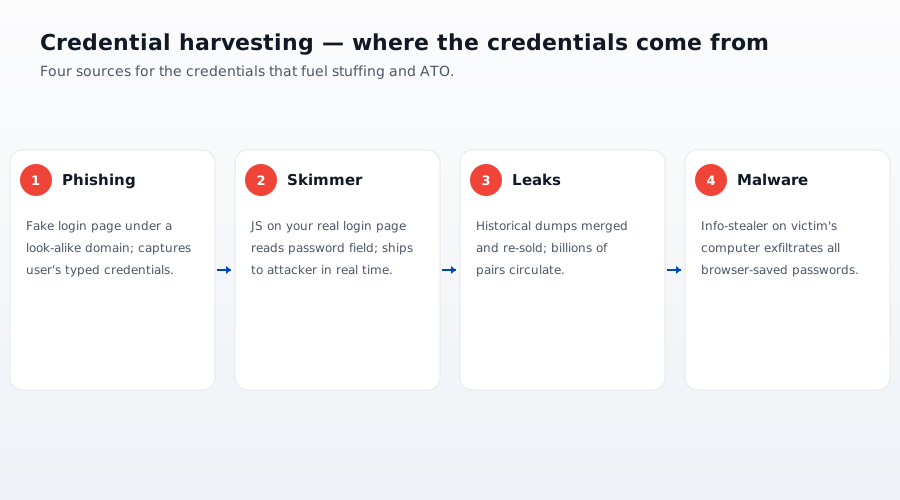
Credential harvesting is the automated collection of login credentials from users who believe they are interacting with a legitimate service. Attackers gather username and password pairs through phishing pages, compromised third-party scripts, adversary-in-the-middle proxies, and malware on victim devices, then use those credentials in follow-on account takeover campaigns.
| Credential harvesting | Credential stuffing | |
|---|---|---|
| Goal | Collect valid credentials from victims | Test stolen credentials against target sites |
| Where it happens | Phishing pages, your login form, victim devices | Your login endpoint |
| Detection layer | In-browser, client-side monitoring | Server-side rate limiting and device intelligence |
| MFA stops it? | Phishing-resistant MFA (passkeys, FIDO2) blocks phishing-based capture only, not compromised login-page scripts or infostealer malware | Yes, for most stuffing attempts |
Credential harvesting is not credential stuffing (and the difference matters)
Say a fraud vendor tells you they "stop credential attacks." Ask them which half, harvesting or stuffing. If they cannot answer cleanly, they are selling you rate limiting dressed up as a threat platform.
Harvesting is the top of the funnel. Attackers collect valid credentials. Stuffing is the bottom. Attackers try those credentials against target sites. A single harvesting operation feeds thousands of stuffing campaigns. A single stuffed credential can be tested against every merchant on the internet.
The detection signals are different:
- Harvesting shows up on YOUR site as suspicious script activity on the login page, or as data exfiltration to an unfamiliar third party domain.
- Stuffing shows up on YOUR site as bulk login attempts, IP velocity, and distributed low and slow patterns.
Rate limiting stops stuffing. It does not touch harvesting. If your only credential attack defence is a rate limit on /api/login, you are catching the second half of the attack and letting the first half continue unchallenged.
Four 2026 harvesting techniques your MFA does not stop
1. Phishing landing pages (still the number one attack vector)
Attackers register a look alike domain (see our post on homoglyph attacks for the Cyrillic character trick), clone your login HTML, and drive traffic via SMS or email. The user types their password into a page that looks identical to yours. The credential goes to the attacker.
Standard MFA reduces the value of the stolen password, but not to zero. If the user's password is reused elsewhere (roughly 65% are, per every credential reuse study), the attacker has just gained access to their email, their bank, or their SaaS estate.
2. Evilginx style adversary in the middle (AiTM)
Evilginx is an open source phishing framework that runs a reverse proxy between the victim and the real login page. The victim types their password. Evilginx forwards it to the real site. The real site returns the MFA prompt. The victim solves the MFA. Evilginx forwards it. The real site returns the session cookie. Evilginx steals the session cookie.
This defeats TOTP, SMS OTP, and push notification MFA. It does not defeat passkeys or FIDO2 hardware keys, because those cryptographically bind to the origin domain and refuse to authenticate for a proxied site.
If your user base is not on phishing resistant MFA in 2026, Evilginx class attacks are trivially cheap for attackers. The framework is open source, the phishing templates are commodity, and the payoff is a bypass of every non FIDO2 MFA implementation.
3. Third party script compromise on your own login page
This is the one most defences miss. Your login page is clean. Your server side code is clean. Your certificates are valid.
But your login page loads scripts. Google Tag Manager. A chat widget. Analytics. A/B testing. Any one of those, or any of their transitive dependencies, can be updated by its owner without notifying you. When one gets compromised, either through a supply chain attack like Polyfill.io (490,000 plus affected sites in 2024) or through a tag manager rule change, the compromised script now runs in the same JavaScript context as your login form.
It can read the form fields. It can attach a listener to the submit event. It can beacon the credentials to an attacker controlled domain before your login endpoint even sees the request.
Your WAF does not see this. Your server logs do not see this. Your SIEM does not see this. The only place the exfiltration is visible is inside the visitor's browser session, at the moment it happens.
4. Infostealer malware on the user's device
Infostealers like RedLine, Raccoon, and LummaC2 harvest saved passwords from browsers, cookies from local session stores, and MFA tokens from authenticator apps. Once installed on a victim's device, they run continuously and beacon the collected credentials to attacker infrastructure.
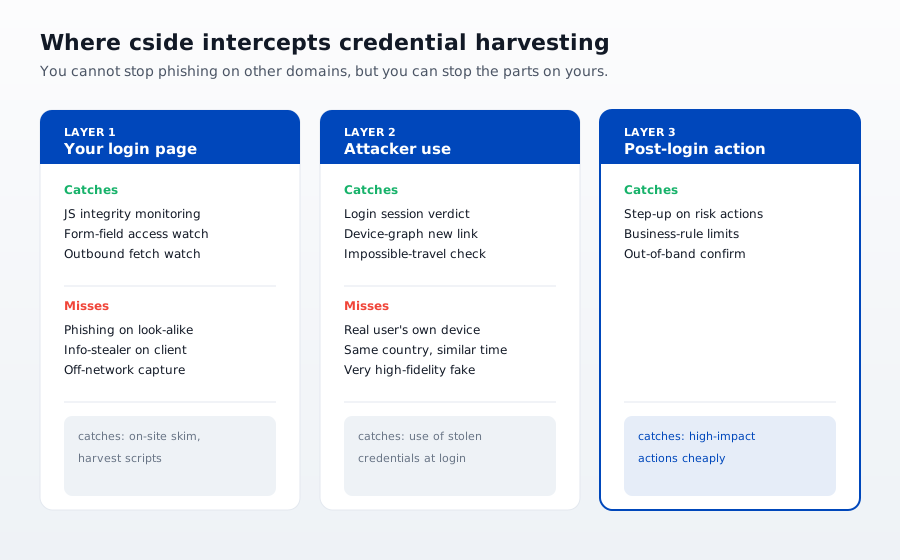
You cannot stop this attack from your side of the wire. What you CAN do is detect the downstream use. An authentication that succeeds from a device fingerprint or geographic origin inconsistent with the account's history.
The dataset attackers are actually using in 2026
RockYou2024 is the reference corpus. Published in mid 2024, it contains around 10 billion unique plaintext passwords. An aggregate of every meaningful breach compilation that came before it, deduplicated and normalized. Every other prior compilation (Collections #1 through #5, Have I Been Pwned's Pwned Passwords, the various "COMB" leaks) is a subset.
Attackers do not stuff 10 billion credentials against your login. That would trip any rate limit. What they do is:
- Filter to credentials matching your domain (via the source breach metadata)
- Filter to credentials created in the last 24 months (higher likelihood of still being valid)
- Filter to passwords that pass basic strength heuristics (attackers assume the user reused a "real" password, not
password123) - Test the filtered subset in low and slow batches from distributed residential IPs
This is why IP reputation does not help you catch modern credential stuffing. The IP is a residential ISP. The velocity per IP is 2 to 3 attempts per hour. Only cross account correlation catches it.
What actually detects credential harvesting
Four signal sources, in order of ROI.
1. In session monitoring of your login page
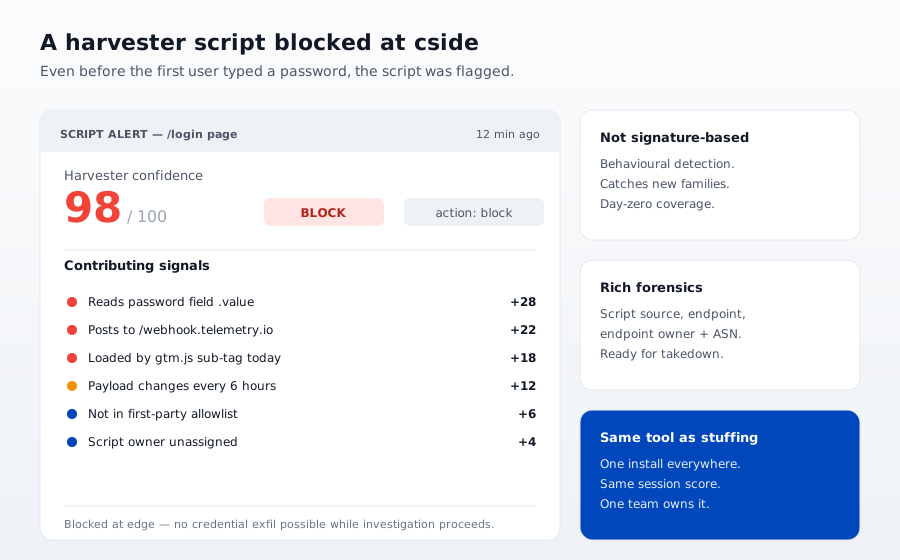
The only defence that catches technique number three (third party script compromise) is watching what scripts actually read from the login form in a real user's browser session. This is what cside's client side security platform does. A first party sensor observes DOM reads, form field access, and outbound network activity in every real user session, then flags any script that touches the credential fields without being on the authorized list.
You cannot build this yourself as a one off. You need continuous observation across every real session, because the attacker will only arm the exfiltration on a subset of visitors (targeted geo, targeted browser, targeted account type) to avoid detection scanners.
2. Device intelligence at login
At the login endpoint, compute a device fingerprint from browser attributes, TLS or JA fingerprint, and behavioral cadence. Compare it against the account's device history. A new device from a new geo attempting authentication is a strong signal that something is off, whether from Evilginx style AiTM or from a fresh infostealer harvest.
Our own device intelligence primer walks through the signal stack. The short version: 40 plus browser attributes combined into a stable device ID that survives cookie clears and private windows.
3. Have I Been Pwned lookup at login (or better, at signup)
Have I Been Pwned publishes a range lookup API that lets you check whether a password appears in any known breach corpus without sending the actual password (via k anonymity SHA-1 prefix). This should be a step in every login flow above a certain risk score.
If a user is authenticating with a password that appears in RockYou2024, treat that as prima facie evidence of harvesting. Force a password reset, and step up to phishing resistant MFA on their next login.
4. Correlation across accounts
The single most reliable signal is that the same device, same fingerprint, or same behavioral pattern is attempting authentication against multiple accounts on your platform in a short window. Rate limiting per account misses this. Rate limiting per IP misses this because residential proxies rotate every 30 seconds. Only device signal correlation catches it.
Where MFA still helps (and where it does not)
Phishing resistant MFA, WebAuthn, FIDO2 hardware keys, passkeys, genuinely stops the phishing landing page and Evilginx cases. If your user base is not on it by end of 2026, you are running an anachronism.
But phishing resistant MFA does not help against:
- Third party script compromise on your own login page (the compromised script reads the password field regardless of MFA type)
- Infostealer malware on the user's device (the malware exfiltrates the passkey seed or the session cookie post auth)
- Cross account correlation attacks (the credential is already valid; MFA at first login is not the bottleneck)
Layered detection, MFA plus in session monitoring plus device intelligence plus HIBP lookup, is what closes the four gaps. Not any single control.
What we tell people who ask if cside is "another MFA vendor"
We are not. MFA is what happens at your login endpoint. cside is what happens in the browser session, in the seven seconds between the user typing their password and hitting submit. We see the scripts that read the form. We see the outbound network calls. We see the exfiltration attempts that never reach your server logs.
If your defense stops at the login endpoint, you are not seeing credential harvesting technique number three. That is the case for roughly 90% of e commerce, fintech, and SaaS logins in 2026. Fix it, and you close the biggest under defended gap in the credential attack chain.
Related reading
- Browser fingerprint spoofing: how attackers bypass detection and how to stop them
- Credential stuffing: how to detect and stop it at the login
- What is device fingerprinting: the definitive 2026 guide
- Account takeover fraud prevention: the complete 2026 guide
- How Polyfill.io compromised 490,000 sites (browser supply chain attack)
- Homoglyph attacks: the аpple.com problem



