

TL;DR: block Applebot-Extended without breaking Siri and Spotlight
- Two crawlers, not one: Most publishers hear 'block Apple' and put a single Disallow rule against Applebot, which quietly evicts them from Siri, Spotlight, and Safari suggestions. Applebot-Extended is the AI training crawler; standard Applebot is a different user-agent that powers discovery.
- The right robots.txt: Apple documents Applebot-Extended as a separate opt-out that respects robots.txt and uses the
Applebot-Extended/0.1user-agent. ADisallow: /against Applebot-Extended paired with an unrestricted or path-scoped Applebot block keeps AI training out while Apple Intelligence keeps citing you in Siri answers. - The decision: If your priority is opting out of Apple Intelligence training without giving up Safari and Spotlight distribution, write both user-agent blocks in the same file. If you want out of Apple entirely, one line does the job, and you accept the loss of discovery traffic.
Short on time? See cside's AI-agent detection. It covers everything below in one deployment.
Apple operates two distinct web crawlers. The standard Applebot powers Siri, Spotlight Search, and Safari's content suggestions. It has existed for years and behaves like a conventional search engine crawler. Applebot-Extended is newer, introduced alongside Apple Intelligence, and collects web content specifically for AI model training and generative features.
Blocking standard Applebot affects your site's performance in Apple's search and discovery products. Blocking Applebot-Extended specifically opts you out of Apple's AI training pipeline without affecting standard Apple search features. The two require separate robots.txt rules. If you are working through the wider list of AI crawlers, the same approach applies to others such as Anthropic's ClaudeBot and Common Crawl's CCBot.
Standard Applebot vs. Applebot-Extended
Quick answer: Standard Applebot is Apple's search and discovery crawler. Applebot-Extended is Apple's AI training crawler, used to collect content for Apple Intelligence and foundational model development. They use different user-agent strings. Blocking one does not block the other.
| Crawler | Purpose | User-agent |
|---|---|---|
| Applebot | Siri, Spotlight, Safari suggestions, search indexing | Applebot/0.1 |
| Applebot-Extended | Apple Intelligence AI training, generative features | Applebot-Extended/0.1 |
This distinction matters because most site owners who want to block AI training data collection do not want to break their relationship with Apple's search and discovery features. Applebot-Extended blocking is surgical: it opts you out of AI training without removing your site from Siri suggestions, Spotlight search results, or Safari content features.
What is Apple Intelligence and why does Applebot-Extended feed it?
Quick answer: Apple Intelligence is Apple's AI system, announced at WWDC 2024, built into iOS 18, iPadOS 18, and macOS Sequoia. It powers writing assistance, image generation, Siri improvements, and generative features across Apple's device ecosystem. Applebot-Extended collects web content that trains and improves these AI capabilities.
Apple Intelligence runs on-device for many features and uses Apple's server infrastructure for more complex tasks. The models powering these features require training data from the web, which is what Applebot-Extended collects. As Apple expands Apple Intelligence capabilities (more Siri depth, better writing suggestions, richer generative features) Applebot-Extended's crawl activity is likely to grow.
How to block Applebot-Extended (without blocking standard Applebot)
Quick answer: Use separate
robots.txtentries forApplebot-ExtendedandApplebot. ADisallow: /underApplebot-Extendedblocks AI training collection. LeavingApplebotunrestricted preserves your site's presence in Siri, Spotlight, and Safari features.
To block Applebot-Extended while keeping standard Applebot access:
User-agent: Applebot-Extended
Disallow: /

User-agent: Applebot
Allow: /
Or with path-level restrictions on standard Applebot:
User-agent: Applebot-Extended
Disallow: /

User-agent: Applebot
Disallow: /account/
Disallow: /checkout/
Allow: /
Apple documents this process in its official Applebot documentation. The documentation explicitly describes Applebot-Extended and provides the opt-out mechanism.
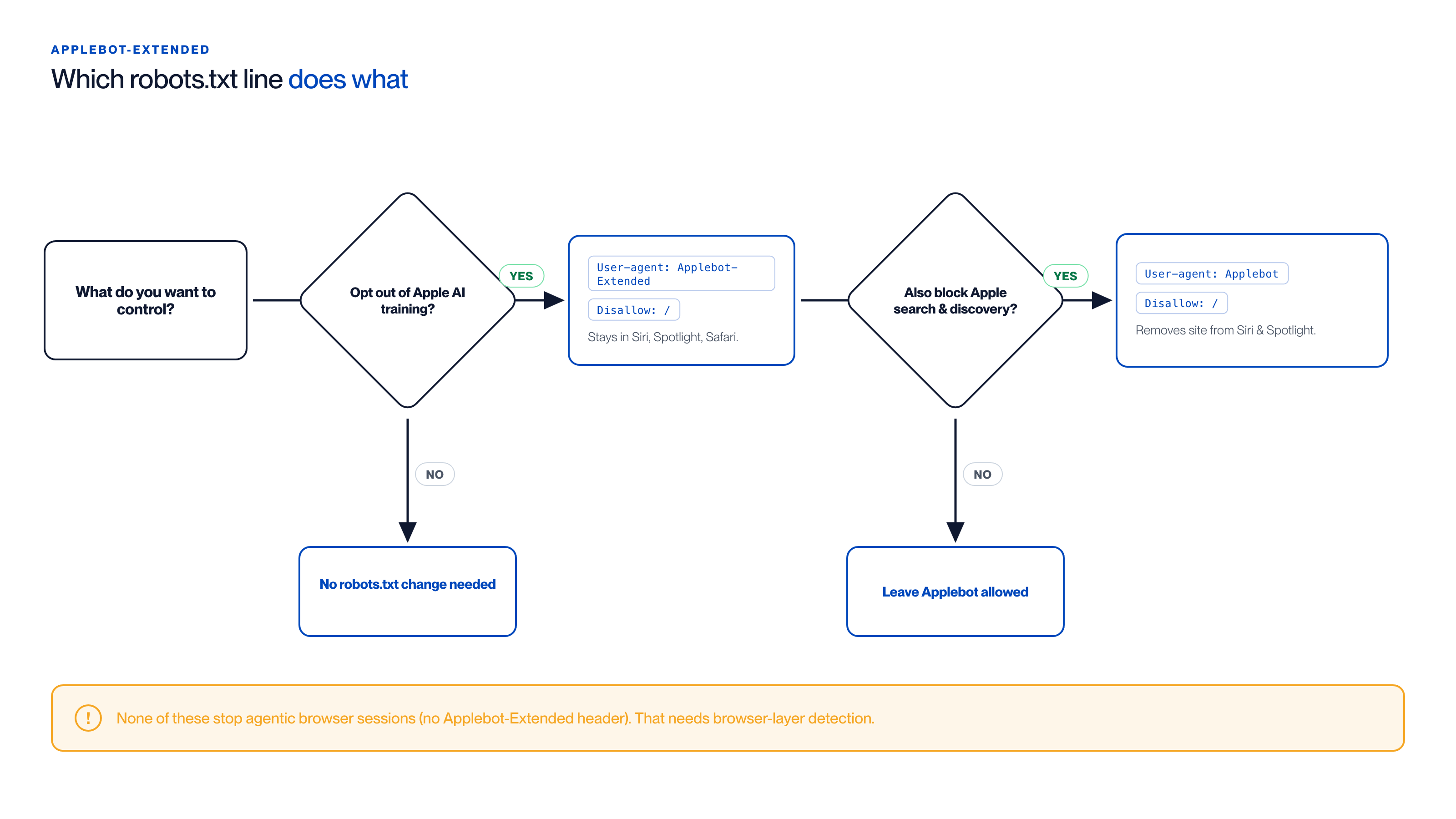
Choosing your robots.txt configuration:
- Opt out of AI training only (most common):
User-agent: Applebot-Extended+Disallow: /. You stay in Siri, Spotlight, and Safari. - Opt out of all Apple crawling: add
User-agent: Applebot+Disallow: /as well. This removes your site from Siri suggestions and Spotlight results. - No change: leave both crawlers allowed.
- In every case: none of these
robots.txtrules stop an Apple Intelligence agent browsing in a real session, it carries noApplebot-Extendedheader, so agentic access needs browser-layer detection.
How to block both Applebot variants
Quick answer: If you want to restrict all Apple automated access, both standard search and AI training, add both user-agents to your
robots.txt. This removes your site from Siri suggestions and Spotlight results as well as Apple Intelligence training.
User-agent: Applebot-Extended
Disallow: /

User-agent: Applebot
Disallow: /
Most site owners opt out of Applebot-Extended only. Blocking standard Applebot is a significant decision that reduces Apple device discoverability for your content. It is worth scoping the blocking to the specific crawler that raises data concerns.
Why you might block Applebot-Extended
Quick answer: The reasons to block Applebot-Extended are similar to reasons to block other AI training crawlers: proprietary content, licensed material, IP concerns, or explicit organisational policy on AI training data. The case for blocking is somewhat simpler because you can do it without breaking Apple search features.
Specific reasons organisations block Applebot-Extended:
- Licensed content: Publishers with content licensed for specific uses cannot legally allow that content into AI training pipelines without separate authorisation
- Competitive content: Companies with proprietary pricing, product, or research data do not want that data in Apple's AI training corpus
- Policy compliance: Organisations with explicit data governance policies that restrict AI training data collection
- Control preference: A general preference for opting out of AI training data programs before the full implications of inclusion are understood
The opt-out mechanism Apple provides is cleaner than what most AI crawlers offer: separate user-agents with documented behaviour, explicit Apple documentation, and a compliance record consistent with Apple's broader approach to developer and publisher relations. The same robots.txt pattern extends to the broader problem of blocking AI content scrapers across every declared crawler that respects the standard.
Browser-layer detection: what Applebot-Extended blocking doesn't cover
Quick answer: Blocking Applebot-Extended controls Apple's training data pipeline. It does not control any future Apple Intelligence agentic products that browse your site on users' behalf, or any other undeclared AI agent operating in a real browser session. Those require browser-layer detection.
Apple's current focus with Apple Intelligence is on-device processing and AI-assisted features. But the direction of AI development is toward agentic products that browse and transact on behalf of users. If Apple builds or enables agents that complete tasks through real browser sessions, those sessions will not carry the Applebot-Extended user-agent and will not be affected by your robots.txt block.
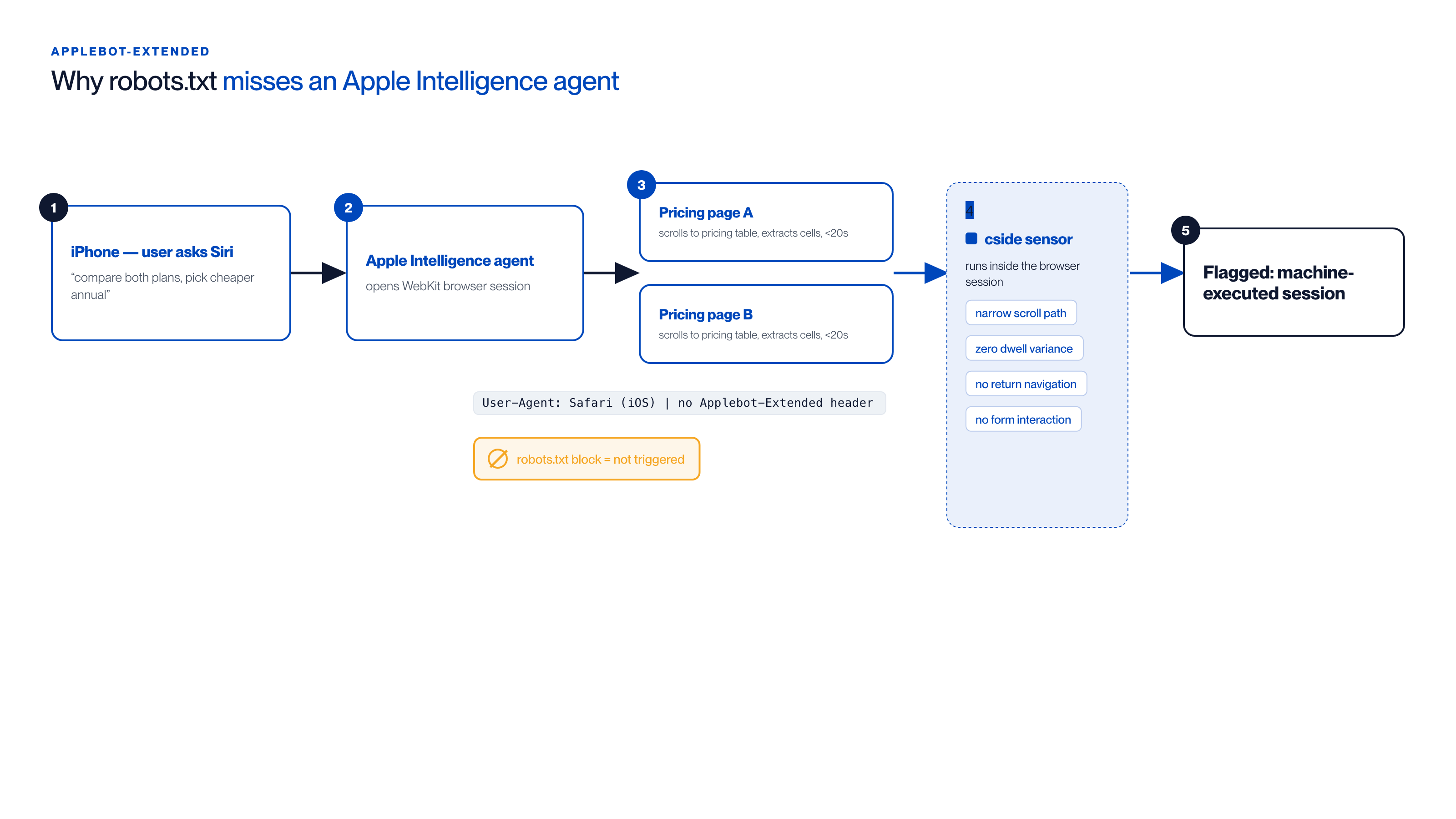
How an Apple Intelligence agent slips past a robots.txt block:
- User asks Siri to compare two SaaS pricing pages and recommend the cheaper annual plan.
- Siri delegates to an agent that opens a WebKit browser session.
- The session arrives with a standard Safari (iOS) user-agent and a legitimate iOS device fingerprint, no
Applebot-Extendedheader, so therobots.txtblock never applies. - The agent loads both pricing pages, scrolls straight to the pricing table, and extracts the cells in under 20 seconds.
- cside, running inside the browser session, flags it on behavioural signals, narrow scroll path, zero dwell variance, no return navigation, no form interaction, that are invisible at the network layer.
cside operates inside the browser session and surfaces the behavioural signals that distinguish machine-executed sessions from human browsing: interaction timing, navigation linearity, fingerprint characteristics, and JavaScript execution patterns. In cside's controlled testing, traditional tools missed AI agents operating inside real browser sessions in 81 out of 100 scenarios. For organisations that want coverage of both declared crawlers and undeclared browser agents, robots.txt and browser-layer monitoring together provide the full posture.
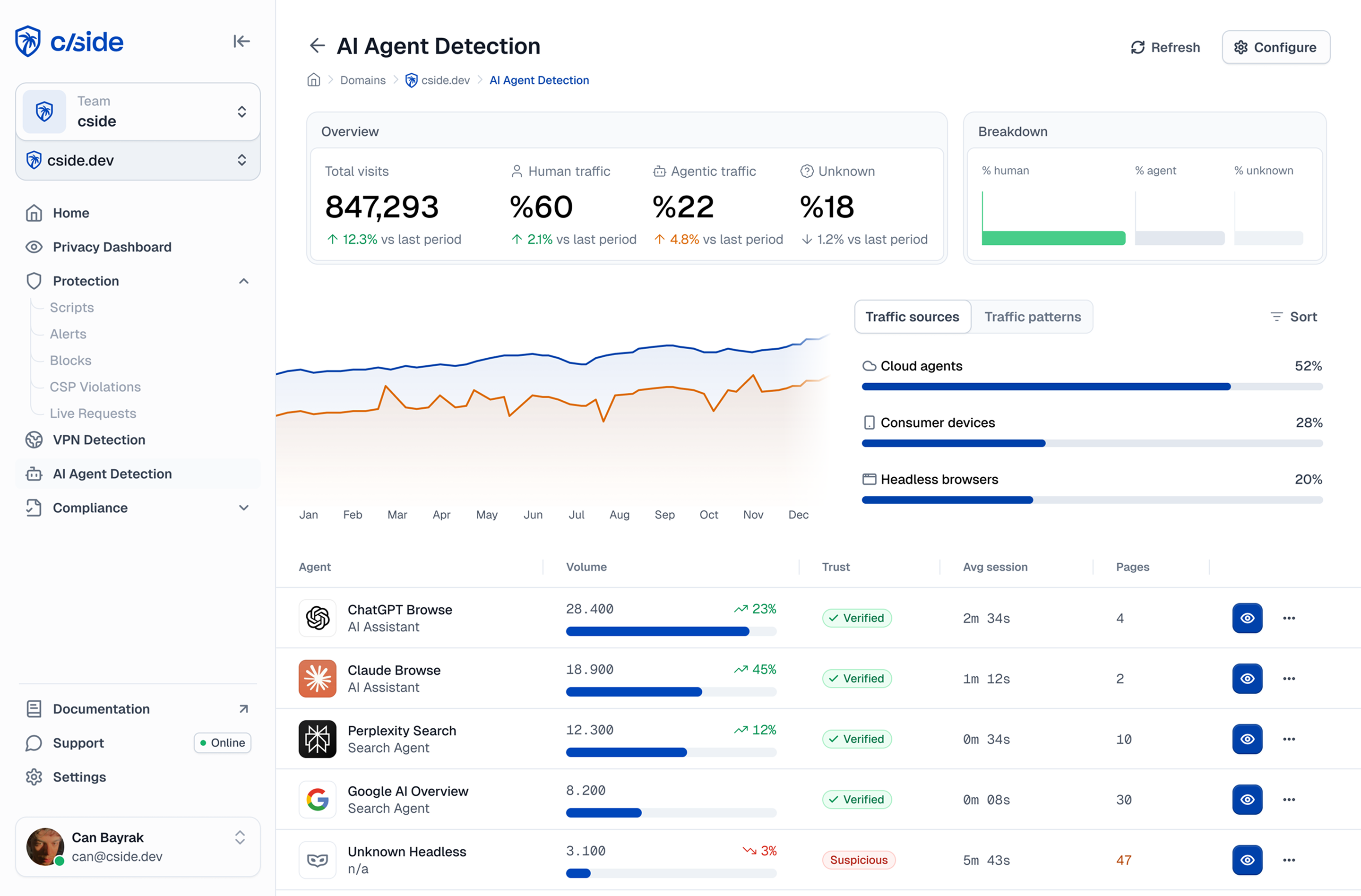
Consider what an Apple Intelligence agentic task looks like at the browser layer. A user on an iPhone asks Siri to compare subscription plans across two SaaS providers and recommend the cheaper annual option. Siri delegates to an agent that opens a WebKit session, navigates each pricing page, and extracts table data. The request arrives with a standard Safari user-agent and a legitimate iOS device fingerprint. There is no Applebot-Extended header because this is not a training crawl, it is an agentic product session. The agent completes both pricing pages in under 20 seconds, scrolls programmatically to the pricing section without any exploratory browsing, and submits no form interactions. Those behavioural signals (narrow scroll path, zero dwell variance, no return navigation) are invisible at the network layer and only surfaced by instrumentation running inside the browser session. For a deeper look at how agentic sessions evade robots.txt entirely, see our guide to blocking AI agent content scraping bots.



