

TL;DR: block ClaudeBot without stopping Claude agents from browsing your site
- Crawler versus agent: Teams block ClaudeBot expecting Claude to disappear from their site, then Claude Computer Use walks in the next day. ClaudeBot is Anthropic's training crawler; Claude-powered agents that browse the web use different infrastructure and different user-agents.
- The robots.txt block: ClaudeBot identifies itself as
Claude-Web/1.0, is documented in Anthropic's crawler pages, and honors robots.txt reliably; aDisallow: /plus Anthropic's published IP ranges at the firewall covers both robots.txt-reading and non-compliant behavior in one enforcement layer. - The decision: If you want out of Claude's training data, this one-file change does it. If you also want to keep Claude Computer Use out of your checkout, that is a separate detection problem that needs browser-layer signals.
Short on time? See cside's AI-agent detection. It covers everything below in one deployment.
ClaudeBot is the web crawler operated by Anthropic to collect training data for Claude. It is a declared, HTTP-based crawler: it identifies itself, operates from published IP ranges, and is designed to respect robots.txt directives. Blocking it is technically simple.
The more important context: blocking ClaudeBot addresses Anthropic's training data pipeline. It has no effect on Claude-powered agents, tools, or products that browse the web on users' behalf. Those are separate systems that require browser-layer detection. For the broader pattern across AI scrapers, see our guide to blocking AI agent content-scraping bots.
What Is ClaudeBot?
Quick answer: ClaudeBot is Anthropic's training crawler. It collects publicly available web content to train and improve Claude models. It uses a declared user-agent string and is listed in Anthropic's public documentation along with its IP ranges. It is an HTTP crawler, not an interactive browser agent.
ClaudeBot's primary user-agent identifier is Claude-Web/1.0 with a reference to Anthropic's crawler documentation page. Anthropic maintains documentation describing the crawler's purpose, behaviour, and how to block it.
Like GPTBot, ClaudeBot does not execute JavaScript or interact with web application interfaces. It makes HTTP GET requests to publicly accessible URLs, reads the response, and moves on. It does not log in, fill forms, or navigate interactive elements.
How to Block ClaudeBot with robots.txt
Quick answer: Add
ClaudeBotto yourrobots.txtto block the crawler entirely. Anthropic's documentation states ClaudeBot respects these directives. Use path-level rules if you want to restrict only sensitive sections while allowing the crawler on public content.
To block ClaudeBot from your entire site:
User-agent: ClaudeBot
Disallow: /
To allow the crawler on public content but restrict sensitive paths:
User-agent: ClaudeBot
Disallow: /account/
Disallow: /checkout/
Disallow: /admin/
Allow: /blog/
Allow: /products/
Anthropic has a good compliance reputation for its crawlers honouring robots.txt rules. This is the simplest and most broadly effective approach for controlling ClaudeBot access without infrastructure-level changes. The same robots.txt approach works for other declared crawlers, including CCBot and Bytespider.
IP-Level Blocking for ClaudeBot
Quick answer: Anthropic publishes ClaudeBot's IP ranges in its crawler documentation. Denying these ranges at your firewall or CDN provides enforcement that does not depend on the crawler reading
robots.txt. Check the documentation periodically, as IP ranges can expand when Anthropic scales crawl infrastructure.
IP-level blocking is the more robust enforcement option:
- It catches any version of the crawler that might not correctly handle
robots.txt - It creates a server-level log of blocked requests you can audit
- It does not rely on self-identification through the user-agent string
The tradeoff: Anthropic's published IP ranges require maintenance. If you block them at the firewall level, set a reminder to check for range updates quarterly or when Anthropic publishes changelog entries to their crawler documentation.
ClaudeBot vs. Claude-Powered Agents: The Gap That Matters
Quick answer: ClaudeBot is Anthropic's crawler. Claude the assistant is a different product. When Claude helps a user browse the web, research a topic, or complete a task, it uses different infrastructure than ClaudeBot. Blocking ClaudeBot does not prevent Claude-powered agents from visiting your site.
This is the same structural gap that applies to GPTBot and OpenAI Operator. The training crawler and the interactive agent are separate systems.
When a user asks Claude to research a product, compare prices, or complete a web-based task, Claude uses a browser session or web search tool that is not ClaudeBot. That session may have no identifying headers that connect it to Anthropic at all. From your server's perspective, it looks like a standard browser request.
The correct mental model: robots.txt and IP blocking manage your relationship with Anthropic's data collection pipeline. They do not manage your relationship with Claude as a product being used by real users to interact with your site.
What Happens After You Block ClaudeBot
Quick answer: Blocking ClaudeBot prevents your content from entering Anthropic's training data pipeline. It does not prevent Claude from referencing your site in responses based on previously indexed content. It does not prevent Claude-powered agentic systems from browsing your site on users' behalf.
After a ClaudeBot block:
- Future training runs will not include your new content
- Previously collected content remains in existing Claude model weights
- Claude users who ask Claude to browse your site are unaffected
- Any Claude-powered agent (Claude.ai computer use, Claude API agents) that visits your site is unaffected
The scope of a robots.txt block is narrower than most site owners expect. It is a statement about one specific crawler, not a policy that applies across an AI company's entire product portfolio.
Browser-Layer Detection Beyond ClaudeBot
Quick answer: Blocking ClaudeBot is straightforward. The harder problem is detecting Claude-powered agents browsing your site in real browser sessions on users' behalf, sessions that look identical to human traffic at the network layer. That requires browser-layer observation.
Consider what a Claude-powered computer use agent actually does when a user asks it to research a SaaS product. It opens a real Chromium session, loads the pricing page, and scrolls through the feature table. At the network layer, the request looks identical to a human visit: a standard Chrome user-agent, a residential IP, TLS fingerprint in range. No ClaudeBot header. No Anthropic IP range. The agent navigates four pages in 11 seconds without a single mouse-movement variance, never scrolls back, and never pauses at a form field unless the task requires input. Those timing signals and interaction patterns are detectable only inside the browser session. cside's instrumentation captures them at the JavaScript execution layer before any network-level tool can see them. In cside's controlled testing, traditional tools missed AI agents operating inside real browser sessions in 81 out of 100 scenarios: network tools are simply not watching the right layer.
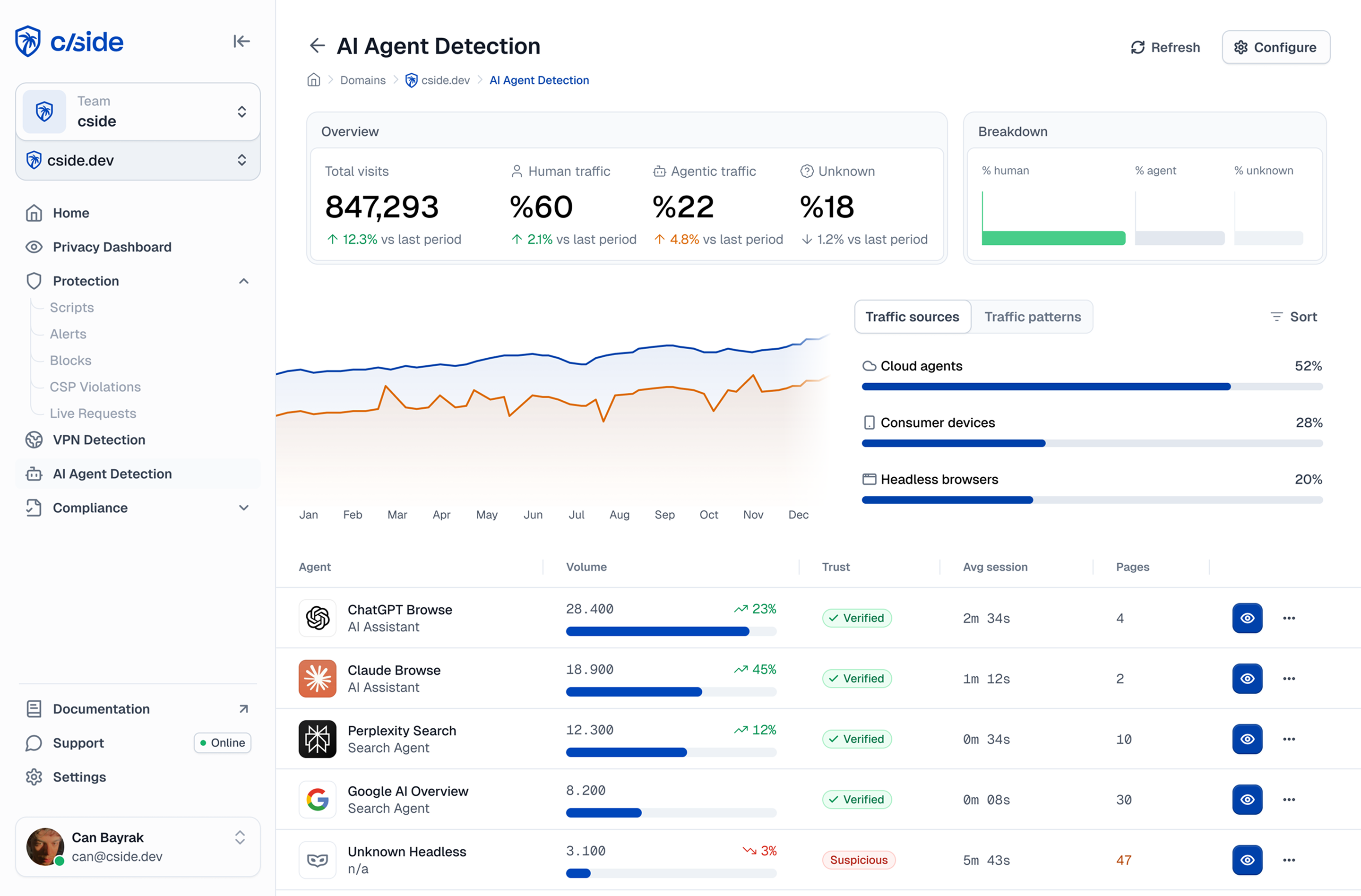
cside operates inside the browser session and surfaces the behavioural signals that distinguish agent-executed browsing from human behaviour. Interaction timing, navigation patterns, fingerprint consistency, and JavaScript execution characteristics are all observable inside a browser session but invisible to network-layer tools. ClaudeBot itself is not in that category: it is easily blocked. The agents operating through browser sessions are exactly what those tests identified as the invisible threat.



