

TL;DR: stop AI assistants that bypass WAFs
- WAFs check three things: user-agent string, request rate, source IP reputation. OpenAI Operator sends a real Chrome UA, moves at human speed, and rides a residential proxy. That is not a bot problem, it is a WAF problem.
- Name the agent: US account takeover losses jumped from $11.4B in 2024 to $13.5B in 2025, an 18% year-on-year rise per Javelin. cside reads canvas entropy, cursor geometry, and WebGL output inside the session so Operator, Claude for Chrome, and Playwright get named.
- Verdict per session: Do not block a category, verdict a session. Allow accessibility tools, block credential stuffing, challenge account settings, all per page. If your bot vendor cannot return a named agent, real customers will pay for the false positives.
Short on time? See cside's AI-agent detection. It covers everything below in one deployment.
Bot protection in 2026 has to work inside the browser, not just at the network perimeter. AI agents like OpenAI Operator and Claude for Chrome run in real Chromium with genuine user-agent strings, so the header, rate, and IP checks a WAF relies on all read them as human.
Browser automation and AI agents can run in genuine browser engines. Device and behavioral signals can add context to network evidence when deciding how to respond. What is bot mitigation?.
Why network-layer bot protection misses AI agents
Traditional bot protection runs at the network layer. A WAF checks three things: the user-agent string, the request rate, and the reputation of the source IP. AI agents defeat all three by design.
OpenAI Operator runs inside a real Chromium browser. It sends a genuine Chrome user-agent string rather than a bot identifier. It fills login forms, clicks buttons, and moves through pages at roughly human speed, so rate limiting never trips. Routed through a residential proxy, its IP resolves to a home broadband connection with no blocklist history. At every checkpoint a WAF can inspect, the agent looks like a person.
The same holds for Playwright, Puppeteer, and Selenium in stealth configurations. They suppress the navigator.webdriver property that older detection depended on, and a network-layer tool has nothing left to check.
Browser-layer signals that expose AI agents
Browser-layer signals are the only reliable way to separate AI agents from human users in 2026. None of them appear in an HTTP request header, so a WAF or perimeter tool never sees them.
Canvas fingerprint entropy. When a browser renders a canvas element, the output varies with the GPU, the graphics driver, and the operating system font-rendering pipeline. A virtualised or headless GPU produces low-entropy, highly uniform output. A real user's machine produces richer, noisier output. That difference is measurable and consistent.
Session cadence. Human users pause, re-read, correct typos, and lose focus, so their interaction timing carries natural variance. AI agents execute sequences with mechanical regularity: keystrokes arrive at fixed intervals, fields are completed in precise order, and page transitions happen without hesitation or backtracking.
Cursor geometry. A human moving a cursor from one point to another traces a curved arc with micro-corrections. An agent using programmatic mouse movement produces straight-line vectors or suspiciously smooth curves that are implausible for organic input.
Font and WebGL fingerprint. The set of fonts installed on a system and the output of WebGL shader programs both vary with real hardware. Containerised or virtualised environments produce predictably limited font sets and uniform WebGL output that does not match the claimed user-agent platform.
Named agents that show these patterns include OpenAI Operator, Claude for Chrome, Playwright, Puppeteer, and Selenium. Each is identified through a combination of signals rather than any single check.
US account takeover losses climbed from $11.4 billion in 2024 to $13.5 billion in 2025, an 18% year-on-year rise, according to the Javelin Strategy & Research 2026 Identity Fraud Study.
| Year | US account takeover losses (USD) |
|---|---|
| 2024 | $11.4 billion |
| 2025 | $13.5 billion |
That growth is driven mainly by automated credential stuffing, with AI agents increasingly replacing older scripted bots as the attack tool of choice.
Per-page controls for detected AI agent traffic
Blocking every AI agent is rarely the right move. Some are legitimate: accessibility tools, sanctioned B2B workflow automations, and customer-approved integrations all run through browser automation. You want control over that traffic, and a blanket reject throws the legitimate cases out with the abusive ones.
cside lets you set a response for each page or endpoint it monitors. For every detected AI agent you pick one of four actions: block, allow, challenge, or guide. That granularity matters because the right response changes with the page and the vertical.
iGaming operators block automated bonus claims. An agent that completes a registration flow and claims a welcome bonus before withdrawing is a direct margin cost, and blocking agents on registration and bonus-claim pages stops it without affecting real players.
eCommerce platforms block AI-driven checkout during flash sales and product drops, where automated buying at scale clears stock before real customers can reach it and damages trust in the brand.
Fintech platforms flag agents running KYC flows. Automated document submission paired with synthetic identity data can clear basic liveness checks when the underlying session is never inspected for automation.
How cside AI agent detection works
cside AI agent detection runs from a single script tag added to your page. There is no SDK to integrate, no server-side change, and no infrastructure to manage.
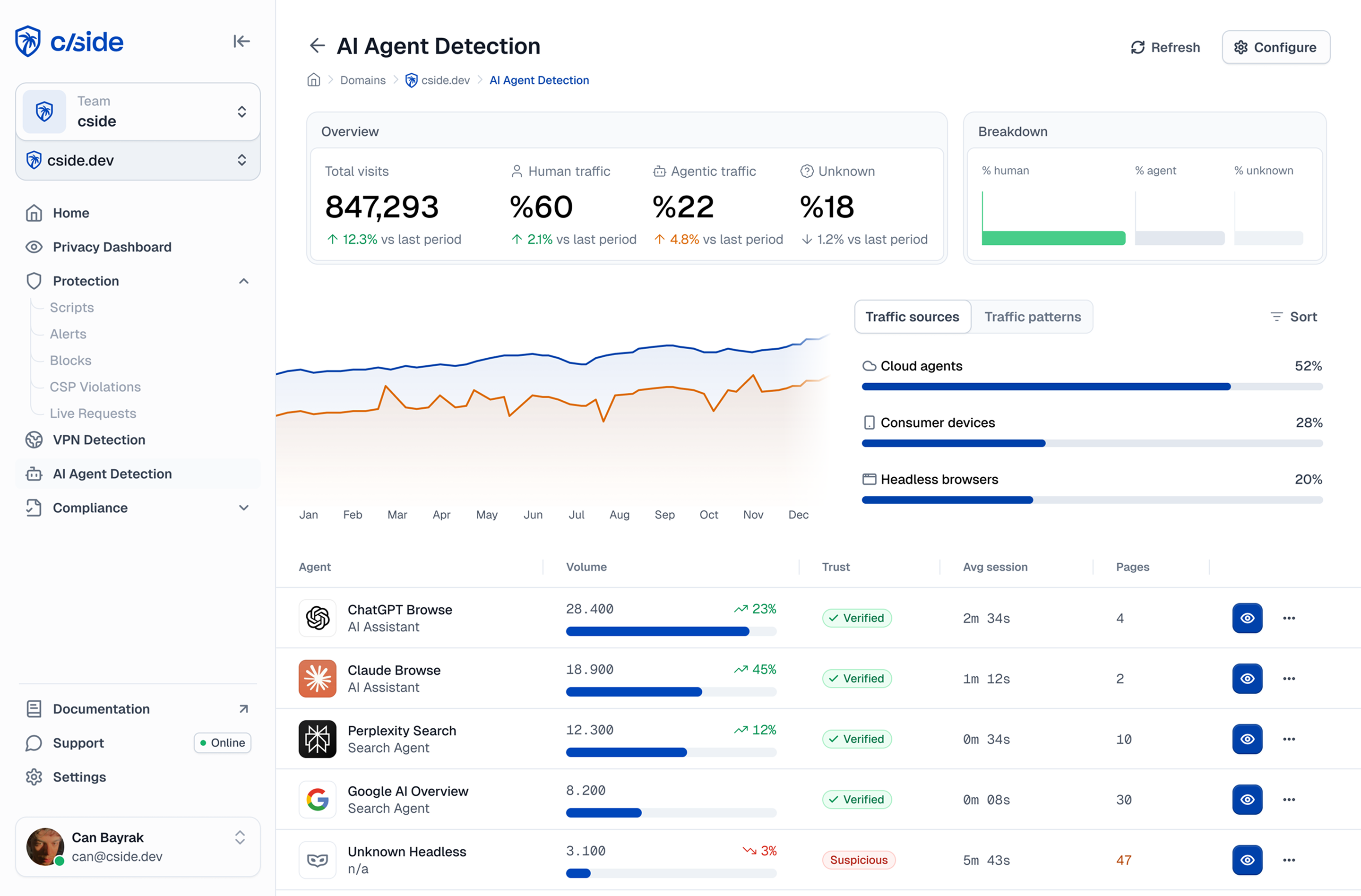
Once it is live, the script collects more than 250 browser signals per session: the canvas and WebGL fingerprints described above, plus session cadence, cursor geometry, navigator property consistency checks, and font enumeration.
cside does more than return a bot-or-not flag. Where the signals allow, it names the specific agent (OpenAI Operator, Claude for Chrome, Playwright, Puppeteer, Selenium, and others each leave a distinct combination), which gives your security and product teams context to act on instead of a bare score.
The verdict comes back in real time over the API, before the session completes a sensitive action, and it slots into your existing authentication, checkout, and fraud-review systems.
See the AI agents and bots already in your traffic and start free at cside.
Further reading:



