

Highcharts SVG export XSS: What GHSA-mw4f-gj5x-6xr4 means for your site
Highcharts has disclosed a browser-side cross-site scripting (XSS) issue in the way it filters chart text, tracked as GHSA-mw4f-gj5x-6xr4 and CVE-2026-116796. The flaw can turn a link in exported or reparsed SVG into a JavaScript execution path. It does not mean that every page loading an affected Highcharts version is immediately exploitable. The attacker needs control over chart text, an export or serialization step, and a user who activates the resulting link. Highcharts rates the issue High severity.
The timing matters. Highcharts published its advisory on 2026-09-29. Highcharts' changelog lists a security-fix release of version 13.1.1 on 2026-09-20. The GitHub Advisory Database entry says GitHub and NVD published their records on 2026-10-28. This is a recent public issue, though October 28 was not the initial disclosure date.
How an SVG works
SVG (Scalable Vector Graphics) is an XML-based image format. Its source describes shapes and text with elements such as <rect>, <path>, and <text>, rather than storing a fixed grid of pixels. The browser parses those elements and draws the result. A viewBox sets the drawing's internal coordinates, which the browser can scale to the space available. In the illustration, each <rect> sets a bar's position and size. See MDN's SVG introduction and the SVG 2 coordinate specification.
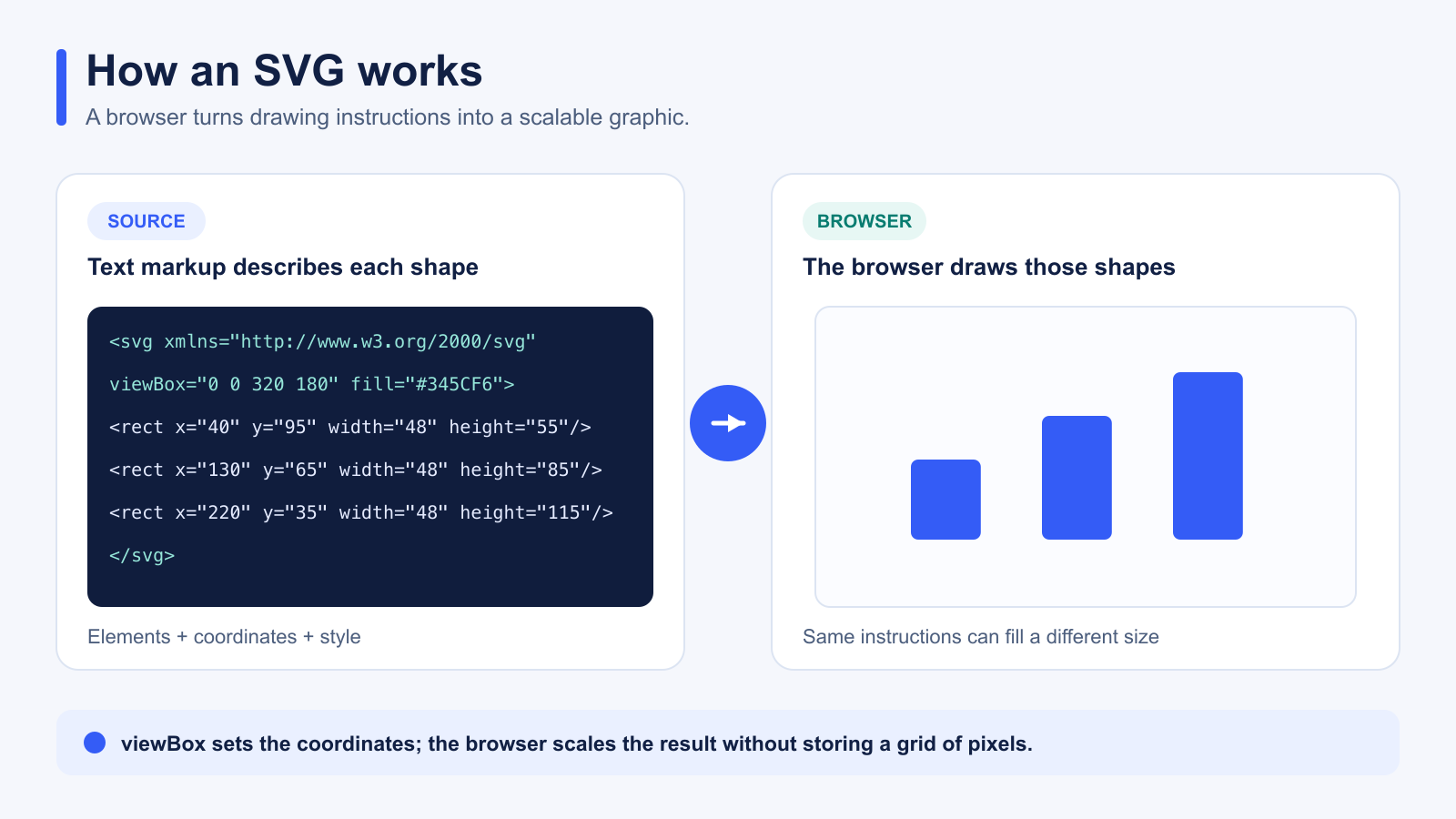
SVG can also contain links. href is the current link attribute; xlink:href is an older form whose xlink prefix needs an XML namespace declaration. How the SVG is loaded matters: through an HTML <img>, links are inactive and scripts do not run; parsed as a document or inserted inline, links can be active. That difference is central to this issue. See the SVG 2 linking specification and MDN's SVG linking guide.
How the SVG export issue works
Highcharts filters markup supplied to text options such as a chart title. In affected versions, its filter checks the URL scheme in attributes such as href and src, but fails to apply the same check to xlink:href. We checked the shipped Highcharts 12.1.0 core bundle and found that omission in filterUserAttributes. An SVG anchor with a javascript: URL can therefore survive filtering. The upstream fix adds xlink:href to the attributes that receive URL-scheme validation.
The normal chart view is not the full attack path. Highcharts says the attribute does not become an active link on the live page because it lacks the XLink namespace there. When the chart is exported to SVG or its markup is serialized and parsed again, the link can become active. If a user clicks it, script runs in the origin of the document that parsed the output. The same issue applies whether or not useHTML is enabled. Read the maintainer's impact analysis.
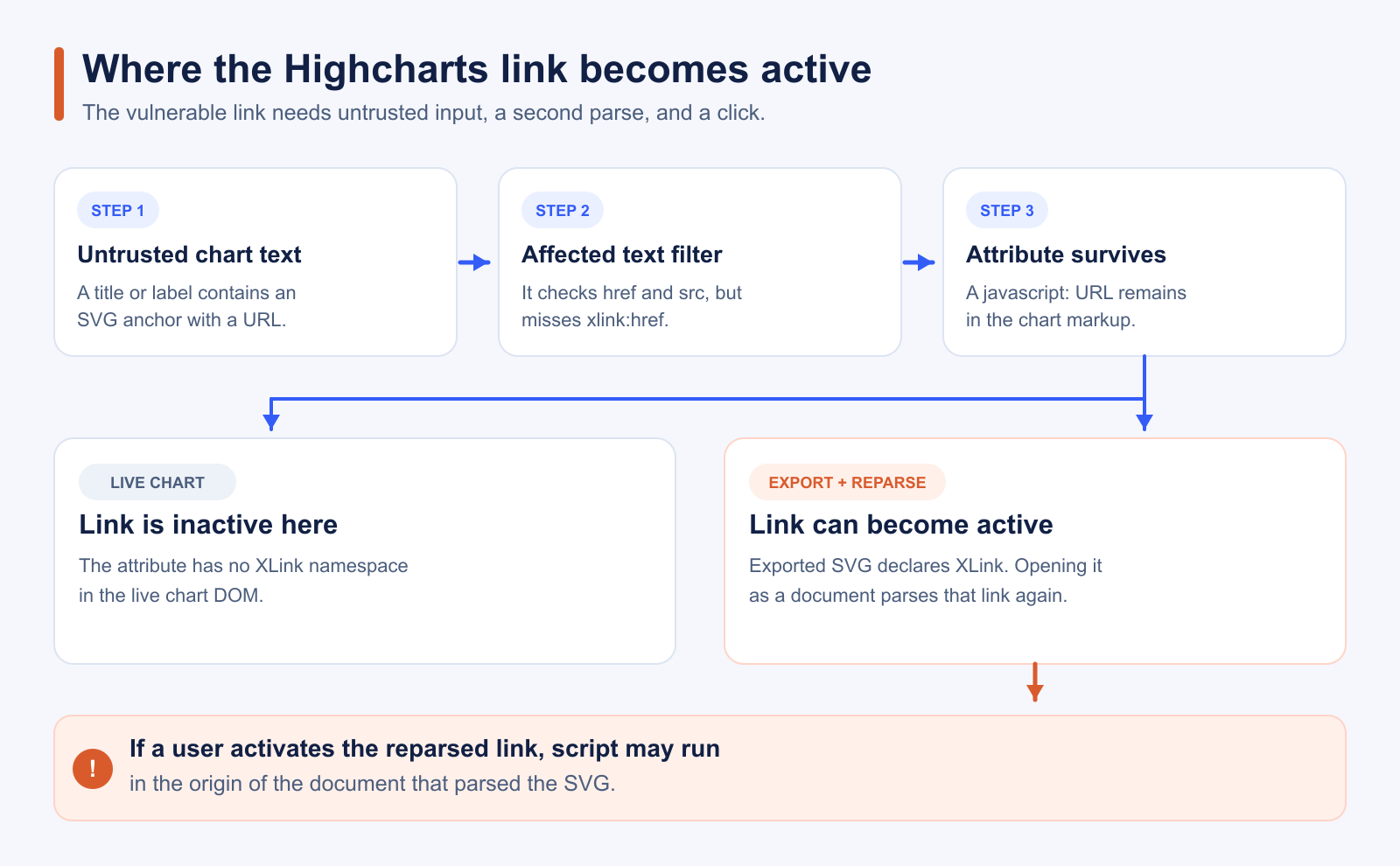
An affected version needs an update. The steps below determine whether your application also has the specific data flow and output handling required for exploitation.
[MID_BLOG_CTA]
Which versions are affected?
| Highcharts release line | Affected versions | First patched version |
|---|---|---|
| 11.x and earlier | 10.3.2 through 11.4.8 | 11.4.9 |
| 12.x | 12.0.0 through 12.6.1 | 12.6.2 |
| 13.x | 13.0.0 through 13.1.0 | 13.1.1 |
These ranges come from the Highcharts advisory. If your application loads Highcharts from a CDN, check the URL users actually receive. A package manifest alone may not reflect the script served in their browsers.
How to check whether your charts are exposed
Follow the complete path through your application, not only the package version:
- Confirm the core version in the browser. Inspect the Network panel or loaded script URLs on every route that renders charts. If Highcharts is exposed globally,
Highcharts.versionis another quick check. Include CDN files that do not appear in your package manifest. - Trace externally supplied text. Review chart titles, subtitles, labels, and other text options. Identify any value that a user, partner, or external data source can influence before it reaches Highcharts.
- Find the output path. Check SVG downloads, custom exports, server-rendered charts, and code that serializes and later inlines chart markup. The default SVG download uses the exporting module, but other serialization paths can also reparse the content.
- Check the user's interaction and document origin. The advisory requires someone to activate the link after reparsing. Script executes in the origin of the document that parses the output, which may differ from the chart's original page.
Simply displaying an affected chart on a live page does not demonstrate the reported XSS path. Test the full workflow in a controlled environment if you need to establish reachability.
How to fix the issue
Upgrade Highcharts core to the patched version for your supported release line. If you load modules separately, update them to the matching version. After deployment, verify the version delivered to browsers, including cached CDN assets.
For a regression check, follow Highcharts' test in the fix commit: supply an unsafe xlink:href in a chart text option and assert that exported SVG does not retain a javascript: link. If an immediate upgrade is blocked, the maintainer advisory provides a temporary filter patch to apply before creating charts.
cside can help identify which scripts visitors actually load and where known vulnerable versions appear across a site. Application owners can then verify the chart inputs and output workflows that determine reachability. For more on maintaining a live script inventory, see our third-party script security guide.
As of 2026-10-28. Advisory records and affected-version ranges can change; check the Highcharts maintainer advisory before making a final remediation decision.



