

TL;DR: shared-login device diversity counting
- The IP placebo: IP-based sharing detection is a placebo. Eight colleagues on one office network share a single public IP, so every session passes while one seat funds the whole team.
- Device diversity counting: cside counts distinct hardware fingerprints per account from 250+ browser signals, and it holds through incognito and VPN. Five fingerprints on one login in 24 hours is confirmation, not suspicion.
- Turn it into revenue: If your churn model treats shared logins as retained users, wire the per-account device count into an in-product upgrade prompt. If not, keep flying blind on seat revenue.
Short on time? See cside's frictionless account sharing detection. It covers everything below in one deployment.
The most reliable account sharing detection software works at the device layer. It fingerprints each session and counts how many distinct devices sit behind a single login, which is the one signal that shared credentials cannot hide. Tools built on IP addresses or authentication checks miss the most common case: a legitimate account holder sharing one seat across a whole team.
Shared logins are hard to catch because they use valid usernames and valid passwords. Authentication checks pass, rate limits stay untriggered, and the accounts look normal in product analytics. The device layer is where the truth shows up. If one account logs in from five distinct device fingerprints in 24 hours, that is five different people, not one person switching machines.
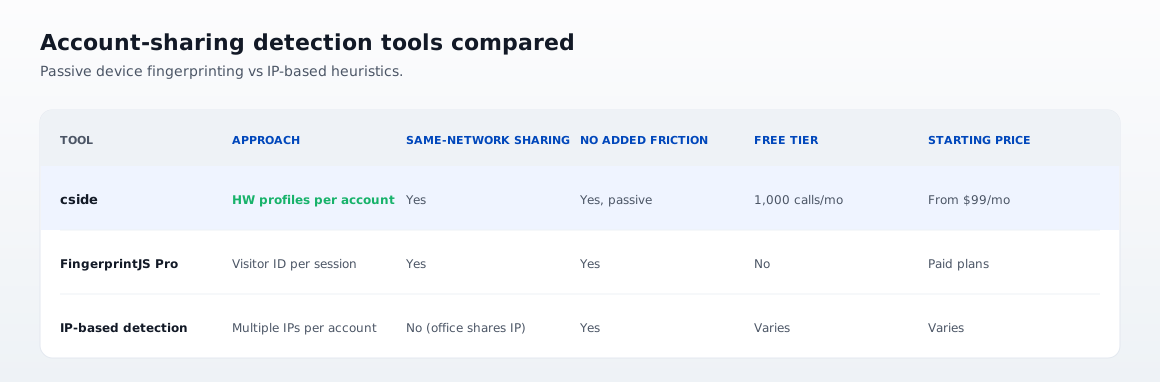
| Tool | Approach | Catches same-network sharing | Detects without added friction | Free tier | Starting price |
|---|---|---|---|---|---|
| cside | Device fingerprinting, counts distinct hardware profiles per account | Yes | Yes, passive silent collection | Yes, 1,000 API calls/mo | From $99/mo |
| FingerprintJS Pro | Device fingerprinting, visitor ID per browser session | Yes | Yes | No | Paid plans |
| IP-based detection | Flags logins from multiple IPs per account | No, same office shares one IP | Yes | Varies | Varies |
Why IP-based detection fails for account sharing
The usual first attempt at account sharing detection is IP-based: flag any account that logs in from more than a set number of IP addresses per day. This catches some geographic anomalies, but it misses the most common sharing scenario.
Picture eight colleagues in one office sharing a single internet connection and a single public IP address. IP-based detection sees one source and passes every session, so the whole team can share one login indefinitely without tripping an alert. Distributed teams on a corporate VPN collapse the signal even further, because all traffic exits through the same gateway.
IP data is a useful fraud signal in other contexts, but it structurally cannot identify same-network credential sharing.
How cside detects seat abuse with device fingerprinting
cside builds a stable device fingerprint from 250+ browser signals per session: canvas rendering output, GPU characteristics, font metrics, WebGL behavior, audio context, and dozens of hardware-derived attributes. Because the fingerprint comes from physical hardware rather than stored identifiers, it holds up across cookie clearing, incognito mode, and VPN use.
The account sharing detection logic runs on fingerprint diversity. When one account authenticates from several distinct fingerprints inside a configurable window, cside returns a real-time signal showing how many distinct devices have touched that account. Two fingerprints in 24 hours is a flag. Five fingerprints is near-certain confirmation of active sharing.
For each session, cside returns a real-time verdict: a device fingerprint identifier, whether that device is already known for the account, and the count of distinct devices seen on the account in the rolling window. Your application can use these signals to trigger a seat expansion prompt, require step-up authentication from an unrecognized device, or log the event for account review.
Collection is passive. Legitimate users on their own devices see no extra friction, and only sessions that cross the diversity threshold surface in the detection logic. The whole thing runs from a single script tag, with no SDK changes to your application.
FingerprintJS Pro
FingerprintJS Pro is a device fingerprinting library focused on generating a stable visitor ID per browser session. Its core fingerprinting is reliable and its developer documentation is thorough.
For account sharing detection, FingerprintJS Pro gives you the per-session visitor ID, and your backend builds the device diversity logic on top of it. The product does not ship built-in account sharing features, so the diversity counting, threshold logic, and response signals are custom work you maintain. It also has no free tier, so testing accuracy on your real traffic means an upfront commitment.
If you want the sharing signal returned directly in the API rather than assembled in your own backend, cside's account-level signals are more direct. For a fuller feature-by-feature view, see the Fingerprint vs cside comparison.
What to evaluate when choosing
- Does it detect sharing on the same network? Device fingerprinting does; IP-based detection does not.
- Does the API return a built-in diversity signal or just a raw device ID? Built-in signals cut implementation time.
- Does it add friction for legitimate single-device users? Passive collection should stay invisible to them.
- Can it trigger seat expansion prompts automatically? Integration with your billing or user management decides whether detection turns into revenue.
- Does it handle the iGaming case? Shared accounts in bonus-eligible contexts need hard blocks, not just prompts.



