

TL;DR: catch one SaaS login across many desktops
- Counting the wrong thing: Concurrent session limits do not catch password sharing, because sharers rarely log in at the same second. A team of eight taking turns lives comfortably under a two-session cap. You are counting the wrong thing.
- The device count: cside builds a hardware-derived fingerprint from more than 250 signals per session and returns a per-account device count via API, with 1,000 calls a month on the free tier. Eight colleagues on one login produce eight distinct fingerprints from the same office IP.
- Prompt, don't block: Do not block the account, prompt for a seat. When the API flags a new device on an account that already has three, show the seat expansion prompt at the moment the session lands. Silent for real users, hard signal for the finance conversation.
Short on time? See cside's frictionless account sharing detection. It covers everything below in one deployment.
Password sharing detection tools identify when several people log in with one set of credentials to avoid buying additional seats. This is the most common form of seat abuse in per-user licensed software, and it slips past most standard controls. The users hold valid credentials, they clear MFA when it is required, and their sessions look normal. The one signal that gives them away is that a single account shows up on several distinct physical devices in a short window.
| Tool type | How it works | Misses same-network sharing | Requires custom implementation | Free tier |
|---|---|---|---|---|
| cside (device fingerprinting) | Browser-layer hardware signals per session | No | No (built-in diversity signal via API) | Yes (1,000 calls/mo) |
| Concurrent session limits | Blocks more than N active sessions simultaneously | No (sequential use evades it) | No | Depends on platform |
| IP-based detection | Flags accounts logging in from multiple IPs | Yes (shared office network) | No | Depends on platform |
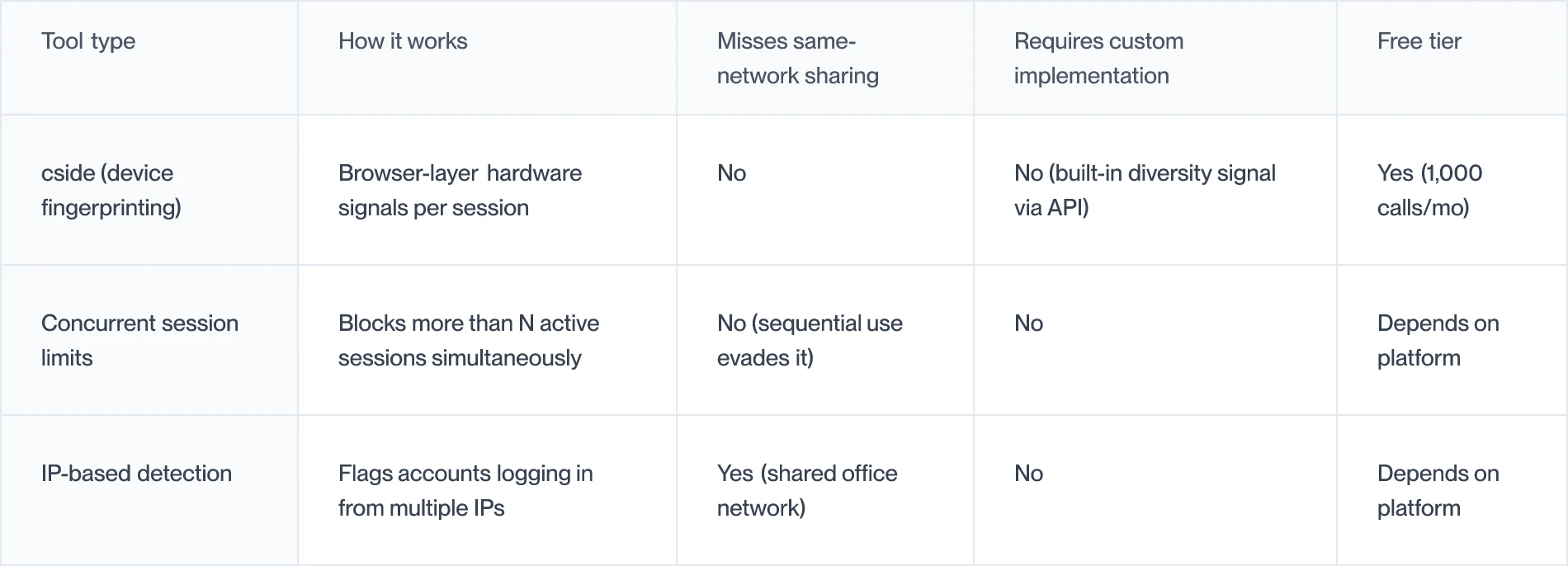
The three tools SaaS teams try first (and why they fall short)
Concurrent session limits are the most common first line of defense. You allow one or two active sessions per account and block additional logins. The problem is that password sharers rarely operate simultaneously. They share credentials and log in at different times throughout the day. Sequential access never hits the concurrent limit. A team of eight sharing one login can operate comfortably within a two-session limit as long as they are not all working at the exact same moment.
IP-based detection flags accounts that authenticate from multiple IP addresses. This catches some geographic anomalies but misses the most common enterprise sharing pattern entirely. Eight colleagues in the same office use one internet connection. Their sessions all arrive from one IP. IP detection sees a single source and raises no flag. For teams using a corporate VPN, the situation is the same: all traffic exits the VPN gateway with one IP address.
Authentication platforms like Okta or Azure AD verify the credential and, optionally, a second factor. They are effective at preventing unauthorized login attempts, but they have no visibility into whether the authorized account holder is sharing their credentials. If a user relays an OTP to a colleague, or the colleague operates during an existing authenticated session, the authentication platform sees a valid session and does nothing.
What actually works: device fingerprinting
Every physical device (laptop, desktop, or workstation) has a distinct combination of GPU, CPU, fonts, screen resolution, audio hardware, and canvas rendering behavior. A browser-layer fingerprinting tool reads these signals during each session and produces a stable device identifier. That identifier persists across cookie clearing, incognito mode, and VPN connections because it comes from physical hardware rather than stored state.
When you associate each authentication event with its device fingerprint and track how many distinct fingerprints appear per account in a rolling time window, password sharing becomes visible. One user on one device produces one consistent fingerprint. Eight colleagues sharing one login produce eight distinct fingerprints, each with a different hardware profile.
The threshold for flagging is configurable. Two distinct fingerprints in 24 hours can be normal, for example a user with a laptop and a desktop. Five distinct fingerprints in 24 hours is not a plausible single-user scenario.
cside for SaaS password sharing detection
cside account sharing detection builds a device fingerprint from more than 250 browser signals per session and exposes a per-account device-diversity signal through its API. Your application sees the current device fingerprint, whether that device is already known for the account, and how many distinct devices have been seen in the time window you configure.
This is the signal your seat expansion workflow needs. When the API flags a new device on an account that already has three known devices, your application can show a prompt: this account is being accessed from a new device, would you like to add a seat? The detection stays passive and silent, and it adds no friction for single-device legitimate users.
cside integrates as a single script tag, and the verdict is available in real time, so the prompt can appear at the moment the new-device session is detected rather than in a delayed notification.
Buyer checklist for password sharing detection
- Does it detect sharing on shared networks? Device fingerprinting does; IP detection does not.
- Does it work without concurrent session enforcement? You may want to trigger prompts instead of blocking sessions.
- Is the diversity signal built into the API, or does it need custom backend logic?
- Can you configure the threshold? Two devices and five devices carry different business implications.
- Does it handle mobile sessions? A user on a mobile browser has a distinct fingerprint from their desktop, so your threshold logic should allow for it.



