
TL;DR: monitoring van grensoverschrijdende gegevensoverdracht
- Wat het is: Grensoverschrijdende gegevensoverdracht vindt plaats wanneer persoonsgegevens die op je website worden verzameld, naar servers in een ander land worden gestuurd. AVG Artikel 30 (ROPAs) en 28 (verplichtingen van verwerkers), samen met de openbaarmakingsvereisten van de CCPA, verplichten website-eigenaren te documenteren waar gegevens naartoe worden gestuurd.
- Inventariseer verzamelaars: Begin met een inventarisatie van wie gegevens verzamelt (alle externe gegevensverzamelaars op je site). Koppel elke gegevensverzamelaar aan een rechtmatige grondslag.
- Monitor bestemmingen: Monitor waar gegevens daadwerkelijk naartoe worden gestuurd. Kijk naar externe domeinen, hostingregio's en subverwerkers. Je kunt een snelle momentopname krijgen via handmatige inspectie in de ontwikkelaarstools van je browser. Of gebruik een geautomatiseerde tool zoals cside Privacy Watch voor doorlopende monitoring.
- Voed je documentatie: Deze informatie voedt je privacynalevingsdocumentatie via ROPAs, DPAs, privacyverklaringen en incidentaudits. Plotselinge wijzigingen in gegevensbestemmingen (zoals naar Rusland of China) zijn ook vroege signalen van een datalek op je website.
Weinig tijd? Bekijk cside Privacy Watch. Dit dekt alles hieronder in één deployment.
4 stappen om grensoverschrijdende en internationale gegevensoverdracht op je website bij te houden
1. Inventariseer wie gegevens overdraagt op je site
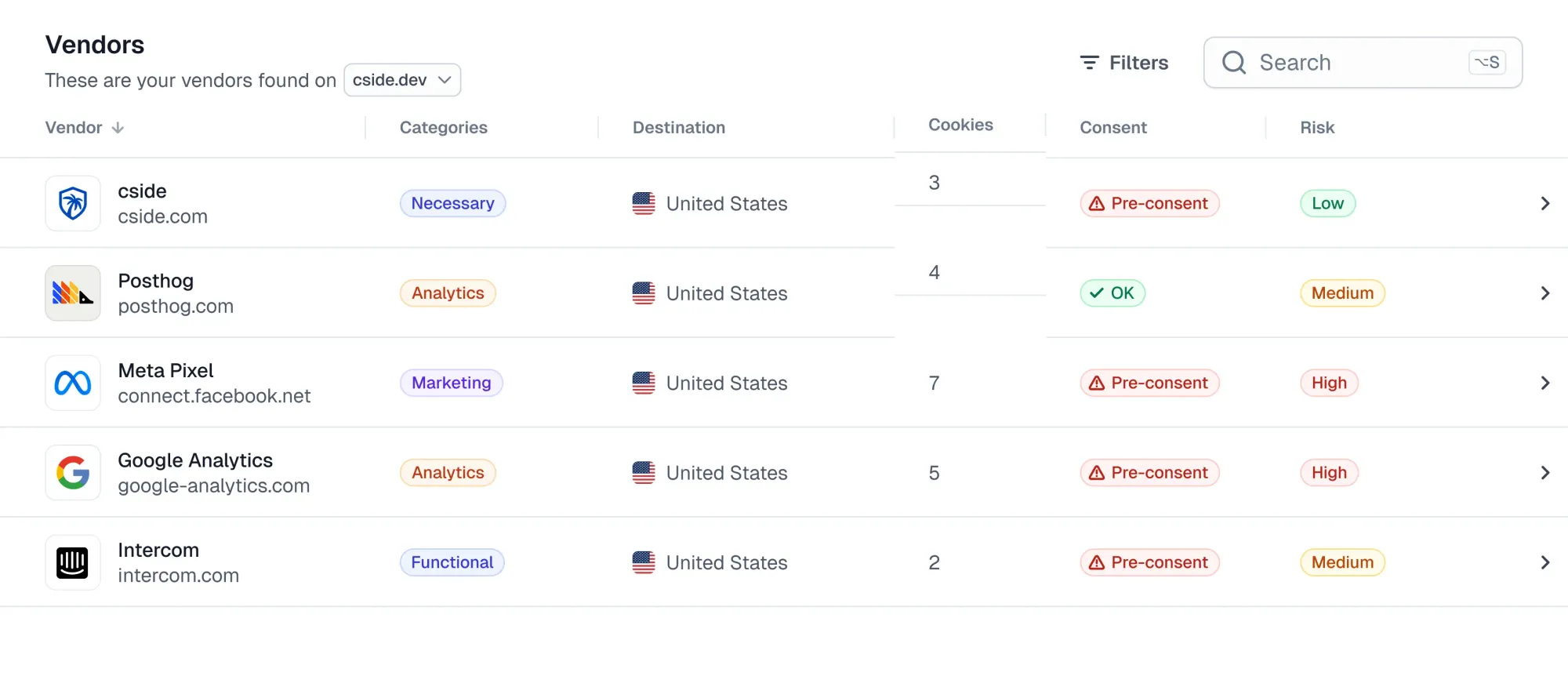
Om grensoverschrijdende gegevensoverdrachten bij te houden, moet je begrijpen waar gegevensverzameling daadwerkelijk begint. Dit omvat zowel eigen elementen die je direct beheert als diensten van derden die op je site zijn ingebed.
Eigen gegevensverzameling (je eigen team):
Eigen componenten zoals contactformulieren, CRM-integraties en intern gebouwde analysetools kunnen uitgaande gegevensstromen activeren. Het is makkelijk om verzamelpunten op je site over het hoofd te zien of onduidelijkheid te hebben over wie ze beheert (marketing, support of ontwikkelaars).
Gegevensverzameling door derden (leveranciers en tools):
Scripts van derden verdienen speciale aandacht. De meeste teams weten niet hoe scripts van derden achter de schermen werken, en op een gemiddelde website staan er tientallen, blijkt uit onderzoek van Web Almanac. Tools zoals analyseplatforms, advertentiepixels, chatwidgets, A/B-testscripts of ontwikkelaarsbibliotheken laden van externe domeinen en kunnen zonder toestemming persoonsgegevens over grenzen sturen.
Die scripts van derden laden op hun beurt scripts van vierde partijen, die weer scripts van vijfde partijen kunnen laden, enzovoort. Je hebt het script van de derde partij mogelijk goedgekeurd, maar je bent blind voor alle subverwerkers verderop in de toeleveringsketen.
'Leveranciersinventarissen' in algemene compliancetools zijn een goed begin. Maar ze monitoren geen code-uitvoering in de browser. We hebben gesproken met ondernemingen die ontdekten dat ze nog steeds live code hadden die gegevens verwerkte op hun website, van leveranciers die maanden eerder waren beëindigd.
Het handmatig opstellen van een inventarisatie van alle gegevensverzameling door derden op je website omvat:
- De broncode van je site inspecteren op codefragmenten van derden
- Tagmanagers (zoals Google Tag Manager) inspecteren op verborgen datatrackers
- Dit proces continu herhalen naarmate nieuwe scripts worden toegevoegd, verwijderd of bijgewerkt.
Webbeveiligingstools zoals cside automatiseren dit proces met doorlopende monitoring. Je kunt beginnen met een gratis websitescan van scripts van derden.
2. Begrijp welke gegevens worden overgedragen op je site
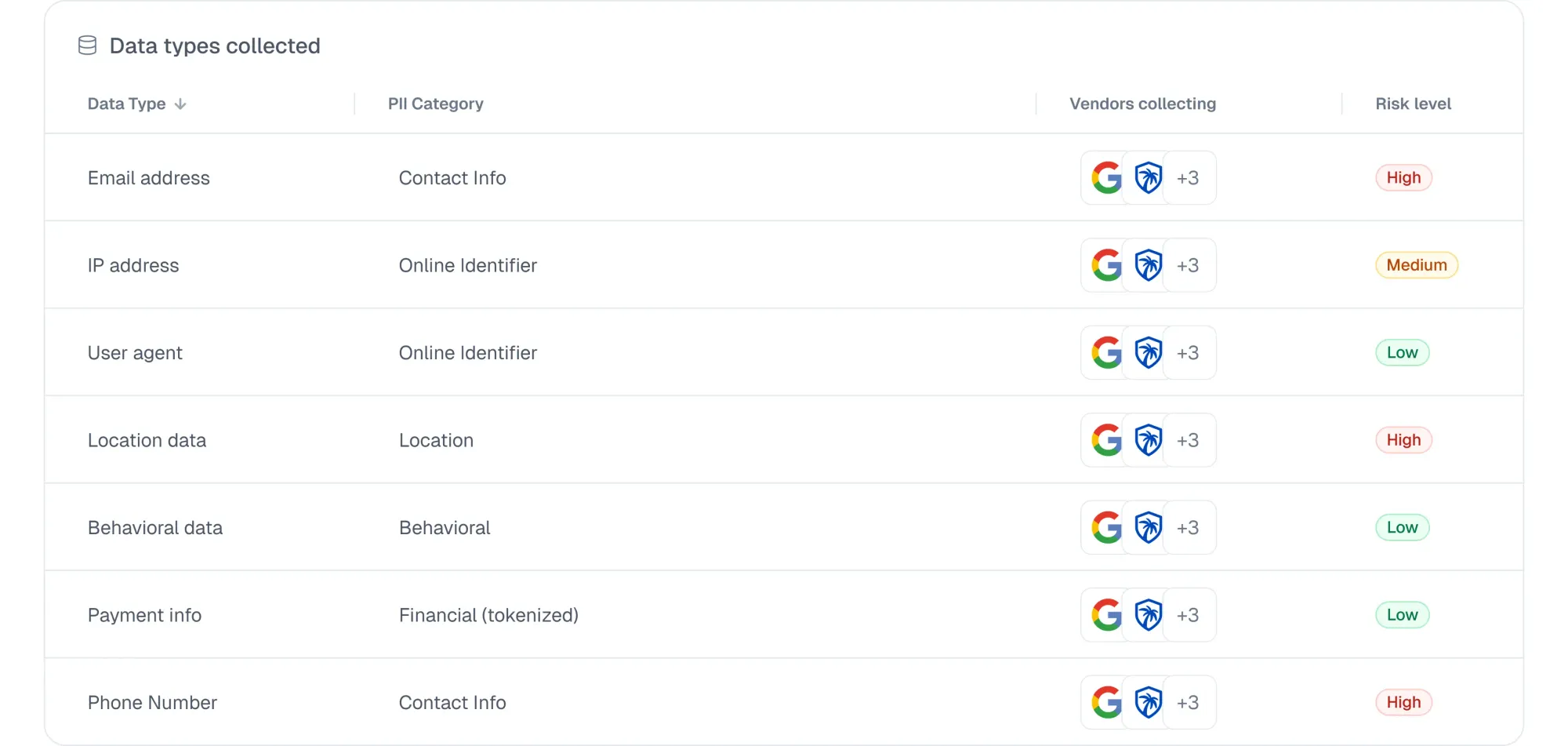
Zodra je de eigen en externe verzamelpunten op je site kent, is je volgende doel begrijpen welke gegevens ze daadwerkelijk verzamelen en buiten de site versturen.
- Er zijn voor de hand liggende invoervelden zoals namen, e-mailadressen en telefoonnummers.
- Scripts van derden leggen ook identifiers vast zoals IP-adressen, cookies, sessie-ID's, apparaatgegevens of locatiemetadata, vaak zonder dat de gebruiker dit merkt.
- Gevoelige gegevens worden ingevoerd via KYC-flows (rijbewijzen, paspoorten) en supportchatbots ontvangen afbeeldingen van accountgegevens van klanten.
Sommige afzonderlijke gegevenspunten zijn privacyvriendelijk, maar wanneer je ze combineert kunnen de verzamelde gegevenspunten kwalificeren als persoonsgegevens onder de AVG en kunnen ze tellen als 'delen' onder de CCPA (zelfs als de bedoeling eenvoudige sitemeting was).
Daarom moet elke gegevensstroom worden gekoppeld aan de categorie van de rechtmatige grondslag voor elk kader waaraan je voldoet.
Het koppelen van gegevenstypen aan een juridische rechtvaardiging is hoe organisaties verantwoording tonen tijdens audits voor CCPA-'delings'-openbaarmakingen en reageren op regelgevingsvragen over rechten van betrokkenen.
Je inventarisatie moet kolommen bevatten met zoiets als dit:
Bij gevoelige gegevens is extra voorzichtigheid geboden. Gezondheidsinformatie, nauwkeurige locatiegegevens, biometrische identifiers of politieke opvattingen vereisen vaak expliciete toestemming en sterkere waarborgen. Zelfs onbedoelde verzameling kan nalevingsverplichtingen met zich meebrengen, met name in gereguleerde sectoren zoals de gezondheidszorg.
3. Monitor waar gegevens naartoe worden gestuurd
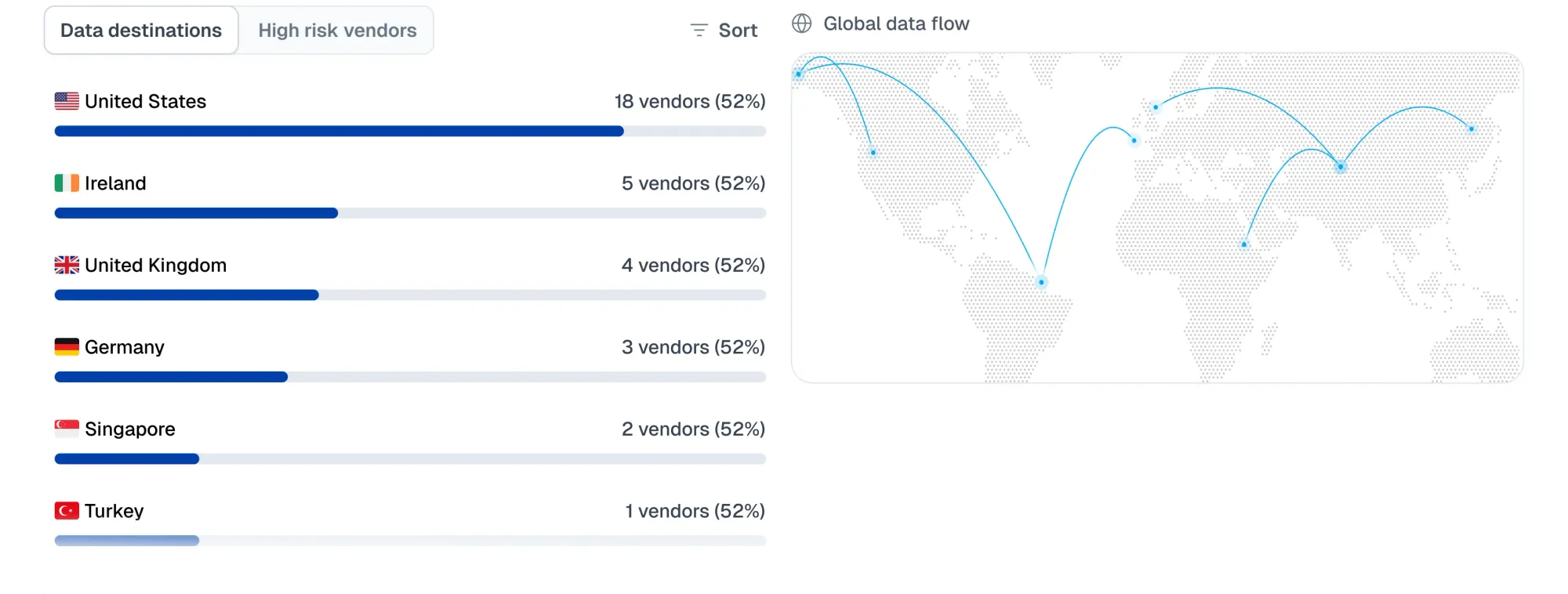
Nu heb je zicht nodig op waar gegevens naartoe gaan zodra ze de browser van de gebruiker verlaten. Eigen code en code van derden sturen gegevens naar externe domeinen voor opslag of verwerking. Die externe servers kunnen worden gehost in andere staten of landen.
- Je afrekenformulier legt het e-mailadres van een klant vast in Californië, maar de servers van je e-mailserviceprovider staan in Frankfurt.
- Een bezoeker in Londen laadt je homepage. Een analysescript stuurt gegevens naar servers in de VS of APAC. Je hebt zojuist een internationale gegevensstroom geactiveerd.
Deze bestemmingen bepalen of een gegevensstroom een grensoverschrijdende overdracht wordt met regelgevende gevolgen.
Het Amerikaanse Ministerie van Justitie beperkt grote overdrachten van gevoelige persoonsgegevens naar landen van zorg, waaronder China, Rusland, Iran, Noord-Korea, Cuba en Venezuela.
Dit is geen eenmalige controle. Externe leveranciers en SDK's wijzigen hun code regelmatig of voegen nieuwe subverwerkers toe. Één enkele update kan gegevensstromen zonder kennisgeving naar een nieuw land verplaatsen. De verplichtingen van AVG Artikel 44 en CCPA §1798.100 rondom delen en openbaarmaking veronderstellen een doorlopende verantwoordelijkheid voor het bijhouden van gegevensbewegingen.
Handmatige controles via browser DevTools of netwerkmonitoringtools zoals het tabblad "Network" in Chrome kunnen direct laten zien waar verzoeken naartoe zijn gestuurd. Dit wordt echter onbeheersbaar door script- en domeinwijzigingen. Bovendien tonen deze handmatige controles slechts een snelle momentopname, wat onvoldoende is voor nalevingsdocumentatie.
4. Documenteer grensoverschrijdende overdrachten voor regelgevingsvereisten (AVG & CCPA)
Wanneer toezichthouders vragen hoe persoonsgegevens je website verlaten, verwachten ze een antwoord dat gedocumenteerd is, niet achteraf gereconstrueerd.
Onder de AVG worden grensoverschrijdende overdrachten expliciet behandeld in Artikelen 44 tot en met 50. Deze artikelen verplichten organisaties te registreren waar gegevens naartoe worden gestuurd, welke waarborgen op die gegevens van toepassing zijn en het juridische mechanisme dat elke overdracht ondersteunt.
AVG Artikel 30 (ROPAs) vereist documentatie over gegevensbewegingen naar derde landen of internationale organisaties.
AVG Artikel 28 (Verplichtingen van verwerkers) vereist dat DPAs aantonen:
- Welke subverwerkers worden gebruikt
- Waar gegevens worden verwerkt
- Hoe verdere overdrachten worden afgehandeld
DPAs weerspiegelen wat een leverancier beweert waar te zijn. Zonder monitoring van scripts van derden is het onmogelijk te verifiëren dat die scripts zich op je site ook daadwerkelijk zo gedragen. Als een externe leverancier wordt gecompromitteerd in een supply chain-aanval, worden DPAs genegeerd en vindt overmatige gegevensverzameling plaats zonder dat je team dit opmerkt.
De CCPA richt zich op transparantie. Bedrijven moeten aantonen:
- Welke derden persoonsgegevens ontvangen
- Of die gegevens worden beschouwd als een verkoop of een deling
- Hoe consumentenrechten van toepassing zijn op die openbaarmakingen
Hoe cside helpt bij het bijhouden van grensoverschrijdende gegevensoverdracht
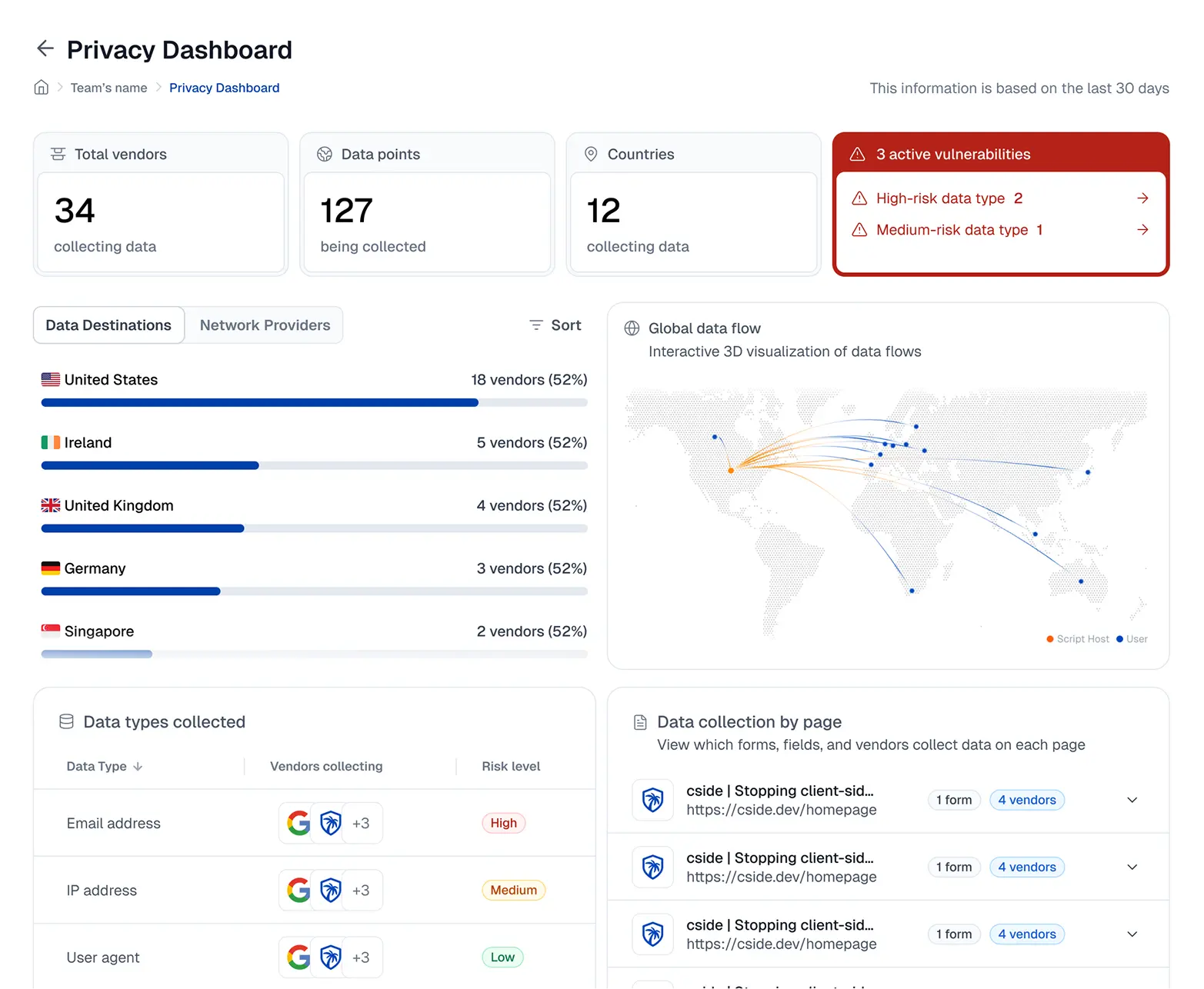
cside Privacy Watch monitort elk script van derden op je website op beveiligingsrisico's en verborgen privacyschendingen. De webbeveiligingsengineers van cside zijn gespecialiseerd in het monitoren van code-uitvoering in de browser, en zij bouwden Privacy Watch nadat ze ontdekten dat traditionele compliancesoftware gegevensexfiltratie-events niet detecteerde.
Als laag in de enterprise GRC-stack helpt het websitemonitoringplatform van cside je:
- Alle gegevensverzamelpunten op je website bij te houden (van eigen code en externe leveranciers)
- Te waarschuwen wanneer gegevensbestemmingen worden gewijzigd of nieuwe gegevens worden verzameld door leveranciers
- Kwaadaardige code die op je site is geïnjecteerd en gebruikersgegevens steelt, te onderscheppen (web skimming)
- Verkeerd geconfigureerde code van derden op je website te identificeren die privacynaleving schendt
- Live websitecode te vergelijken met leveranciersinventarissen in je GRC-tools om te garanderen dat beëindigde leveranciers geen code meer actief hebben op je website
Andere best practices voor grensoverschrijdende gegevensoverdracht
Controleer je leveranciersbeleid
Begin met het privacybeleid en de DPA van de leverancier. Let op:
- Waar gegevens worden verwerkt
- Welke subverwerkers betrokken zijn
- Welke waarborgen verwerkers hebben getroffen
Zorg ervoor dat je het opgegeven beleid verifieert met wat technische monitoring laat zien. Scripts van derden kunnen zich anders gedragen dan de opgegeven DPAs als er sprake is van verkeerde configuraties of kwaadaardige code-injecties. Je kunt voorbeelden van DPA-tracking bekijken op onze blog hoe je je website AVG-compliant maakt
Versleutel gegevens tijdens overdracht en opslag
Versleuteling is een belangrijke waarborg wanneer persoonsgegevens over grenzen bewegen en tussen tools zoals CRM's, datawarehouses en API's worden uitgewisseld. Het vermindert de blootstelling als gegevens worden onderschept of door onbevoegden worden benaderd.
Belangrijk om op te merken: versleuteling treedt doorgaans pas in werking nadat door de gebruiker ingediende gegevens (zoals een formulier) de perimeter van je netwerk-/API-beveiliging binnenkomen. Gegevens kunnen worden gestolen vóórdat ze deze perimeter bereiken, via web skimming.
Welke wetten documentatie van grensoverschrijdende gegevensoverdracht verplichten
| Privacykader | Vereiste / Artikel | Wat het vereist |
|---|---|---|
| AVG | Artikelen 44 tot en met 50 (Doorgifte aan derde landen) | Doorgifte buiten de EU/EER vereist goedgekeurde waarborgen |
| AVG | Artikel 30 (ROPAs) | Verwerkingsverantwoordelijken moeten ontvangers in derde landen en gebruikte waarborgen documenteren |
| AVG | Artikel 28 (DPAs) | DPAs moeten verwerkingslocaties en verdere doorgifte aan subverwerkers vastleggen |
| CCPA / CPRA | §1798.100 (Transparantie) | Bedrijven moeten categorieën van verzamelde en gedeelde persoonsgegevens openbaar maken |
| Amerikaans Ministerie van Justitie | Data Security Program | Beperkingen op grensoverschrijdende gegevensoverdracht naar China, Rusland, Iran, Noord-Korea, Cuba en Venezuela |



