
TL;DR: GDPR controls list for websites in 2026
- Website GDPR compliance in 2026 breaks into six control areas: lawful basis, consent management, data minimization, subject rights fulfillment, breach notification, and third-party processor accountability.
- The under-addressed area is data minimization on the client side. Every third-party script your page loads is a potential data processor for GDPR purposes, and most privacy programs do not inventory them.
- Continuous script inventory closes the gap between your privacy policy and what your site actually does. cside surfaces every third-party script and the PII it touches, with dated evidence for supervisory-authority review.
Short on time? See cside Privacy Watch. It covers everything below in one deployment.
To comply with GDPR you need to monitor and justify all "data processing" activities on your website. GDPR is not about cookie banners or users clicking "accept all". Since its inception the point of GDPR was to mandate companies to collect the least amount of personal data possible and to have privacy built into systems regardless of consent.
Any data processing that isn't strictly necessary needs a justification. You can't justify what you can't see:
- The dozens of processors that run on your site (chatbots, ad pixels, and analytics trackers)
- Unexpected "data trackers" (font libraries or performance scripts that handle IP addresses or geolocation)
- Malicious scripts that steal personal data without server security tools noticing (like the British Airways attack).
TL;DR
- GDPR Articles 6, 13 to 15, 25, 28, 30 and 32 all have website specific requirements that organizations must adhere to.
- A cookie banner or Consent Management Platform (CMP) helps capture consent, but does not guarantee GDPR compliance on its own.
- GDPR compliance drift happens when new scripts, plugins, or tags are added and collect data without privacy teams noticing.
- Malicious website scripts can leak personal data before encryption and server security tools kick in (companies are fined for this under Article 32).
- A fully compliant website incorporates a full GDPR compliance stack: Infrastructure & internal controls through tools like Vanta, CMPs like OneTrust, and client-side compliance with cside.
Reducing GDPR risk from embedded third-party code
Embedded third-party code is the highest-risk client-side exposure for GDPR on most websites. Every analytics pixel, chat widget, and ad script your site loads can access form inputs, device identifiers, and behavioral data before your backend security tools see it. To reduce that risk: audit embedded scripts continuously, enforce consent gating before they execute, maintain signed DPAs with every processor, and monitor for vendor code changes that silently expand data collection.
Why embedded scripts create outsized GDPR exposure
Third-party scripts are dynamic. A script that passed your initial vendor review can be updated by the vendor to collect additional personal data without notifying you. This is not theoretical: the British Airways breach that resulted in a €20M GDPR fine began with a modified third-party script on their payment page that silently exfiltrated card data.
Three distinct GDPR risks come from embedded code running on your site:
- Consent bypass: scripts that fire before the user consents, or outside their approved categories
- Data over-collection: scripts that access personal data beyond their declared purpose in your DPA
- Processor drift: vendor code updates that expand data processing scope without your knowledge
Website script monitoring for GDPR compliance
Website script monitoring gives compliance teams continuous visibility into which scripts load, what data they access, and whether that behavior changes after your last audit. Static privacy reviews and annual scans cannot catch a vendor update that ships at midnight and starts collecting new fields by morning.
Platforms like cside Privacy Watch observe third-party script execution in real browser sessions and alert teams to new scripts, changed behavior, or unauthorized data transfers as they happen, giving you audit-ready evidence for supervisory authority review.
GDPR requirements that apply to your website (client-side)
<tr>
<td>
<strong>Provide transparent disclosures to users</strong><br>
<span class="article-ref">(Articles 12-14)</span>
</td>
<td>
<ul>
<li>Privacy notice with clear data categories and purposes</li>
<li>Validation that disclosures match real website tracking behavior</li>
</ul>
</td>
</tr>
<tr>
<td>
<strong>Prevent data exposure with appropriate safeguards</strong><br>
<span class="article-ref">(Articles 30 & 32)</span>
</td>
<td>
<ul>
<li>Continuous website monitoring for unauthorized data collection</li>
<li>Detection of script injections and risky DOM changes that leak data</li>
</ul>
</td>
</tr>
<tr>
<td>
<strong>Document and oversee third-party processing</strong><br>
<span class="article-ref">(Articles 25, 28 & 30)</span>
</td>
<td>
<ul>
<li>ROPA showing which processors receive data and where it is sent</li>
<li>Organized records of custom or standardized DPAs</li>
<li>Documentation of cross-region data transfers</li>
</ul>
</td>
</tr>
</tbody>
</table>
How to comply with GDPR Article 6 - lawful basis for processing:
What the Article Requires: Personal data may only be processed if one of six lawful bases applies including consent, contractual necessity, or legitimate interest.
In Practice: You must show a valid legal reason (like explicit user consent) before collecting or using someone's personal data on your website.
To comply on your website:
- Identify all points where personal data is collected (e.g., forms, analytics, chat widgets, 3rd party scripts).
- Classify those processing activities under a lawful basis (consent, contract, or legitimate interest).
- Ensure non-essential scripts or cookies are inactive by default until consent is given.
- Keep records that link each data type to its lawful processing purpose.
How cside helps with GDPR lawful basis for processing
- Maps data processors on your website (third party scripts, first party scripts) to their data collection purpose and consent category.
- Detect scripts that are firing before consent or without a valid lawful basis.
- Continuous monitoring so consent and processing stay aligned as your website changes.
How to comply with GDPR Article 13, 14, 15 - transparency & data subject rights
What the Article Requires: Websites must disclose to data subjects (users) what personal data they collect, why they collect it, and who they share it with. Users must also have an easy way to request access, corrections, or the deletion of that data.
To comply on your website (Transparency Requirements):
- Inventory what personal data is collected, for what purpose, and which third parties receive it.
- Display this information in an easy to access privacy notice. Make sure that privacy notice is regularly updated and aligns with what actually happens on your website.
To comply on your website (Data Subject Rights)
- Define a process and response mechanism (typically within 30 days) to handle data subject access requests (DSARs).
- Most teams will use a DSAR management tool once they start receiving regular requests. DSAR tools will automate the honoring of consumer requests across different platforms.
How cside helps with GDPR transparency & data subject rights
- Notifies you when website scripts are added or when vendors make changes to code that affect how your site handles user data.
- Validate privacy disclosures against actual data processing behavior on your website.
- See what personal data 1st party, 3rd party, and 4th party scripts (sub processors) are interacting with on your website.
How to comply with GDPR Article 25: data protection by design and by default
What the Article Requires: Organizations must implement appropriate technical and organizational measures that ensure personal data is processed in accordance with GDPR principles, and that privacy is built into systems from the start, rather than added later.
In Practice: Demonstrate that privacy is built directly into your systems. This GDPR article references the term "data minimisation" as a core guideline to follow. Your website should collect the least amount of data possible. This means minimizing how much data your scripts collect and controlling when they execute.
To comply on your website:
- Configure scripts, cookies, and plugins so that data processing is disabled until the user gives explicit consent.
- Limit personal data collection to what's strictly necessary.
- Review new integrations or third party scripts (like marketing tools) for default tracking behavior before deployment.
- Keep an eye out for third party scripts that are over-collecting data.
How cside helps with GDPR data protection by design
- Detects hidden trackers that ignore consent rules or collect unnecessary personal data.
- Flags code changes to third-party scripts that expand data processing beyond the original scope
- Demonstrates "protection by design" with data minimization controls for third-party website code execution.
How to comply with GDPR Article 28: processors
What the article requires: Controllers must use only processors that provide guarantees of GDPR-compliant data protection measures. This agreement must be formalized in a written contract or Data Processing Agreement (DPA). Processors on your website include third-party or sub-processor scripts that handle personal data on your behalf. Common processors include analytics platforms, marketing tags, payment providers, or embedded widgets.
In Practice: Since third-party scripts count as "processors", are you expected to have dozens of individual DPA's with each processor?
Regulators recognize that many processor relationships are created through standardized online terms. For example:
- Google's Data Processing Terms apply automatically when you use Analytics or Ads.
- Meta provides a built-in Controller/Processor Addendum for advertisers.
- Cloudflare, AWS, etc. offer downloadable or accepted-by-use DPAs.
You don't need a custom-signed document for every vendor, but you must be able to show that:
- You reviewed and accepted the vendor's DPA or equivalent, and
- You know what personal data that vendor processes.
To comply on your website:
Start with a vendor inventory that lists every third party that processes personal data on your site. Organizing this info is simplified a privacy management platform.
Each record should include:
| GDPR Requirement Category | What a GDPR-Compliant Website Must Have |
|---|---|
|
Know what personal data your website collects and justify a lawful basis (Articles 5 & 6) |
|
| Example Vendor | |
|---|---|
| Vendor Name | |
| Vendor Category | |
| Processor / Controller | |
| Type of Personal Data Processed | |
| Data Transfer Locations | |
| Review or Renewal Date |
Related reading: our GDPR compliance tools comparison for 2026 · the most common GDPR compliance failures and how to prevent them
An automated method to detect third party processors is through a free website scan or continuous monitoring tool. Maintain a list of all vendors that process personal data collected through your site and add them to your DPA inventory.
How cside helps with GDPR processor accountability requirements:
- Monitor third-party scripts to ensure processors aren't collecting more data than your agreement allows.
- Discovers "processors" on your website by scanning live scripts and script behavior, keeping your DPA inventory accurate.
- Flags when new scripts are added or when existing vendors modify code in a way that changes how they process personal data, prompting teams for a DPA review.
- Maps data transfers across regions to support documentation.
How to comply with GDPR Article 30: records of processing activities
What the Article Requires: Controllers and processors must maintain a written record of all personal data processing activities. This record (often called a RoPA) must include what personal data is processed, why it's processed, who receives it, where it's stored or transferred, how it's protected, and how long it's kept.
In Practice: Article 30 is about showing regulators that you understand data flows within your organization. That includes knowing which scripts collect personal data, which vendors receive it, and whether any transfers occur outside the EU.
RoPA records typically include all organizational processing activities, not just what happens online. That means documenting how internal teams like HR, IT, and customer support use personal data.
Article 30 generally only applies to companies with 250+ employees. Although, even smaller companies are still required to comply with this article under certain circumstances.
To comply on your website:
- Who, What, Where: Keep a record of all scripts and third-party tools that handle personal data. Note what type of data they process and where that data is sent (especially if it leaves the EU).
- Retention: Document how long each category of data is kept and when it's deleted or anonymized.
- Security: Record what technical or organizational measures protect that data, such as encryption, access controls, or consent-based activation.
How cside helps with GDPR records of processing activities:
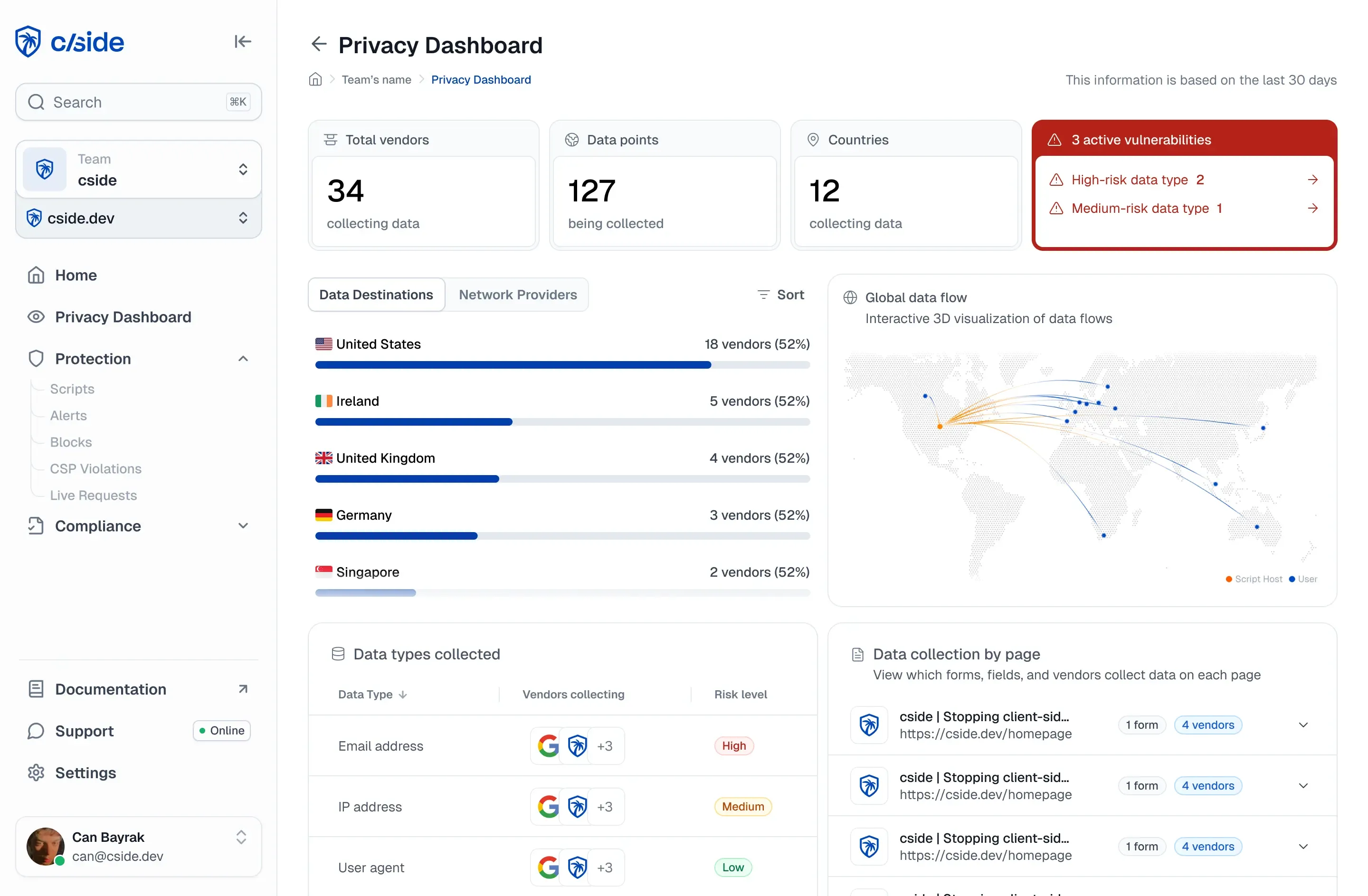
- Provides verified data to inform your RoPA, giving privacy teams live evidence of which vendors process data on your website.
- Generates 24/7 audit-ready reports of every script action and data transmission for regulatory review.
- Proves client-side security measures are in place to support ROPA documentation of data protection.
- Visual dashboard of data transfers across regions to support Article 30 ROPA documentation
ROPA Template
See this RoPA template from the ICO (Information Commissioner's Office) to get a starting point of how to document these activities.
How to comply with GDPR Article 32: security of processing
What the Article Requires:
Organizations must implement technical and organizational measures to ensure the confidentiality and availability of personal data. These include but are not limited to encryption, employee/contractor access control, regular testing, and processes to detect, respond to, and recover from security incidents.
In Practice:
You need to prove that your systems (throughout the entire data lifecycle) are designed to prevent unauthorized data exposure.
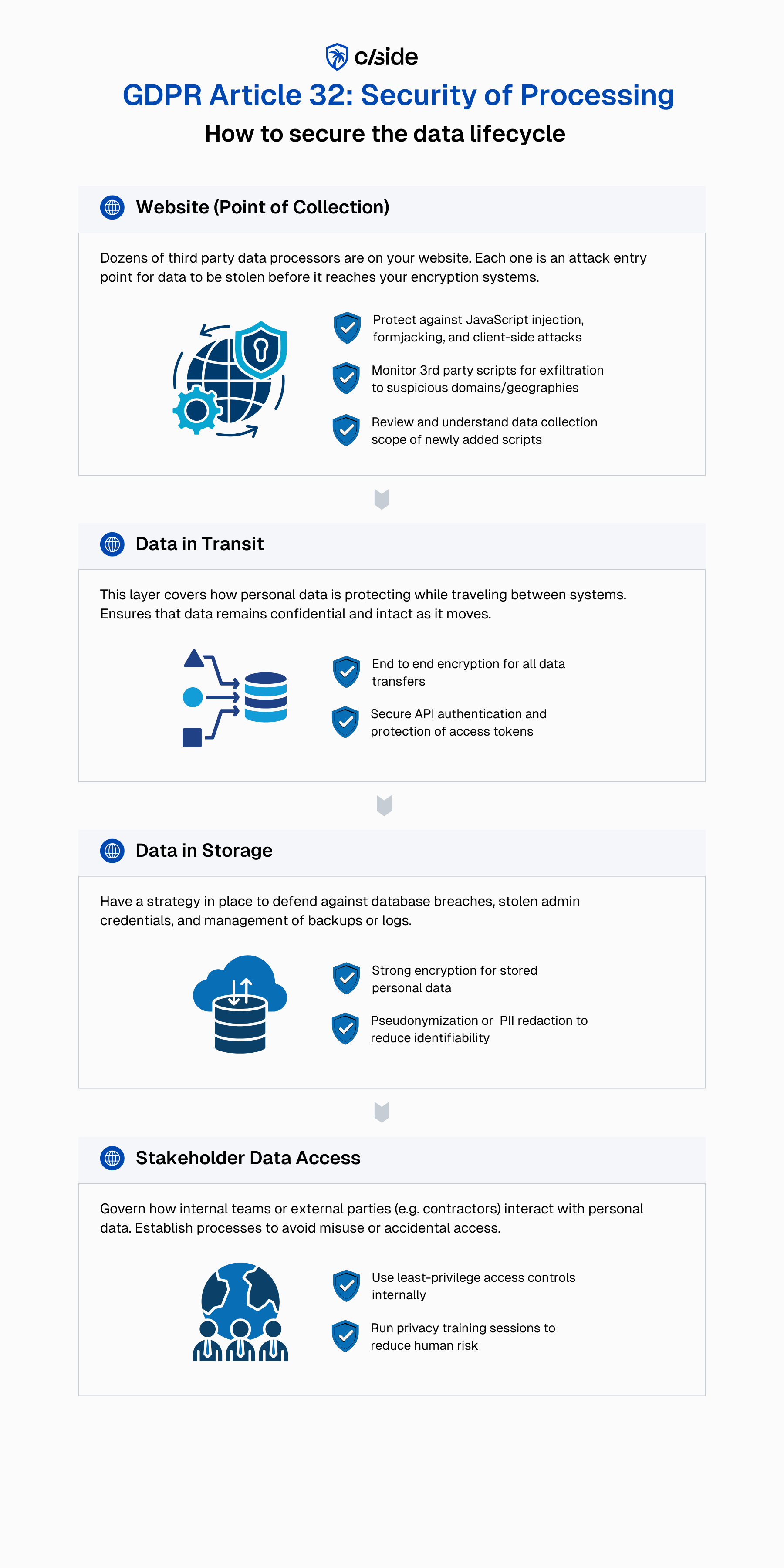
Securing your website (the point of collection):
- Ensure form fields, payment pages, and KYC flows (drivers licenses, passport scans) are protected against JavaScript injection or keylogging.
- Monitor third-party scripts for any signs of data exfiltration or unauthorized network requests. Especially those loading from newly added or unknown domains.
- Enforce basic control with CSP and SRI to allow approved scripts to execute. For larger websites, use a continuous monitoring tool that inspects JavaScript execution and DOM manipulations in real time.
- Maintain hashed versions of approved scripts so you can roll back to a safe version if tampering or suspicious network activity is detected.
Securing data in transit:
- Use end to end encryption to ensure data can't be read while traveling between systems.
- Secure your APIs and authentication. More websites are deploying LLM generated code that mishandles API keys and access tokens.
Securing data in storage:
- Reduce identifiability where possible with pseudonymization or PII redaction.
- Use strong encryption for all stored personal data.
Securing data access from internal stakeholders:
- Enforce least-privilege permissions for access to personal data.
- Conduct privacy security training to educate staff on phishing and credential hygiene.
As for responding to incidents:
- Detect: Integrate SIEM platforms for event correlation and real-time alerting. Deploy runtime monitoring tools for client-side systems to spot suspicious signals and alert your team before a breach occurs.
- Alert: Regularly test your alert mechanisms to ensure integrations are working as expected. Run occasional client-side penetration tests to alert mechanisms can be suppressed
Under Article 33 of the GDPR, controllers must notify authorities within 72 hours of becoming aware of a breach.
How cside helps with GDPR security of processing
- Protects sensitive forms by detecting JavaScript injections, keylogging attempts, or unauthorized data capture
- Monitors third-party scripts for signs for suspicious activity, automatically flagging newly added, unapproved domains, or modified vendor code that pose GDPR risks
- Oversees JavaScript execution and DOM changes that could leak personal data
- Generates detailed logs that prove client-side security measures are in place for Article 32 obligations around "unauthorized exposure" of personal data.
- Defends against client-side attacks that suppress web security alert
With 380,000+ client-side attacks in 2025, third-party code has become one of the largest attack surfaces for personal data. One of the most significant GDPR breaches (British Airways incident, €20M fine) was executed through a script injection on their website.
When users fill out forms or interact with your chat widgets, their personal data can be stolen before it reaches your encryption tools or secured backend systems. That's why client-side security is a core part of modern GDPR compliance.
What tools should I use for GDPR compliance?
GDPR compliance is not handled by a single tool. It requires multiple layers of controls, each designed to address a different part of the data lifecycle. Many of these tools are built to support multiple privacy and security frameworks (e.g., GDPR, SOC 2, ISO 27001, PCI DSS), so most organizations already have pieces of this stack in place.
<compare-table data='{ "head_class": "!font-normal !bg-white", "cols": { "layer": { "title": "Compliance Layer" }, "covers": { "title": "What This Layer Covers" }, "tools": { "title": "Example Tools" }, "frameworks": { "title": "Relevant Frameworks" } }, "rows": [ { "layer": "Layer 1: Infrastructure Security & Compliance", "covers": "Secures back-end systems, cloud infrastructure, access controls, and internal processes", "tools": "Vanta, Drata, Sprinto", "frameworks": "SOC 2, ISO 27001, internal controls" }, { "layer": "Layer 2: Consent Management", "covers": "Captures user consent, manages preferences, and supports DSAR workflows and transparency requirements", "tools": "OneTrust, Transcend, Ketch", "frameworks": "GDPR consent, DSARs, CPRA, other privacy laws" }, { "layer": "Layer 3: Website Client-Side Compliance", "covers": "Protects against website data breaches and monitors how scripts execute, what data they collect, and whether third-party code behaves as intended.", "tools": "cside Privacy Watch", "frameworks": "GDPR Art. 28, 30, 32, PCI DSS 6.4.3 / 11.6.1, CCPA, U.S. State Laws" } ] }'
Is a cookie banner enough for GDPR compliance? (no)
Limitations of cookie banners
A cookie banner or CMP helps capture and manage user preferences but it does not guarantee those preferences are respected nor that personal data is fully protected. To be clear, CMPs are an important tool that should be present in a GDPR compliance stack. But a CMP alone does not cover all layers of GDPR website compliance.
Limitations of cookie banners:
- Code misconfigurations can result in cookie banner preferences being ignored (such as incorrect integrations with Google Tag Manager)
- Data collection can still fire due to hard-coded triggers or scripts deployed outside the CMP's control
- CMPs do not protect against client-side attacks (JavaScript injection, formjacking) that steal personal data, which companies can be fined for under Article 32
- Third party scripts frequently update code. In some cases, data collection is expanded beyond what users "accepted".
How cside Privacy Watch eliminates website GDPR risks
1. Continuous visibility into website data processing
Privacy teams can't justify or document processing they can't see. cside watches how first- and third-party scripts behave in the browser across pages.
- Discovers all scripts, trackers, and embedded third parties running on your site
- Shows what personal data is accessed, transmitted, or exposed at runtime
- Alerts teams when new scripts or vendors are introduced that may require review, DPA changes, or ROPA changes
2. Enforcement of consent & lawful processing
Consent only matters if it's enforced at runtime. cside verifies that scripts respect consent choices and lawful bases as your website evolves.
- Detects scripts firing before consent or outside approved categories
- Flags over-collection from scripts, plugins, or third party code
- Validates that processing operates within declared consent and lawful purposes
3. Third-party processor oversight & documentation
Third-party scripts act as processors under GDPR. Scripts are meant to be dynamic so their behavior can change without notice. cside helps teams maintain audit-ready oversight.
- Monitors vendor code changes that expand data collection
- Identifies sub-processors (4th party scripts) and unexpected data transfers
- Supports RoPA and DPA documentation with verified, live data
- Visualizes data transfers across regions to speed up documentation.
4. Client-side security & Article 32 protection
GDPR security obligations also apply at the point of data collection - the browser. cside protects against threats that server security, website scanners, and infrastructure tools don't see.
- Detects JavaScript injection, form-jacking, and unauthorized data capture
- Monitors DOM changes and suspicious network requests
Generates evidence that safeguards are in place to prevent unauthorized exposure
The GDPR compliance checklist for 2026
Use this GDPR compliance checklist as a working document for any website operating in the EU or serving EU visitors.
- Publish a privacy notice that names your data controller, lawful basis for each processing activity, retention periods, and data subject rights under Articles 15-22.
- Deploy a consent management platform that supports opt-in consent (not implied), with an equally easy "reject all" option per EDPB 2024 guidance.
- Maintain a record of processing activities (Article 30), required if you have 250+ employees or process personal data at scale.
- Sign Data Processing Agreements with every processor (analytics, marketing, hosting, CDN, tag manager).
- Log and honour data subject requests within one calendar month.
- Notify the supervisory authority within 72 hours of a personal data breach with significant risk.
- Monitor third-party scripts on your site, cside's Privacy Watch detects when a script starts collecting personal data without consent, catching violations that a consent banner alone cannot enforce.