

TL;DR: detect Playwright inside the browser session, not at the network edge
- No network-layer tell: Every WAF vendor promises to catch automation, but Playwright drives real Chromium, Firefox, and WebKit instances with valid TLS, current user-agents, and clean HTTP/2 headers. There is no network-layer tell, and Forrester renamed the analyst category to Bot and Agent Trust Management Software in Q4 2025 to reflect exactly that shift.
- The in-browser signature: The in-browser signature holds up:
navigator.webdriverset totrue,window.__playwrightcontext markers, statistically uniform interaction timing, absent hover events before clicks, straight-line pointer trajectories, scroll depth landing exactly on the target element, and zero input correction. cside reads these signals from inside the session. - Per-page policy: If Playwright drives your internal test suite and synthetic monitoring, allow it on known infrastructure and apply per-page policy on checkout, account creation, and pricing. If you are seeing Playwright signatures outside that allowlist, block on browser-layer signals rather than trying to reverse-engineer stealth patches.
Short on time? See cside's AI-agent detection. It covers everything below in one deployment.
Playwright is a browser automation framework built and maintained by Microsoft. It controls real Chromium, Firefox, and WebKit browser instances, executes JavaScript fully, and produces sessions that look indistinguishable from genuine users at the network layer. That makes it the preferred tool for a growing category of AI agents, scrapers, and fraud operations that are specifically designed to evade detection.
Blocking Playwright is not like blocking a declared crawler. There is no user-agent string to deny, no published IP range to restrict, and no robots.txt directive it will respect. Detection requires reading what happens inside the browser session itself. Forrester noted the shift in Q4 2025, formally renaming the analyst category to Bot and Agent Trust Management Software: the fight has moved from bots at the network edge to agents operating inside real browser sessions. For the broader pattern across automated agents, see our guide to blocking AI agents on your website.
What Is Playwright?
Quick answer: Playwright is an open-source browser automation library maintained by Microsoft. It launches and controls real browser instances (Chromium, Firefox, WebKit), executes JavaScript, handles authentication flows, and interacts with web application interfaces. It is widely used for legitimate testing, but also powers a significant share of AI agents, scrapers, and automated fraud operations targeting live websites.
Unlike earlier automation tools such as Selenium or PhantomJS, Playwright was designed for modern web applications. It handles dynamic content, single-page applications, shadow DOM, iframes, and complex authentication flows without the rendering gaps that older tools exhibited. When used by a malicious or undeclared agent, those capabilities make it particularly difficult to distinguish from a real user at the infrastructure level.
Playwright sessions leave a clean network footprint: a standard TLS handshake, a current browser user-agent, valid HTTP/2 headers, and no obvious automation fingerprints in the request stream. The session looks legitimate because it is running a legitimate browser. Operators running evasion-focused deployments also layer stealth libraries such as playwright-stealth or rebrowser-patches on top, which suppress the default JavaScript environment signals that simpler detection scripts rely on.
Playwright vs Selenium vs Puppeteer: Why the Comparison Matters for Detection
Quick answer: Selenium, Puppeteer, and Playwright all drive real browsers, but they differ in architecture in ways that shape what each one leaves behind. Selenium is the easiest to detect by default. Puppeteer and Playwright are harder, and Playwright is currently the most common in AI agent and scraping deployments because it covers Chromium, Firefox, and WebKit from a single API.
Selenium is the oldest of the three. It communicates with browsers through the WebDriver protocol, which sets navigator.webdriver to true by default and leaves a consistent Chrome DevTools Protocol footprint. Most detection stacks catch basic Selenium sessions reliably. Puppeteer is Google's Chromium-only equivalent of Playwright: it drives Chromium via the Chrome DevTools Protocol and shares many of the same environment signals. Playwright, built by Microsoft, is the most capable of the three. It controls Chromium, Firefox, and WebKit from a single API, and handles modern web application patterns better than either predecessor. Playwright does not ship with stealth features by default; operators bolt on third-party community packages such as playwright-stealth or rebrowser-patches (installed separately) to suppress the obvious JavaScript environment tells.
For detection purposes, the framework matters less than what it leaves behind in the browser session. All three produce the same class of signals: interaction timing that is statistically uniform, navigation paths that follow task sequences rather than exploratory patterns, and JavaScript environment properties that differ from genuine user sessions. Browser-layer detection reads those signals regardless of which framework generated them.
Why Standard Blocking Methods Fail Against Playwright
Quick answer: Playwright uses real browsers, so IP blocks, user-agent filtering, and robots.txt have no effect. A Playwright agent arrives with a valid IP, a current Chrome or Firefox user-agent, and correct TLS signatures. Network-layer tools cannot distinguish it from a human session without browser-layer signals.
Traditional bot blocking operates on the assumption that automated traffic looks different at the network edge. Playwright removes that assumption. Here is why each standard method fails:
robots.txt: Playwright agents do not check robots.txt. The framework provides no mechanism for honouring it, and any agent using it for scraping or fraud has no incentive to comply.
User-agent filtering: Playwright's default user-agent strings are identical to current Chrome, Firefox, or WebKit releases. Blocking common automation user-agents (like HeadlessChrome) has no effect because Playwright launches headed browser instances that report the standard production user-agent.
IP blocking: Playwright agents typically run on cloud infrastructure, residential proxies, or distributed networks with rotating IP addresses. IP-level blocking catches only unsophisticated deployments. Well-resourced operations rotate through IP pools faster than blocklists can be updated.
WAF and CDN rules: WAF and CDN rules that look for automation signals in headers or request patterns will see a clean Playwright session as legitimate traffic. The HTTP layer is indistinguishable.
How Playwright Is Detected at the Browser Layer
Quick answer: Playwright leaves signals inside the browser session that are invisible at the network layer but readable from within the page. These include timing anomalies in interaction sequences, absent or unrealistic micro-movement patterns, navigation path uniformity, and specific JavaScript environment properties that differ from genuine user sessions.
Browser-layer detection reads the signals that Playwright automation cannot easily suppress without breaking its own functionality:
Interaction timing: Human users produce irregular timing between actions, with natural variance in click timing, keystroke intervals, and scroll velocity. Playwright automation produces statistically uniform timing or near-identical sequences across sessions. Even with randomisation added by the operator, the distribution differs from genuine human variance.
Navigation and engagement patterns: Human users exhibit non-linear navigation, revisit previous pages, interact with secondary elements, hover before clicking, and leave micro-corrections in input fields. Playwright sessions follow programmatic sequences with no exploratory behaviour, no pointer hesitation, and no abandoned form inputs.
JavaScript environment properties: Playwright exposes specific runtime properties that differ from genuine browser sessions. The most diagnostic include navigator.webdriver (set to true in unpatched Playwright), window.__playwright and window.__pw_manual context markers, and anomalies in the WebGL renderer string and timing API resolution. Stealth libraries attempt to overwrite these values, but doing so introduces secondary inconsistencies that remain detectable.
CDP and WebSocket traces: When Playwright uses Chrome DevTools Protocol to control the browser, specific WebSocket patterns and message timings can be observed from within the page context. These are not visible at the HTTP layer but are readable by in-page detection scripts. For a wider walkthrough of these techniques, see our guide to detecting AI agent traffic on your website.
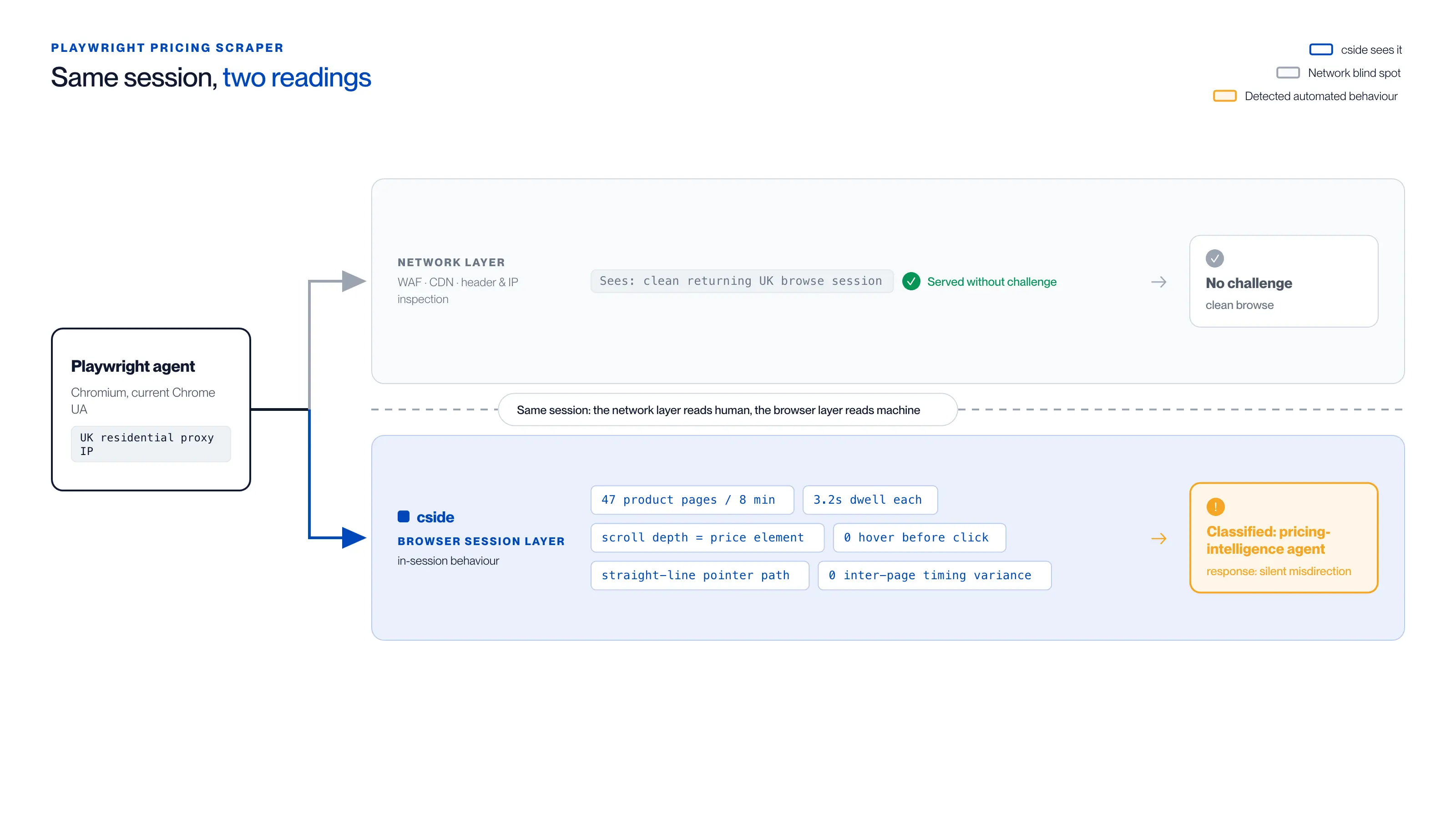
| What the session does | Network layer (WAF/CDN) | Browser layer (cside) |
|---|---|---|
| Identity | Returning UK user, residential proxy IP | Playwright Chromium, current Chrome UA |
| Activity | Standard browse session | 47 product pages in 8 minutes, 3.2s dwell each |
| Movement | Nothing unusual logged | 0 hover events, straight-line pointer path, scroll depth exactly at price element |
| Timing | Low-rate, clean traffic | 0 variance in inter-page timing |
| Outcome | Served without challenge | Classified as pricing-intelligence agent → silent misdirection |
Playwright Stealth and Why It Does Not Eliminate Detection
Quick answer: Playwright stealth libraries (playwright-stealth, rebrowser-patches) suppress the obvious JavaScript environment tells that unpatched Playwright exposes. Each patch introduces a secondary inconsistency, and none of them can suppress the behavioural signals a session produces, which is where browser-layer detection reads.
Playwright stealth libraries, primarily playwright-stealth and rebrowser-patches, patch the JavaScript environment to remove the most obvious automation tells. They overwrite navigator.webdriver to return undefined, inject a realistic window.chrome object, normalise navigator.plugins, and fix the permissions API mismatch that headless contexts produce by default. Installs of these libraries have climbed steadily as network-layer detection becomes less effective and operators shift effort into suppressing the environment signals that simpler scripts rely on.
Stealth patches create a different problem, though. Each patch introduces its own secondary inconsistency. A browser session where navigator.webdriver returns undefined but window.chrome.runtime is a stub object, where WebGL renderer strings suggest a discrete GPU that does not match the reported platform, and where every click lands within two pixels of the target element with zero prior hover movement is not a clean session, it is a patched session. The patched flags become confirming evidence rather than primary signals.
The harder signal for stealth tooling to suppress is behavioural. Playwright sessions, with or without stealth libraries, produce interaction timing distributions, scroll patterns, and navigation sequences that differ statistically from genuine human sessions. Those signals do not live in a JavaScript property that can be overwritten. They emerge from how automation frameworks execute instructions, and suppressing them requires slowing and randomising execution, which reduces throughput without necessarily making the automation impractical. Low-volume or distributed attacks can still run at a slowed pace, but doing so removes most of the scale advantage that automation is deployed for in the first place.
What This Looks Like in Practice
A retail competitor deploys a Playwright agent to monitor pricing on your product catalogue. The agent launches a Chromium instance with a current Chrome user-agent and a residential proxy IP from a UK address. Your WAF logs it as a standard browse session from a returning UK user. Your CDN serves it without a challenge.
Inside the session, cside observes: 47 product pages visited in 8 minutes, each with a 3.2-second dwell time and a scroll depth exactly reaching the price element. No hover events before any click. No cursor movement outside the interaction path. Zero variance in the inter-page timing. The pointer trajectory on each product title follows an identical straight line.
The network layer saw a clean session. The browser layer saw a machine. cside classifies the session as a pricing-intelligence agent and triggers a policy response, while the WAF log still shows nothing unusual.
A second pattern cside sees frequently involves checkout fraud. A Playwright agent iterates through card number ranges on a low-friction checkout page, submitting one order attempt every 4 to 6 seconds across hundreds of sessions. Each session uses a different residential IP, a fresh browser context, and a realistic navigator.userAgent string. The WAF sees distributed, low-rate traffic from clean IPs. The browser layer sees zero real pointer movement, no form field hesitation, and navigator.webdriver returning true in unpatched instances. Intent classification at the browser layer stops the enumeration before meaningful card data is validated.
Playwright MCP Server: Agentic Sessions Without a Human Script
Quick answer: Microsoft's
@playwright/mcplets MCP-compatible assistants control Playwright. An AI-directed session can have a different timing profile from a fixed script, so detection needs more than an automation flag.
The Playwright MCP documentation also describes an extension that connects to existing browser tabs. Browser configuration and connection mode affect which runtime signals a site can observe.
Model inference can introduce pauses and retries between actions. Those delays vary with the model, task, and tools; there is no universal timing threshold that identifies an MCP-driven visitor.
cside combines browser and behavioral signals to assess automated sessions. A property such as navigator.webdriver can be useful when exposed, but neither its presence nor absence identifies every Playwright configuration. Test detection against the browser versions and connection modes relevant to your traffic.
Patterns to investigate together:
- Timing and retries: repeated action sequences, pauses, and failed interactions across the session
- Goal-directed navigation: repeated paths to a target with limited exploration
- Interaction detail: cursor movement, field edits, and navigation history, allowing for autofill and assistive technology
Use these as inputs to a risk decision. They do not prove that a visitor is automated or that automation is malicious.
Blocking and Policy Options for Playwright Agents
Quick answer: Once a Playwright session is detected at the browser layer, policy responses can include hard block, silent misdirection (serving altered content to the agent while allowing genuine users through), rate limiting, or allow with monitoring. The right response depends on whether the agent's intent is commercial, malicious, or legitimately automated.
Hard blocking (returning a 403 or redirect) is appropriate for agents showing malicious intent signals, such as credential stuffing, checkout fraud, or high-volume data extraction. Silent misdirection is often more effective for pricing intelligence operations, as it degrades the quality of data the competitor receives without alerting them that detection has occurred.
Not all Playwright sessions are hostile. Legitimate testing pipelines, accessibility audits, and internal automation tools also use Playwright. An effective policy separates intent from tooling: the question is not "is this Playwright?" but "what is this session trying to do, and is it authorised to do it?"
Per-page policy rules allow different responses on different sections of the site. A Playwright agent on the pricing page presents a different risk profile than one on the blog. Blocking uniformly across the site risks disrupting legitimate automated workflows. The same intent-led logic applies to agentic browsers such as OpenAI Operator that drive real browser sessions.
Should You Try to Block All Playwright Traffic?
Quick answer: No. Playwright is also used by legitimate testing tools, monitoring services, and internal automation. The correct approach is intent classification, not tool blocking. Detect what the agent is doing, not what tool it is using, and apply policy based on the session's behaviour and the risk it presents to that specific page or function.
Organisations that attempt to block all Playwright traffic typically find two outcomes: they disrupt their own CI/CD pipelines and monitoring tools, and they push adversarial agents to switch to equivalent frameworks (Puppeteer, Selenium, custom browser automation) that present identical detection challenges.
The more durable approach is browser-layer intent classification. A Playwright session completing a legitimate synthetic monitoring check, a Playwright session scraping pricing data, and a Playwright session attempting card testing on a checkout form all use the same tooling. The session behaviour distinguishes them. In cside's controlled testing, traditional bot detection tools failed to classify malicious AI agent sessions correctly in 81 out of 100 test scenarios, a gap that reflects architecture rather than configuration. The same browser-layer approach extends to blocking AI content scrapers that arrive without a declared user-agent.



