
TL;DR: block PerplexityBot after the 2024 publisher compliance controversy
- The 2024 compliance problem: The default assumption is that a
Disallow: PerplexityBotline ends the conversation. In 2024, Wired, The Atlantic, and other publishers reported that Perplexity kept surfacing detailed excerpts from robots.txt-disallowed content, and Perplexity's explanations were inconsistent. - IP-level enforcement: PerplexityBot uses
PerplexityBot/1.0 (+https://docs.perplexity.ai/docs/perplexitybot)and Perplexity publishes IP ranges in its crawler documentation; a robots.txt block plus IP-level denial at the firewall gives enforcement that does not rely on the crawler self-reporting, and terms-of-service language adds a legal layer. - The decision: If your content is paywalled news or original research and you saw excerpts in Perplexity answers despite a robots.txt block, escalate to IP blocking and TOS this quarter. If your content is marketing pages and you want Perplexity citations, leave PerplexityBot allowed and revisit if the compliance picture shifts.
Short on time? See cside's AI-agent detection. It covers everything below in one deployment.
PerplexityBot is the declared web crawler that powers Perplexity's AI search engine. When a user queries Perplexity, the search results draw from content PerplexityBot has indexed. In 2024, multiple publishers reported that Perplexity was reproducing copyrighted content from their sites in search results despite robots.txt blocks, making PerplexityBot one of the more controversial AI crawlers to block.
This guide covers PerplexityBot specifically. If you are trying to control Perplexity's shopping agent, see our companion post on how to block Perplexity Shopper, because it requires a different approach entirely. For the broader pattern across declared crawlers, see our guide to blocking AI agent content-scraping bots.
What Is PerplexityBot?
Quick answer: PerplexityBot is Perplexity's AI search crawler. It indexes web content to power Perplexity's AI-generated search results. It identifies itself with a declared user-agent string and is documented at docs.perplexity.ai. In 2024, it faced significant criticism from publishers for apparent
robots.txtnon-compliance and content reproduction without sufficient attribution.
PerplexityBot's user-agent: PerplexityBot/1.0 (+https://docs.perplexity.ai/docs/perplexitybot)
The 2024 controversy is relevant context for your blocking decision. Multiple major publishers, including media outlets and news organisations, reported that Perplexity was surfacing detailed reproductions of their paywalled or robots.txt-restricted content in AI search answers. Perplexity disputed some of these characterisations, but the episode established that PerplexityBot's compliance is more actively contested than GPTBot's or ClaudeBot's.
The 2024 Compliance Controversy
Quick answer: In 2024, Wired, The Atlantic, and other publishers reported that Perplexity was reproducing content from their sites in AI search results despite having
Disallow: PerplexityBotin theirrobots.txt. Perplexity's explanations at the time were inconsistent, leading several publishers to take additional technical and legal steps.
The concern went deeper than crawling. Summarisation and reproduction persisted even when PerplexityBot honoured robots.txt for its direct crawl, because Perplexity could access and summarise the same content through other means: cached copies, third-party data sources, or live browsing infrastructure. The net result from publishers' perspective was that their content appeared in Perplexity answers regardless of their robots.txt settings.
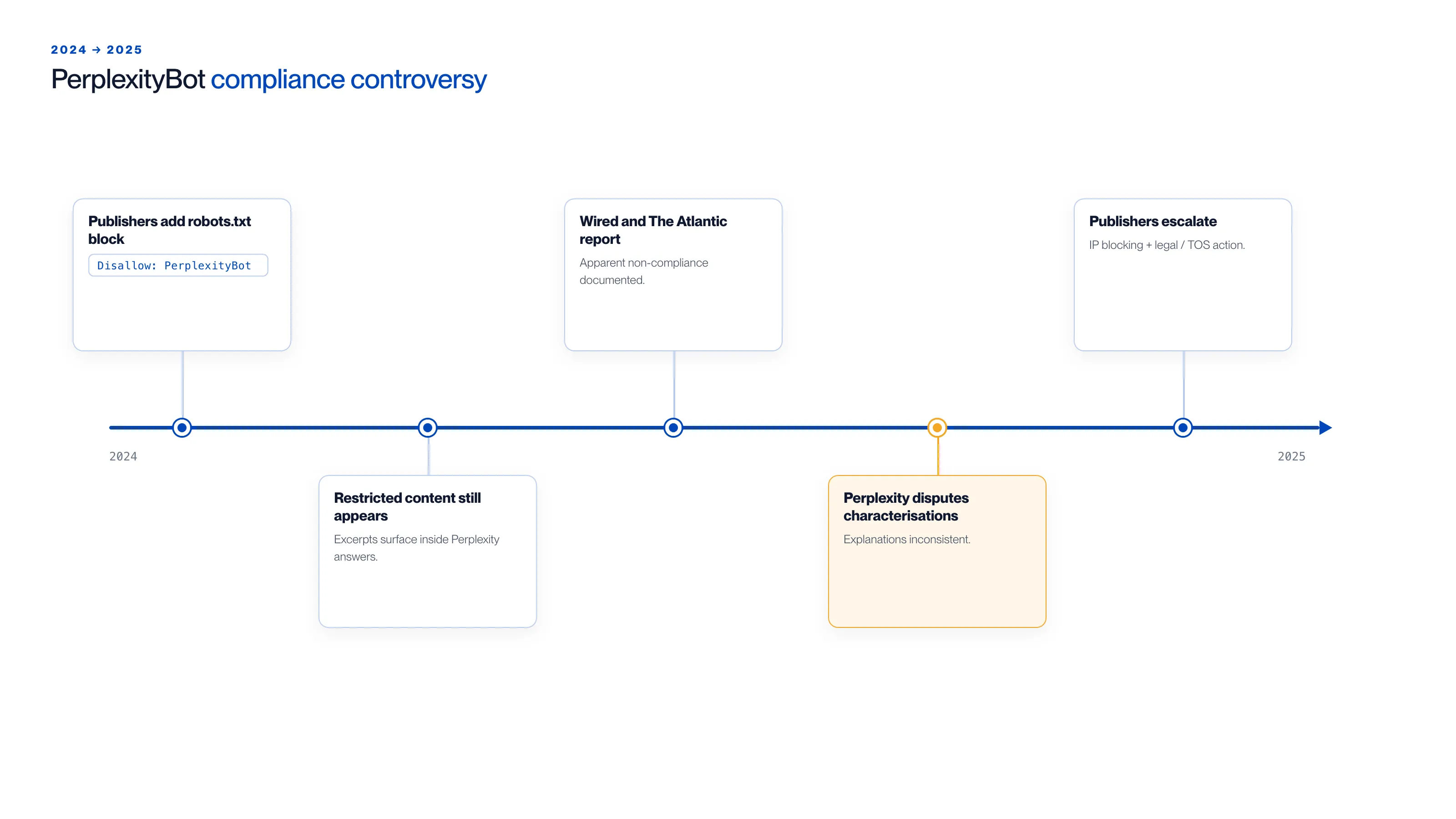
The controversy unfolded in roughly this order across 2024-2025:
- Publishers added
Disallow: PerplexityBotto theirrobots.txt. - Restricted content still appeared, surfacing as excerpts inside Perplexity's AI answers.
- Wired and The Atlantic reported the apparent non-compliance.
- Perplexity disputed the characterisations; its explanations were inconsistent.
- Several publishers escalated to IP blocking plus legal or terms-of-service action.
robots.txt blocking still has value for PerplexityBot, but its reach is limited against a search product with multiple content acquisition channels. IP-level blocking and active monitoring provide more reliable enforcement.
How to Block PerplexityBot with robots.txt
Quick answer: Add
PerplexityBotto yourrobots.txt. Given the 2024 compliance controversy, also implement IP-level blocking and consider adding legal language to your terms of service explicitly restricting AI training data collection and AI search summarisation.
To block PerplexityBot from your entire site:
User-agent: PerplexityBot
Disallow: /
For path-level control:
User-agent: PerplexityBot
Disallow: /premium/
Disallow: /members/
Disallow: /api/
Allow: /public/
Given the 2024 controversy, treat robots.txt as a signal of intent rather than a hard technical control for PerplexityBot. The same declared-crawler approach is more dependable for crawlers with cleaner compliance histories, such as CCBot.
IP-Level Blocking
Quick answer: Perplexity publishes PerplexityBot's IP ranges in its documentation. Denying these ranges at the firewall or CDN level provides enforcement independent of whether the crawler reads
robots.txt. For publishers or content-heavy sites, IP blocking is the more reliable approach given the compliance history.
Locate Perplexity's current IP ranges from their official documentation at docs.perplexity.ai. Add them to your firewall, CDN edge configuration, or reverse proxy deny rules. Review this list quarterly, as crawl infrastructure IP ranges expand as crawl volume grows.
PerplexityBot vs. Perplexity Shopper: A Critical Distinction
Quick answer: PerplexityBot (the indexing crawler) and Perplexity Shopper (the transacting agent) are separate systems. Blocking PerplexityBot does not affect Perplexity Shopper. Shopper uses a real browser session with a standard Chrome user-agent. It requires browser-layer detection, not
robots.txtblocking.
| System | Purpose | User-agent | Detection approach |
|---|---|---|---|
| PerplexityBot | Crawls and indexes content | PerplexityBot/1.0 (declared) | robots.txt + IP blocking |
| Perplexity Shopper | Completes purchases for users | Standard Chrome (undeclared) | Browser-layer behavioural signals |
Engineers who add PerplexityBot to robots.txt and consider the Perplexity problem solved have addressed one of the two systems. Perplexity Shopper is invisible to everything in the blocklist approach. In cside's controlled testing, traditional tools missed AI agents in 81 out of 100 controlled test scenarios, and Shopper is exactly the kind of session those tools miss.
What that looks like in practice: a Perplexity Shopper session tasked with buying a specific product opens a real Chrome session, navigates to a retailer's category page, filters by the requested specification, selects a product, and proceeds to checkout. Every network-layer signal is clean: a residential IP, a standard TLS handshake, and a Chrome user-agent string indistinguishable from a human shopper. The behavioural tell is in the browser layer. The agent moves through product filtering with no cursor variance, selects the first qualifying result without pausing to compare alternatives, and enters address data at a uniform keystroke interval with no correction events. cside's AI agent detection instrumentation captures those interaction-layer anomalies before any checkout event fires, giving operators visibility the network layer never provides.
What PerplexityBot Blocking Actually Achieves
Quick answer: A PerplexityBot block prevents the declared crawler from directly indexing your content in future crawl runs. It does not prevent Perplexity from referencing previously indexed content, accessing your content through third-party sources, or surfacing summarisations in AI search results through channels other than direct crawling.
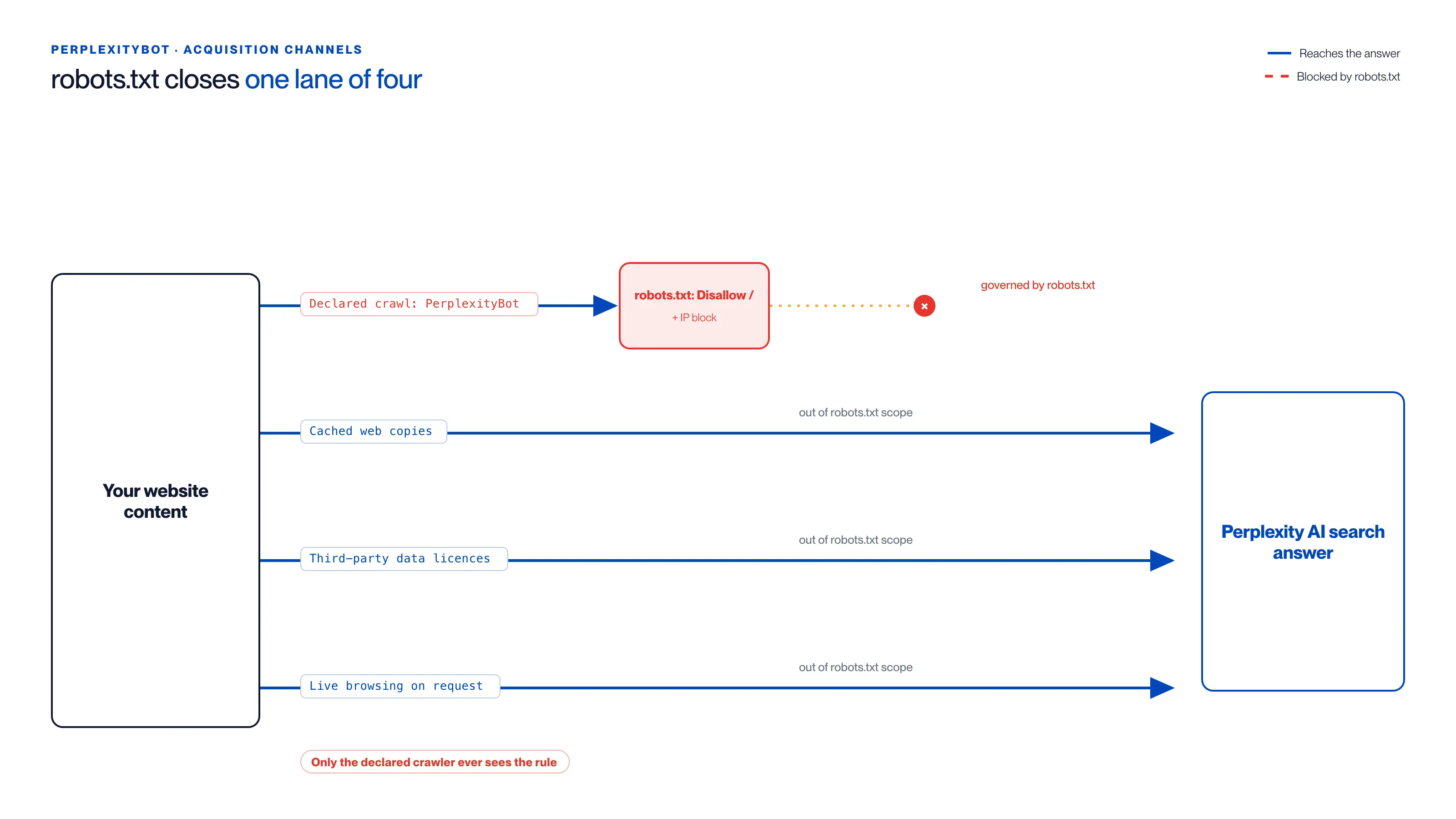
robots.txt and IP blocking govern only the declared crawl. The other three channels reach a Perplexity answer regardless:
| Acquisition channel | What it is | Stopped by robots.txt + IP block? |
|---|---|---|
Declared crawl (PerplexityBot) | Perplexity's named crawler making direct requests | Yes (the only path it governs) |
| Cached web copies | Content already indexed in Perplexity's knowledge base | No (out of robots.txt scope) |
| Third-party data licences | Syndicated, aggregated, and licensed datasets | No (out of robots.txt scope) |
| Live browsing on request | On-demand fetch when a user query triggers a lookup | No (out of robots.txt scope) |
This is the limitation the 2024 controversy exposed. Robots.txt blocks a specific crawler from making new requests. It does not scrub existing indexed content from a search product's knowledge base, and it does not prevent content acquisition through alternative channels that the crawler itself does not directly use.
For organisations with strict requirements (paywalled content, proprietary research, licensed material), the combination of robots.txt, IP blocking, legal TOS language, and technical content protection such as authentication walls and dynamic rendering provides a more complete protection posture than any single approach.