Two terms keep showing up in bot detection and fraud prevention conversations: "stealth browsers" and "anti-detect browsers." They get used interchangeably, but they solve different problems, attract different users, and require different detection strategies.
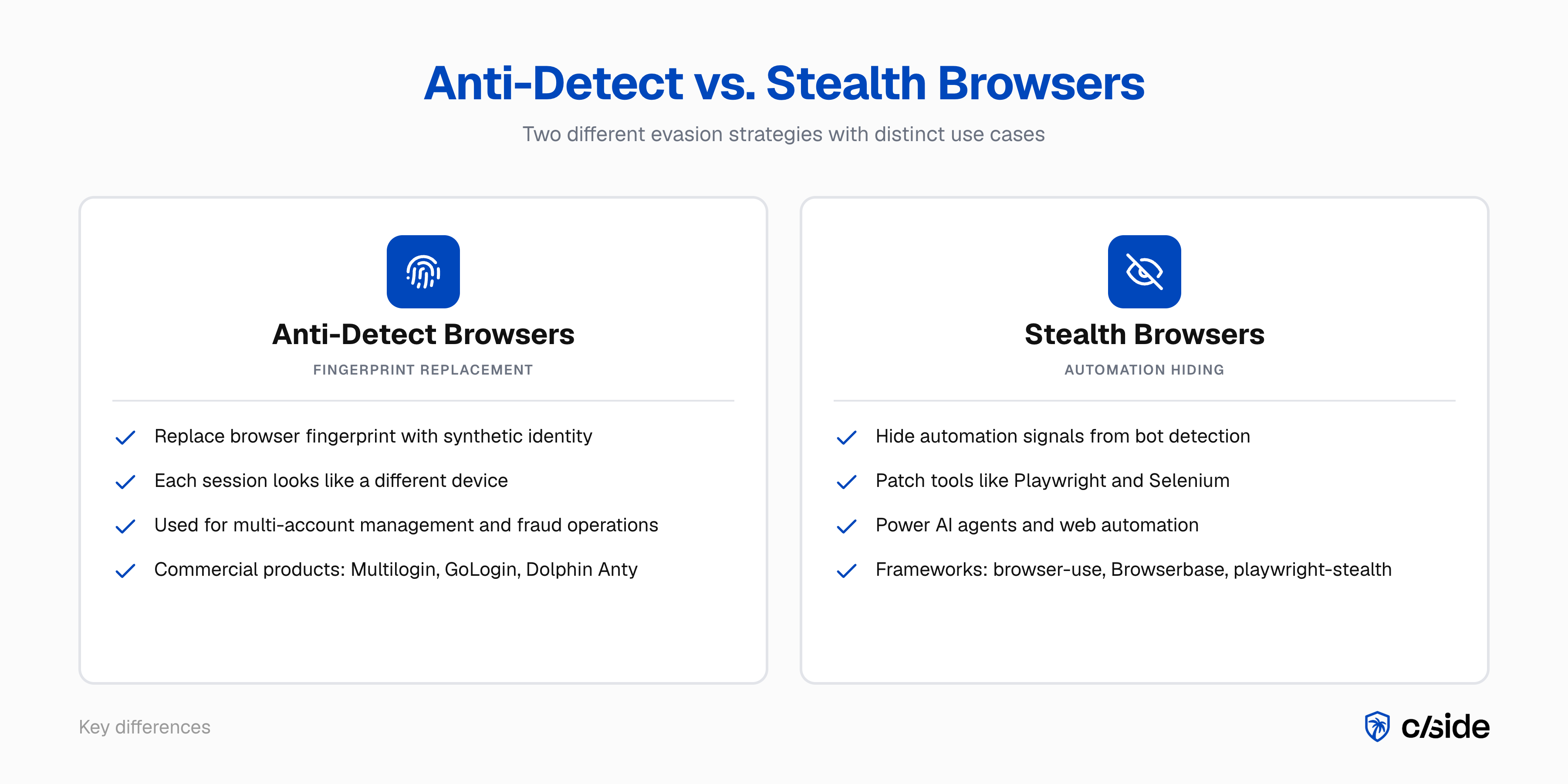
Anti-detect browsers replace your browser's fingerprint with a synthetic one so you look like a different device on every session. Stealth browsers patch automation tools so bots can pass as real users.
Tools like cside have risen to solve this problem. Our internal tests found that traditional detection tools missed AI agents in 81 out of 100 controlled attempts. For companies that want to stop AI agent fraud (credential stuffing, scraping) or account-related fraud (like new account fraud, account sharing) the ability to catch stealth browsers is crucial. This is possible through advanced fingerprinting and behavioral signal detection.
What's the difference between anti-detect browsers and stealth browsers?
Anti-detect browsers
An anti-detect browser is a modified browser (usually a Chromium or Firefox fork) that overrides fingerprint-generating APIs so each session presents a unique synthetic identity. Products like Multilogin, GoLogin, Dolphin Anty, and AdsPower are sold commercially with documentation, customer support, and team collaboration features.
The term has been around since roughly 2015. It is typically used when referring to browsers designed to evade fingerprinting detection.
Stealth browsers
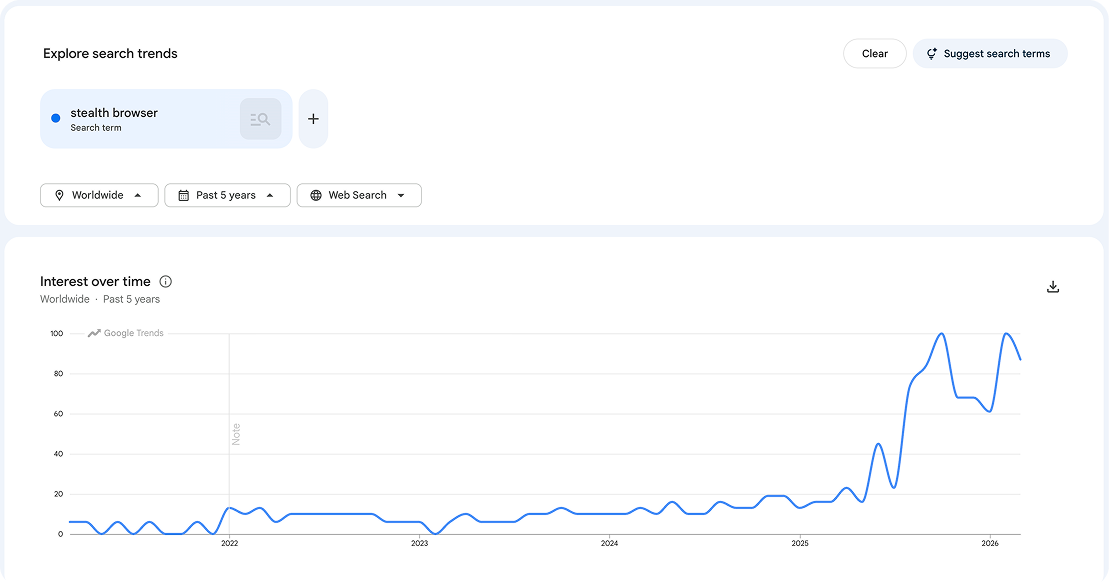
A stealth browser is a browser automation setup built on tools like Playwright or Selenium, or higher-level agent frameworks like browser-use and Browserbase, patched with evasion libraries specifically designed to get through bot detection. They solve CAPTCHAs via AI vision models or human-powered solving services, use residential proxies, and adjust browser properties to allow automated actions on a website without being blocked.
This term is relatively new, rising sharply in 2025 with the rise of agent-driven automation. When a user asks ChatGPT to browse the web, or an AI coding assistant navigates documentation on someone's behalf, the underlying infrastructure is a stealth browser. The user may not even realize it. For a deeper look at how these agents evade traditional defenses, see how OpenClaw agents bypass bot detection.
The signals we use at cside to catch stealth and anti-detect browsers
cside is a web security platform specialized on monitoring the browser runtime layer. We help organizations prevent fraud like web skimming, account fraud, and AI agent driven fraud. As an organization we are co-chairs of the W3C anti-fraud browser security unit.
Both our Fingerprinting and AI agent detection solutions use 102+ signals to catch stealth and anti-detect browsers. As a cat and mouse game, evasion tactics change constantly. We have a team dedicated to updating detection techniques to stay ahead of the race.
| Detection approach | What it catches | What anti-detect/stealth browsers defeat |
|---|---|---|
| IP reputation | Datacenter and known bad IPs | Residential proxies (clean IP history) |
| User-agent filtering | Known bot user-agents | Synthetic but plausible browser strings |
| Fingerprint hash blocklisting | Known bad fingerprints | Fresh synthetic fingerprints with no history |
| WebDriver / automation flags | Basic headless browsers | Stealth patches that normalize browser APIs |
| Rate limiting per session | High-velocity single sessions | Velocity distributed across many synthetic identities |
| Behavioral / browser-layer detection | Interaction patterns, state, timing | Cannot be fully suppressed by fingerprint spoofing or stealth patches |
-
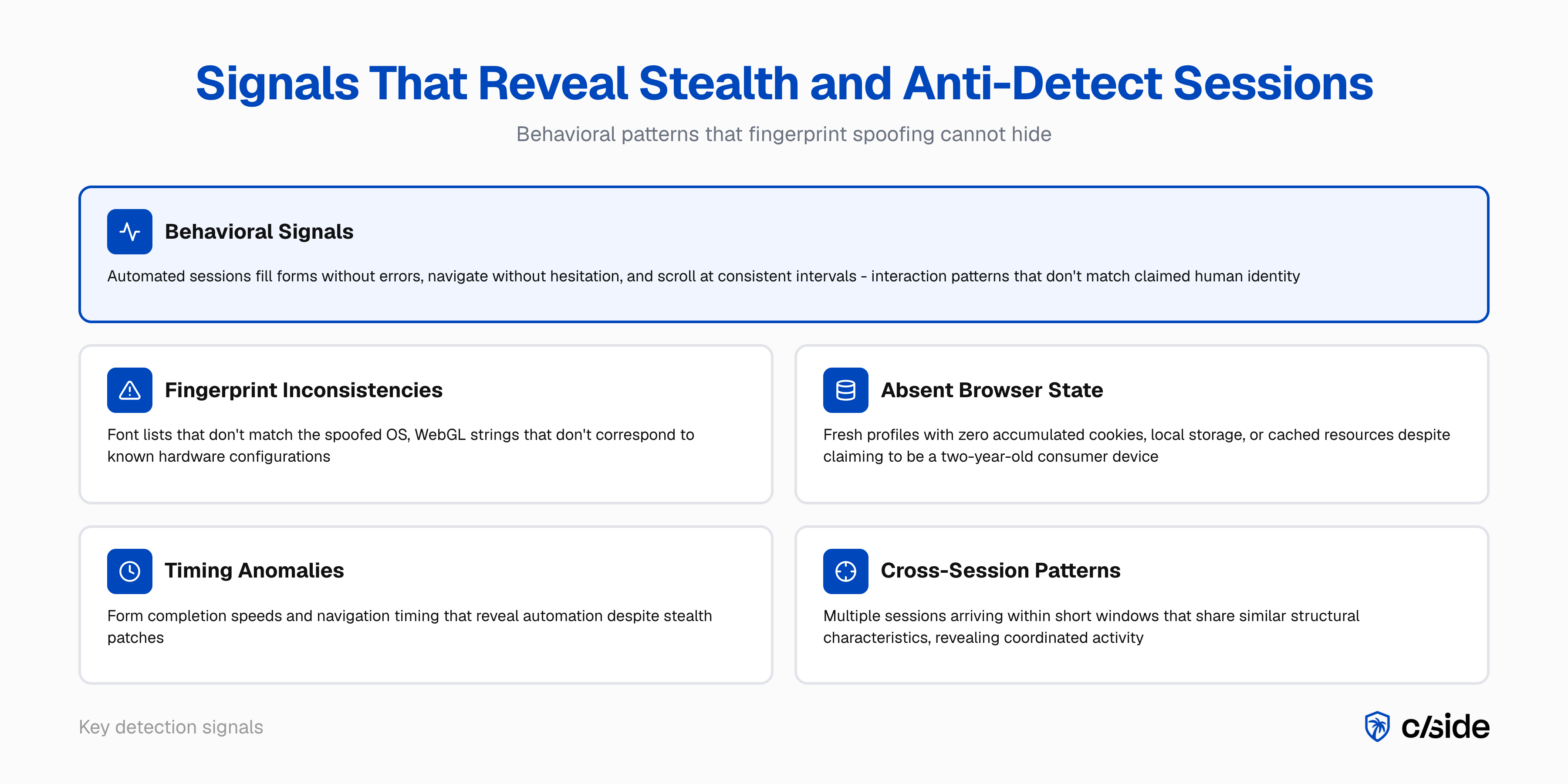
Internal fingerprint inconsistencies. Anti-detect profiles vary in quality. Lower-quality configurations introduce detectable mismatches: a font list that doesn't match the spoofed OS, a WebGL renderer string that doesn't correspond to any real hardware for the claimed device, or AudioContext output that is statistically implausible. cside's fingerprinting layer collects these signals passively and flags inconsistencies that surface-level checks miss.
-
Behavioral signals. Human users interact imprecisely: mouse paths deviate, scroll speeds vary, form fills include pauses and corrections. Automated sessions, whether running through anti-detect or stealth browsers, fill forms without errors, navigate without hesitation, and scroll at consistent intervals. cside observes this behavioral layer inside the browser session, where neither fingerprint spoofing nor stealth patches can suppress the signal.
-
Cross-session correlation. No single session may look anomalous on its own. The pattern across sessions does. Multiple sessions arriving within a short window that share similar structural characteristics, similar behavioral timing, or similar post-session actions reveal coordinated activity that individual session analysis misses.
Who uses stealth and anti-detect browsers and why
Anti-detect browsers
The primary commercial use case is multi-account management. Digital agencies managing multiple client ad accounts use anti-detect browsers to maintain account isolation on platforms that restrict multi-account use. Fraud operators use the same tools for fake account creation at scale, promo and referral fraud, card testing, coordinated scraping, and review manipulation. Each session presents a new synthetic identity, making fingerprint-based duplicate detection ineffective.
Stealth browsers
Stealth browsers power the rapidly growing category of agent-driven automation. Consumers use them, often without realizing it. When someone asks an AI assistant to book a flight, compare prices, or fill out a form, the AI agent behind that request is typically running a headless or stealth browser that needs to bypass CAPTCHAs and bot detection to complete the task.
Gartner predicts that by 2030, 20% of company revenue, representing trillions of dollars globally, will come from "machine" customers. A significant share of that machine-driven commerce will run through stealth browser infrastructure. The agents are not trying to commit fraud. They are carrying out tasks users asked them to do. But they still need to get past bot detection to function, which puts them in the same technical category as malicious automation from a detection system's perspective.
Legitimate commercial use
There is also a category of stealth browser use that is not agent-driven but still legitimate:
- End-to-end application testing. QA teams run headless browsers against staging and production environments. These sessions need to behave like real browsers, and some testing frameworks use stealth patches to avoid being blocked by the application's own bot detection.
- Data aggregation platforms. Price comparison sites, travel aggregators, and market intelligence platforms scrape data across thousands of sources. Whether you want to block them depends on your business model, but the intent is commercial, not fraudulent.
- Accessibility and compliance testing. Automated tools that audit sites for WCAG compliance or regulatory requirements often run through headless browsers.
Some sites care about blocking these use cases. Some don't. The point is that stealth browser traffic is not automatically malicious, and your detection response should account for that.
How anti-detect and stealth browsers work
Anti-detect browsers
Anti-detect browsers hook into the browser's JavaScript APIs at the engine level and replace real device values with synthetic ones. When a page calls canvas.getContext('2d').getImageData(), the anti-detect browser returns a deterministic but synthetic pixel array rather than the real rendering output of the GPU. The same applies to WebGL, AudioContext, font enumeration, and navigator properties.
| Fingerprint vector | What a normal browser exposes | What anti-detect browsers do |
|---|---|---|
| Canvas 2D | Real GPU rendering artifact | Synthetic pixel noise, deterministic per profile |
| WebGL renderer | Real GPU vendor + model string | Spoofed from a library of real device strings |
| Installed fonts | Actual system fonts | Filtered list matching the spoofed OS profile |
| Screen resolution | Real display dimensions | Synthetic value matching spoofed device type |
| Navigator.userAgent | Real browser + OS version | Synthetic UA from profile configuration |
| Timezone / language | Real system settings | Spoofed to match a target geography |
| Hardware concurrency | Real CPU core count | Synthetic value consistent with spoofed device |
| AudioContext | Real hardware audio fingerprint | Deterministic synthetic output |
Well-built profiles maintain internal consistency: the spoofed user-agent matches the spoofed screen size, platform, and font list. This is what makes them difficult for fingerprint-based systems to flag by inconsistency alone.
Stealth browsers
Stealth browsers solve a different problem. Instead of faking a device identity, they hide the fact that the browser is automated. A standard headless Chrome session exposes telltale signals: navigator.webdriver is set to true, the window.chrome object is missing or incomplete, and certain JavaScript properties behave differently than in a real user session.
Stealth patches address these signals systematically. Libraries like playwright-stealth override navigator.webdriver, inject a realistic window.chrome object, fix permissions.query behavior, and normalize navigator.plugins. Higher-level frameworks like browser-use and Browserbase abstract this further, giving AI agents a ready-made browser environment with evasion built in. More sophisticated setups also handle WebRTC leak prevention, timezone consistency with the proxy's geolocation, and realistic TLS fingerprints.
The challenge for detection is that the ecosystem of evasion libraries evolves continuously as new detection signals are identified. When a bot detection vendor flags a new automation signal, the community of stealth library maintainers responds with patches. It is a persistent arms race.
Why standard detection fails against anti-detect and stealth browsers
Anti-detect browsers
Standard detection compares sessions against known fraud signals: bad IP ranges, flagged fingerprints, suspicious user-agents. Anti-detect browsers replace all of those signals with clean synthetic equivalents.
- IP blocking fails because anti-detect browsers pair with residential proxies. The IP belongs to a real consumer device with no fraud history.
- Fingerprint hash blocking fails because each session generates a new fingerprint hash that has never appeared in a blocklist.
- User-agent filtering fails because the user-agent is a plausible, real-world browser version with nothing anomalous about it.
Stealth browsers
Bot detection systems look for automation signals: the webdriver flag, missing browser APIs, inconsistent JavaScript behavior, headless rendering artifacts. Stealth browsers patch all of these.
- WebDriver detection fails because stealth libraries override
navigator.webdriverto returnfalse. - CAPTCHA challenges fail because sessions are solved by AI vision models or human-powered CAPTCHA services.
- JavaScript environment checks fail because stealth patches normalize the browser environment to match a real user session, including
window.chrome,navigator.plugins, and permissions behavior.
cside found that traditional detection tools missed AI agents in 81 out of 100 controlled attempts. The FP-Inconsistent study (Vekaria et al., ACM IMC 2025) found that evasive bots using fingerprint manipulation achieved an average evasion rate of roughly 53% against commercial anti-bot services. Sessions using anti-detect and stealth browsers are a core reason for that gap: they defeat every detection layer that operates on identity signals rather than behavioral signals.
When to block vs. challenge anti-detect and stealth browser sessions
Forrester renamed the bot management category to "Bot and Agent Trust Management Software" in Q4 2025, validating a graduated-response model over binary allow/block decisions. The goal is not to block everything that looks different, but to apply the right response to the right confidence level.
| Session confidence | Signals present | Recommended response |
|---|---|---|
| High (3+ converging signals) | Fingerprint inconsistency + clean state + behavioral precision | Block at registration or checkout |
| Medium (1-2 signals) | Clean state + behavioral regularity, no fingerprint inconsistency | Challenge: step-up auth, address verification |
| Low (behavioral only) | Slightly regular interaction patterns, no fingerprint signals | Rate-limit catalog access; monitor for escalation |
| Agent-driven (legitimate) | Stealth browser with human-initiated task, no fraud signals | Allow with monitoring; tag segment for review |
| Legitimate multi-account use | Human behavioral layer intact, account management pattern | Allow with monitoring; tag segment for review |
For registration flows, blocking high-confidence sessions before account creation prevents fake account infrastructure from being established. For checkout, a step-up challenge is often preferable: it adds friction without canceling a real transaction if the session is a false positive. For catalog and pricing pages, rate-limiting detected sessions degrades the value of scraping operations without blocking legitimate users in the same traffic segment.
The hardest category is agent-driven traffic. A stealth browser session carrying out a legitimate user task (comparing prices, filling out a form) will trigger the same detection signals as a malicious bot. The difference is in the behavioral pattern and the post-session action. Legitimate agent sessions tend to be isolated, purpose-driven, and non-repetitive. Malicious automation tends to be high-volume, systematic, and repetitive across many synthetic identities.
For a practical guide on blocking unwanted agent traffic, see how to block AI agents on your website.