

TL;DR: price scraping and how to stop it
- What it is: Price scraping bots harvest your product prices in real time to feed competitor repricing engines and aggregation platforms.
- Why defenses fail: Traditional defenses (IP blocks, rate limiting, CAPTCHAs) fail against scrapers running on residential proxies with real browser automation.
- Browser signals reveal it: Browser behavioral signals reveal scraping sessions that look clean from the server: cursor precision, navigation skips, missing browser APIs, and timing anomalies.
- Browser-layer detection: Browser-layer detection classifies suspicious sessions so you can serve a contact page instead of real prices, blocking the scraper without turning away customers.
Short on time? See cside's AI-agent detection. It covers everything below in one deployment.
What Is Price Scraping?
- Price scraping
- Price scraping is the automated, large-scale extraction of product prices, promotional rates, and stock levels from a website without the site owner's consent. Scrapers simulate browser sessions to collect this data continuously, often feeding it into a repricing engine that adjusts a competitor's prices to undercut yours within minutes.
Price scraping is the automated extraction of your pricing data by bots that simulate real browser sessions. The scraped data feeds two main use cases: competitor repricing tools that automatically undercut your prices, and aggregation platforms that display product comparisons across multiple retailers. In both cases, your pricing strategy becomes your competitor's advantage.
Aberdeen Research found that scraping costs e-commerce businesses between 3% and 14% of annual website revenue, with pricing data being one of the primary targets. Price scrapers can account for a significant portion of catalog page traffic on large retail sites, consuming server resources while providing zero commercial value.
How Price Scraping Works
Traditional scrapers sent bare HTTP requests to collect page HTML. They were easy to block because they lacked JavaScript execution and their IP addresses were recognizable datacenter ranges.
Modern price scrapers are different. They run inside real browsers (Chromium, Firefox) using automation frameworks like Playwright or Puppeteer. They execute JavaScript, load external scripts, render CSS, and pass basic bot-detection checks. They rotate through residential proxy pools so each request arrives from a different home IP address in your target country.
The scraping loop works like this:
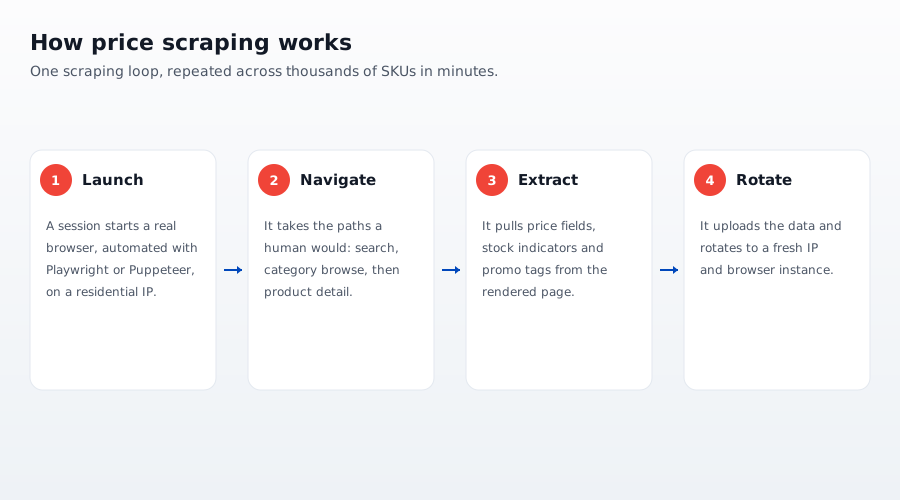
- A scraper session launches a real browser with a residential IP.
- It navigates your catalog pages, often following the same pattern human users would: search, category browse, product detail.
- It extracts price fields, stock indicators, and promotional tags from the rendered page.
- It uploads the data and rotates to a fresh IP and browser instance.
A single scraping network can collect prices across thousands of SKUs in minutes. By the time you notice unusual traffic, your entire catalog has been exfiltrated.
Why Traditional Anti-Scraping Fails
IP blocking
Blocking known datacenter IP ranges stops unsophisticated scrapers but has no effect on residential proxy networks. A residential IP belongs to a real home broadband connection, often on an ISP's consumer allocation. Your server sees it as a normal visitor. Blocking it blocks real customers with the same ISP.
CAPTCHAs
AI-powered CAPTCHA solvers (2Captcha, anti-Captcha, and purpose-built LLM-based solvers) pass most CAPTCHA types with accuracy comparable to human users. CAPTCHAs also add friction for real customers, increasing cart abandonment. They are a losing trade in 2026.
Server-side rate limiting
Scrapers throttle themselves to stay within rate limits. A scraper targeting a 10,000 SKU catalog does not need to be fast; it can spread requests over hours across thousands of IPs and still complete a full data collection run before your analytics flag anything unusual.
Browser Behavioral Signals That Reveal Price Scrapers
The server cannot distinguish a scraper using a residential proxy and a real browser from a genuine customer. The browser can.
cside monitors four signal layers inside each session. These are the behavioral signals that most reliably expose scraping activity:
1. Cursor and scroll patterns
Real users move their mouse in curved, imprecise paths with natural acceleration and deceleration. They scroll with variable speed, pause, scroll back. Scrapers driven by automation frameworks produce mechanically precise movements: linear cursor paths, instantaneous scroll events, or no movement at all (headless sessions that do not simulate input).
2. Navigation sequences
A human browsing for a price comparison takes non-linear paths: they read descriptions, scroll past the fold, zoom into images, and sometimes navigate backward. A price scraper follows a minimal sequence: load the page, locate the price element, extract, move on. Pages that receive zero dwell time and no mouse interaction after the price element loads are a strong signal.
3. Browser environment anomalies
Real browsers expose a consistent set of JavaScript APIs: Web Audio, WebGL, speechSynthesis, device orientation events, and others. Headless or minimally configured browser instances often have these APIs missing, stubbed, or returning values inconsistent with the claimed OS or screen resolution. Canvas fingerprinting and font enumeration also return values that differ between real consumer devices and automation environments, even when the User-Agent string claims to be Chrome on Windows.
4. Identity persistence across sessions
A genuine customer returns with a consistent browser fingerprint: same installed fonts, same canvas rendering signature, similar hardware characteristics. A residential proxy scraper rotates identity on each session. The fingerprint changes every request while the behavioral pattern (catalog crawl, no purchase intent, price field extraction) remains constant.
Comparison: Anti-Scraping Approaches
| Approach | Stops datacenter bots | Stops residential proxy scrapers | Customer friction |
|---|---|---|---|
| IP block list | Yes | No | Low (if list is clean) |
| Rate limiting | Partially | No | None |
| CAPTCHA | Partially | No | High |
| User-Agent filtering | Yes | No | None |
| Browser fingerprinting | Yes | Partially | None |
| Behavioral detection (browser-layer) | Yes | Yes | None |
| Browser-layer + fingerprinting combined | Yes | Yes | None |
Behavioral detection at the browser layer is the only approach that consistently catches residential proxy scrapers because the behavioral signals are independent of IP address and User-Agent.
How cside Detects Price Scrapers
cside deploys a first-party JavaScript snippet on your pages. It monitors script execution, browser environment, and session behavior in real user browsers without a proxy or DNS change.
When a session triggers anomalous patterns across identity, network, browser environment, and behavioral layers, cside classifies it as a likely bot. Your enforcement logic can act on that classification in real time:
- Serve a decoy price: show a contact-us page or a static placeholder instead of the real price. The scraper collects nothing useful. A real customer who was mis-classified can still reach you.
- Add friction selectively: require additional steps only for flagged sessions, keeping the checkout flow clean for genuine buyers.
- Feed your fraud stack: pass the bot classification as a signal to your existing fraud rules or A/B test a graduated response.
Because cside runs in the visitor's browser, it observes what automation frameworks actually do on the live page, including conditional behavior that only activates on real pricing pages, not on synthetic test requests or crawler scans.
For a broader look at how AI-powered scraping bots work and the detection layers that stop them, see our guide to blocking AI agent content scraping bots.



