TL;DR: how Magecart attacks work
- Named victims, real crews: At least seven attacker crews injecting JavaScript on payment pages. British Airways (380k records), Ticketmaster, Newegg, Warner Music.
- Runs past the WAF: The attack runs after your WAF approves the page, in the same JavaScript context as your checkout form.
- The rules that close it: 6.4.3 and 11.6.1 close it. Required since 31 March 2025 for anyone touching a payment page.
Short on time? See cside's in-browser Magecart and skimmer blocking. It covers everything below in one deployment.
Lookalike domains are a common delivery vehicle here. See how homoglyph attacks work for the character-level tricks that make a malicious domain visually identical to a trusted one.
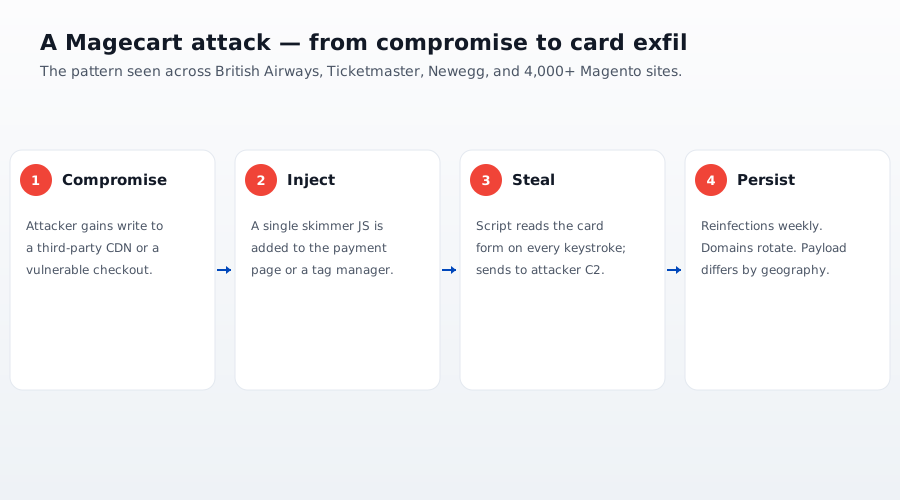
The attack in three moves
Every skimming campaign, regardless of which group runs it, comes down to the same lifecycle. Strip away the branding and you get three moves.
| Move | What happens | Where it lives |
|---|---|---|
| Inject | Attacker gets their JavaScript to load on your page | A compromised first-party file, third-party tag, or tag manager |
| Capture | The script reads card or credential data from the form | The DOM and form event listeners in the browser |
| Exfiltrate | A copy of the data is sent to the attacker's server | An outbound browser request to an attacker domain |
The rest of this post walks each move in order, because the order is what makes the attack invisible.
Move 1: how the code gets onto the page
The attacker needs their JavaScript to execute in the visitor's browser. They have three common routes onto the page, none of which require touching your origin server's logic.
- A self-hosted file. They gain write access through a vulnerable plugin, an outdated CMS, or a stolen admin login, then append a few lines to a JavaScript file you already ship. The change is small and often tucked inside legitimate code, so a diff looks unremarkable.
- A third-party script. They compromise a vendor whose script you load directly with
<script src>, such as an analytics, chat, or A/B-testing widget. Now the skimmer ships from the vendor's domain to every customer who loads your page, and it is never in your repository to find, which is why securing third-party scripts is its own discipline. - A tag manager. They take over a Google Tag Manager container or similar and add one tag containing the skimmer. Every site and page using that container now runs the code, including checkout pages where the tag has no business loading.
The third-party and tag-manager routes scale, which makes them the dangerous ones. One compromised vendor seeds skimmers across every site that trusts it, and a script you approved can pull in another script you never reviewed, the fourth-party problem. This is the supply-chain shape that PCI DSS 4.0.1 requirement 6.4.3 and 11.6.1 target by demanding an inventory and authorization of every script on a payment page. The 2018 Ticketmaster breach took exactly this path: the skimmer reached checkout through a compromised supplier's chatbot script, not Ticketmaster's own code (Wikipedia summary of the 2018 incident).
Move 2: how the skimmer reads your form
Once the script runs, reading the form is ordinary web development turned against you. Reading and modifying the DOM is how every modern framework works, so the skimmer's actions look like normal page behavior. A skimmer typically does one or more of the following:
- Reads input values directly. It selects the card-number, expiry, CVV, and name fields by their
id,name, orautocompleteattributes and reads.valuestraight from the DOM. - Attaches event listeners. It hooks
input,keyup,change, orbluron the payment fields, so it captures each keystroke even if the user never submits. - Hijacks the submit path. It wraps the form's submit handler or hooks the "pay" button, assembling the full payload at the moment the user commits.
- Patches network primitives. Advanced skimmers override
fetch,XMLHttpRequest.prototype.send, ornavigator.sendBeaconto read the real payment request as your own code sends it. - Overlays a fake field. Some inject a counterfeit payment iframe on top of the real one, so the shopper types card details straight into the attacker's input. cside's own analysis of a Magecart campaign found a fake payment frame inserted at checkout via a single obfuscated JavaScript line, the kind of swap a server-side scan never sees.
Conditional serving is what keeps it quiet
The skimmer does not fire for everyone. It gates itself so the people most likely to catch it, namely security teams, scanners, and bots, never see the malicious behavior:
- Path gating. Many skimmers arm only on URLs that match a checkout or login pattern, so the code lies dormant everywhere else.
- Automation detection. Reading
navigator.webdriverreturnstruein headless and automated browsers, so the skimmer can serve clean code to a scanner and the real payload to a shopper. More advanced variants probe for Selenium globals or Chrome DevTools Protocol (CDP)Runtimeleaks to spot instrumented browsers. - Once-per-session firing. Exfiltrating a single time avoids duplicate network noise that might stand out in a log.
That arms race is escalating on the attacker side too: cside's Future of Web Security 2026 research report tracked playwright-stealth growing about tenfold across 2025, automation built to defeat navigator.webdriver and similar checks. The same evasion that hides an attacker's tooling from defenders is what hides a skimmer from yours. The code is usually obfuscated on top of all this, which buries intent during a manual review.
Move 3: how the data leaves
Capture is useless to the attacker until the data reaches them. Exfiltration is a single outbound request from the browser, and the attacker has several quiet ways to send it.
| Method | How it looks on the wire |
|---|---|
navigator.sendBeacon() | A small POST that fires reliably on unload, designed for analytics, so it blends in |
fetch() / XMLHttpRequest | A standard async request, often to a look-alike domain that mimics a CDN or analytics host |
| Image request | The payload is appended to an <img> src as a query string; the browser "loads" an image that is really a data drop |
| WebSocket | A persistent channel for streaming captured keystrokes in near real time |
Three properties make this leak nearly impossible to spot from the outside. The request is HTTPS, so it is encrypted like all your other traffic. The destination is usually a typosquatted or freshly-registered look-alike domain that reads like a real vendor. The British Airways skimmer exfiltrated to baways.com, so it does not jump out of a log. And the payload is tiny and often base64-encoded, so it reads like a routine telemetry ping. Critically, this request goes from the browser straight to the attacker; it never passes through your origin, your WAF, or your payment gateway. That is the whole reason the theft is invisible to the server.
Why your server, WAF, and processor never see it
Put the three moves together and the blind spot is obvious. The code loaded in the browser, read the field in the browser, and sent the copy from the browser to a third domain. Your backend only ever saw the legitimate, authorized transaction.
- A web application firewall inspects requests arriving at your origin. The exfiltration request never arrives there, so the WAF has nothing to inspect.
- A SIEM aggregates server and infrastructure logs, and the skimmer generates no server event. Fraud monitoring flags purchase anomalies, but the real purchase completed exactly as expected.
- A payment processor like Stripe or Adyen secures the transaction it receives. If your card fields sit on your own page, a skimmer reads them before the processor is ever involved, and your page still owes its own PCI DSS 4.0.1 6.4.3 and 11.6.1 evidence regardless of the processor.
The attack lives in a runtime your server-side stack cannot reach. A client-side problem needs a client-side defense.
How browser-layer monitoring catches each move
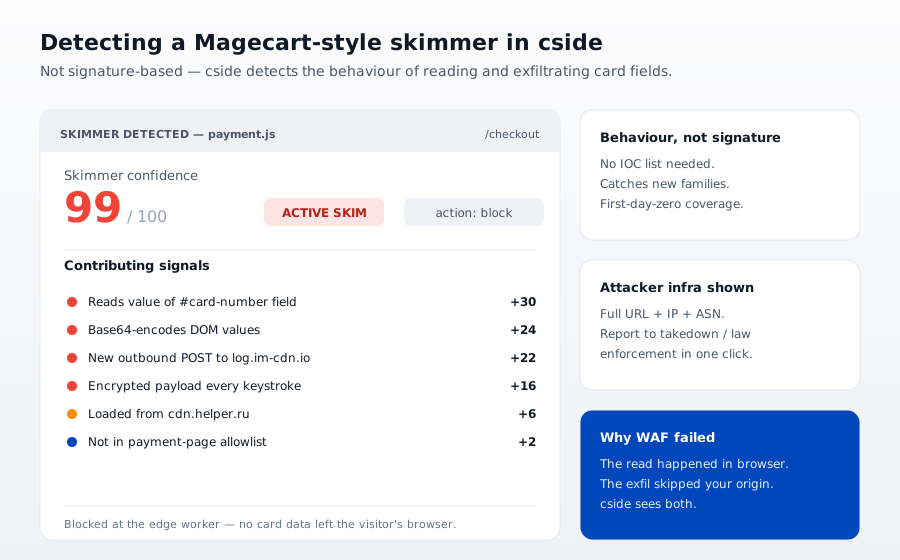
Detection has to sit where the skimmer runs. cside monitors scripts and behavior in the browser, so each move leaves a signal it can act on.
- Inject shows up as a new or modified script. cside maintains a script inventory and flags additions, changes, and tampered third-party tags when they appear, not weeks later in a fraud report.
- Capture shows up as behavior. Unexpected listeners on payment fields, code reading inputs it should not, and overrides of
fetchorsendBeaconare runtime anomalies against a known-good baseline. - Exfiltrate shows up as a destination. cside surfaces outbound requests to domains not on your allowlist, the signature move of a skimmer trying to leave.
Because cside runs in real browsers rather than a clean-room scanner, conditional serving does not hide the skimmer the way it hides from a headless crawler. That same visibility produces the evidence PCI DSS 4.0.1 expects: an authorized inventory of payment-page scripts for 6.4.3, and alerting on unauthorized changes to script content and headers for 11.6.1, both mandatory since 2025-03-31.
Further reading on cside
- What is online card skimming?
- What is Magecart: complete guide and prevention strategy
- Formjacking vs Magecart vs digital skimming
- What are digital skimmers?
- The biggest Magecart attacks in history (so far)
- cside client-side security
Named Magecart incidents (2018 to 2024)
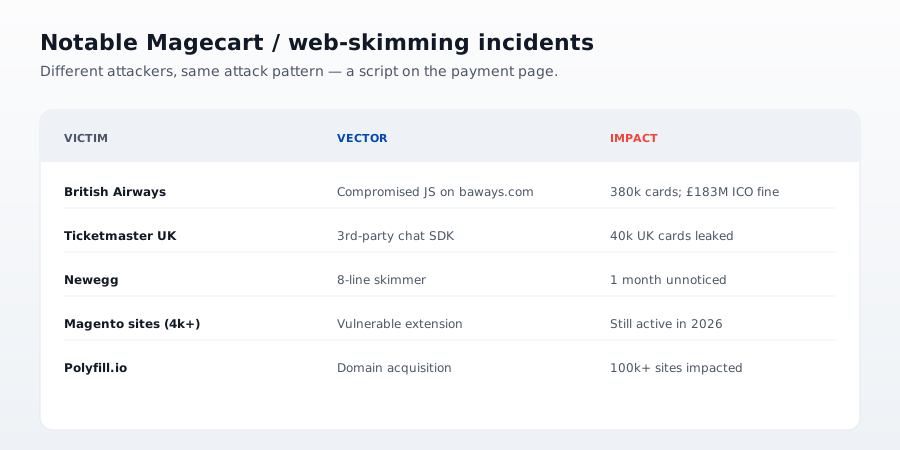
The Magecart ecosystem is a loose federation of at least seven distinct groups (numbered Group 1 through Group 12 by RiskIQ) using shared TTPs. The public disclosures below are the reference cases customers and QSAs cite when scoping PCI DSS 4.0.1 §6.4.3 and §11.6.1 controls.
- British Airways (2018). Around 380,000 payment card records exfiltrated over 15 days from a compromised script served on the checkout and mobile-app pages. UK ICO fine reduced from £183M to £20M.
- Ticketmaster UK (2018). Card details of ~40,000 customers exposed after the Inbenta customer-support script served from a third-party CDN was modified to skim the payment page. ICO fine £1.25M.
- Newegg (2018). 15 lines of injected JavaScript captured all card data submitted to
checkout/payment.aspxfor 35 days. Attribution to Magecart Group 4 by RiskIQ. - Warner Music Group (2020). Multiple e-commerce sites operated by WMG in the US and UK compromised for three months, targeting checkout data on the Volusion platform.
- Segway (2022). Attackers used a malicious Magento extension to skim payment forms, disclosed by Malwarebytes.
- Kaiser Permanente (2024). 13.4M members notified after third-party analytics and tracker scripts on member-facing pages exposed sensitive information, adjacent to the same Magecart TTP class.
- Polyfill.io supply-chain (2024). After a change of ownership,
cdn.polyfill.iobegan serving malicious code to >100,000 sites embedding the library, disclosed by Sansec. Fastly, Cloudflare, and Google intervened at the network layer. - Adobe Commerce / Magento Cosmicsting (CVE-2024-34102). Server-side XML deserialization flaw used to plant client-side skimmers on hundreds of Magento merchants through 2024 and into 2025.
Every case above bypassed the merchant's server-side defenses and manipulated code the browser executed. That is the exact gap PCI DSS 6.4.3 (script authorization and integrity) and 11.6.1 (payment-page change detection) were written to close.