
Affiliate hijacking is when injected JavaScript on a web page, or a malicious browser extension on a visitor's device, silently routes a click through an attacker's affiliate link before the real destination loads. The attacker earns a commission the merchant never authorized. The redirect fires inside the browser in under a second, leaving no trace in server logs. Detecting it requires monitoring JavaScript execution across real visitor sessions.
TL;DR: affiliate hijacking
- Affiliate hijacking is when a compromised or malicious browser extension, DNS resolver, or third-party script redirects legitimate merchant traffic to attacker-controlled affiliate links, capturing commissions on transactions the merchant would have gotten anyway.
- The damage is dual: the merchant pays commissions on non-incremental sales, and the user's session can be redirected to lookalike or phishing sites.
- Detection requires in-session monitoring of outbound network calls from your site, because the redirect happens after the page loads and before the transaction commits. Server-side controls do not see it.
Short on time? See cside's chargeback-evidence tooling. It covers everything below in one deployment.
Affiliate hijacking is a growing form of third-party script abuse in e-commerce. Injected JavaScript intercepts a user's outbound click inside the browser, routes it through an attacker's affiliate URL, and sends the user on to the real destination. The server sees a normal request; the fraud is complete before the next page loads.
This guide explains how affiliate hijacking and the broader category of traffic hijacking work, how attackers avoid detection, and what actually stops them.
The umbrella term for this class is customer journey hijacking: injected code diverting visitors off the path your site intended.
What is affiliate hijacking?
Affiliate hijacking is a form of traffic hijacking where injected JavaScript changes a user's click, outbound link, or session path so it passes through an attacker's affiliate URL before reaching the real destination. The user may still land on the expected site, but attribution and commission credit move to the attacker. Because the redirect is triggered inside the browser, server logs, WAFs, and checkout-only controls often see a normal page request while the revenue theft happens between click and destination.
What is traffic hijacking?
Traffic hijacking is when someone secretly changes where a website's links go, sending visitors to other sites. Often, for malicious reasons. This is bad for users (who get tricked or exposed to danger) and for website owners (who lose trust and revenue).
We've conditioned users to think it's normal that, when they click "Pay", the screen flashes and a brand new page loads from a completely different domain.
But this is a massive blind spot and attackers know it.
So if you're protecting the payment form itself, by validating scripts on that page using cside for example, it makes perfect sense for a bad actor to hijack the click that brings users there instead.
For more on this tactic, see our January PCI DSS update for SAQ A companies.
This specific tactic is known as clickjacking (simply a strategy of the traffic jacking), and it's commonly used to impersonate trusted flows.
Types of hijacking at a glance
| Term | What it is | Who it harms |
|---|---|---|
| Traffic hijacking | Code secretly changes where a site's links or navigation send visitors | Users and site owners |
| Clickjacking | Tricks a user into clicking something other than what they see, often via invisible overlays | Users |
| Affiliate hijacking (link hijacking) | Reroutes a click or session through an attacker's affiliate link to steal a commission | Affiliate programs and site owners |
| Malicious redirect | Sends a visitor to a scam or malware page mid-flow | Users and site owners |
SERP-based vs. browser-based affiliate hijacking
Affiliate hijacking happens at two distinct points in the user journey, and each requires a different defense.
SERP-based affiliate hijacking strikes before a visitor reaches your site. An unauthorized affiliate bids on your branded keywords in Google or Bing, places an ad above your organic results, and intercepts users who intended to navigate directly to you. The visitor clicks the affiliate's paid ad, generating a commission that the legitimate publisher never earned. This attack surfaces in paid search dashboards and is handled by search-monitoring tools that scan ad auctions for brand keyword violations.
Browser-based affiliate hijacking strikes after the visitor is already on your site. Injected JavaScript (entering through a compromised third-party script, a rogue tag manager entry, or a malicious browser extension) rewrites outbound links, stuffs attacker-controlled affiliate cookies, or opens hidden redirects before the user reaches the destination. The server receives a normal request; the entire fraud completes inside the browser before the next page loads. Because it runs after page delivery, it is invisible to server logs, WAFs, and paid search monitoring.
cside's msclairty[.]com threat report documents a real example: a browser extension impersonating Microsoft Clarity deleted legitimate tracking cookies (_ga, _gid, rtkclickid-store) and replaced them with an attacker's affiliate cookie (pub=twsc), all inside the visitor's browser, with zero detections across ninety VirusTotal security engines.
The two attack types are not mutually exclusive. A single bad actor can run SERP hijacking to intercept new visitors while browser-side scripts quietly target users who arrive organically or through paid campaigns. Closing one gap while leaving the other open is a partial defense.
Affiliate hijacking in practice: a software download scenario
Software download sites pay among the highest per-click and per-install commissions in affiliate marketing, which makes them the most targeted category. Here is how a browser-based attack typically plays out on a site running an affiliate program through a network like CJ Affiliate or Impact.com.
- A third-party analytics tag loaded through a tag manager entry is compromised. Its payload is obfuscated and only activates for visitors who do not already have a specific session cookie, making it invisible in standard QA runs.
- When a visitor lands on the download page, the injected script calls
document.querySelectorAll('a.dlink')and rewrites each link'shref, routing clicks through the attacker's affiliate redirect URL with the attacker's publisher ID as a tracking parameter. - The visitor clicks "Download". Their browser follows the affiliate redirect, which writes a tracking cookie and forwards them to the real download. The file arrives. The visitor notices nothing unusual.
- The affiliate network records the click under the attacker's publisher ID. The merchant's dashboard credits the conversion to a publisher they never authorized. The actual referring channel earns nothing.
The server logs show a clean sequence: page load, click, download. The fraud is only visible inside the browser, at the moment the script rewrites the link. cside deploys as a single first-party JavaScript snippet and monitors script execution across real visitor sessions, flagging the querySelectorAll call and link mutation the instant they occur, before any click, and surfacing the unauthorized publisher ID in the dashboard.
How does affiliate fraud work?
Affiliate hijacking is the most common form: malicious code forces a user's click or session through an attacker's affiliate link before the real destination loads, so the attacker collects a commission the visitor never meant to generate. More broadly, affiliate fraud is when someone abuses affiliate programs (which pay for clicks or sales) by forcing users through their special links, even if the user never wanted to go there. This is unfair to both the real website and the companies running the affiliate programs.
A common tactic is link hijacking, where a script redirects a user through the attacker's affiliate link before reaching the final destination. In more sophisticated cases, attackers insert affiliate links dynamically only for certain high-value users, or based on browser signals, making detection harder.
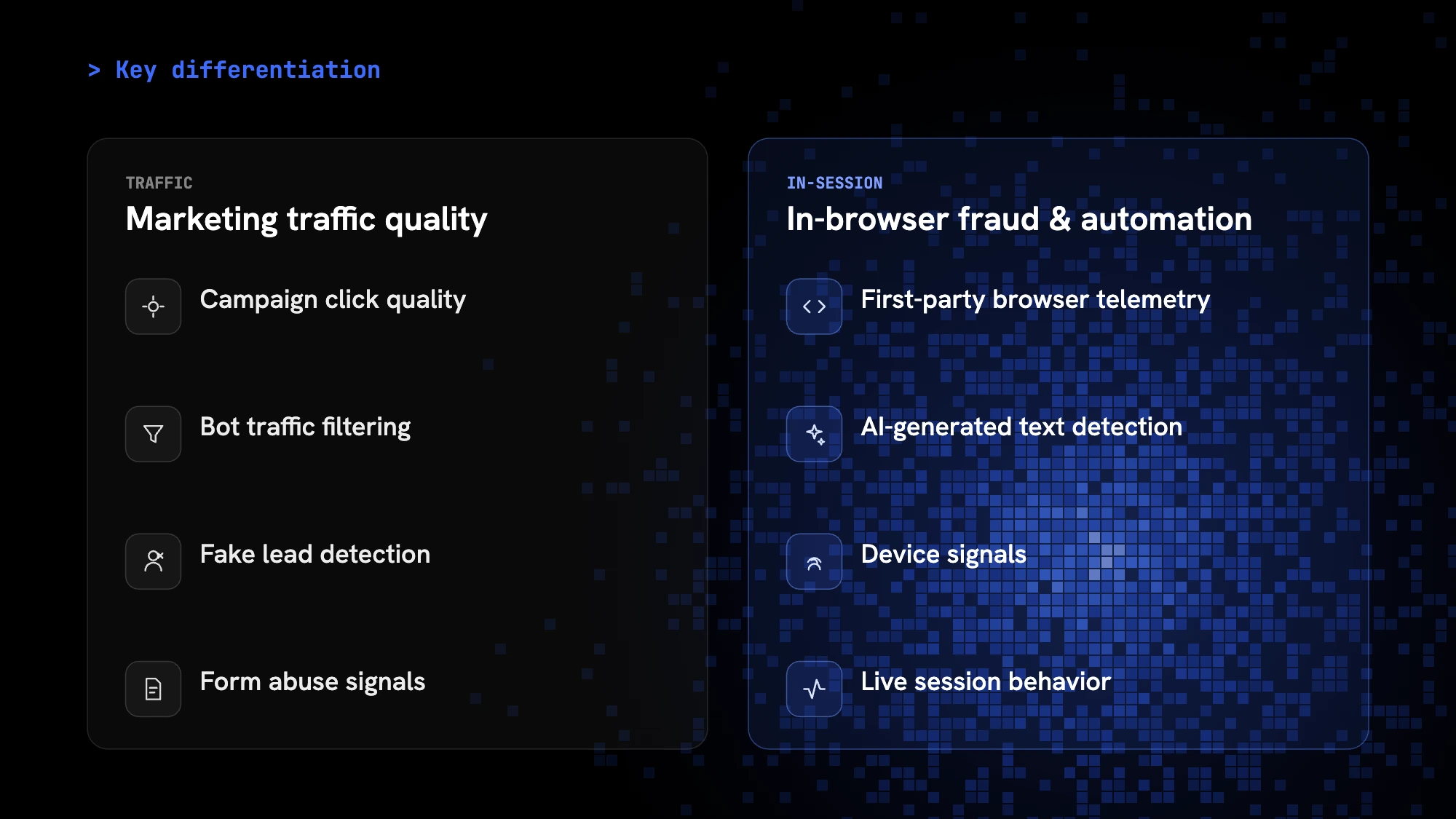
Traffic-quality checks can flag campaign click quality, bot traffic filtering, fake leads, and form-abuse signals. Browser-session visibility adds the runtime view that shows when JavaScript rewrites links, opens hidden redirects, or manipulates attribution cookies inside the page.
How do you know affiliate hijacking is happening on your site?
Affiliate hijacking leaves no trace in server logs because the redirect fires inside the browser. These signals appear when you have client-side visibility:
- Attribution gaps in affiliate dashboards. Conversions driven by your paid campaigns start crediting an unfamiliar affiliate ID you never authorized.
- Inconsistent referral paths. Users arriving from direct or paid traffic pass through an extra domain before checkout, visible only in browser-level request traces, not in server access logs.
- Scripts querying link elements at runtime. A script calling
document.querySelectorAll('a')or attaching click listeners to all outbound links is a strong indicator of link rewriting. - Cookie-gated redirect behavior. The hijack activates only for visitors without a specific cookie, making it nearly impossible to reproduce in QA sessions that reuse the same browser profile.
- Zero-commission gaps. Ad-spend reports show paid impressions and clicks, but affiliate program dashboards credit conversions to a publisher you did not authorize.
The FBI's Internet Crime Complaint Center (IC3) received 880,418 complaints in 2023, reporting total losses of more than $12.5 billion (source: IC3 2023 Annual Report). Affiliate click fraud is systematically undercounted in those figures: server logs show a normal request sequence even when the redirect fires client-side.
How do these attacks happen? (with simple code snippets)
Attackers use hidden JavaScript on websites.
Here's how it works, step by step:
1. Detecting your browser
The script first checks what browser you're using:
// Checks if you are using Chrome, Firefox, Safari, etc.
function getBrowser() {
  // ...detects browser type...
}
2. Replacing download links
It finds all the download links and changes what happens when you click them:
// Finds all download links and changes their behavior
let links = document.querySelectorAll('a.dlink');
for (let link of links) {
  link.setAttribute('href', 'javascript:void(0);');
  link.addEventListener('click', function () {
    // Instead of downloading, you get redirected
    window.open('https://malicious-redirect[.]com', "_blank");
  });
}
3. Tracking and limiting redirects
To avoid being too obvious, the script uses cookies to limit how often you get redirected:
function hasCookie() {
  return document.cookie.includes('wpdlInterval=1');
}
How to prevent affiliate hijacking
Affiliate hijacking fires inside the visitor's browser, not on your server, so conventional security controls are in the wrong place. These steps target the browser layer:
-
Inventory third-party scripts on every page. Hijacking code enters through compromised tag manager entries, rogue ad scripts, or malicious browser extensions. You need a live runtime inventory, not a static code scan.
-
Alert on outbound link mutations at runtime. Monitor for scripts calling
document.querySelectorAll('a'), overwritinghrefattributes on link elements, or attaching click listeners to all outbound links. Legitimate scripts rarely modify links; affiliate-hijacking scripts almost always do. -
Cross-reference your authorized publisher list. If your affiliate dashboard credits a publisher ID you never authorized, that is the after-the-fact signal. Automate comparisons of affiliate reports against your approved publisher list so gaps surface quickly.
-
Test in fresh browser profiles from multiple regions. Hijacking scripts activate only when a specific cookie is absent, making them invisible in QA sessions that reuse the same browser profile. Testing from clean profiles across different locations exposes the conditional redirect behavior.
-
Enforce a strict Content Security Policy. A CSP limiting approved script sources reduces the channels attackers can use to inject new scripts. It does not catch hijacking via already-whitelisted scripts, but it raises the cost of the attack.
-
Deploy browser-layer security monitoring. Client-side monitoring that observes JavaScript execution during real visitor sessions can flag unauthorized navigations and link rewrites in real time. This is the only control that sees the affiliate redirect as it fires. cside runs this monitoring via first-party JavaScript, which avoids the ad-blocker stripping that affects third-party security tags.
What does this mean for you?
- For users: You might end up on scammy or dangerous sites, or your computer could get infected.
- For website owners: Your visitors lose trust, your reputation suffers, you risk compliance violations, and you lose out on real revenue.
How can you spot and prevent this?
For users:
- Be careful with download links, especially on unfamiliar sites.
- Use a browser extension or ad blocker that warns about suspicious redirects.
- Keep your browser and antivirus up to date.
For website owners:
- Regularly scan your site for unknown scripts.
- Use security plugins and keep your software updated.
- Set up alerts for unusual traffic patterns.
Final thoughts
Traffic hijacking and affiliate fraud are real threats. When you understand how these attacks work, you can better protect yourself and your website. Stay alert, and always be cautious with unfamiliar links.
For website owners, the defense is browser-layer visibility. Affiliate-hijacking and redirect code only reveals itself at runtime in the browser, so client-side security monitoring that inventories every script and alerts on unauthorized changes to outbound links is what catches it. cside also flags the AI agents and bots that increasingly automate this abuse.
Sign up to get started or book a demo.



