

TL;DR: undeclared AI agent detection without user-agent
- The undeclared agents: The declared crawlers (GPTBot, ClaudeBot, PerplexityBot) are the easy problem. The harder ones are custom LangChain, AutoGPT, and Playwright agents that never self-identify. Ahrefs found 63% of websites already saw AI chatbot traffic in early 2025, and much of it is undeclared.
- What cside sees: For one GET /pricing, the network layer sees Chrome user-agent, residential IP, standard headers, no anomaly. cside reads scroll regularity outside human variance, a clean default fingerprint with no prior cookies, and pure sequential navigation with no branching, and rate-limits within the same request cycle.
- Graduated response: Start with a week of monitoring and classification, not blocking. If signals are low-confidence, log. If medium, challenge with CAPTCHA or account verification. If high-confidence with fraud indicators, hard-block. Forrester renamed the category Bot and Agent Trust Management Software in Q4 2025 for a reason.
Short on time? See cside's AI-agent detection. It covers everything below in one deployment.
The declared AI crawlers (GPTBot, ClaudeBot, PerplexityBot) are the easy ones. They identify themselves. You can block them with two lines of robots.txt if you choose to. They are the part of the AI agent problem that is already solved.
The harder problem is the unknown agents: AI systems that visit your site without declaring their identity, running inside real browsers, using standard user-agents, and behaving in ways that look like human traffic until you examine session-level signals carefully. In cside's controlled testing, traditional tools missed AI agents operating inside real browser sessions in 81 out of 100 scenarios. For the wider playbook, see our guide to detecting AI agent traffic on your website.
What Makes an AI Agent "Unknown"
Quick answer: Unknown AI agents are automated systems that do not declare their identity through user-agent strings or other conventional signals. They operate through real browser sessions, use standard Chrome or Firefox user-agents, and are functionally invisible to network-layer detection tools that rely on header inspection and IP matching.
The category includes:
- Custom-built enterprise agents: Companies building internal AI tools that browse competitor sites, check pricing, or monitor inventory, often built on top of frameworks like LangChain, AutoGPT, or Playwright without any self-identification
- Research and analysis agents: AI systems running competitive intelligence or data collection tasks that deliberately avoid identification to prevent being blocked
- Malicious agents: Fraud tools, scraping systems, and automated attack infrastructure that use AI-powered browser automation to evade detection
- Third-party AI products: Consumer and business AI tools that use real browser automation without publishing crawler documentation or IP ranges
The common thread is absence of self-declaration. There is no robots.txt rule that stops a system that does not identify itself.
Why robots.txt and IP Blocking Don't Help
Quick answer:
robots.txtonly controls declared user-agents. An agent that presents a standard Chrome user-agent has no applicablerobots.txtrule. IP blocking based on published ranges catches crawlers that self-identify; it is useless for agents that use residential proxies, rotating IPs, or cloud infrastructure shared with legitimate users.
The structural problem with header-based detection is that it was designed for a world where automated systems self-identified. Search engine crawlers followed the convention because it was mutually beneficial. AI agents operating for competitive intelligence, fraud, or data collection have no incentive to self-identify, and many have strong reasons not to.
Network-layer tools see the same thing for an unknown AI agent and a human visitor: a Chrome browser request from a plausible IP address with standard HTTP headers. The difference between the two is behavioural, and behaviour is only visible inside the session. Headless automation frameworks are a common source of this traffic; our guide to blocking Playwright covers the framework-specific traces those drivers leave.
The Browser-Layer Signal Stack
Quick answer: Unknown AI agents reveal themselves through behavioural signals inside the browser session: interaction timing, navigation patterns, fingerprint characteristics, JavaScript execution anomalies, and network request sequencing. These signals are consistent across agent types because machine-executed browser sessions produce systematically different patterns from human-executed ones.
Key signals that reveal unknown agents:
Timing patterns Human users have variable, imprecise interaction timing. They pause between actions, take irregular amounts of time to read content, and move the cursor in non-linear paths. Agent sessions execute at machine precision or near-precision: consistent inter-action intervals, immediate responses to page load events, no reading pauses.
Fingerprint characteristics A genuine human Chrome session accumulates a complex fingerprint state: cookies from prior sessions, extension artifacts, cached resources, font rendering variations from the user's OS configuration. Agent sessions typically present clean, default-state fingerprints without this accumulated context. High fingerprint cleanliness in a new session is itself a signal.
Navigation logic Human browsing is nonlinear. Users browse categories, backtrack, compare products, revisit pages. Agent navigation follows task logic: direct paths from entry point to target page, no exploration or backtracking unless the task requires it, interaction only with elements necessary for task completion.
JavaScript execution context Real browser sessions run JavaScript in an environment shaped by the user's hardware, installed fonts, screen resolution, and browser configuration. Automation frameworks produce measurable deviations from real browser JavaScript execution: subtle inconsistencies in timing, canvas rendering, WebGL behaviour, and audio context outputs that fingerprinting techniques can identify.
Network request patterns Human browsing generates network requests shaped by browsing history, cached assets, and non-linear navigation. Agent sessions generate request patterns shaped by task logic, which is structurally different even when individual requests look normal.
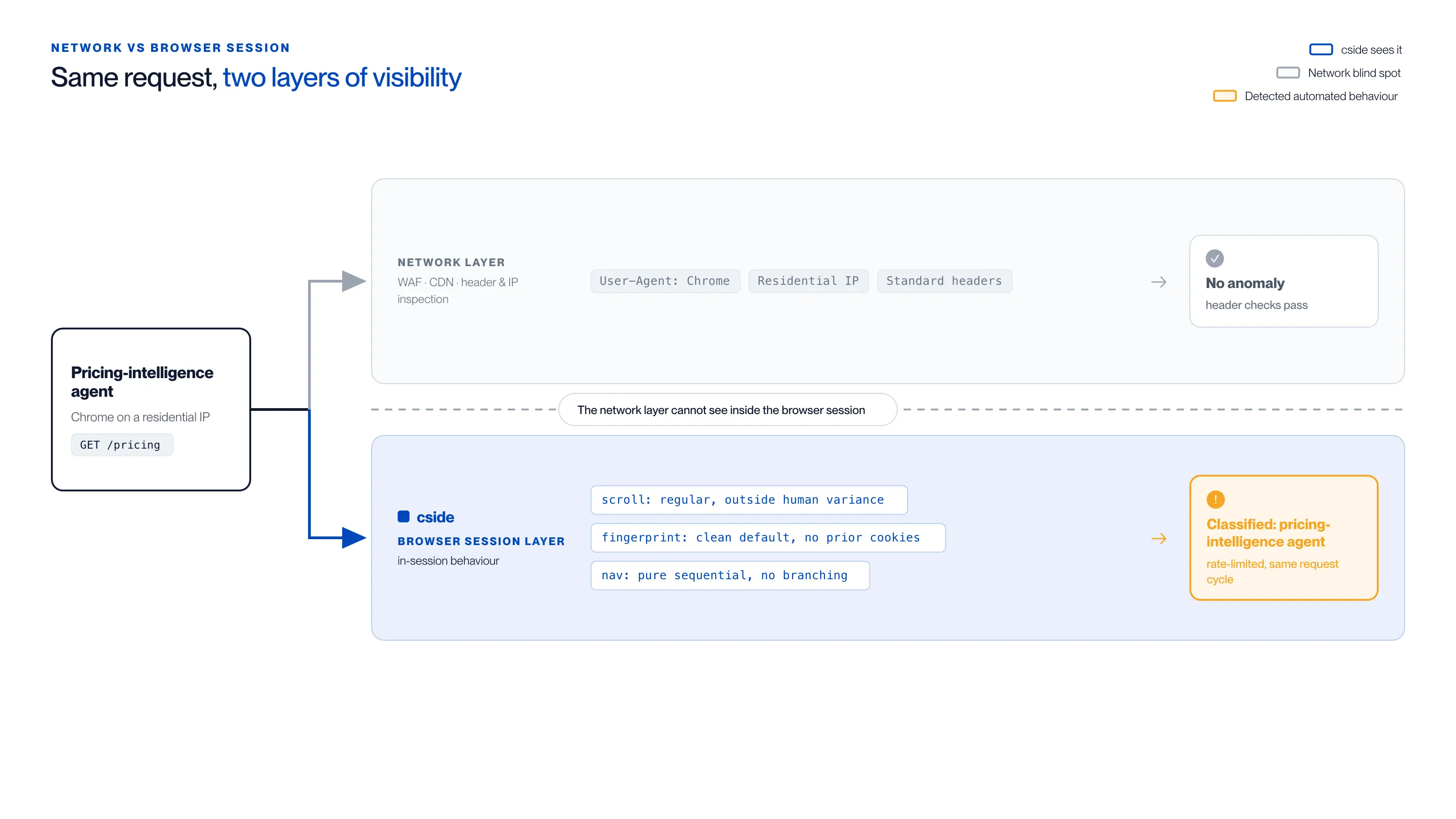
For one GET /pricing from a pricing-intelligence agent running Chrome on a residential IP, the two layers see different things:
| Network layer sees (WAF, CDN, header & IP inspection) | Browser session layer reads (cside, in-session behaviour) |
|---|---|
User-Agent: Chrome | scroll: regular, outside human variance |
| Residential IP | fingerprint: clean default, no prior cookies |
| Standard headers | nav: pure sequential, no branching |
| Verdict: no anomaly, header checks pass | Verdict: classified as a pricing-intelligence agent, rate-limited within the same request cycle |
What cside Catches That Network Tools Miss: A Concrete Scenario
Quick answer: A competitor's pricing intelligence agent visits a retailer's catalogue page every four hours. It presents a standard Chrome user-agent, originates from a residential IP, and passes all header checks. Network tools see nothing unusual. Here is what happens inside the browser session, and what cside observes.
The agent loads the category page and pauses for 1.2 seconds, a deliberate delay to mimic reading time. It then scrolls to the bottom in a single linear sweep at a constant velocity, with no acceleration or deceleration. Cursor position does not move between scroll events. The agent clicks through to 47 product pages in 8 minutes, each visit following the same pattern: load, pause 0.8 seconds, collect the price and stock field values, navigate to the next URL in sequence. No comparison logic, no filter interaction, no backtracking.
cside observes three converging signals: scroll event regularity outside human variance, a clean default-state fingerprint with no prior session cookies, and a navigation graph showing pure sequential traversal with no exploratory branching. These signals are invisible at the network layer. They are only visible inside the executing browser session, which is where cside operates. Those three converging signals are drawn from a baseline of 250+ browser, device, and network signals cside reads per session, enough to tie each session to the device behind it and build a persistent fingerprint. The session is classified as a pricing-intelligence agent and rate-limited within the same request cycle.
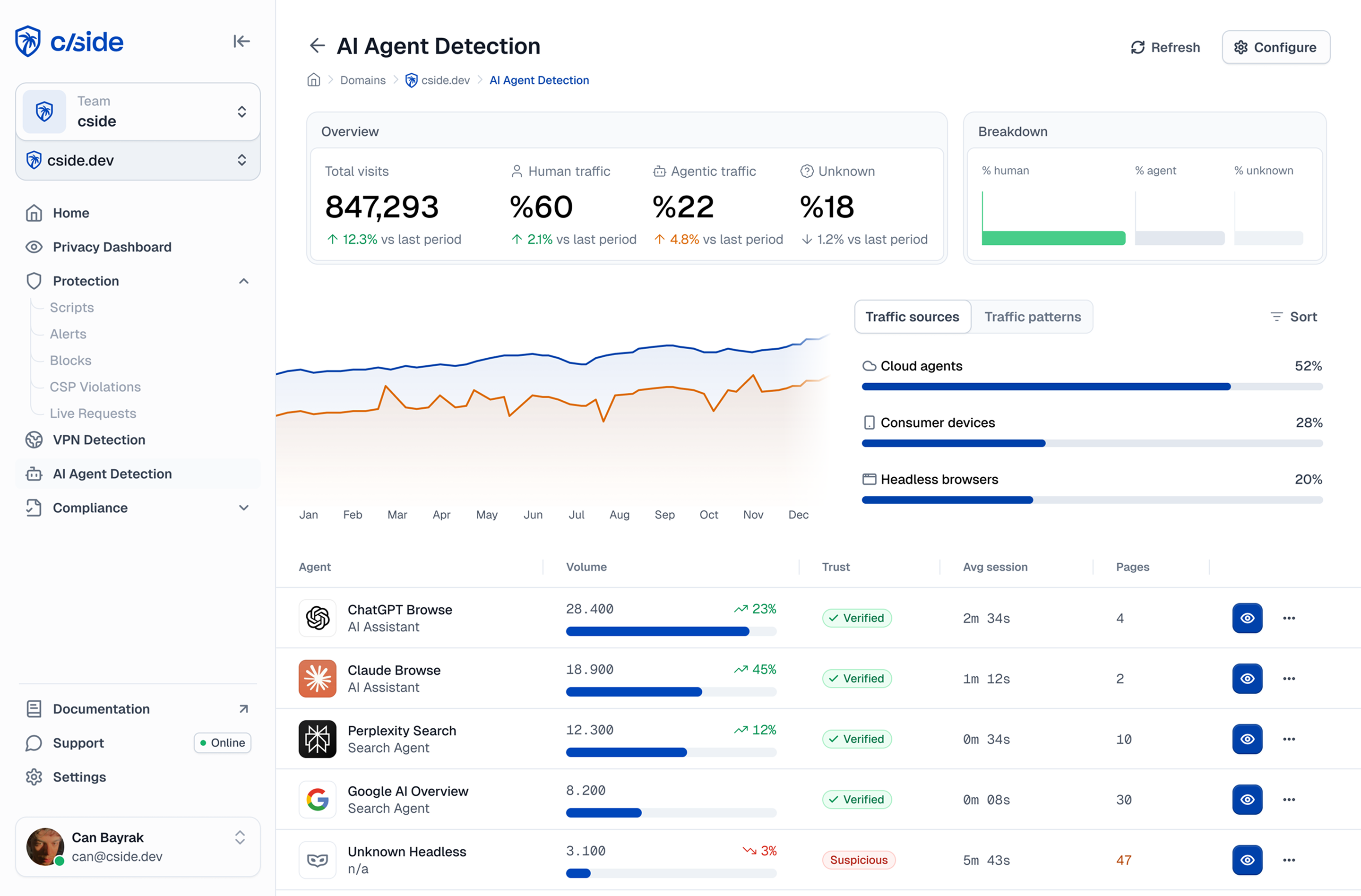
cside operates inside the browser session and surfaces the behavioural signals that distinguish agent-executed browsing from human behaviour. You can see how this works end to end on the cside AI agent detection page.
Graduated Response: What to Do When You Detect One
Quick answer: Unknown agent detection gives you a classification, not automatically a disposition. The appropriate response depends on what the agent appears to be doing. A session with low-risk signals might be monitored. One with fraud signals warrants blocking. Automated content scraping warrants rate limiting. The goal is proportional response, not binary block-or-allow.
A practical response framework:
| Signal set | Likely agent type | Recommended response |
|---|---|---|
| Clean fingerprint, linear navigation, no form interaction | Indexing/research agent | Monitor, rate-limit catalogue access |
| Clean fingerprint, checkout path traversal, machine timing | Shopping/agentic commerce | Challenge at checkout, flag for review |
| Rapid form fill, multiple accounts, payment testing patterns | Fraud automation | Block, log for investigation |
| Bulk content download, no interaction with UI elements | Content scraper | Rate-limit, add authentication walls on valuable content |
| Account creation patterns, rapid registration | Fake account creation | Challenge, require phone verification |
The right tool for implementing these responses requires session-level visibility. cside surfaces named and unnamed agents in a real-time dashboard with session-level detail, including the behavioural signal profile that triggered the classification. Payment-testing patterns in particular deserve their own playbook; see our guide to blocking AI card-testing agents.
Building a Baseline
Quick answer: You cannot identify unusual agent behaviour without a baseline of what normal traffic looks like. Start with monitoring and classification before adding blocking rules. A week of session data reveals agent traffic volume, patterns, and origin that you would never see from server logs alone.
Most organisations that first deploy browser-layer monitoring are surprised by how much agent traffic is already present on their sites. Ahrefs found that 63% of websites were already seeing traffic via AI chatbot interfaces as of early 2025. A meaningful fraction of that traffic involves automated systems that do not self-declare.
Blocking without a baseline risks cancelling legitimate sessions. Understanding your agent traffic before acting on it leads to better policy decisions, and catches patterns that suggest coordinated or escalating activity before it causes damage. This is now a recognised software category in its own right: Forrester renamed it Bot and Agent Trust Management Software in Q4 2025.



