TL;DR: how to detect AI agents on your website
- Agents evade detection: AI agents drive real browsers. They pass IP checks and fingerprint checks. Traditional bot detection does not see them.
- Behavior is the tell: Behavior is the only reliable tell: deterministic mouse paths, DOM burst reads, CDP artifacts, no viewport scroll before the query.
- Score and act: Score every session 0-100. Allow 0-30, step up 31-70, block 71-100.
Short on time? See cside's AI-agent detection. It covers everything below in one deployment.
3 methods to detect AI agents on your website
Summary table: Detecting AI agent traffic on your website
| Server Logs | Specialized AI Agent Detection | Traditional Bot Detection | Analytics Tools | |
|---|---|---|---|---|
| What it catches | Known crawlers that self-identify (GPTBot, ClaudeBot, etc.) | Stealth agents, browser-based bots, locally hosted agents, fraudulent automation | Scripted bots, known bad IPs, basic rate abuse | Traffic anomalies and patterns that indicate bot activity |
| Security depth | Misses agents that spoof its User-Agent or doesn't declare itself | Not 100% perfect coverage, but the strongest option available today | Stealth browsers, residential proxies, locally hosted agents | Can't distinguish AI agent sessions from human ones |
| How to set up | Check your CDN dashboard (Cloudflare, Vercel) or parse Nginx/Apache access logs | Add a JS snippet to your site (similar to installing analytics) | Toggle bot protection in your CDN dashboard; enterprise tiers require contracts | Configure custom dimensions in GA4 or PostHog to surface anomalies |
| Cost | Free | cside has Free, Small Business, and Enterprise plans | Free (basic) to enterprise pricing | Free |
| Best for | Quick first look at known crawler activity | Catching fraudulent agents | Blocking commodity bots and known bad patterns | Spotting something is wrong before you know what it is |
We break down specific signals to look for at the network, browser, and behavioral layers further down in this blog.
Method 1: Analyze server logs
- How it works: Every time someone (including bots) visits your website, your server writes down what it claimed to be. Many AI bots actually tell you their name. OpenAI's bot says "GPTBot," Anthropic's says "ClaudeBot,". To confirm a crawler is legitimate and not spoofed, cross-check the request IP against the crawler's officially published IP ranges.
- How to set it up: If you use a CDN or hosting platform, check their dashboards first. Cloudflare, Vercel, and Netlify already sit on your server logs and package this information in a dashboard. For self-hosted sites, your web server (Nginx, Apache) keeps access logs that you can download or search with command-line tools.
- Limitations: This only works on bots that choose to be honest. Both user-agent string and IP range based defenses can be easily evaded. The bots that are actually dangerous don't announce themselves. And browser-based agents like ChatGPT's Atlas or OpenClaw are less likely to self identify through user-agent strings.
Method 2: Specialized AI agent detection tools
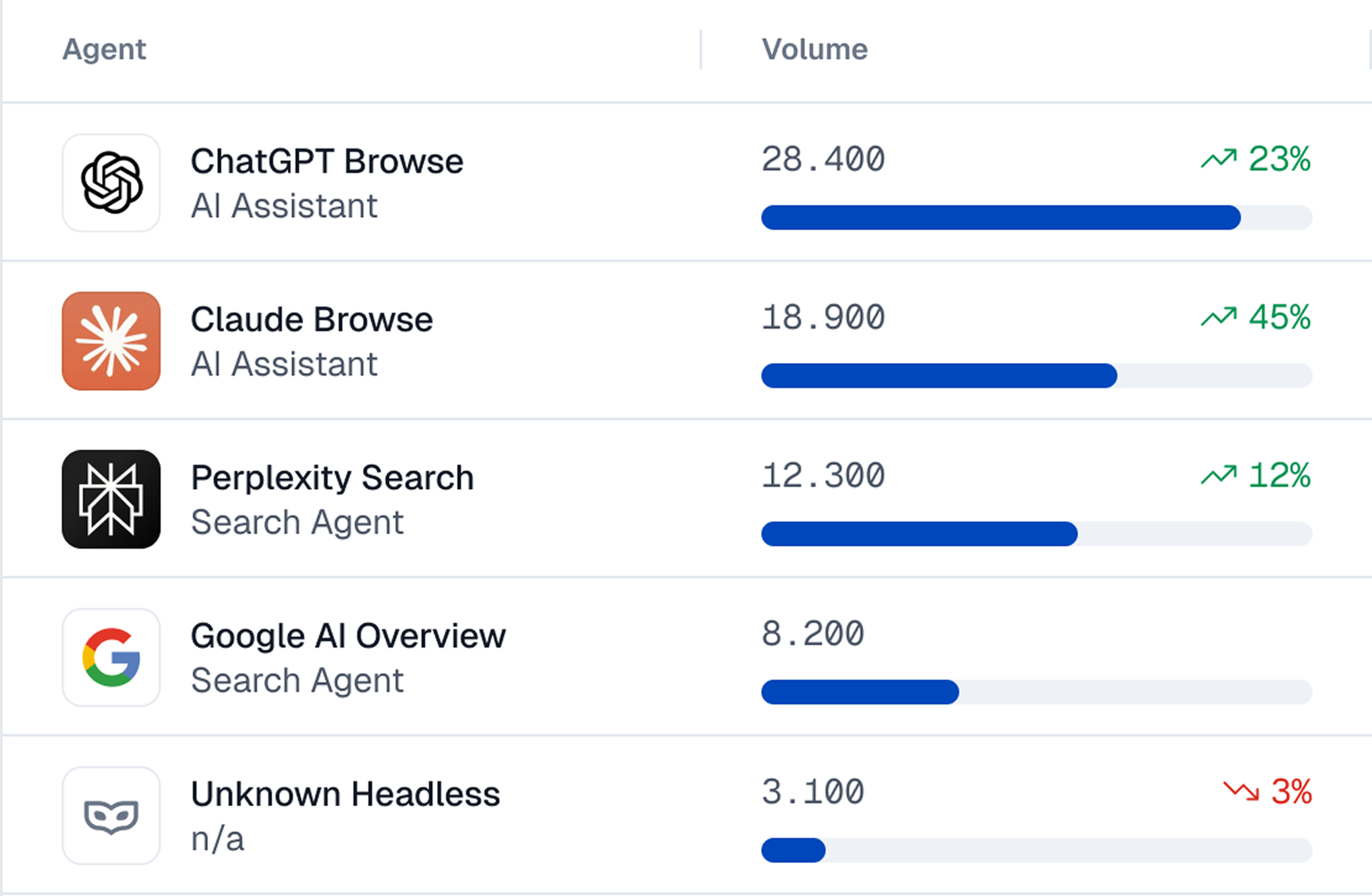
A new category of detection tools emerged specifically to address AI agents, because the problem goes well beyond scraping and crawling. 78% of CTOs at financial institutions surveyed by Accenture expect a spike in fraud driven by AI shopping agents.
- How it works: These tools monitor dozens of signals across 4 detection layers: identity (who the visitor claims to be), network (where they're connecting from), browser environment (what their runtime looks like), and behavior (how they actually interact with the page). By cross-referencing signals across all four layers, they can catch agents that pass any single check on its own.
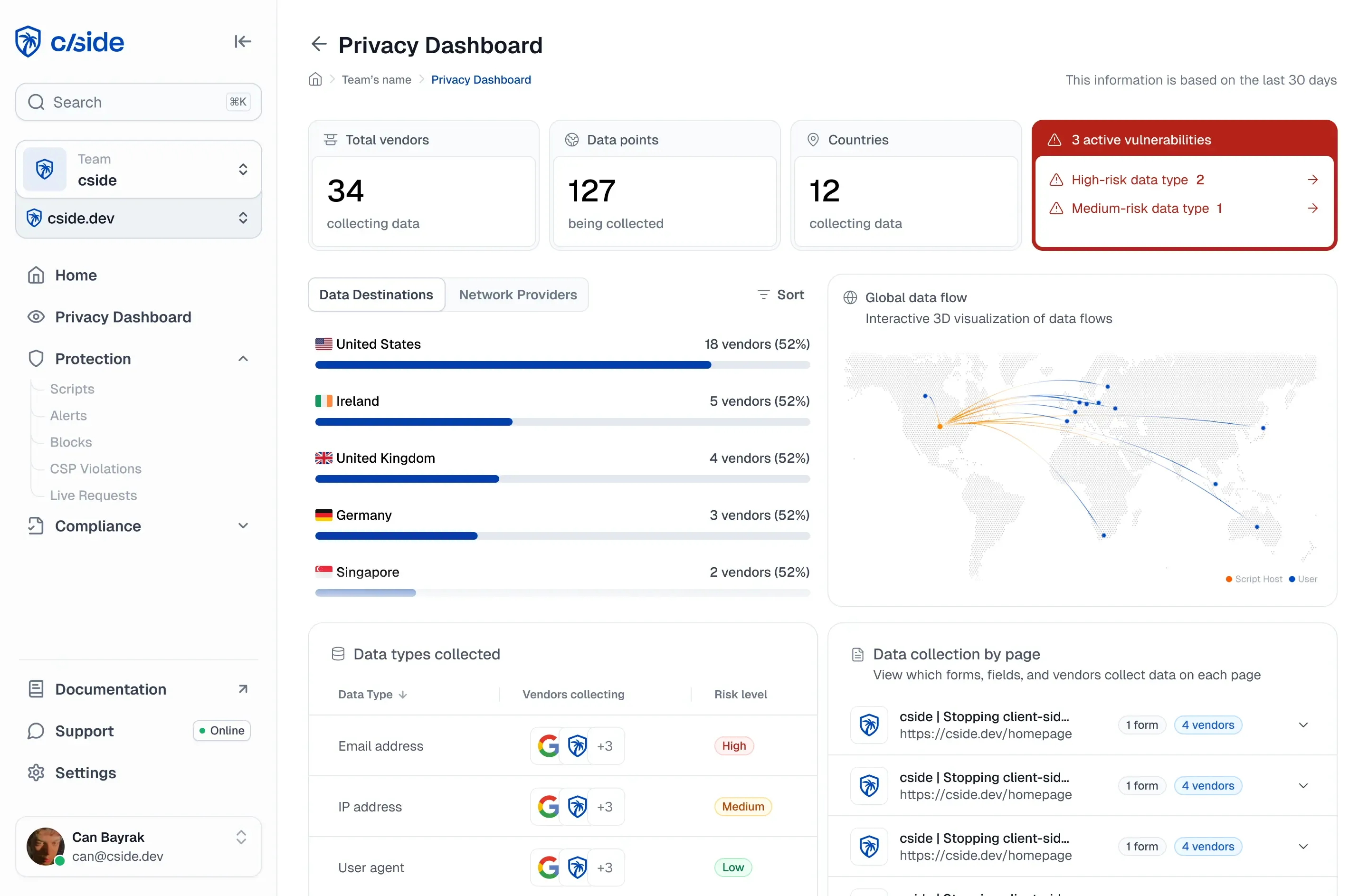
- How to set up: Most of these tools (such as cside) are installed by adding a JavaScript snippet to your site, similar to how you'd install an analytics tool. Once cside is installed it instantly monitors activity across all four signal layers and shows you a dashboard of visitors that are human, which are known agents, and which are suspicious.
We break down signals we use for our own AI agent detection further down in this blog.
Method 3: Traditional bot detection tools
Tools like Cloudflare Bot Fight Mode and Akamai Bot Manager were built to catch automated traffic. They're the most common starting point for bot defense, and one many teams already have in place.
- How they work: These tools analyze incoming requests using a combination of IP reputation, TLS fingerprints (JA3/JA4), header consistency, and challenge-response mechanisms like CAPTCHAs.
- How to set up: Most CDN providers offer a basic bot protection toggle in their dashboard. Other dedicated platforms may require a JS snippet or reverse proxy setup, plus a contract conversation.
Limitations: Plenty of security vendors slapped "AI bot detection" onto their product pages in the last year without adequately changing how their detection works under the hood. Low cost or free "add ons" for AI agent detection largely rely on looking for basic automation patterns or CAPTCHA style checks, missing many of the malicious agents.
Some of our engineers at cside ran a test by deploying AI agent based bots against two major bot detection platforms, and we bypassed detection on 81 out of 100 attempts.
Now, to be fair, there is often a massive difference between the free/add on features versus the dedicated enterprise bot management products from the same company. Tools like Cloudflare's Enterprise Bot Management go deeper with behavioral signals. But they also come with enterprise pricing that most companies can't justify.
Many of the companies we speak to don't realize how much malicious traffic they allow under the impression that toggling a "bot protection" button from a WAF vendor is all the defense they need.
Bonus method: Analytics tools (Google Analytics, PostHog)
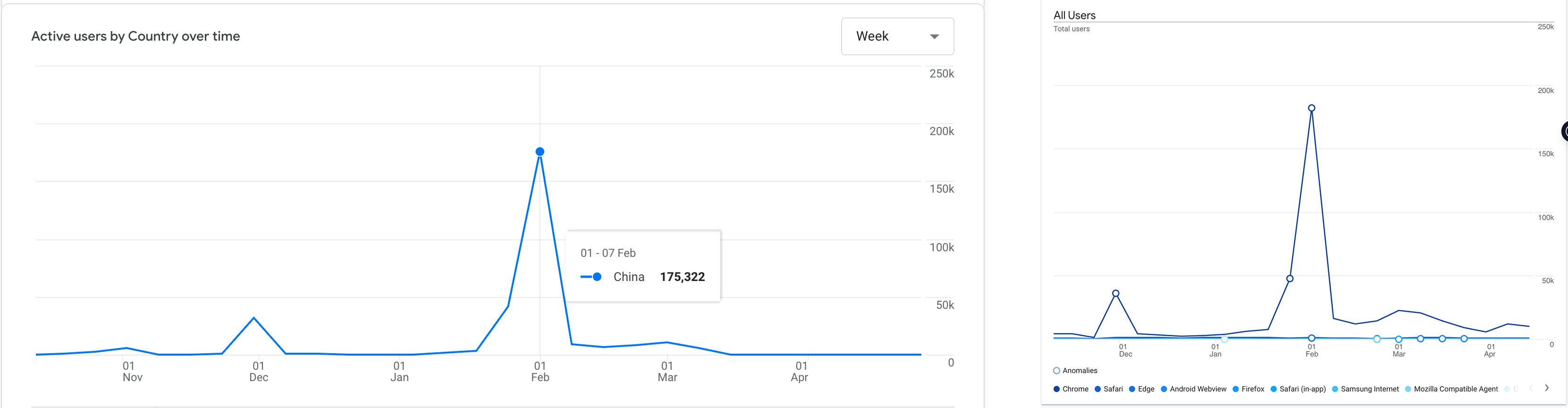
We noticed a spike from China even though that country is geo-blocked in Cloudflare. Upon inspection, this spike correlated with a rise in "Chrome" related traffic.
Google Analytics and PostHog are not bot detection tools. But we wanted to include them as a free, instant (most websites already use these tools), and no-code option that you can play with. To be clear - by default analytics tools like GA4 will miss AI agent traffic and categorize them as "real visitors". They can't distinguish between a real visitor and a Playwright script browsing your site in headless Chrome.
This is why our research found a 275% spike in forum discussions about bot traffic that bypassed the usual defense mechanisms and showed up onto Google Analytics.
But with custom parameters you can catch some agentic browser traffic:
- A rise in traffic from "Chrome" as the browser. Most automation frameworks default to Chrome or "Chromium".
- Sessions from countries you've already geo-blocked. For example, our Cloudflare set up blocked China but GA4 still shows a ton of traffic spikes from that region.
- Sudden traffic from specific cities, often Chinese cities, that make no sense for your business.
- A massive spike in traffic from a particular screen resolution (e.g. 1270x980) and the same geographical area. This can indicate a bot farm that uses thousands of the same device.
- An unexplainable spike from a random country. We had Norway go from near zero to 10,000+ sessions in a single month. This indicates VPNs/Rotating proxies used at scale by bots.
The types of AI agent traffic on your website
When people think of AI agent traffic, the first thing that comes to mind is crawlers. Crawlers do make up a large portion of automated traffic, but they're only one category.
- AI search crawlers: Agents from AI-powered search engines like Perplexity and Google AI Overviews. They visit your site to pull content into AI-generated search results.
- LLM training crawlers: Bots like GPTBot, ClaudeBot, and CCBot that scrape your content to train or update large language models. Most declare themselves in their User-Agent strings. These can be problematic for websites with content they want protected (artwork, writing, music) and not used to train LLMs.
- Scrapers: Specifically, the ones that come from outside the major AI platforms. Aggregation services pulling your data into competing products, competitors monitoring your pricing, or piracy operations copying your content at scale.
- User action agents (information retrieval): A consumer asks ChatGPT to research your product or tells Claude to compare prices across three vendors. The platform sends an agent to your site that browses pages, reads content, and brings the answer back.
- User action agents (task execution): Agents deployed by consumers to fulfill tasks. Perplexity Comet completing a purchase, a browser automation downloading a PDF or filling out a contact form. They click buttons, submit forms, and navigate flows just like a human would.
- Fraudulent agents: Agents built for explicitly malicious purposes. For example - testing batches of stolen credit cards against your payment flow or creating dozens of accounts to abuse referral bonuses. These are familiar fraud patterns, but AI agents make them cheaper to deploy and harder to catch.
AI search crawlers and LLM training crawlers can be caught with relatively basic methods. If you are worried about fraudulent agents, a specialized AI agent detection tool that is purpose built for fraud detection is a better option.
AI bot detection signals that we use at cside
| Signal Layer | What It Looks At |
|---|---|
| Identity | Who the visitor claims to be. User-Agent strings, bot signatures, and cross-checks against known crawler lists. |
| Network | Where the request comes from. IP reputation, ASN analysis (datacenter vs. residential), TLS fingerprinting (TLS handshake fingerprint/TLS handshake fingerprint), and geographic consistency between IP location and browser settings. |
| Browser/Device | Whether the browser environment is real. Automation framework artifacts (CDP traces), Browser API consistency (WebGL, Canvas, Audio), and hardware plausibility checks. |
| Behavioral | How the visitor actually interacts with the page. Typing speed, navigation timing, form fill patterns, mouse movements, and click placement. |
Identity signals
- The most straightforward way to identify an AI agent is by checking who they claim to be. This is what robots.txt was built for. Crawlers like GPTBot, ClaudeBot, and GoogleBot identify themselves through User-Agent strings or other signatures/bot identifiers.
- At cside, we maintain a list of known crawler signatures and cross-check incoming User-Agents against it, including publicly flagged aggressive or malicious crawlers.
- The limitation is that identity signals are easily spoofable. This system is only reliable for bots that choose to self declare. According to Ahrefs, up to 98% of AI traffic is from major platforms (OpenAI, Anthropic, Google, Meta) which can usually be identified through identity signals.
Other emerging approaches tackle the agent identity problem more seriously. For example Browserbase, a platform that lets users create browser automations, issues an AI agent "passport" that is a cryptographically verified credential. If this becomes industry standard across browser automation tools, AI traffic filtering would become easier for organizations.
Network layer signals
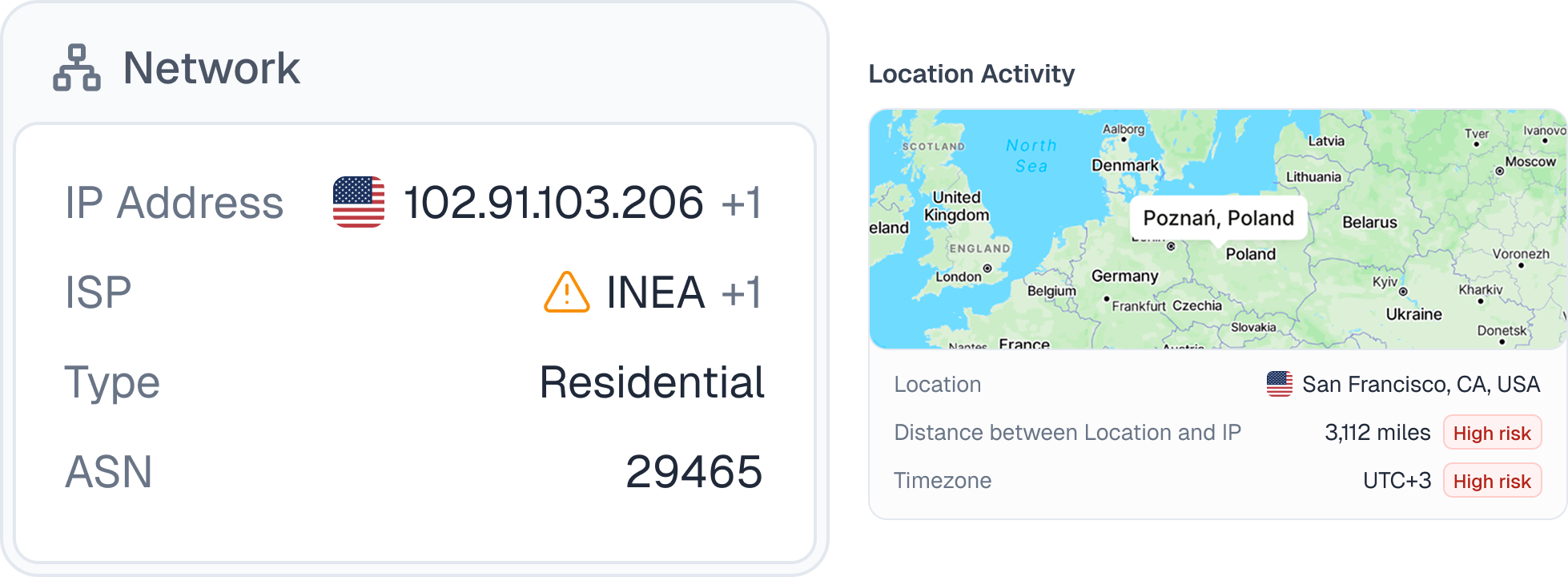
- IP reputation and ASN analysis: Every request originates from an IP address tied to an Autonomous System Number (ASN). Datacenter ASNs (AWS, GCP, Azure) are a strong indicator of automation. Residential IPs are harder to flag, but cross-referencing against known proxy networks helps.
- TLS fingerprinting (TLS handshake fingerprint/TLS handshake fingerprint): When a browser connects to your site, the TLS handshake creates a fingerprint that identifies the real client software. If someone claims to be Chrome but their TLS fingerprint looks like a Python script, you've caught a mismatch.
- Geographic consistency: Cross-reference IP geolocation with the browser's timezone and language settings. If the IP resolves to Frankfurt but the browser reports a timezone of Asia/Shanghai and a language of zh-CN, something doesn't add up.
Browser/device layer signals
- Automation framework artifacts. Playwright and Puppeteer use the Chrome DevTools Protocol to control the browser, and this leaves clues. Some that we look for are
cdc_prefixes in window objects or accessibility elements that have been stripped. - Browser API consistency: WebGL, Canvas, and Audio context should tell a coherent story about the device. When a browser reports a powerful GPU through WebGL but produces Canvas output that doesn't match or when the Audio context fingerprint is missing entirely, something has been tampered with.
- Hardware plausibility: The declared GPU, screen resolution, and operating system need to make sense together. A visitor with a 375x812 mobile resolution reporting a desktop NVIDIA GPU on Linux is not a real device profile.
Behavioral signals
Behavioral analysis focuses on how a visitor uses your site. Typing speed, time between page navigations, how forms get filled out, scroll depth, mouse movement patterns. Even sophisticated automation tends to produce patterns (or anomalies) that can be identified.
This layer requires constant evolution. Agents get smarter, and yesterday's detection signal may be patched by today. At cside, we continuously collect behavioral data and run AI models against it to surface new patterns as agent behavior changes.
Button click placement is a concrete example. One of our engineers, Martijn Cuppens, analyzed three popular browser extension-based tools:
- One clicked every button at the exact center. Another always clicked slightly off-center to the right. The third centered most of the time but would occasionally place a click at a random position within the button, an intentional attempt to introduce noise.
This is one of hundreds of behavioral signals we collect and analyze. Each one alone might not be conclusive. Together, they build a profile that's very difficult to fake.
Timing and cadence. Repeated inter-action delays can indicate automation, but model inference can also introduce uneven pauses. Compare timing across a session instead of treating one interval as proof.
Mouse trajectory. Some automated interactions jump directly to an element or repeat simple paths. Compare movement, acceleration, and click placement together, accounting for touchscreens, keyboards, and assistive technology.
Scroll behavior. Repeated jumps to target elements can add context to a risk score. Similar behavior can come from keyboard navigation or accessibility tools, so it needs corroborating signals.
Form fill telemetry. Bulk field updates and limited editing can indicate automated form filling. Password managers and browser autofill also produce these patterns; combine them with device continuity and other session signals.
Misconception: AI agents will only use websites through APIs and MCP
You'll hear this a lot: websites will shift to APIs and MCP and the browser won't matter anymore. It's a prophetic narrative, but it doesn't hold up and is certainly not the case today:
- Google published a guide on making your website agent-ready, and it explicitly covers visual UI optimization. Agents interact through DOM parsing and visual screenshots. If Google thought websites were going API-only, they wouldn't be telling you to make your buttons clearer and your layouts more stable.
- A study by Carnegie Mellon researchers found hybrid agents using both browsing and API calls significantly outperformed API-only interactions. Agents used both modalities in 77.7% of tasks. Even with a good API available, they still fell back to the browser.
Why this matters: agents browse like humans because that's what works best. They click, scroll, fill forms, and navigate page by page. That behavior is visible at the browser layer. You can't observe an API call the same way you can observe an agent working through your checkout flow. The browser is where you catch them.
Why AI agent detection is different than regular bot detection
Stealth browsers and anti-detect frameworks
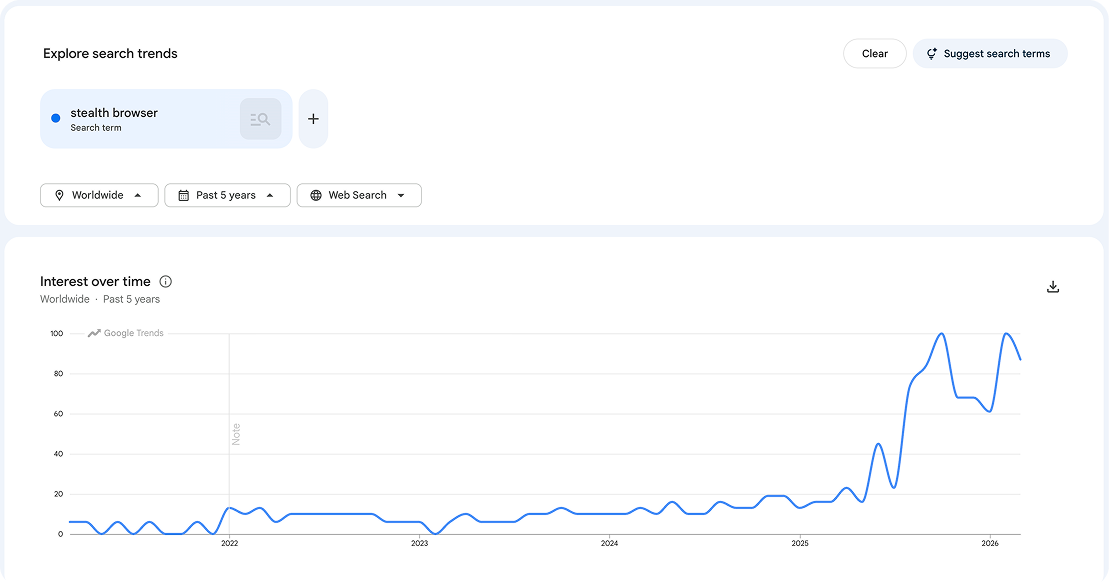
- There's a whole category of automation tools now built specifically to be invisible to bot detection such as Playwright with stealth plugins or browser-use. They suppress the
navigator.webdriverflag, spoof Canvas and WebGL fingerprints, and try to strip out the Chrome DevTools Protocol traces that most detection tools look for. - This isn't a small corner of the internet. Playwright's npm installs tripled to over 35 million monthly downloads. Google searches for "stealth browser" went from flat to continuous all time highs in the last two years.
Locally hosted automation
Traditional bots ran on cloud servers (datacenter IPs or virtual machines). AI agents increasingly run on real consumer hardware. Someone using a Claude browser extension on their personal laptop sends requests from a legitimate residential IP, a real browser, and authentic device fingerprints.
Attackers can replicate this behavior by running Playwright on local devices (Mac Minis for example) which seems indistinguishable from a consumer using a device.
From scripted patterns to reasoning-based automation
Traditional bots followed scripts. Step one, step two, step three. That predictability is what made them catchable. AI agents now reason about the page, decide what to do next, and adapt when something unexpected happens.
CAPTCHAs are not a reliable backstop now either. AI vision models now solve CAPTCHAs faster and more reliably than humans.
How to distinguish between malicious AI agents and consumer AI agents
There's a new vector to consider when it comes to bot detection. A chunk of "AI agent traffic" comes from consumers sending agents to your site.
- Perplexity Comet makes purchases on behalf of users. Amazon Buy for Me checks inventory and completes orders. Base44 books reservations. These are real products with real consumer adoption, not prototypes.
As covered in our AI agent research report, "user action" AI bot traffic increased by over 15x throughout 2025. Blocking all automation now means blocking potential revenue or at least slowing down the buying experience. These autonomous browsers also introduce new exposure for site operators, including consent bypass and payment-flow risks, which we cover in agentic AI security risks for websites.
From "bot or not" to intent classification
For years, bot detection was binary. Is this a bot? Yes? Block it. This breaks down when your customers are the ones sending the bots. Or when you value the SEO/AEO visibility that comes from crawlers.
- The new approach is intent classification: Instead of asking "is this a bot," you ask "what is this bot trying to do?" The answer determines whether you allow it, monitor it, challenge it, or block it.
Signals feed into a risk score. If a visitor tested 17 credit cards in three minutes, that's a card enumeration attack. If a session shows automation signals and is creating multiple accounts on your site, that might be multi-accounting (multiple accounts to exploit free trials or sign-up bonuses). Bot detection, fingerprinting, and account activity signals work together to trigger enforcement actions when automated activity looks like fraudulent activity.
Why your website analytics tools don't catch AI agent traffic
AI crawlers and scrapers like GPTBot and ClaudeBot don't execute JavaScript at all. They request your HTML, extract the content, and move on. Your analytics snippet never fires, so these visits never appear in GA4, PostHog, or Amplitude.
Browser-based AI agents have the opposite problem. They operate in real browsers and generate session data that looks like a human. So GA4 and other analytics tools count them as real users.
What to do when you detect AI agent traffic
Don't default to blocking
It's tempting to block everything that looks automated, but blanket blocking hurts you in two ways. You lose visibility into what's actually happening on your site, and you block consumer agents that are trying to purchase your products or recommend your brand through AI search.
Adaptive response strategies to AI agent traffic
- Redirect or serve agent-specific content: An insurance company we work with found bots running through their quoting workflow to scrape pricing. Their solution: when a bot was detected in the quoting flow, the final step showed a "contact us" screen instead of the generated quote. No price data leaked to competitors/aggregation platforms. In the case of a false positive, a human could still continue the sales process.
- Customize the experience. Rather than blocking an agent, give it a purpose-built view. A page that acknowledges "we've identified you as an AI agent, here's an optimized version" lets consumer agents get the information they need while your human visitors see the full experience.
We have a full guide that covers different fraud scenarios here: How to block fraudulent AI agents on your website.
What is bot detection
Bot detection is the process of identifying automated (non-human) traffic on a website in real time, distinguishing scripted agents, headless browsers, and AI-driven crawlers from legitimate users. Effective bot detection in 2026 combines four signal families: identity signals from HTTP headers and TLS fingerprints, network signals like ASN and IP reputation, browser signals derived from JavaScript-observable device properties, and behavioural signals from mouse, keystroke, and navigation patterns.
The distinction between what is bot detection today and what it was five years ago is the arrival of AI-driven agents that mimic human interaction convincingly. Bot detection systems that rely only on IP block-lists or User-Agent parsing miss modern AI agents entirely. Effective detection has to score signals across all four families and correlate them at the session level.
cside's in-browser detection captures the browser and behavioural signal families directly at the page level, then correlates them with network and identity signals to produce a per-session score. Internal cside tests show that 81% of AI-agent-based bots bypassed legacy bot detection platforms when tested against production defences.
Bot detection tools and software for 2026
Bot detection tools and bot detection software in 2026 fall into three categories: edge / WAF vendors (Cloudflare Bot Management, Akamai Bot Manager, Imperva) that filter traffic before it reaches the origin; dedicated fraud vendors (DataDome, PerimeterX / HUMAN, Kasada) that specialise in bot mitigation as a stand-alone product; and browser-layer detection tools (cside) that focus on in-browser device intelligence and behavioural analysis at the page level.
Each category catches a different class of bot. Edge vendors are strong on high-volume, low-sophistication traffic where blocking at the WAF is the most efficient response. Fraud vendors add behavioural analysis and are effective against credential stuffing and account creation abuse. Browser-layer tools are the tightest fit for detecting AI agents, headless browsers, and stealth automation that pass the edge filters.
cside operates in the browser-layer category, purpose-built to catch what edge tools cannot see because the traffic already reached the browser. For a category-by-category comparison, see the best AI bot and agent detection tools for 2026.
How cside solves AI bot and agentic browser detection
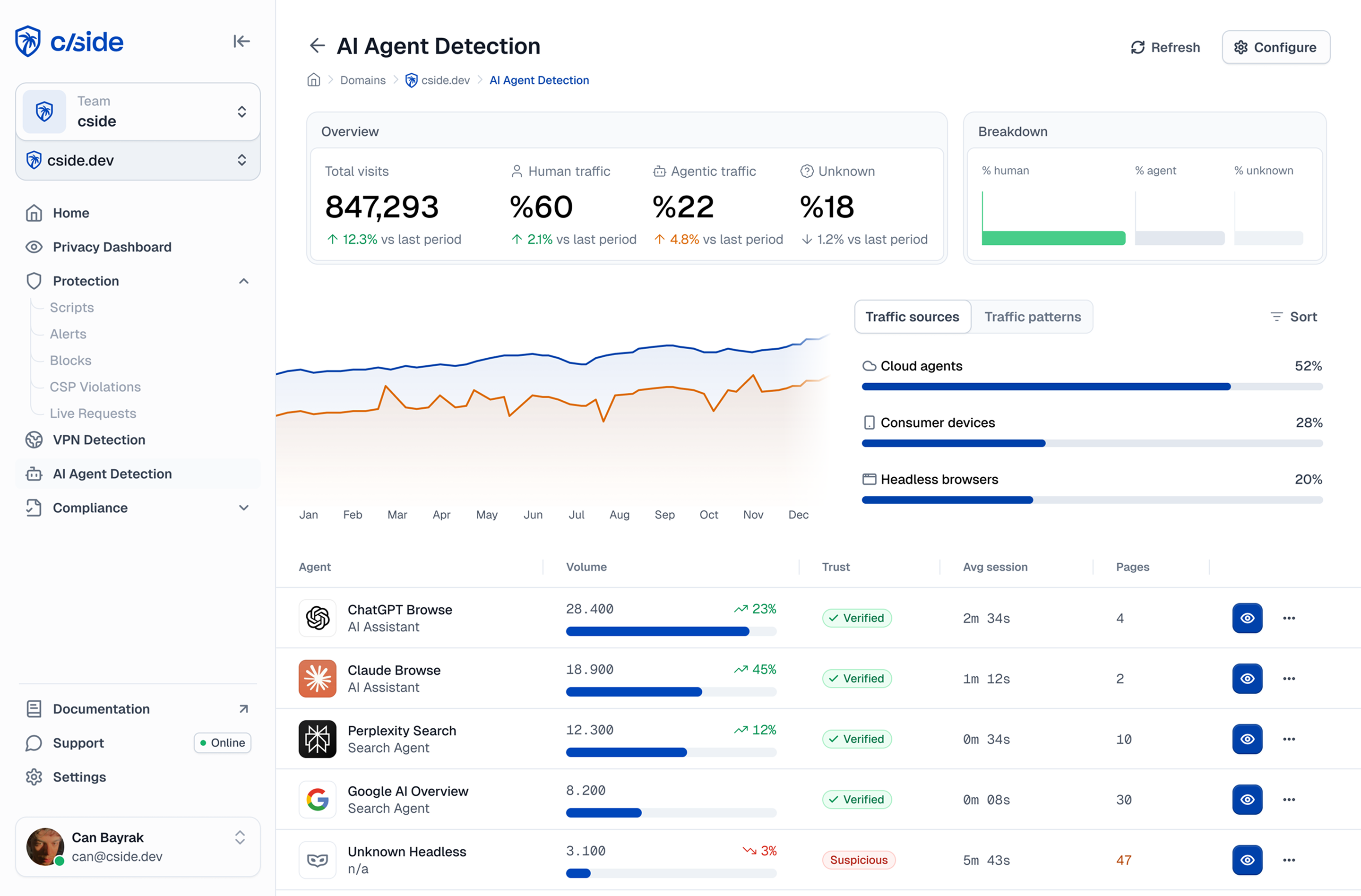
cside is a web security platform specialized in watching the browser runtime. It reads a baseline of 250+ browser, device, and network signals on every session, enough to tie each visit to the device behind it and build a persistent fingerprint even when the agent looks like a real user. cside's AI agent detection is purpose-built to identify fraudulent AI agents on your website. With cside:
- Get a dashboard of which agents are accessing your site and what they are doing
- Automatic risk scores from behavioral signals to catch bad AI agents (including browser based and locally hosted ones) that evade traditional bot defenses
- Feed detection signals into your own enforcement action workflows
- Prevent AI agent fraud such as promo code abuse, content piracy, credit card testing, vulnerability discovery, and advanced scraping
Once you know how to detect AI agents, the next question is what to put in place. For a buyer's framework, see how to evaluate and choose an AI agent detection solution as a CISO.
Related guides
- how to block AI agents on your website
- catching bots that don't want to be caught
- headless browser detection techniques
- stealth browsers and anti-detect browsers, explained
- how to detect VPN traffic on your website