
TL;DR: Ataques Magecart
- Qué es un ataque Magecart: Un ataque Magecart es un ataque de web skimming basado en el navegador en el que se inyecta JavaScript malicioso en un sitio web para robar datos de tarjetas de pago o entradas de formularios sensibles directamente desde el navegador del usuario durante el proceso de pago o de inicio de sesión.
- Por qué los ataques Magecart son difíciles de detectar: Magecart opera completamente en el navegador, por lo que las defensas tradicionales como los WAF, los SIEM y la monitorización de transacciones no detectan nada inusual mientras los pagos legítimos siguen procesándose con normalidad.
- Cómo prevenir los ataques Magecart: Una prevención eficaz requiere minimizar los scripts en las páginas de pago, gobernar y monitorizar el JavaScript de terceros, aplicar controles del navegador como CSP y SRI, y desplegar una herramienta de monitorización continua del lado del cliente como cside.
¿Poco tiempo? Consulta el bloqueo de Magecart y skimmers en el navegador de cside. Cubre todo lo de abajo en un solo despliegue.
"Recientemente me notificaron de una brecha de datos en tu tienda y mi tarjeta de crédito ha sido usada de forma fraudulenta."
Esto es una pesadilla para el soporte al cliente. Tus equipos de fraude y finanzas también están recibiendo alertas de los emisores de tarjetas y preguntas de los proveedores de pago.
Magecart no falsifica las páginas de inicio de sesión o de pago. Abusa de las páginas reales de inicio de sesión y de pago en las que tus clientes ya confían.
Tu inicio de sesión y tu proceso de pago se convierten en el eslabón más débil de tus controles de seguridad. Ni siquiera servidores sólidos, un WAF y controles PCI evitarán que unas pocas líneas de JavaScript malicioso en el navegador capturen datos de tarjeta y PII durante semanas antes de que alguien lo note.
Esta guía muestra qué es Magecart, cómo funciona, por qué es difícil de detectar y las herramientas para prevenir Magecart.
What is a Magecart attack?
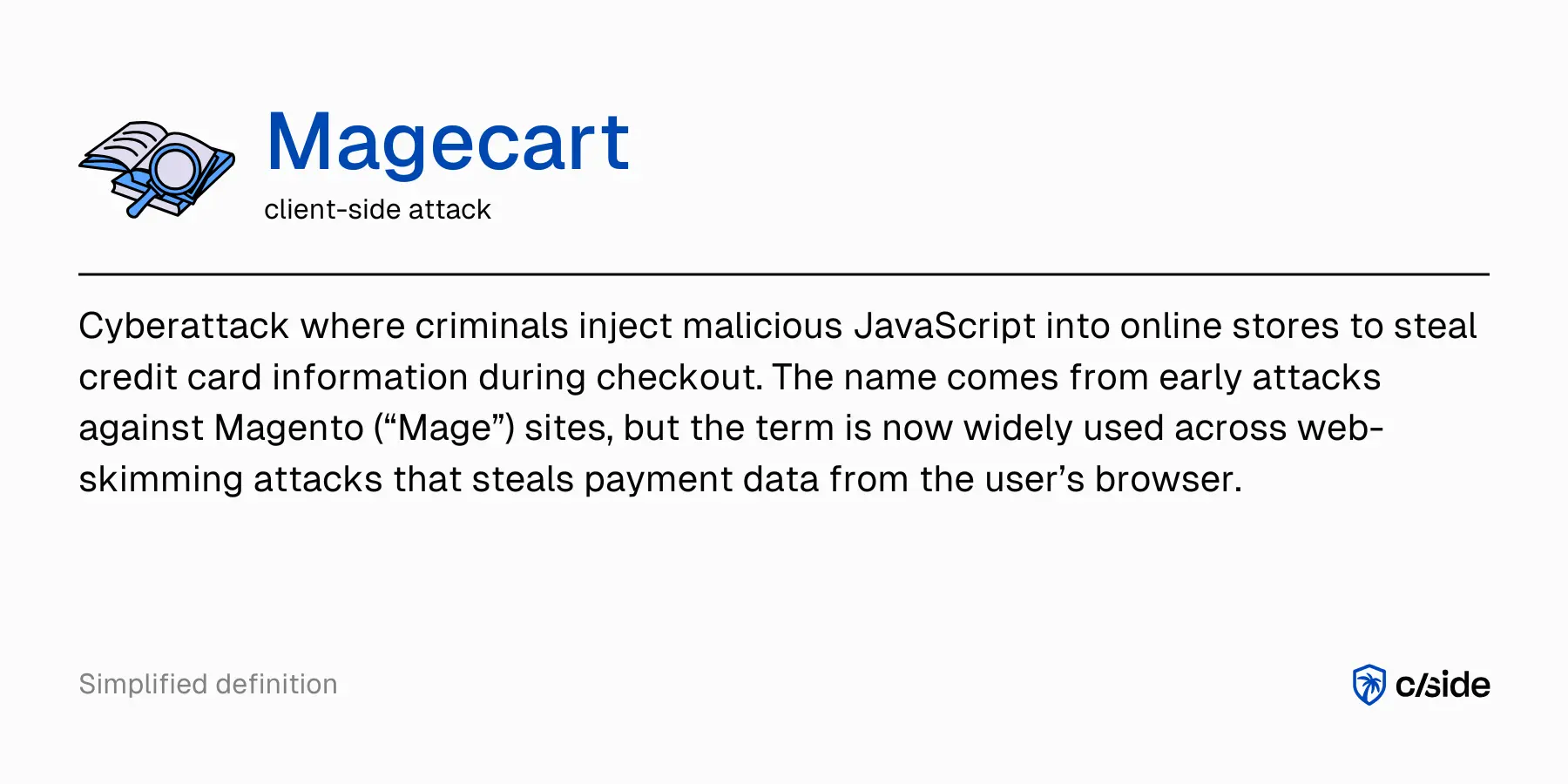
Un ataque Magecart es un ataque de web skimming basado en el navegador. Se inyecta JavaScript malicioso en un sitio de comercio electrónico con un único propósito: robar datos de tarjetas de pago.
Es algo que no le deseas a nadie, ni a ti ni a tus clientes. Es una pesadilla para las tiendas online porque abusa de la confianza de tus clientes. Causa un daño enorme al negocio online: pérdidas económicas, contracargos, multas regulatorias y un grave daño reputacional.
Tu WAF y tu stack de seguridad del lado del servidor no verán nada de esto. El ataque vive por completo en el navegador del usuario, en un entorno de código que tu monitorización de backend nunca toca. Incluso otros controles relacionados con PCI DSS, como el cifrado o la tokenización, no sirven de nada si el atacante roba los datos de la tarjeta antes de que esas defensas entren en juego. Las transacciones en tu lado simplemente siguen completándose como si nada fuera mal. Desde tu perspectiva, parece un día normal de negocio. Pero mientras tanto, los datos se exfiltran silenciosamente desde el navegador de tu cliente hacia los servidores del atacante.
Magecart es un tipo de web skimming
Magecart es una forma de web skimming (o e-skimming). El web skimming es la versión online del skimming de tarjetas de crédito en cajeros automáticos: las pulsaciones de teclas o las entradas son copiadas por dispositivos ocultos y luego usadas para gastar dinero en otro lugar. Cuando los atacantes añaden su JavaScript malicioso a una tienda online, se abren muchas oportunidades para ellos. Pueden ver lo que un usuario escribe en los formularios de pago o de inicio de sesión y exfiltrar en secreto estos datos a sus propios sistemas.
Cómo ha evolucionado el término "Magecart"
Alrededor de 2015-2016, los investigadores de seguridad empezaron a reportar que las tiendas online basadas en Magento estaban siendo objetivo de ataques de skimming de tarjetas online. Normalmente, se inyectaba JavaScript en las páginas de pago para robar y exfiltrar datos de pago e información personal. De ahí: 'Magecart' - 'Mage' de Magento y 'cart', abreviatura de carrito de compra.
Con el tiempo, los ataques Magecart se extendieron a otras plataformas y configuraciones de comercio electrónico personalizadas. Cualquier plataforma con JavaScript del lado del cliente y scripts de terceros era vulnerable, no solo Magento.
Del skimming de tarjetas en Magento a los ataques de estilo Magecart en todas partes
Magecart evolucionó hasta convertirse en un estilo de ataque: una etiqueta para el skimming digital, el formjacking, el e-skimming, el skimming de tarjetas online, y se ha convertido en una amenaza importante para las plataformas de venta minorista online.
Magecart es menos un apodo para un grupo específico y más una etiqueta paraguas para un ecosistema de grupos y técnicas de skimming digital. En términos generales, usan el mismo vector de ataque pero se apoyan en infraestructuras y herramientas distintas.
How Magecart attacks work
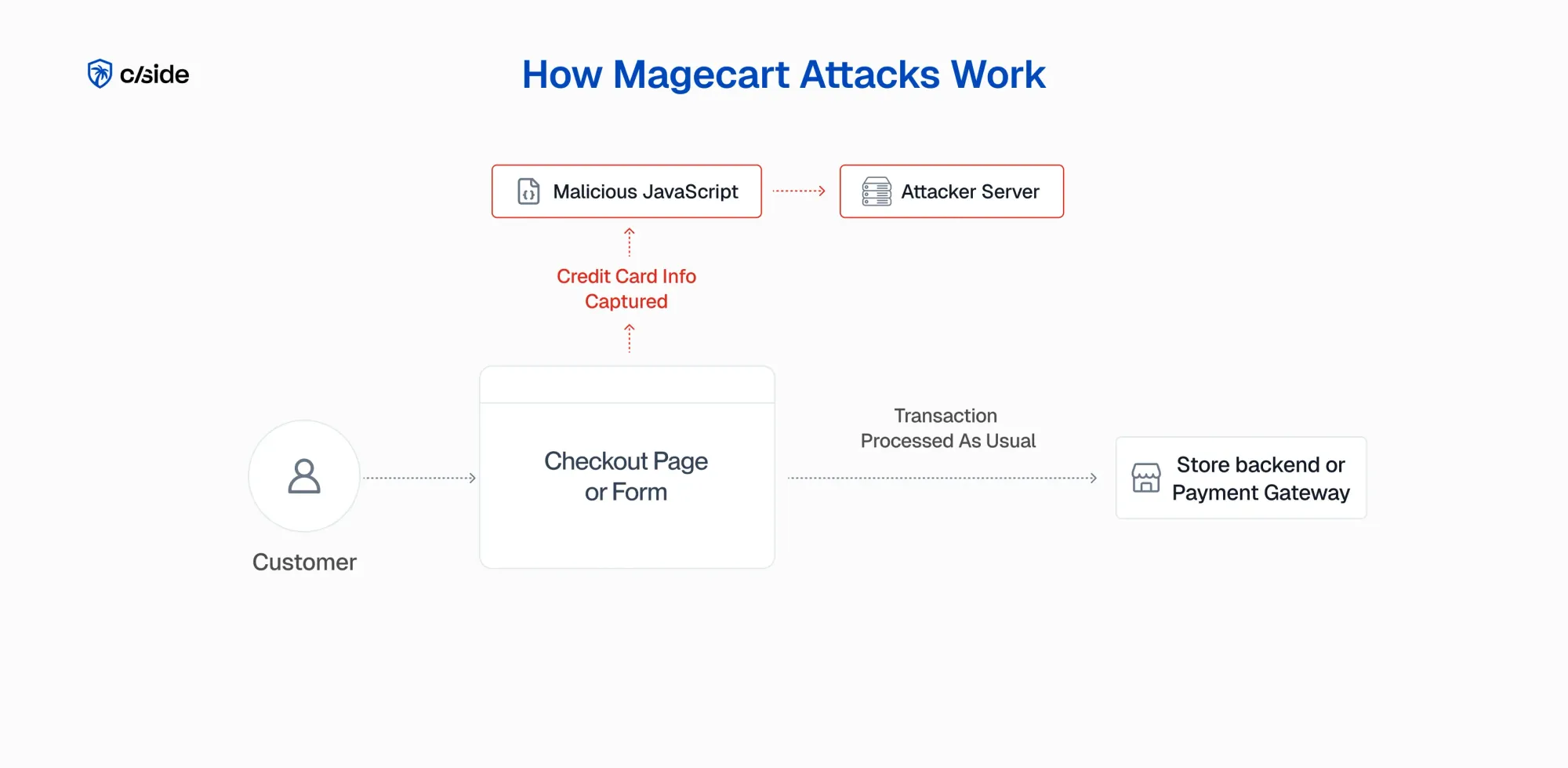
La idea parece sencilla: copiar los datos del formulario y exfiltrarlos a un endpoint comprometido. ¿Qué tan difícil puede ser? En realidad, estos ataques son más sutiles y sofisticados. En todo momento, la tienda online debe comportarse como se espera: sin errores, sin tiempos de espera.
Para que el skimming digital tenga éxito, ni tus sistemas de monitorización ni tus clientes deben notar nada fuera de lo normal.
Así se desarrolla un ataque Magecart típico en el navegador.
1. Inyectar JavaScript malicioso en el sitio
Primero, el atacante necesita una forma de ejecutar su propio JavaScript en el navegador del usuario, porque ahí es donde tiene lugar el ataque. Busca vulnerabilidades como plugins o componentes de CMS desactualizados o mal configurados, o scripts de terceros descuidados como un plugin, archivos de CDN, gestores de etiquetas, etc.
Este punto débil se convierte en el vector de ataque: el atacante añade un par de líneas de su JavaScript malicioso a un archivo de producción existente o a un script de terceros. El cambio es mínimo, a menudo mezclado con código legítimo, así que nada llama la atención durante una revisión de seguridad.
2. Leer los datos de pago y del formulario
Una vez hecho esto, el JavaScript malicioso accede al DOM y lee los datos que el usuario introdujo en el formulario. Que JavaScript acceda y modifique el DOM es un comportamiento normal en el desarrollo web moderno. Es la forma en que JavaScript hace las páginas dinámicas sin recargar todo el documento HTML. Muchos frameworks como React o Svelte se basan en que JavaScript puede manipular el DOM.
El skimmer digital se centra ahora en campos específicos del formulario de pago o de inicio de sesión: número de tarjeta, fecha de vencimiento, CVV, nombre, dirección, etc. Copia estos valores sin modificar el formulario ni el flujo del usuario de ninguna forma visible.
3. Exfiltrar los datos al servidor del atacante
Una vez capturados los datos, el siguiente paso es transferirlos sin ser detectados a un servidor controlado por el atacante. La mayoría de las veces, el disparador de la exfiltración es que el usuario haga clic en el botón de "pagar"/"enviar". En ese momento, el script ensambla el payload (en bruto o codificado) con los datos de la tarjeta, la información personal y a menudo detalles de contexto como marcas de tiempo o URLs.
Las técnicas de exfiltración habituales incluyen fetch, XMLHttpRequest (para código antiguo), solicitudes de imágenes ocultas y navigator.sendBeacon(). TLS/HTTPS no detendrá la exfiltración porque parece una solicitud https legítima, con un payload muy pequeño. Los atacantes suelen usar dominios muy parecidos a los nombres de host legítimos de tiendas online, CDN o servicios de analítica, para no levantar sospechas. Si la solicitud de exfiltración falla, el código simplemente captura el error y no se ejecuta. Pero la transacción legítima sí se completará.
4. Mantener la tienda funcionando y el fulfillment en marcha
Para que el ataque Magecart sea eficaz, las transacciones deben seguir fluyendo. El skimmer exfiltra una copia de los datos, pero el formulario de pago también se envía a tu backend y a la pasarela de pago. Se crean pedidos, se autorizan pagos y tus sistemas de fulfillment se ponen en marcha.
How attackers gain access to web scripts for Magecart attacks
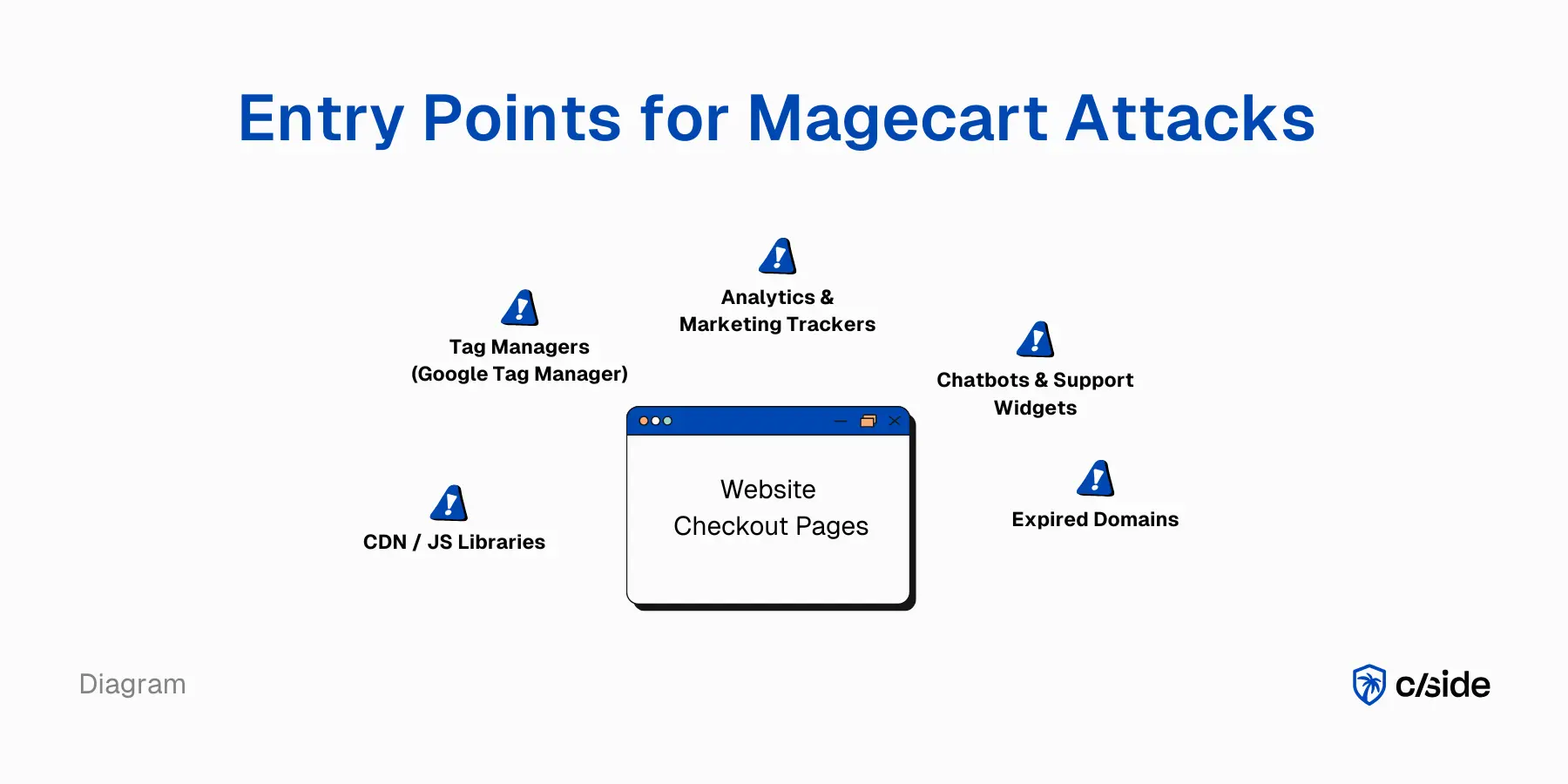
Los atacantes buscan puntos débiles en tu stack web: lugares donde los scripts pueden editarse y el código de skimming puede colarse. Para defender tu sitio y construir un modelo de amenazas eficaz, debes centrarte en algunos vectores de entrada comunes de los ataques Magecart.
1. Magecart a través de plugins, CMS o código de la plataforma de comercio electrónico
Tu propio CMS o plataforma de comercio electrónico es una superficie de ataque directa. Plataformas como Magento, WooCommerce, apps de Shopify y código de checkout personalizado necesitan una revisión periódica. Los puntos débiles habituales son los plugins y extensiones desactualizados, o las ediciones inseguras de plantillas o archivos JavaScript. Las cuentas de administrador necesitan protección adicional: si un atacante puede iniciar sesión como administrador, los cambios en los scripts son fáciles.
Si tu tienda online tiene un plugin de pago o de seguimiento desactualizado en Magento o WooCommerce, el skimming digital está a un solo paso. Si los atacantes consiguen modificar los archivos del plugin o abusar de una cuenta de administrador, solo necesitan editar un único archivo JavaScript en la página de pago para añadir su skimmer.
2. Magecart a través de la cadena de suministro de código de terceros
Esto incluye cualquier entrada mediante
A veces una cuenta de Google Tag Manager (GTM) o un widget de chat externo tiene código que se carga en todo el sitio (incluidas las páginas de pago) aunque no cumpla ninguna función en esas páginas. Si se secuestra GTM y se añade una etiqueta adicional con código JavaScript de skimmer, cada formulario de pago de cada sitio que use ese contenedor ejecuta ahora código Magecart.
Why Magecart attacks are hard to detect
Ahora que hemos visto cómo funciona un ataque Magecart en el navegador, es justo preguntarse: ¿por qué las defensas tradicionales no lo detectan? Tenemos reglas de WAF, dashboards de SIEM y controles PCI. Sin embargo, estas capas de seguridad siguen teniendo un punto ciego para los ataques del lado del cliente, basados en el navegador, como Magecart.
1. El WAF, el SIEM y los datos de transacciones pasan por alto los ataques Magecart
La mayoría de las herramientas de seguridad web están diseñadas para proteger la actividad del lado del servidor o monitorizar la infraestructura de la empresa, no el navegador de los usuarios. Un WAF inspecciona el tráfico hacia tus aplicaciones, pero no ve lo que el navegador envía directamente a otros dominios. Un SIEM muestra los registros del servidor y de la infraestructura, pero no registra las llamadas salientes adicionales del navegador hacia endpoints maliciosos.
Analizar los datos de transacciones en busca de fraude no revelará evidencia de un ataque Magecart, porque el flujo de compra legítimo sigue completándose con normalidad. El skimmer copia los datos de la tarjeta en el navegador mientras el backend ve una transacción limpia y autorizada sin anomalías.
Los atacantes hábiles pueden interceptar valores sensibles a nivel del DOM antes de que se envíen a tus servidores, silenciando de forma efectiva tus sistemas de alerta.
2. La falta de visibilidad sobre scripts de terceros aumenta el riesgo de Magecart
Tener visibilidad completa sobre los scripts de terceros es un gran desafío. ¿Qué scripts se están ejecutando? ¿Tienen permiso para ejecutarse en un formulario de pago o en una página de inicio de sesión? ¿Quién hace seguimiento de su comportamiento y de sus cambios a lo largo del tiempo? Son preguntas muy básicas con las que muchas organizaciones tienen dificultades cuando nadie es plenamente responsable de la cadena de suministro del lado del cliente.
Los desarrolladores web tienen un control limitado sobre estos scripts, porque son gestionados y alojados por proveedores externos. Cuando cambia la propiedad o se despide a personal, es posible que los scripts de terceros o las bibliotecas de JavaScript dejen de actualizarse, y una vulnerabilidad en cualquiera de esos scripts de terceros puede convertirse en un riesgo de seguridad.
Este es precisamente el vector de entrada que explotan los ataques Magecart. Comprometer un script o biblioteca de terceros muy utilizado puede convertirlo en un ataque de cadena de suministro a gran escala en todos los sitios que lo usan.
3. Un problema del lado del cliente necesita una defensa del lado del cliente
Este es el problema central de Magecart: la mayoría de las empresas no tienen visibilidad real de lo que ocurre en el navegador. Los dashboards de seguridad del lado del servidor no muestran a qué dominios envía solicitudes el navegador durante el proceso de pago, aunque se trate de llamadas de origen cruzado (CORS).
No alertan cuando aparece un nuevo dominio de salida en un formulario de pago. Y no avisan de una infracción de la Content Security Policy (connect-src) cuando un script intenta exfiltrar datos hacia un endpoint inesperado.
4. El fraude solo se descubre más tarde, mucho más tarde
Uno de los aspectos más dañinos de un ataque Magecart es que rara vez lo detecta la propia organización que sufrió la brecha. En la mayoría de los casos, las primeras señales de alarma vienen de bancos, emisores de tarjetas o clientes. Para cuando estos informes externos salen a la luz, el skimmer ya ha recopilado un volumen significativo de datos de titulares de tarjetas.
Guías relacionadas
Profundiza en el tema:
How to prevent Magecart attacks
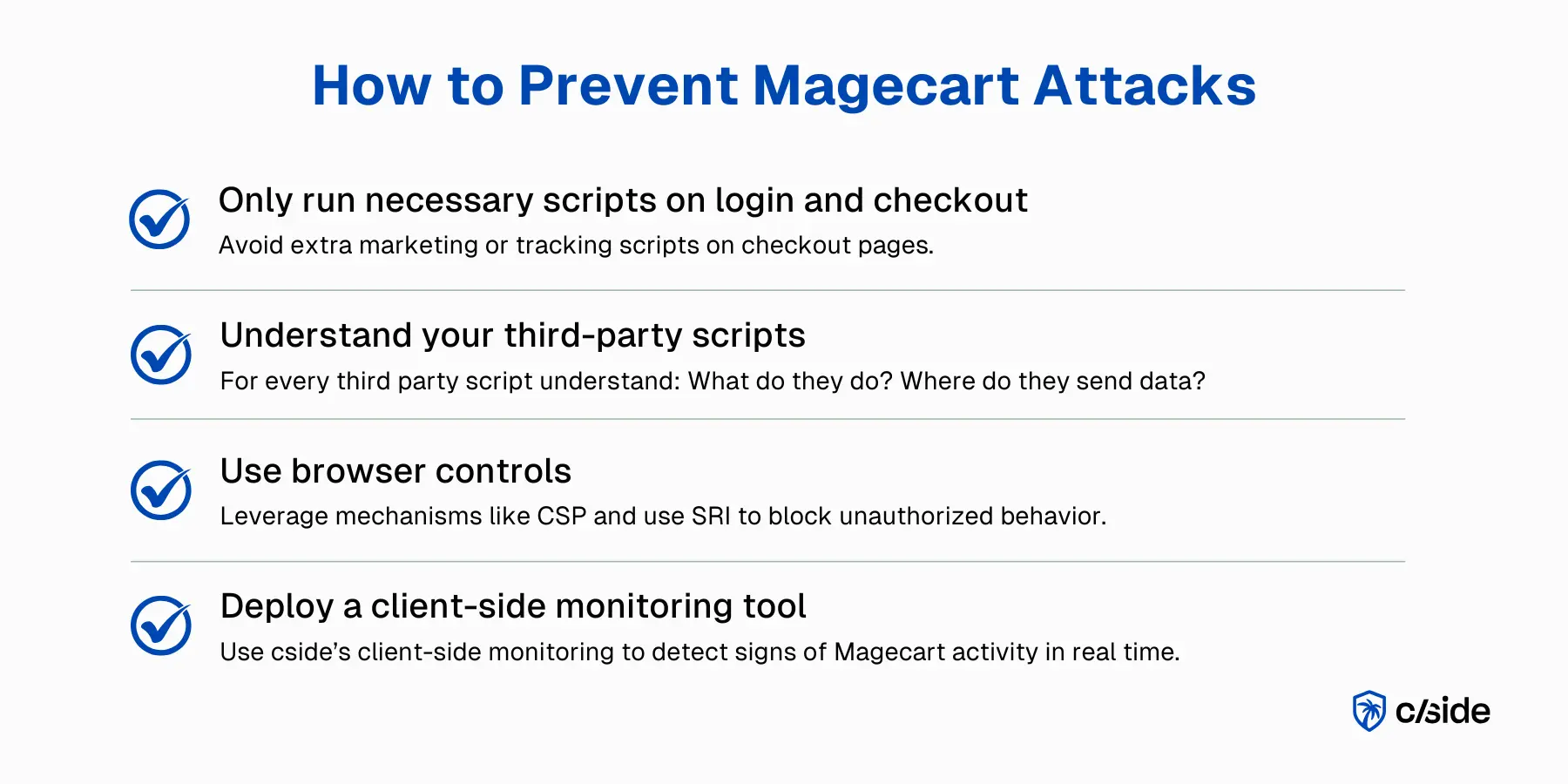
Los principios básicos de la prevención de Magecart son sencillos: mantén tu flujo de pago lo más limpio y minimalista posible, mantén el control de los scripts que se ejecutan ahí y añade controles del lado del navegador con monitorización continua 24/7. Estos pasos te ayudarán a reducir tu exposición a Magecart.
1. Ejecuta solo los scripts necesarios en el inicio de sesión y el pago
En el inicio de sesión y en el pago, cada script adicional añade riesgo. Estas páginas deben cargar solo la UX básica y lo estrictamente necesario para la autenticación y el pago. Sin dudarlo, elimina marketing, analítica, widgets de chat, etc. del inicio de sesión y del pago.
Preferiblemente, aísla el checkout y usa una plantilla minimalista o incluso un subdominio separado con solo las entradas de terceros necesarias. Esto limita tu superficie de ataque y las oportunidades de que el código Magecart oculte sus rastros. También hace que la limpieza sea mucho más fácil si algo sale mal.
2. Usa cside para la gobernanza de scripts de terceros
Crea un inventario de scripts para tener una visión clara de qué scripts se ejecutan y dónde, y qué hacen realmente. Las páginas sensibles, incluidas las de inicio de sesión y pago, solo deberían servir scripts de terceros que hayan sido aprobados con una justificación.
Por último, define un proceso de gestión de cambios para especificar quién puede modificar scripts y contenedores de gestores de etiquetas. También puedes exigir vistas previas y aprobación antes de que los cambios entren en producción. En paralelo, aplica una gobernanza estricta de proveedores e incluye la seguridad de scripts y la gestión de incidentes como parte de los contratos y la incorporación de proveedores externos.
Una herramienta de gobernanza de scripts de terceros puede automatizar estos elementos al instante con un dashboard que asocia cada script a un proveedor y genera automáticamente descripciones de lo que hace cada script.
3. Usa controles del navegador: CSP y SRI
Una Content Security Policy (CSP) te ayuda a definir desde dónde pueden cargarse los scripts (script-src) y hacia dónde puede enviar datos el navegador (connect-src).
script-src debe restringirse a dominios de confianza y connect-src debe permitir solo los endpoints necesarios para el pago, en lugar de permitir cualquier destino.
Habilitar una CSP también ayuda a reportar infracciones de la política, especialmente en el inicio de sesión y el pago. Se revelarán intentos inesperados de inyección de scripts y de exfiltración. Para bibliotecas de terceros estáticas, usa Subresource Integrity (SRI) para reforzar la integridad, pero trátalo como una capa más de tu defensa, no como la solución definitiva.
4. Usa cside para monitorizar Magecart
Con Magecart, necesitas ojos en el navegador. La monitorización automatizada y continua del lado del cliente, 24/7, revelará qué scripts se están ejecutando y qué comportamientos sospechosos señalan actividad de Magecart. Una herramienta de prevención de Magecart mapea todos los scripts de tu sitio y usa un motor asistido por IA para detectar señales de alerta a partir de una variedad de puntos de datos.
cside ayuda a los comercios a identificar y detener:
- Ataques a la cadena de suministro de JavaScript de terceros
- Scripts de terceros maliciosos o manipulados
- Scripts mal configurados que filtran datos sensibles
- Magecart, e-skimming, formjacking y skimmers relacionados
cside está validado para los requisitos del lado del cliente de PCI DSS 4.0.1 y lo usan equipos de cumplimiento para prevenir infracciones de RGPD, CCPA y otras violaciones de privacidad causadas por scripts de terceros de riesgo.
Magecart readiness quick self-assessment
¿Estás preparado para hacer frente a ataques de estilo Magecart? Sí/no
- Nuestras páginas de pago e inicio de sesión solo cargan scripts cuyo propósito y comportamiento esperado conocemos
- Tenemos una lista actualizada de todos los scripts, propios y de terceros, que se ejecutan en nuestra página de pago.
- El marketing, la analítica, las pruebas A/B y los widgets de chat se monitorizan para asegurar que no recopilan más datos de los necesarios
- Los cambios en scripts "de confianza" como los contenedores de gestores de etiquetas...
- Verificamos la integridad de los scripts mediante una herramienta de seguridad del lado del cliente u otro mecanismo (como Sub Resource Integrity)
- Tenemos monitorización del lado del cliente que muestra a dónde se envían los datos recopilados por scripts de terceros
- Tenemos un mecanismo para bloquear scripts que hayan sido identificados públicamente como comprometidos
Biggest Magecart attacks in recent history
Nuestro informe de amenazas del lado del cliente de 2025 identificó más de 72.000 sitios web afectados por ataques del lado del cliente. Los mayores ataques Magecart de la historia reciente siguen el mismo patrón: unas pocas líneas de JavaScript malicioso comprometen a millones de usuarios antes de que nadie lo note. A continuación, un resumen rápido de los casos más destacados.
- Ticketmaster (2018) - Script de chatbot comprometido Los atacantes inyectaron código de skimming en un chatbot de terceros alojado por Inbenta Technologies. Cada carga de página ejecutaba el script malicioso, exponiendo datos de pago y personales de aproximadamente 9,4 millones de clientes durante cuatro meses. El incidente derivó en multas regulatorias y acuerdos en demandas colectivas.
- British Airways (2018) - 22 líneas de JavaScript malicioso Los atacantes obtuvieron acceso usando credenciales de terceros comprometidas e insertaron solo 22 líneas de código skimmer en una biblioteca usada en la página de pago de BA. Los datos se exfiltraron a un dominio muy similar al legítimo ("baways.com"), afectando a unos 400.000 clientes. BA se enfrentó a decenas de millones en multas por RGPD y años de litigios.
- Newegg (2019) - Script inyectado en la página de pago Los atacantes obtuvieron acceso de escritura al servidor de pagos de Newegg y añadieron un pequeño skimmer al botón de pago. Cuando los clientes enviaban el pago, los datos de la tarjeta se enviaban a un dominio de analítica falso ("neweggstats.com"), comprometiendo números de tarjeta, CVV y datos personales durante más de un mes antes de ser detectado.
What is Magecart
Magecart es una familia de ataques de skimming basados en el navegador en los que se inyecta JavaScript malicioso en un sitio web legítimo (normalmente la página de pago o de inicio de sesión) y captura los datos de la tarjeta de pago, las credenciales o los datos personales mientras el usuario los teclea. El atacante rara vez toca el servidor. El script malicioso se ejecuta por completo en el navegador del visitante, lo que significa que las defensas tradicionales del lado del servidor (WAF, agentes de endpoint, SIEM) no ven el robo ocurrir. El banco emisor de la tarjeta, semanas o meses después, suele ser la primera parte en notar que algo va mal cuando aparece fraude duplicado entre titulares de tarjeta que comparten un mismo comercio.
El término Magecart se refería originalmente a grupos criminales concretos que atacaban tiendas Magento en 2015-2016, pero en 2026 designa a toda la clase de ataques de skimming del lado del cliente, independientemente de la plataforma (WordPress, Shopify, stacks a medida, todos afectados). El vector de inyección varía: scripts de terceros comprometidos, herramientas de desarrollo secuestradas, credenciales de CI/CD expuestas o el compromiso directo del propio pipeline de compilación de JavaScript del comercio.
cside inspecciona en tiempo real cada script que se ejecuta en el checkout del comercio, de modo que las inyecciones de Magecart se detectan en el momento en que aparecen, en lugar de semanas después, cuando las redes de tarjetas correlacionan el fraude.
Magecart mitigation and protection layers that hold in 2026
La mitigación y la protección frente a Magecart en 2026 requieren varias capas, porque ningún control por sí solo detecta todos los vectores de inyección. El stack que realmente aguanta tiene cuatro piezas fundamentales: una Content Security Policy estricta en la página de pago (bloquear fuentes de scripts no confiables, permitir solo lo que el checkout necesita), Subresource Integrity en cada script de terceros (que la carga falle si el hash del script cambia), un inventario formal de scripts de terceros que un QSA pueda evaluar frente al requisito 6.4.3 de PCI DSS 4.0.1, y monitorización continua del lado del navegador que detecte los skimmers independientemente de cómo se produjo la inyección.
CSP y SRI son necesarios pero no suficientes. SRI solo protege los scripts que puedes fijar a un hash concreto, pero la analítica, los gestores de etiquetas y otro código de terceros cambian con demasiada frecuencia como para fijarlos, así que los operadores de Magecart más sofisticados atacan esos scripts no fijados, o subvierten un script de confianza que carga más código en tiempo de ejecución sin salir de la lista blanca de tu CSP. Ahí es donde la monitorización continua se vuelve fundamental.
cside ejecuta la capa de monitorización continua: cada script que se ejecuta en el checkout se inventaría, se verifica su integridad y se observa su comportamiento en busca de exfiltración. Cuando un script previamente confiable empieza a hacer solicitudes salientes a un dominio desconocido, cside lo señala y puede bloquear el payload antes de que los datos del cliente salgan del navegador. Para el desglose completo del ataque y la guía de configuración de CSP, el resto de este playbook cubre en profundidad los pasos operativos.
FAQ
¿Cómo sé si mi sitio tiene una infección de Magecart o e-skimming?
Los ataques Magecart son difíciles de detectar porque el proceso de pago sigue funcionando con normalidad y las herramientas del lado del servidor no detectan nada inusual. El único método fiable es la monitorización del lado del cliente con una herramienta como cside que inspecciona los scripts que se ejecutan en el navegador y señala cambios sospechosos en el código o transferencias de datos salientes.
¿Pueden ocurrir ataques Magecart aunque use un procesador de pagos como Stripe o PayPal?
Sí. Si los campos de pago de tu web están alojados en tu propio sitio (incluso cuando usas un procesador de pagos externo), los scripts de terceros de tu página pueden seguir accediendo a lo que los usuarios escriben en esos campos. Si tu sitio redirige por completo a los clientes al dominio del proveedor de pagos (por ejemplo, checkout.stripe.com), Magecart no puede capturar ahí los datos de la tarjeta. Sin embargo, otra información sensible de tu sitio, como credenciales de acceso, datos KYC o detalles de cuenta, se puede seguir extrayendo si hay scripts maliciosos presentes.
¿Puede ocurrir un ataque Magecart aunque tokenice o cifre los datos de la tarjeta de crédito?
Sí. La tokenización y el cifrado solo se producen después de que el cliente envía su pago, pero Magecart roba los datos mientras el usuario los teclea. Incluso los flujos completamente tokenizados o cifrados siguen siendo vulnerables al skimming si hay scripts maliciosos ejecutándose en la página.
¿Qué requiere realmente la protección contra Magecart en 2026?
La protección eficaz contra Magecart en 2026 requiere cuatro capas trabajando juntas: una Content Security Policy (CSP) estricta que limite qué scripts pueden cargarse y adónde puede enviar datos el navegador, Subresource Integrity (SRI) para scripts estáticos, un inventario formal de scripts de terceros que satisfaga el requisito 6.4.3 de PCI DSS 4.0.1, y monitorización continua del lado del navegador que detecte inyecciones independientemente de cómo entraron los atacantes. CSP y SRI solos no son suficientes: los atacantes sofisticados apuntan a scripts no fijados como gestores de etiquetas que cambian con demasiada frecuencia para poder hashearlos, por lo que la monitorización en tiempo real es la capa fundamental.
¿La protección contra Magecart es lo mismo que el cumplimiento de PCI DSS?
No, pero se solapan significativamente. Los requisitos 6.4.3 y 11.6.1 de PCI DSS 4.0.1 abordan directamente los vectores de ataque Magecart al exigir inventarios de scripts en páginas de pago y mecanismos de detección de manipulaciones, razón por la que los comerciantes que buscan el cumplimiento de PCI a menudo despliegan monitorización del lado del cliente como parte de su alcance. Sin embargo, el estado de cumplimiento no equivale a protección activa contra Magecart: un comerciante que cumple con un escaneo trimestral del inventario de scripts puede seguir siendo vulnerado durante días o semanas entre escaneos. La monitorización continua en tiempo real es lo que convierte el cumplimiento en protección real.
¿Cuál es la diferencia entre la protección contra Magecart y un WAF?
Un Web Application Firewall (WAF) opera en el borde de la red, inspeccionando el tráfico HTTP entre los usuarios y tu servidor. No ve qué JavaScript se ejecuta dentro del navegador del usuario después de que la página carga. Magecart opera completamente en el navegador: el skimmer se ejecuta del lado del cliente, copia las entradas del formulario y exfiltra datos a un dominio de terceros en una solicitud que el WAF nunca ve. La protección contra Magecart significa específicamente monitorización del lado del cliente: observar qué scripts se ejecutan realmente en sesiones de visitantes reales, detectar nuevas llamadas salientes a dominios desconocidos y señalar cambios en scripts de confianza. Los WAF y la protección contra Magecart son complementarios, no sustitutos.



