

TL;DR: why websites still load third-party JavaScript
- Self-hosting does not work: You cannot self-host your way out of this. Many third-party scripts serve different payloads per user agent, per IP, or per locale, so pulling them to your origin ships a single stale copy instead of the suite your visitors actually need.
- cside reads every payload: The Intercom npm package loads a fleet of runtime scripts and @monaco-editor/react ships to over 712,000 weekly downloads while pulling in a third-party script. cside's first-party JavaScript agent watches each script's runtime behavior in the browser and rips each payload apart at the AST level.
- CSP trusts domains, not code: If your CSP is your entire supply chain plan, you have a policy that trusts domains, not code. Decide which one you actually need to know.
Short on time? See cside's in-browser Magecart and skimmer blocking. It covers everything below in one deployment.
How third-party scripts enter a website
When developing a website, you'll often include libraries to help speed up the development process, and avoid reinventing the wheel. However, there are times where you need to load a script from an external source. Recent attacks such as the Polyfill domain takeover raise an obvious question: why do you even need 3rd party scripts, and how do they end up on a website?
Firstly, let's set the stage. 3rd party scripts are JavaScript files served from a server other than your own. For example, suppose I run my website, cside.com. This website was created by a team of developers, who used a number of libraries to put it together. This is then compiled / transformed / chunked into smaller, fewer JavaScript files than the source code originally was built up of. This is what we call 1st party JavaScript - it's served as a resource inside of cside.com, for example cside.com/_next/static/chunks/main-ab76c1828cff9b09.js.
A week later, a marketing team member asks the developers to have a script added to the site for their analytics product of choice. Now, the site has its first 3rd-party JavaScript. This process can continue with the legal team asking for a cookie banner, marketing asking for another analytics script, so on and so forth.
The developers know the risks of 3rd party JavaScript, so they look online at the tool, do some research, and deem it trustworthy.
This cycle repeats until there are a dozen scripts or more on the page. All legitimate, all important, and all 3rd party. In the worst case, one of these domains gets purchased, bad traffic served, and your site becomes infected.
But this is a stretch - and this isn't often how attacks actually happen. The top level scripts on your site usually aren't the ones that are targeted, although that is possible (see our Polyfill writeup here). Often, scripts load other scripts. Some scripts might even create iframes, and load even more scripts. Just as much as your 1st party code uses a number of dependencies, 3rd party scripts also have requirements to make themselves functional, and have their own supply chain.
Sometimes, even first-party libraries you add may load a script during runtime. They might provide a handy React component to drop into your page, but behind the scenes they are adding a few scripts to make themselves functional. Whether it be loading localization, their own analytics, themes or more - it's adding to your website's 3rd party supply chain.
So you might think: why not just download these scripts and host them yourself? For some basic scripts, such as jQuery, this is an obvious choice - and one we recommend. If you are dealing with a static script in your site's supply chain, bring it to your origin if possible.
However, many scripts serve dynamic content based on the requester. For example, they may look at your User Agent in the request, and decide that you need a different version with extra features. Or, they may look at your IP and decide to send you a different localization of the script.
These are still static per-user most of the time, but importantly not static globally. This means that by serving the script yourself, you'd only be serving one variation, not the complete suite of scripts required to give your users the best experience.
Some scripts may even have hard-coded URLs to sub-scripts they will load. This means even if you copy the root script to your site, it will still load external scripts from a remote URL.
Even libraries you might be using every day in your app follow this pattern. Let's take a look at some examples:
The Intercom npm package loads a whole bunch of scripts at runtime:
https://developers.intercom.com/installing-intercom/web/installation#single-page-app
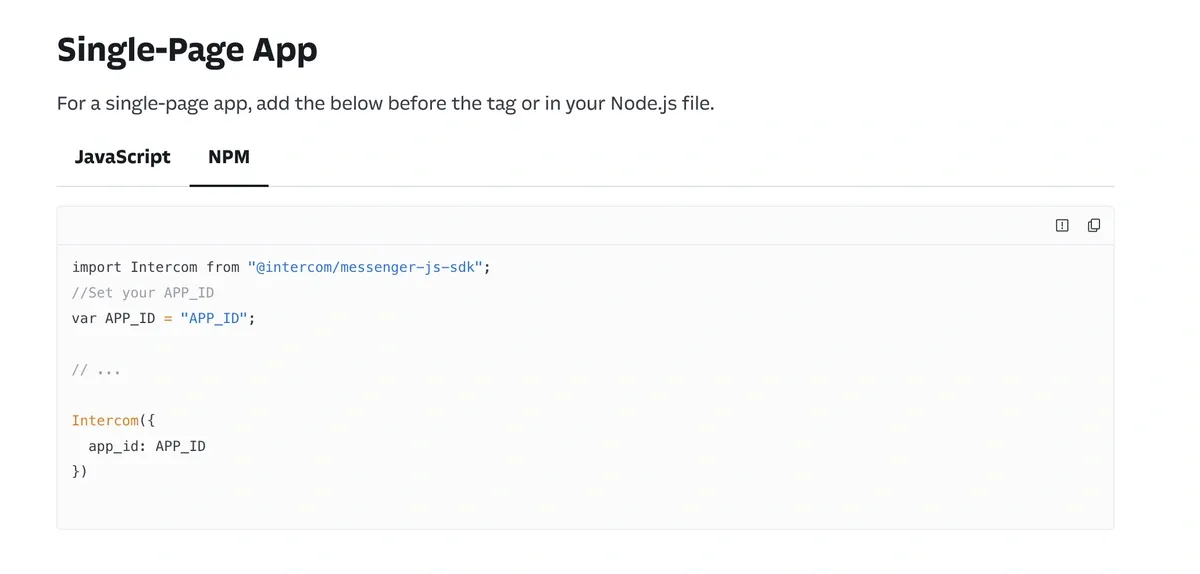
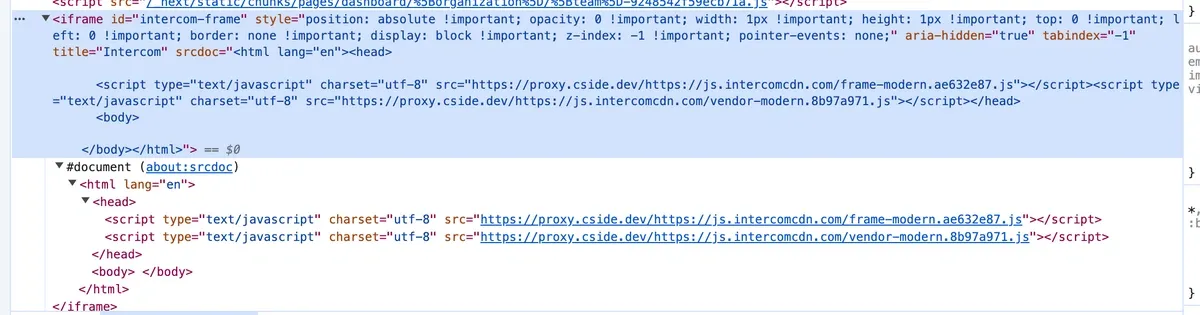
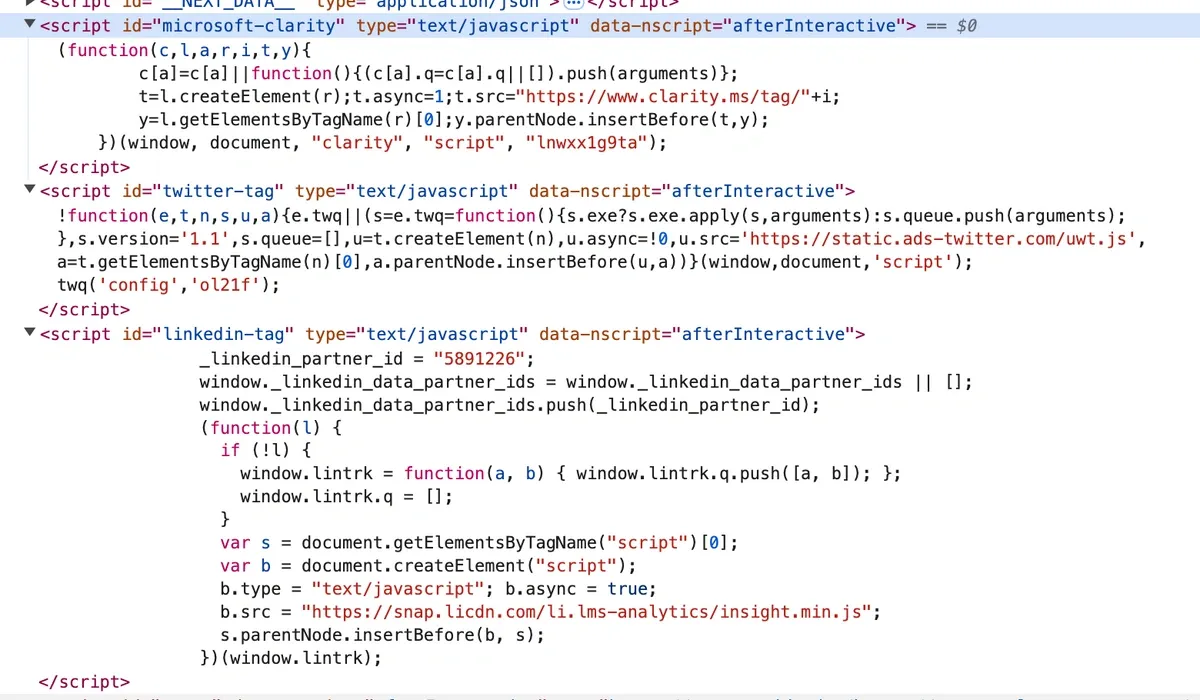
Even when using social media tracking tools, which are unavoidable for most businesses doing social-media-marketing, the first thing scripts they give you do is load another 3rd party script:
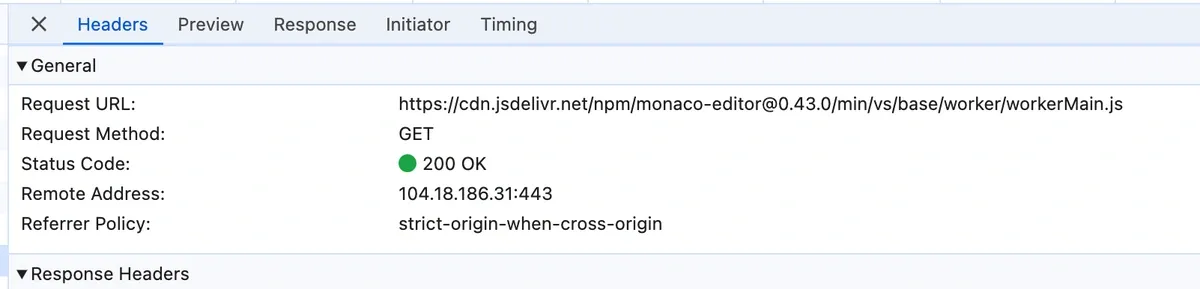
Or, you use a React package such as @monaco-editor/react, with over 712,000 weekly downloads, which loads a 3rd party script for a lot of its functionality: https://www.npmjs.com/package/@monaco-editor/react
So where do we go from here? That's why cside exists. We fetch and analyse every script on our side that loads in the page - even ones loaded during runtime. We rewrite script URLs so cside fetches them first, which lets us block a script before it even gets served to the client.
cside gives a unique vantage point: allowing per-url, per-domain, per-hash, per-headers policy that can be globally deployed in seconds. If any script attempts to load a child script, cside will know about it and analyse it. And then give you the control to decide what happens: allow this script, block this script, and the analytics to go along with it.
For every script cside sees, we hand it over to our detection engine. Our detection engine rips the script apart - right down to the AST level - to figure out what it does. And we do this for every slight change in a script, even if it is a character. We can inform you of what a script is doing, when its access to your site changes, and a whole host of trust information around the source.
We have security analysts working around the clock to spot emerging threats and block them at cside layer before they ever impact one of your customers. Combine this with the aforementioned automatic detection engine, and you now have total control over your site's 3rd party supply chain.
You can sign up for our free tier here.
Does the browser supply chain interest you? If so, come join us on the mission to protect every user of the World Wide Web: https://cside.com/careers



