

TL;DR: block Amazon Buy for Me at checkout without hurting shoppers
- Blocking Amazonbot misses it: Every guide tells you to add Amazonbot to robots.txt, but Amazon Buy for Me runs in transacting mode with a standard browser user-agent. Blocking Amazonbot stops the indexing crawler and leaves the shopping agent walking through your checkout untouched.
- What cside sees: The agent executes JavaScript, fires pixel events, and reads pricing, promo logic, inventory depth, and checkout structure inside a real browser session that server-side tools never see. cside observes interaction timing, form fill velocity, and checkout linearity from inside that same session.
- The decision: If your promo codes and dynamic pricing are the moat, wire in browser-layer detection before the next Prime shopper session lands. If you would rather harvest the order and lose the customer relationship, keep the door open.
Short on time? See cside's AI-agent detection. It covers everything below in one deployment.
Amazon Buy for Me is a shopping agent built into the Amazon app that purchases products from third-party retailers on behalf of Prime users. When a user asks it to buy something Amazon doesn't carry, it opens a browser session on your site, finds the product, and completes the transaction. Your customer never visits your store. Amazon's agent does. It belongs to the same wave of agentic shoppers as OpenAI's Operator and Perplexity's shopping assistant, all of which transact inside real browsers.
That changes what data leaves your site, who controls the checkout experience, and what you know about the buyer behind the transaction.
What is Amazon Buy for Me?
Quick answer: Amazon Buy for Me is an AI agent embedded in the Amazon Shopping app. When a product isn't on Amazon, it opens a real browser session on the competing retailer's website, adds the item to the cart, and completes the purchase on the user's behalf. The user authorises a stored payment method. The retailer sees an order.
Amazon Buy for Me uses a real browser to interact with your site. It loads your JavaScript, executes your checkout flow, and creates a real order. The agent has access to the user's Amazon-stored payment details, so it can complete a purchase without the human ever seeing your checkout page.
For retailers, this raises real concerns. Amazon gains detailed visibility into your product catalogue, pricing, and promotional availability, data that feeds directly into its own competitive intelligence. Your marketing and conversion data (A/B tests, retargeting pixels, email capture, post-purchase flows) gets bypassed because no human completed the session. And your customer relationship ends up intermediated: the buyer sees themselves as an Amazon customer, not yours.
What Amazon Buy for Me collects from your site
Quick answer: While completing a transaction, Buy for Me navigates your full product and checkout flow. It observes your pricing, inventory status, promotional codes, shipping options, and checkout behaviour: exactly the data Amazon's retail intelligence teams use to inform pricing and product decisions on Amazon.com.
The agent accesses your site in a functional browser session, which means it executes JavaScript, fires pixel events, and loads resources. It reads:
- Product pricing and availability: Visible to any visitor, but now systematically collected by a competitor's agent at transaction scale.
- Promotional and discount logic: If your site serves discount codes to logged-in users or returning visitors, the agent may trigger those conditions depending on how its session is constructed.
- Checkout flow structure: The agent needs to traverse your entire checkout to complete the purchase, mapping your funnel in the process.
- Inventory depth signals: Multiple quick add-to-cart interactions on the same product can reveal stock availability signals.
None of this data collection is visible to server-side or network-layer tools. It happens entirely within the browser session.
Why robots.txt and IP blocking fall short
Quick answer: Amazon Buy for Me is designed to complete real transactions, which means it needs to access your checkout. A
robots.txtblock on/checkoutprevents the purchase, cancelling the user's real order. IP-based blocking carries the same problem: Amazon routes sessions through infrastructure that is functionally indistinguishable from legitimate retail traffic.
You can add Amazon's user-agent to your robots.txt:
User-agent: Amazonbot
Disallow: /
But Buy for Me in transacting mode does not use the Amazonbot user-agent. It presents as a standard browser. Disallowing Amazonbot blocks Amazon's indexing crawler, not its shopping agent. The two are distinct systems.
IP-based blocking faces the same problem. Amazon's Buy for Me sessions may route through consumer IP addresses, shared cloud infrastructure, or residential proxies. There is no published IP range list for Buy for Me analogous to the ones Amazon publishes for Amazonbot. Even if there were, IP-blocking a transaction agent means cancelling the purchase, with no explanation to the user who authorised it.
What browser-layer detection reveals
Quick answer: Inside a browser session, cside can observe the interaction patterns that distinguish Buy for Me from a human customer. Machine-executed checkout flows have distinct timing, fingerprint, and event characteristics that no network-layer tool sees.
cside surfaces the following signals specific to agentic shopping behaviour like Buy for Me:
- Form fill velocity: Human users take seconds per field. Agents fill forms at machine speed with no inter-field pauses, hesitation, or correction.
- Checkout path linearity: Human checkouts are nonlinear: users go back, compare shipping options, pause on payment fields. Agent checkouts follow an optimised, direct path without backtracking.
- No browsing context: A real customer session typically includes browsing history within the session (category pages, product comparisons). An agent session that enters directly at the product URL and proceeds immediately to checkout has no natural browsing context.
- Fingerprint stack: A live human Chrome session has a complex fingerprint accumulation: cookies, local storage, browser extension artefacts. An agent session typically presents a clean, default-state fingerprint.
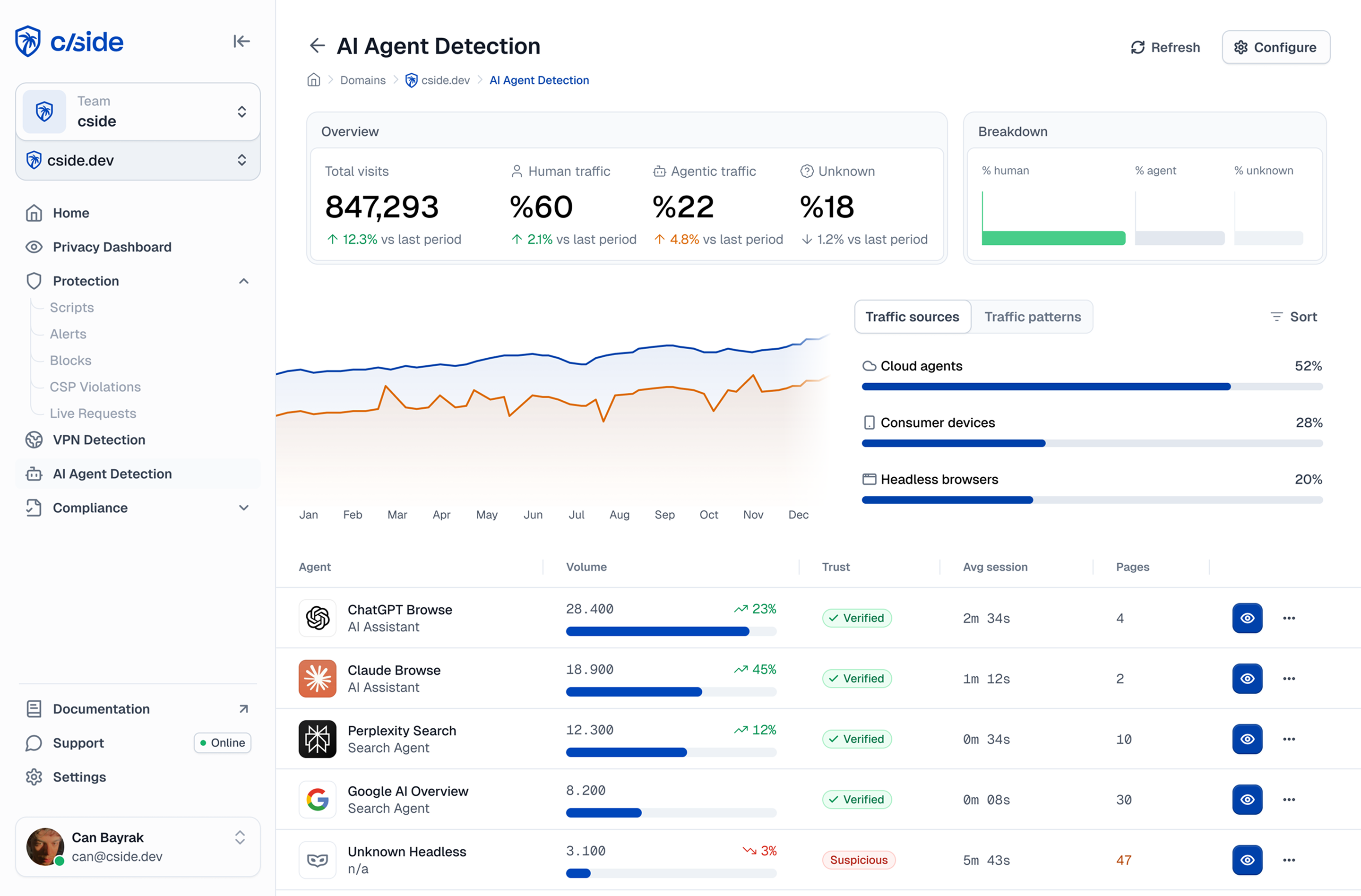
In cside's controlled testing, traditional tools missed AI agents operating inside real browser sessions in 81 out of 100 scenarios. Buy for Me is not a malicious agent, but the detection gap it exposes is real: if you cannot see it, you cannot make a policy decision about it.
Concrete detection scenario: Buy for Me on a sports equipment retailer
A Prime user asks the Amazon app to "buy the Garmin Forerunner 265 in black from [retailer] and ship to my home." Buy for Me opens a Chromium session, resolves the product URL from a search, and lands on the product page. The session presents a standard Chrome 124 user-agent and an IP address belonging to a consumer broadband provider in London. The retailer's CDN and WAF see a routine browser request and pass it through.
cside's instrumentation engages from page load. The agent reads the product page and fires add-to-cart in 2.8 seconds, with no scroll depth beyond the primary CTA and no mouse movement variance between elements. At checkout, all eight required fields complete in 2.1 seconds with no field revisits and no keyboard correction events. The session cookie is fresh, local storage is empty, and the browser canvas fingerprint matches a clean Chromium default rather than any established user profile.
A returning human customer completing the same purchase shows 37 input events, takes 5 to 8 minutes, and generates fingerprint entropy from an established browser environment. cside flags the Buy for Me session at payment entry, giving the retailer a classification signal before the order finalises. The WAF and CDN logged nothing anomalous.
How to respond: practical options
Quick answer: Once you can identify Buy for Me sessions, you have several options depending on your business priorities. Blocking it entirely means refusing Amazon-mediated purchases. Allowing it with monitoring gives you competitive intelligence. A middle path (adding friction at data-sensitive points) limits intelligence leakage without rejecting the order.
| Priority | Approach |
|---|---|
| Protect pricing and inventory data | Require login to view full pricing; limit promotional code triggers to verified human sessions |
| Protect checkout experience and marketing data | Keep the transaction but append agent-flagged orders to a separate analytics segment |
| Block competitive intelligence collection | Rate-limit catalogue navigation to agent-identified sessions; block bulk product page traversal |
| Refuse Amazon-intermediated orders entirely | Block sessions matching Buy for Me behavioural signatures at checkout entry |
Gartner projects that by 2030, 20% of online purchases will be completed by AI agents. The right choice depends on whether you want Amazon-mediated purchases at all. If you do, the goal shifts from blocking to segmenting and protecting your most sensitive data from automated extraction. For a wider view of the tooling category that now governs these decisions, see our comparison of bot and agent trust management platforms.



