

Website tracking tools like Google Analytics and the Meta pixel are a HIPAA problem because they can transmit visitors' health information to vendors that will not sign a Business Associate Agreement. On patient-facing pages, that combination has produced OCR enforcement and class-action lawsuits, and it is detectable and preventable at the browser layer.
TL;DR: hipaa website tracking compliance
- No BAA from Big Tech: Google and Meta will not sign a Business Associate Agreement covering healthcare tracking data. If you have Google Analytics or Meta Pixel on an authenticated patient page, you already have a HIPAA violation, not a risk.
- Penalties are steep: OCR penalty tiers reach $50,000 per violation and $1.9 million per category annually, and Kaiser's 2024 breach exposed 13.4 million members. cside Privacy Watch monitors runtime script behavior across every page type including authenticated sessions.
- Tag rules fail silently: If you rely on tag manager rules to keep trackers off patient portals, one CDN update or ad platform rewrite bypasses that config silently. If runtime monitoring blocks unapproved scripts at execution, PHI never leaves the browser.
Short on time? See cside Privacy Watch. It covers everything below in one deployment.
HIPAA website tracking compliance requires covered entities and business associates to assess every third-party tracking technology deployed on pages that may handle protected health information (PHI). Under HHS OCR guidance issued in December 2022 and updated in March 2024, scripts that collect IP addresses, browsing paths, or health-related search terms on authenticated patient pages can constitute a HIPAA violation without proper safeguards and Business Associate Agreements in place.
Evaluating vendors for this problem? See how cside compares to Feroot, the other client-side monitoring vendor positioned for healthcare compliance.
For how tracking works mechanically across techniques, see what is web tracking.
Why tracking scripts create HIPAA risk
Healthcare websites carry a specific type of user intent. A visitor searching for "depression treatment" or logging into a patient portal shares health information through that interaction, even without filling out a form. Standard web analytics and advertising tools capture this interaction data by design.
The problem is that these tools (Google Analytics, Meta Pixel, LinkedIn Insight Tag, session-recording services, and hundreds of others) send collected data to third-party servers. When the page context is a healthcare provider's site, that data frequently qualifies as PHI under HIPAA, and the data processor then requires a Business Associate Agreement (BAA). Most tracking vendors do not sign BAAs that cover this data. Google Analytics, Meta, and similar ad-funded platforms typically exclude healthcare tracking data from BAA coverage or decline to sign one at all.
Is Google Analytics HIPAA Compliant?
Google Analytics is not HIPAA compliant by default. GA4 collects IP addresses, device identifiers, and behavioral data that can constitute PHI when associated with healthcare service interactions. Google's BAA explicitly excludes Google Analytics, meaning collecting health-related browsing data through GA4 without additional controls exposes covered entities to HIPAA liability.
Google does not offer a BAA that covers Google Analytics 4. The BAA Google provides for Workspace and Cloud Platform explicitly carves out advertising and analytics products. That means every IP address, page URL, and behavioral event GA4 collects on a healthcare site is a potential impermissible disclosure under HIPAA if the page context implies a health relationship.
The practical implication: if GA4 runs on an appointment-booking page, a symptom checker, or any authenticated patient page, you have a HIPAA violation, not a risk to evaluate. Removing GA4 from those pages, or deploying it only behind a consent gate that prevents loading until the patient explicitly opts in, is the minimum corrective action.
GA4 can remain on public marketing pages where no health condition is implied. The test is whether the URL, referrer, or search term collected by GA4, combined with the fact that the page belongs to a healthcare provider, could identify a person in connection with a health service.
The 2022 OCR guidance and what it changed
Before December 2022, many healthcare organizations assumed tracking pixels were permissible on public-facing pages because patients had not logged in and no medical records were being accessed directly.
The HHS Office for Civil Rights bulletin issued in December 2022 closed that assumption. OCR stated that tracking technologies on unauthenticated pages can still expose PHI when the page context reveals a health condition: a hospital's appointment-booking page, a symptom-checker, or a condition-specific resource page. Updated guidance in March 2024 softened OCR's original position on some unauthenticated page scenarios but maintained that authenticated-page tracking without a BAA remains a violation.
The operative test under current OCR guidance:
- Is the entity a HIPAA covered entity or business associate?
- Does the collected data (IP address, URL, search term, referral source) identify a person in connection with a health condition, healthcare service, or payment for care?
- Does the tracking vendor have a signed BAA that covers the data collected?
If 1 and 2 are yes and 3 is no, the tracking technology creates HIPAA liability.
Which data elements become PHI on healthcare websites
| Data element | When it becomes PHI | Example scenario |
|---|---|---|
| IP address | When paired with a health-condition page visit | Patient browses oncology department, IP sent to Meta Pixel |
| Page URL | When URL contains condition or treatment name | /cancer-treatment or /mental-health-therapy path in analytics |
| Referrer URL | When it reveals health condition via search query | Referrer from "back pain specialist near me" search |
| On-site search terms | Always, on authenticated healthcare pages | Patient portal search for "blood pressure medication" |
| Login / account status | On authenticated pages | User logged into patient portal browsing lab results |
| Form input data | During form submission captured by session recorders | Symptom description in an appointment-request form |
Risk level by tracking technology type
| Technology | What it collects | HIPAA risk on patient pages | BAA typically available? |
|---|---|---|---|
| Google Analytics 4 | IP, page URLs, events | High | Limited scope only |
| Meta Pixel | IP, URL, custom events | High | Meta declines BAA |
| LinkedIn Insight Tag | IP, inferred professional data | Medium | LinkedIn declines BAA |
| Session replay (Hotjar, FullStory) | Keystrokes, form inputs, mouse movement | Very high | Varies; verify scope |
| Chat widgets (Intercom, Drift) | User messages, IP, pages viewed | High if health-related content | Requires individual BAA |
| A/B testing tools | Page variant, user ID, click data | Medium | Check vendor terms |
| CDN-delivered third-party scripts | Any data the loaded script collects | Depends on script purpose | Parent-vendor BAA required |
Documented incidents
Kaiser Permanente (2024): Kaiser disclosed a breach affecting 13.4 million members traced to tracking codes on its web properties and mobile apps. The scripts transmitted member names, IP addresses, health encyclopedia search terms, and account login status to third-party vendors. The full incident analysis is on the cside blog.
Novant Health (2022): Novant Health notified 1.3 million patients that Meta Pixel embedded in their patient portal and MyChart integration had sent appointment details, doctor names, and appointment types to Meta.
Cerebral (2023): The mental-health platform disclosed that Meta Pixel, Google, and TikTok tracking pixels it deployed captured sensitive mental-health data (including patient disclosures and psychiatric condition information), which were transmitted to those advertising platforms.
BetterHelp (2023): The FTC reached a $7.8 million settlement with BetterHelp over sharing consumer health data, including email addresses and health-questionnaire answers, with Facebook and Snapchat for ad targeting.
How to conduct a tracking technology inventory
An OCR-aligned risk assessment for tracking technologies covers four steps.
Step 1: Inventory every script on every page. Manual review of your tag manager and source code is insufficient: scripts loaded through ad platforms, CDNs, or embedded partner widgets may not appear in your tag manager at all, and scripts that load conditionally for specific users or regions require runtime observation, not a static scan.
Step 2: Classify pages by data sensitivity. Public marketing pages carry lower risk than patient portals, symptom checkers, appointment-booking forms, and any page requiring authentication. Map each page type to the data it handles and the scripts that load on it.
Step 3: Check BAA status for every tracking vendor. Request the BAA and read the scope limitations. Most ad-funded platforms exclude health data from BAA coverage even when they offer a BAA for other purposes.
Step 4: Remove or gate non-BAA-covered scripts from high-risk pages. For trackers where a BAA is unavailable or declined, either remove them from sensitive pages or use a script-management layer that prevents them from loading on specific page paths.
Technical controls that reduce HIPAA risk
Scope scripts to approved pages. Use your tag manager to prevent analytics and advertising scripts from loading on patient-facing pages. Do not deploy tracking scripts site-wide on a healthcare web property; configure per-page or per-section rules.
Use a Content Security Policy as a control layer. A CSP can block unauthorized third-party script origins from loading on patient-facing pages. A CSP alone does not catch everything (scripts delivered through whitelisted domains can still collect data), but it reduces the attack surface.
Know the limits of Subresource Integrity. SRI prevents a script from being modified in transit but does not prevent an unmodified script from collecting and transmitting PHI by design.
Monitor runtime behavior, not just configuration. Script behavior changes with vendor updates, A/B tests, and CDN delivery variations. Continuously monitoring what data third-party scripts actually send at runtime (not just what their documentation claims) is necessary to detect changes before they become disclosures.
What is a HIPAA covered entity?
A HIPAA covered entity is a health plan, a healthcare clearinghouse, or a healthcare provider that transmits health information electronically in connection with a HIPAA transaction. Covered entities carry the full weight of the Privacy and Security Rules, and they are directly liable when a website tracking script sends patient data to a vendor without a Business Associate Agreement. If you run a hospital, clinic, insurer, or digital-health service handling ePHI, you are almost certainly a covered entity, and this problem is yours to own.
How cside's Privacy Watch addresses healthcare script risk
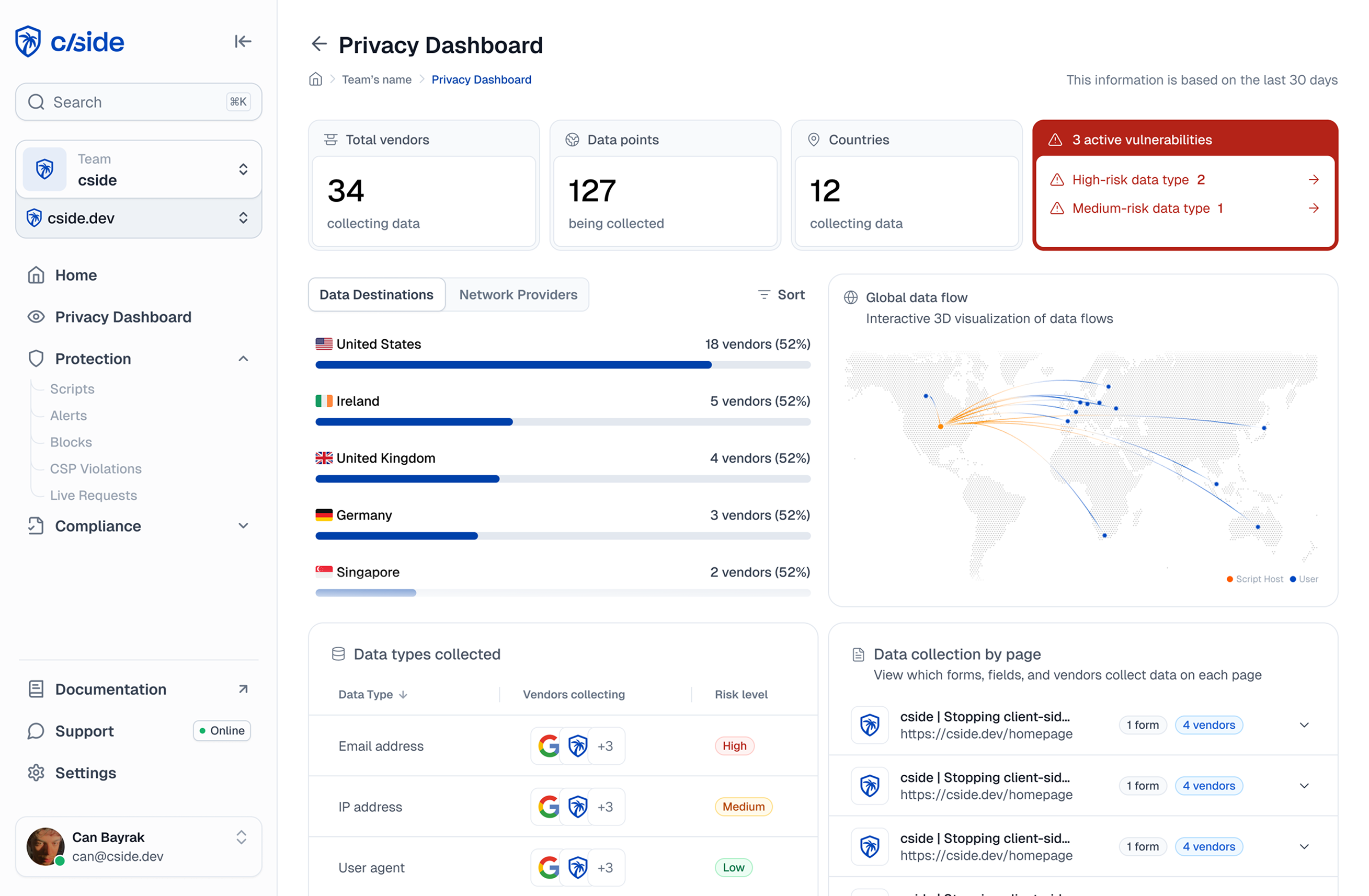
cside's Privacy Watch product monitors the runtime behavior of third-party scripts across web properties, identifying what data each script reads from the page and where it sends that data. For healthcare organizations, this means continuous visibility into whether a deployed tracking pixel is collecting PHI-adjacent data, which domains receive it, and whether any new scripts appear on pages that should be restricted.
When a script loads on a page outside its approved scope, Privacy Watch can flag the event and block script execution before patient data leaves the browser. This monitoring layer captures runtime behavior that configuration-only controls and static tag-manager audits cannot see.



