

En résumé : qu'est-ce que l'e-skimming
- Ce qu'est l'e-skimming : L'e-skimming est une cyberattaque dans laquelle du code est injecté sur le site web d'un marchand. Les utilisateurs qui visitent une page de paiement voient leurs informations volées par un code malveillant qui surveille et « skim » les coordonnées bancaires saisies.
- Volé avant le chiffrement : L'e-skimming capture les données avant ou pendant la soumission du paiement. Les informations sont volées avant d'atteindre le périmètre de chiffrement ou la sécurité serveur.
- Comment cside aide : Pour prévenir l'e-skimming, utilisez un outil comme cside qui surveille le comportement des scripts tiers et vous alerte en cas d'activité suspecte.
- Contrôles navigateur manuels : Vous pouvez également utiliser des contrôles navigateur comme CSP et SRI pour limiter manuellement les scripts tiers pouvant accéder aux pages de paiement.
- L'angle conformité : Les exigences 6.4.3 et 11.6.1 de PCI DSS 4.0.1 (obligatoires depuis le 31 mars 2025) imposent aux marchands d'inventorier chaque script sur les pages de paiement et de surveiller les modifications non autorisées, une pression réglementaire directe pour contrer l'e-skimming.
Peu de temps ? Découvrez le blocage de Magecart et de skimmers dans le navigateur de cside. Elle couvre tout ce qui suit en un seul déploiement.
Qu'est-ce que l'e-skimming ?
- E-skimming
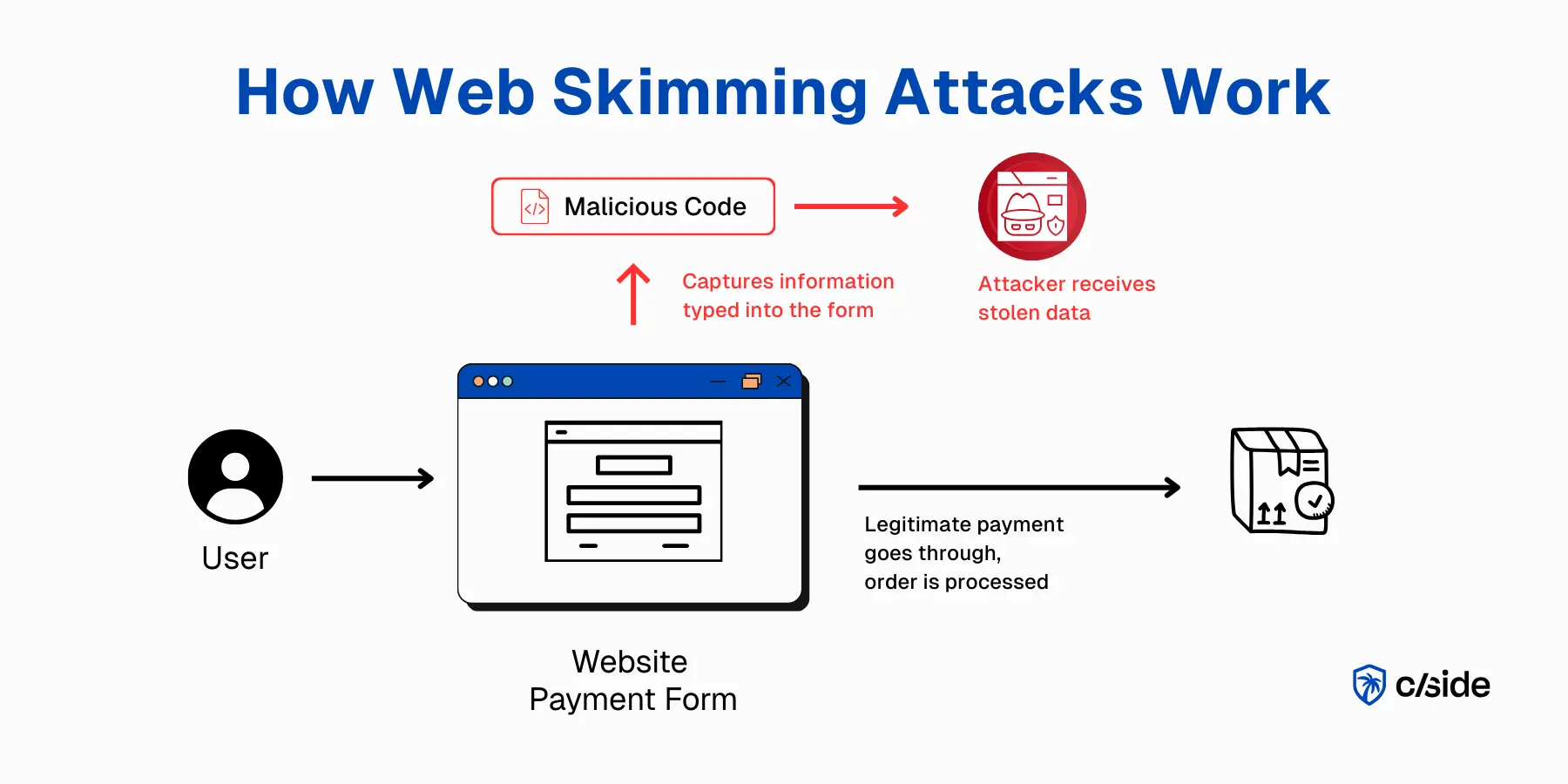
- L'e-skimming (également appelé « web skimming ») est une cyberattaque dans laquelle un acteur malveillant injecte un extrait de code sur le site web d'un marchand. Lorsqu'un utilisateur visite la page de paiement, le code malveillant surveille les saisies dans les formulaires pour récupérer les coordonnées bancaires, qui sont ensuite envoyées à un serveur contrôlé par l'attaquant à des fins frauduleuses.
L'e-skimming est une attaque côté client dans laquelle du JavaScript malveillant injecté sur la page de paiement d'un marchand capture les numéros de carte, dates d'expiration, CVCs et adresses de facturation au moment de la saisie, avant que les données n'atteignent le moindre chiffrement côté serveur. Les données volées sont envoyées en temps réel à un serveur contrôlé par l'attaquant et revendues sur les marchés du dark web ou utilisées directement pour la fraude à la carte. L'e-skimming est l'équivalent numérique d'un skimmer physique fixé sur un distributeur automatique, à la différence qu'il est invisible, entièrement logiciel, et peut fonctionner sans être détecté pendant des mois.
Pour comparaison, le skimming physique de carte consiste à placer un dispositif sur un distributeur automatique ou un clavier de paiement. Un client innocent utilise sa carte pour effectuer un achat, le dispositif capture les informations de carte de crédit et le code PIN saisis. Le dispositif est conçu pour passer inaperçu auprès du personnel de l'entreprise.
De même, les injections de code d'e-skimming sont conçues pour être invisibles. Elles restent souvent sur les pages de paiement pendant des semaines (et dans certains cas des mois) avant que les propriétaires de sites web ne s'en aperçoivent.
Quelles données sont ciblées dans les attaques d'e-skimming
| Type de données | Prix moyen sur le dark web |
|---|---|
| Carte de crédit américaine | 10 $ à 100 $ |
| Compte Gmail | 60 $ |
| Identifiants bancaires | 200 $ à 1 000 $ |
| Identifiants d'entreprise | 100 $ à 10 000 $ |
Bien que l'e-skimming désigne le plus souvent le vol d'informations de carte de crédit, le web skimming peut également désigner de manière plus large des attaques ciblant ces informations :
- Identifiants de connexion (nom d'utilisateur, e-mail, mot de passe)
- Informations personnelles (adresse, nom légal, numéros de téléphone)
L'e-skimming est-il une attaque côté client ?
Oui. Le web skimming, l'e-skimming ou le skimming numérique (différents noms pour le même vecteur de menace) sont une forme d'attaque côté client.
Ces attaques sont souvent bien préparées et sophistiquées, avec des communautés de hackers spécialisées dans les attaques Magecart.
Il existe d'autres attaques côté client, comme le phishing avec des superpositions d'interface ou de fausses pages de paiement.
Lors du web skimming, les attaquants acheminent les données volées vers leur propre serveur, généralement via un domaine qui ressemble étroitement à celui du marchand légitime. Ce type d'attaque a été utilisé contre Ticketmaster et British Airways, entre autres.
Quels sites web sont vulnérables à l'e-skimming ?
Tout site web qui utilise des scripts tiers, en particulier lorsqu'ils s'exécutent sur des pages de connexion ou de paiement. Les sites construits sur Magento, WooCommerce ou d'autres plateformes low-code sont particulièrement vulnérables.
Bien que les plateformes elles-mêmes soient sûres et que leurs équipes de sécurité s'efforcent activement de corriger les vulnérabilités connues, ces plateformes sont fréquemment utilisées par des utilisateurs non techniques qui sont moins susceptibles de détecter une attaque en cours.
Prévenez l'e-skimming avec la sécurité côté client automatisée de cside
Comment fonctionne l'e-skimming et où les choses déraillent
Pour comprendre comment les e-skimmers opèrent, il faut d'abord comprendre le fonctionnement des paiements en ligne.
Lorsque les acheteurs ont rempli leur panier et sont prêts à commander, ils arrivent sur la page de paiement. Ils y remplissent les champs du formulaire. Une fois le paiement soumis, les données sont chiffrées et envoyées au marchand et à l'émetteur de la carte. Si la transaction est approuvée, l'exécution de la commande commence.
Dès que le paiement est soumis, les informations sont protégées par le chiffrement, les contrôles serveur, la sécurité des API et d'autres couches de défense. Malheureusement, l'e-skimming capture les informations avant/pendant la soumission du paiement. Le code malveillant écoute les frappes au clavier pendant que l'utilisateur saisit ses informations. Cette technique spécifique, accrocher les champs de formulaire pour capturer les données au moment de la saisie, est appelée formjacking.
Comment les hackers injectent du code d'e-skimming
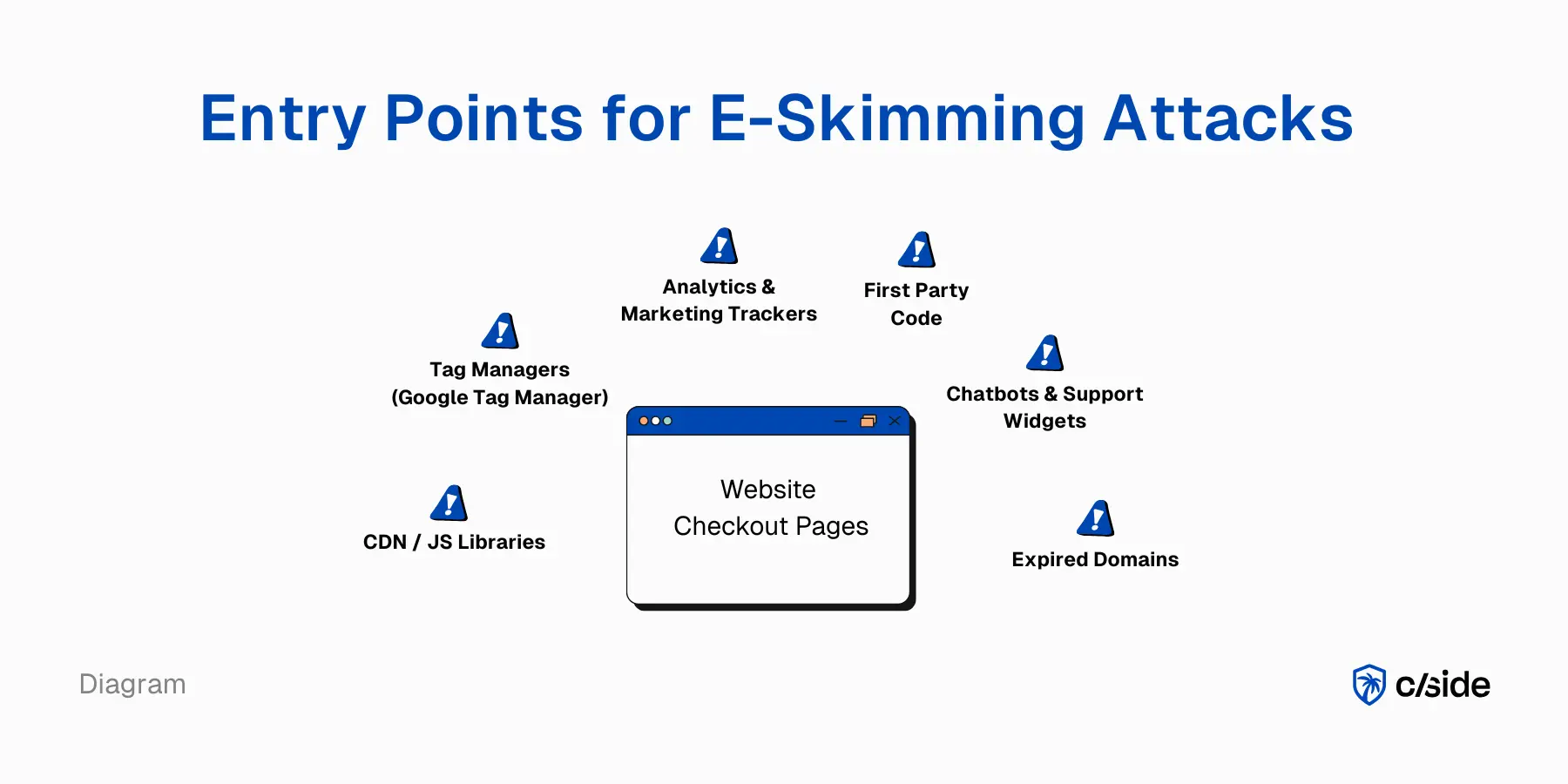
Lorsqu'un utilisateur visite une page de votre site web, son navigateur charge un ensemble de code. Une partie est du code propriétaire créé par votre équipe (ou écrit par la plateforme que vous utilisez, comme Shopify ou WooCommerce). Mais votre site web sert également du code tiers.
Pour les sites e-commerce, cela inclut des plugins et des scripts tiers :
- Outils d'analyse (comme Amplitude)
- Outils promotionnels (comme les captures d'e-mails pour les newsletters)
- Constructeurs de bundles
- Suivi publicitaire (Meta, Google)
Et bien d'autres outils tiers essentiels pour les sites e-commerce.
Les scripts tiers sont un point d'entrée pour le web skimming
Chaque script tiers est un point d'entrée pour les attaquants. Ils peuvent être infiltrés par diverses méthodes :
- Domaines expirés : lorsqu'un ancien domaine n'est pas renouvelé, les attaquants peuvent l'acheter et modifier le code. Si votre site web récupère du code depuis ce domaine, le code malveillant sera chargé.
- Attaques de la chaîne d'approvisionnement : si un tiers de confiance est piraté, son script peut propager du code malveillant sur votre site.
- Via les gestionnaires de balises : si des attaquants accèdent à Google Tag Manager, ils peuvent injecter du code qui ira directement sur votre site en production sans aucune révision. L'activité de ce script sera masquée car il est regroupé avec plusieurs autres scripts.
- Identifiants exposés : des identifiants volés peuvent donner aux attaquants un accès interne à vos systèmes. Plutôt que d'essayer de forcer le coffre-fort (vos serveurs), ils peuvent choisir d'injecter du code sur votre site web.
Individuellement, les outils tiers établis sont sûrs et présentent un risque minimal. Mais les sites web modernes comportent des dizaines de scripts tiers. Un rapport de Web Almanac a révélé que le nombre médian de domaines tiers sur un site web est de 23. Et ces scripts tiers chargent d'autres scripts (scripts de 4e partie) pour les aider dans le traitement des données.
Un chatbot (script tiers) peut charger un outil d'analyse de documents pour aider les clients avec leurs tickets de support en analysant leurs PDF. Vous n'avez jamais directement autorisé cet outil d'analyse de documents, mais il est servi sur votre site (et accède à des informations sensibles).
Vous commencez peut-être à percevoir le problème : votre site web se retrouve avec des dizaines de scripts qui peuvent injecter du code sans que personne ne les surveille.
Ce que les attaquants font avec les données e-skimmées
Quel est le vrai danger ? Dans le scénario optimal pour l'attaquant : il crée un script qui lui permet de voir ce que les utilisateurs saisissent dans le formulaire de paiement. Bingo. Il voit désormais les données personnelles, le numéro de carte, la date d'expiration et le code CVC.
S'il parvient à copier et exfiltrer ces données vers son propre serveur, le butin est sécurisé. Il peut vendre ces informations sur le dark web ou utiliser lui-même les coordonnées bancaires pour commettre des fraudes.
Comment les marchands en ligne peuvent prévenir l'e-skimming
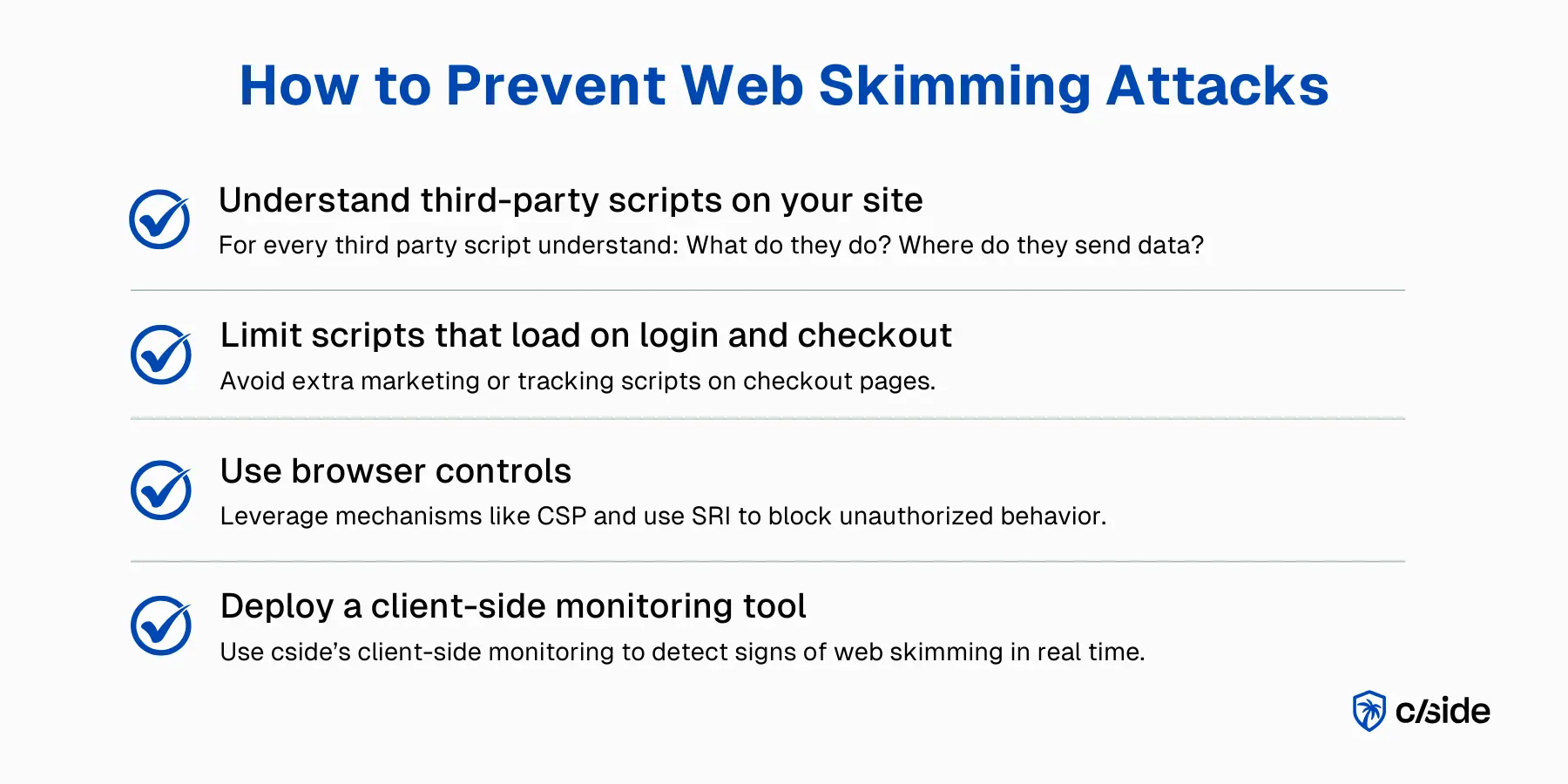
1. Surveiller les scripts tiers : à quelles données accèdent-ils et où les envoient-ils ?
La surveillance des scripts en temps réel est essentielle. Les outils qui observent les scripts tiers et leur comportement déclenchent une alerte lorsqu'une activité suspecte est détectée. Par exemple, si un script d'analyse commence soudainement à lire des données de formulaire et à les envoyer vers un serveur en Russie, vous faites peut-être face à une attaque côté client.
La plateforme cside surveille les scripts tiers pour voir à quelles données ils ont accès et vous alerte immédiatement si l'accès aux données change.
2. Limiter les scripts qui s'exécutent sur les pages de paiement
Pour les marchands, la première étape consiste à savoir quels scripts s'exécutent sur les pages de paiement. Une mesure de précaution consiste à s'assurer que seuls les scripts nécessaires y sont présents. Tout ce qui n'est pas strictement nécessaire au paiement ou à la prévention de la fraude : supprimez-le.
3. Utiliser cside pour la gouvernance des scripts tiers
De nombreux sites web autorisent par défaut les scripts tiers à aller directement en production. Les équipes marketing et les développeurs veulent des mises à jour rapides pour améliorer les fonctionnalités. Même les entreprises qui vérifient chaque script les approuvent une fois et les revoient rarement.
Il peut sembler fastidieux de réviser chaque script ajouté, mais un outil comme cside suit automatiquement chaque nouveau script ajouté et fournit un résumé rédigé par IA ainsi qu'un score de risque pour vous permettre d'approuver rapidement. Tous les scripts sont conservés dans un « inventaire en direct » que les équipes de conformité à la confidentialité ou de sécurité peuvent facilement gérer.
4. Déployer des contrôles de sécurité navigateur : CSP et SRI
Les attaques d'e-skimming se déroulent dans le navigateur, nous pouvons donc y déployer une couche défensive. CSP et SRI offrent cette protection. Certes, ils ne règlent pas tout, mais ils apportent davantage de visibilité.
Un CSP strict détermine quelles sources peuvent charger des scripts et vers quels points de terminaison ils peuvent envoyer des données. Le contenu du script lui-même n'est pas vérifié, mais les flux de données non souhaités sont détectés et peuvent être bloqués. Commencez par Content-Security-Policy-Report-Only pour tester si tout fonctionne correctement.
SRI ajoute un hash aux fichiers : c'est ainsi que vous vérifiez si un script a été modifié à la source ou pendant le transfert. Cela rend beaucoup plus difficile la propagation de code malveillant via une mise à jour ou un fournisseur compromis. Cela fonctionne principalement pour les scripts statiques. Mais les scripts tiers mis à jour automatiquement invalident la vérification du hash.
Pourquoi les outils de sécurité web traditionnels ne détectent pas l'e-skimming
Le malware ne s'exécute pas sur le serveur du marchand. Il s'exécute dans le navigateur du client avec les mêmes droits et privilèges que le code propre du marchand.
Le JavaScript est accepté et exécuté dans le DOM. Les outils de sécurité web traditionnels n'ont souvent aucune visibilité sur cela. Même les outils de défense côté client comme Content Security Policy ne regardent que la source de chaque script. Si une source de confiance sert du code malveillant, les politiques de sécurité du contenu ne détecteront ni ne bloqueront cette attaque.
Ce que PCI DSS 4.0.1 exige pour prévenir l'e-skimming
PCI DSS 4.0.1 a introduit deux exigences qui ciblent directement l'e-skimming, toutes deux obligatoires depuis le 31 mars 2025 :
Exigence 6.4.3 : inventaire et autorisation des scripts sur les pages de paiement. Chaque script chargé sur une page de paiement doit être documenté dans un inventaire, autorisé avec une justification commerciale et son intégrité protégée. Les marchands doivent être en mesure de confirmer qu'aucun script non autorisé ne s'exécute sur la page de paiement. Les révisions manuelles échouent en pratique : les scripts sont souvent ajoutés par les équipes marketing via des gestionnaires de balises et ne sont jamais examinés par la sécurité.
Exigence 11.6.1 : mécanisme de détection de falsification pour les pages de paiement. Les marchands doivent déployer un mécanisme qui détecte les modifications non autorisées des en-têtes HTTP et du contenu des pages de paiement. Le mécanisme doit alerter sur les modifications et évaluer la page au moins une fois tous les sept jours (ou selon les modalités définies par une analyse de risque ciblée). Un script tiers compromis qui modifie le comportement du formulaire satisfait la définition de « modification non autorisée ».
Ensemble, ces exigences signifient que les révisions manuelles de scripts et les audits périodiques ne sont plus suffisants. La surveillance côté client automatisée et continue (le type de surveillance que cside fournit) est ce que PCI DSS 4.0.1 a été conçu pour imposer.
À quoi ressemble la conformité aux exigences 6.4.3 et 11.6.1 en pratique ?
La conformité requiert trois éléments fonctionnant en continu sur chaque page de paiement :
- Un inventaire de scripts en direct qui capture chaque script propriétaire et tiers, son domaine source et sa justification commerciale.
- Vérification d'intégrité qui confirme que chaque script n'a pas été modifié depuis son autorisation.
- Détection de falsification qui alerte dans la fenêtre d'évaluation requise lorsqu'une modification non autorisée du contenu de la page ou des en-têtes est détectée.
Les feuilles de calcul manuelles et les révisions mensuelles ne peuvent pas répondre à ces exigences à grande échelle. Les outils automatisés qui surveillent l'exécution réelle du navigateur (en observant ce que les scripts font réellement, et pas seulement ce que dit leur code source) constituent la voie pratique vers la conformité.
| Exigence PCI DSS 4.0.1 | Ce qu'elle impose | Date d'entrée en vigueur |
|---|---|---|
| 6.4.3 | Inventaire, autorisation et intégrité des scripts sur les pages de paiement | 31 mars 2025 |
| 11.6.1 | Mécanisme de détection de falsification avec alertes pour les modifications des pages de paiement | 31 mars 2025 |
Lecture connexe :



