

Resumen: lista de controles GDPR para sitios web en 2026
- El cumplimiento GDPR web en 2026 se divide en seis áreas de control: base legal, gestión del consentimiento, minimización de datos, cumplimiento de derechos del interesado, notificación de brechas y responsabilidad de procesadores terceros.
- El área menos atendida es la minimización de datos del lado cliente. Cada script de terceros que carga tu página es un potencial procesador de datos a efectos del GDPR, y la mayoría de programas de privacidad no los inventaría.
- El inventario continuo de scripts cierra la brecha entre tu política de privacidad y lo que realmente hace tu sitio. cside expone cada script de terceros y el PII al que accede, con evidencia fechada para revisión de la autoridad supervisora.
¿Poco tiempo? Consulta cside Privacy Watch. Cubre todo lo de abajo en un solo despliegue.
Para cumplir con el GDPR necesitas monitorear y justificar todas las actividades de "tratamiento de datos" en tu sitio web. El GDPR no trata sobre banners de cookies ni sobre usuarios que hacen clic en "aceptar todo". Desde su creación, el objetivo del GDPR fue obligar a las empresas a recopilar la menor cantidad posible de datos personales y a incorporar la privacidad en los sistemas independientemente del consentimiento.
Cualquier tratamiento de datos que no sea estrictamente necesario requiere una justificación. No puedes justificar lo que no puedes ver:
- Las decenas de procesadores que se ejecutan en tu sitio (chatbots, píxeles publicitarios y rastreadores de analítica)
- Los "rastreadores de datos" inesperados (bibliotecas de fuentes o scripts de rendimiento que manejan direcciones IP o geolocalización)
- Scripts maliciosos que roban datos personales sin que las herramientas de seguridad del servidor lo detecten (como el ataque a British Airways).
Resumen
- Los Artículos 6, 13 al 15, 25, 28, 30 y 32 del GDPR tienen requisitos específicos para sitios web que las organizaciones deben cumplir.
- Un banner de cookies o una Plataforma de Gestión del Consentimiento (CMP) ayuda a capturar el consentimiento, pero no garantiza el cumplimiento del GDPR por sí sola.
- El incumplimiento gradual del GDPR ocurre cuando se añaden nuevos scripts, plugins o etiquetas que recopilan datos sin que los equipos de privacidad lo noten.
- Los scripts maliciosos en sitios web pueden filtrar datos personales antes de que entren en acción el cifrado y las herramientas de seguridad del servidor (las empresas son multadas por esto bajo el Artículo 32).
- Un sitio web totalmente conforme incorpora un conjunto completo de herramientas GDPR: infraestructura y controles internos a través de herramientas como Vanta, CMPs como OneTrust, y cumplimiento del lado del cliente con cside.
Reducir el riesgo GDPR derivado del código de terceros integrado
El código de terceros integrado es la mayor exposición GDPR del lado del cliente en la mayoría de los sitios web. Cada píxel de analíticas, widget de chat y script de publicidad que carga tu página puede acceder a campos de formulario, identificadores de dispositivos y datos de comportamiento antes de que las herramientas de seguridad del servidor los vean. Para reducir ese riesgo: audita los scripts integrados de forma continua, aplica restricciones de consentimiento antes de que se ejecuten, mantén DPAs firmados con cada procesador y monitoriza los cambios de código de proveedores que amplíen silenciosamente la recopilación de datos.
Por qué los scripts integrados generan una exposición GDPR desproporcionada
Los scripts de terceros son dinámicos. Un script que superó tu revisión inicial puede ser actualizado por el proveedor para recopilar datos personales adicionales sin avisarte. Esto no es teórico: la brecha de British Airways que resultó en una multa GDPR de 20 millones de euros comenzó con un script de terceros modificado en su página de pago que exfiltraba silenciosamente datos de tarjetas.
Tres riesgos GDPR distintos provienen del código integrado que se ejecuta en tu sitio:
- Omisión del consentimiento: scripts que se activan antes de que el usuario dé su consentimiento, o fuera de sus categorías aprobadas
- Sobrecolección de datos: scripts que acceden a datos personales más allá de su finalidad declarada en tu DPA
- Deriva del procesador: actualizaciones de código del proveedor que amplían el alcance del procesamiento sin tu conocimiento
Monitoreo de scripts del sitio web para cumplimiento GDPR
El monitoreo de scripts del sitio web proporciona a los equipos de cumplimiento visibilidad continua sobre qué scripts se cargan, a qué datos acceden y si ese comportamiento cambia tras tu última auditoría. Las revisiones de privacidad estáticas y los escaneos anuales no pueden detectar una actualización de proveedor que se lanza a medianoche y empieza a recopilar nuevos campos por la mañana.
Plataformas como cside Privacy Watch observan la ejecución de scripts de terceros en sesiones reales del navegador y alertan a los equipos sobre nuevos scripts, cambios de comportamiento o transferencias de datos no autorizadas a medida que ocurren, proporcionándote evidencia lista para auditoría ante la autoridad supervisora.
Requisitos del GDPR que aplican a tu sitio web (lado del cliente)
<tr>
<td>
<strong>Proporcionar divulgaciones transparentes a los usuarios</strong><br>
<span class="article-ref">(Artículos 12-14)</span>
</td>
<td>
<ul>
<li>Aviso de privacidad con categorías de datos y finalidades claras</li>
<li>Validación de que las divulgaciones coinciden con el comportamiento real de seguimiento del sitio web</li>
</ul>
</td>
</tr>
<tr>
<td>
<strong>Prevenir la exposición de datos con salvaguardas adecuadas</strong><br>
<span class="article-ref">(Artículos 30 & 32)</span>
</td>
<td>
<ul>
<li>Monitoreo continuo del sitio web para detectar recopilación de datos no autorizada</li>
<li>Detección de inyecciones de scripts y cambios de DOM riesgosos que filtran datos</li>
</ul>
</td>
</tr>
<tr>
<td>
<strong>Documentar y supervisar el tratamiento por terceros</strong><br>
<span class="article-ref">(Artículos 25, 28 & 30)</span>
</td>
<td>
<ul>
<li>ROPA que muestre qué procesadores reciben datos y a dónde se envían</li>
<li>Registros organizados de DPAs personalizados o estandarizados</li>
<li>Documentación de transferencias de datos entre regiones</li>
</ul>
</td>
</tr>
</tbody>
</table>
Cómo cumplir con el Artículo 6 del GDPR - Base jurídica para el tratamiento:
Lo que exige el Artículo: Los datos personales solo pueden tratarse si se aplica una de las seis bases jurídicas, incluidos el consentimiento, la necesidad contractual o el interés legítimo.
En la práctica: Debes demostrar una razón legal válida (como el consentimiento explícito del usuario) antes de recopilar o usar los datos personales de alguien en tu sitio web.
Para cumplir en tu sitio web:
- Identifica todos los puntos donde se recopilan datos personales (p. ej., formularios, analítica, widgets de chat, scripts de terceros).
- Clasifica esas actividades de tratamiento bajo una base jurídica (consentimiento, contrato o interés legítimo).
- Asegúrate de que los scripts o cookies no esenciales estén inactivos por defecto hasta que se otorgue el consentimiento.
- Mantén registros que vinculen cada tipo de dato con su finalidad de tratamiento lícito.
Cómo ayuda cside con la base jurídica del GDPR para el tratamiento
- Mapea los procesadores de datos en tu sitio web (scripts de terceros, scripts propios) con su finalidad de recopilación de datos y categoría de consentimiento.
- Detecta scripts que se activan antes del consentimiento o sin una base jurídica válida.
- Monitoreo continuo para que el consentimiento y el tratamiento permanezcan alineados a medida que tu sitio web cambia.
Cómo cumplir con los Artículos 13, 14 y 15 del GDPR - Transparencia y derechos de los interesados
Lo que exigen los Artículos: Los sitios web deben informar a los interesados (usuarios) qué datos personales recopilan, por qué los recopilan y con quién los comparten. Además, los usuarios deben tener una forma sencilla de solicitar el acceso, la corrección o la eliminación de esos datos.
Para cumplir en tu sitio web (Requisitos de transparencia):
- Haz un inventario de qué datos personales se recopilan, con qué finalidad y qué terceros los reciben.
- Muestra esta información en un aviso de privacidad de fácil acceso. Asegúrate de que ese aviso de privacidad se actualice regularmente y se corresponda con lo que realmente ocurre en tu sitio web.
Para cumplir en tu sitio web (Derechos de los interesados)
- Define un proceso y un mecanismo de respuesta (normalmente en un plazo de 30 días) para gestionar las solicitudes de acceso de los interesados (DSARs).
- La mayoría de los equipos utilizarán una herramienta de gestión de DSARs una vez que empiecen a recibir solicitudes con regularidad. Las herramientas de DSAR automatizan el cumplimiento de las solicitudes de los usuarios en diferentes plataformas.
Cómo ayuda cside con la transparencia del GDPR y los derechos de los interesados
- Te notifica cuando se añaden scripts al sitio web o cuando los proveedores realizan cambios en el código que afectan a cómo tu sitio gestiona los datos de los usuarios.
- Valida las divulgaciones de privacidad frente al comportamiento real de tratamiento de datos en tu sitio web.
- Muestra con qué datos personales interactúan los scripts propios, de terceros y de cuartos (subprocesadores) en tu sitio web.
Cómo cumplir con el Artículo 25 del GDPR: Protección de datos desde el diseño y por defecto
Lo que exige el Artículo: Las organizaciones deben implementar medidas técnicas y organizativas adecuadas que garanticen que los datos personales se traten de acuerdo con los principios del GDPR, y que la privacidad esté integrada en los sistemas desde el principio, en lugar de añadirse posteriormente.
En la práctica: Demuestra que la privacidad está integrada directamente en tus sistemas. Este artículo del GDPR hace referencia al término "minimización de datos" como directriz fundamental a seguir. Tu sitio web debe recopilar la menor cantidad de datos posible. Esto significa minimizar la cantidad de datos que recopilan tus scripts y controlar cuándo se ejecutan.
Para cumplir en tu sitio web:
- Configura scripts, cookies y plugins para que el tratamiento de datos esté desactivado hasta que el usuario dé su consentimiento explícito.
- Limita la recopilación de datos personales a lo estrictamente necesario.
- Revisa las nuevas integraciones o scripts de terceros (como herramientas de marketing) para detectar el comportamiento de seguimiento predeterminado antes de su despliegue.
- Presta atención a los scripts de terceros que recopilan datos en exceso.
Cómo ayuda cside con la protección de datos desde el diseño
- Detecta rastreadores ocultos que ignoran las reglas de consentimiento o recopilan datos personales innecesarios.
- Señala los cambios de código en scripts de terceros que amplían el tratamiento de datos más allá del alcance original.
- Demuestra la "protección desde el diseño" con controles de minimización de datos para la ejecución de código de terceros en el sitio web.
Cómo cumplir con el Artículo 28 del GDPR: Procesadores
Lo que exige el Artículo: Los responsables del tratamiento deben utilizar únicamente procesadores que ofrezcan garantías de medidas de protección de datos conformes con el GDPR. Este acuerdo debe formalizarse en un contrato escrito o Acuerdo de Procesamiento de Datos (DPA). Los procesadores en tu sitio web incluyen scripts de terceros o subprocesadores que manejan datos personales en tu nombre. Entre los procesadores habituales se encuentran las plataformas de analítica, las etiquetas de marketing, los proveedores de pago o los widgets integrados.
En la práctica: Dado que los scripts de terceros cuentan como "procesadores", ¿se espera que tengas decenas de DPAs individuales con cada procesador?
Los reguladores reconocen que muchas relaciones con procesadores se crean a través de condiciones en línea estandarizadas. Por ejemplo:
- Las Condiciones de Procesamiento de Datos de Google se aplican automáticamente cuando usas Analytics o Ads.
- Meta proporciona un Addendum de Responsable/Encargado integrado para los anunciantes.
- Cloudflare, AWS, etc. ofrecen DPAs descargables o aceptados por uso.
No necesitas un documento firmado de forma personalizada para cada proveedor, pero debes poder demostrar que:
- Revisaste y aceptaste el DPA del proveedor o su equivalente, y
- Sabes qué datos personales trata ese proveedor.
Para cumplir en tu sitio web:
Comienza con un inventario de proveedores que enumere todos los terceros que tratan datos personales en tu sitio. Organizar esta información se simplifica con una plataforma de gestión de privacidad.
Cada registro debe incluir:
| Categoría de requisito GDPR | Lo que debe tener un sitio web conforme con el GDPR |
|---|---|
|
Conocer qué datos personales recopila tu sitio web y justificar una base jurídica (Artículos 5 & 6) |
|
| Proveedor de ejemplo | |
|---|---|
| Nombre del proveedor | |
| Categoría del proveedor | |
| Procesador / Responsable | |
| Tipo de datos personales tratados | |
| Ubicaciones de transferencia de datos | |
| Fecha de revisión o renovación |
Lectura relacionada: nuestra comparación de herramientas de cumplimiento del RGPD para 2026 · los errores de cumplimiento del RGPD más comunes y cómo evitarlos
Un método automatizado para detectar procesadores de terceros es a través de un escaneo gratuito del sitio web o una herramienta de monitoreo continuo. Mantén una lista de todos los proveedores que tratan datos personales recopilados a través de tu sitio y añádelos a tu inventario de DPAs.
Cómo ayuda cside con los requisitos de responsabilidad del procesador del GDPR:
- Monitorea los scripts de terceros para garantizar que los procesadores no recopilen más datos de los que permite tu acuerdo.
- Descubre "procesadores" en tu sitio web escaneando scripts activos y su comportamiento, manteniendo actualizado tu inventario de DPAs.
- Señala cuándo se añaden nuevos scripts o cuándo los proveedores existentes modifican el código de forma que cambia cómo tratan los datos personales, instando a los equipos a revisar el DPA.
- Mapea las transferencias de datos entre regiones para facilitar la documentación.
Cómo cumplir con el Artículo 30 del GDPR: Registro de actividades de tratamiento
Lo que exige el Artículo: Los responsables y los encargados del tratamiento deben mantener un registro escrito de todas las actividades de tratamiento de datos personales. Este registro (a menudo denominado RoPA) debe incluir qué datos personales se tratan, por qué se tratan, quién los recibe, dónde se almacenan o transfieren, cómo se protegen y durante cuánto tiempo se conservan.
En la práctica: El Artículo 30 trata de demostrar a los reguladores que comprendes los flujos de datos dentro de tu organización. Eso incluye saber qué scripts recopilan datos personales, qué proveedores los reciben y si se producen transferencias fuera de la UE.
Los registros del RoPA suelen incluir todas las actividades de tratamiento de la organización, no solo lo que ocurre en línea. Eso significa documentar cómo los equipos internos como RR.HH., TI y atención al cliente utilizan los datos personales.
El Artículo 30 generalmente solo aplica a empresas con más de 250 empleados. Aunque incluso las empresas más pequeñas siguen estando obligadas a cumplir con este artículo en determinadas circunstancias.
Para cumplir en tu sitio web:
- Quién, qué, dónde: Mantén un registro de todos los scripts y herramientas de terceros que manejan datos personales. Anota qué tipo de datos tratan y a dónde se envían esos datos (especialmente si salen de la UE).
- Retención: Documenta durante cuánto tiempo se conserva cada categoría de datos y cuándo se elimina o anonimiza.
- Seguridad: Registra qué medidas técnicas u organizativas protegen esos datos, como el cifrado, los controles de acceso o la activación basada en el consentimiento.
Cómo ayuda cside con el registro de actividades de tratamiento del GDPR:
- Proporciona datos verificados para informar tu RoPA, dando a los equipos de privacidad evidencia en tiempo real de qué proveedores tratan datos en tu sitio web.
- Genera informes listos para auditoría disponibles 24/7 de cada acción de script y transmisión de datos para revisión regulatoria.
- Demuestra que las medidas de seguridad del lado del cliente están en vigor para respaldar la documentación del ROPA sobre protección de datos.
- Panel visual de transferencias de datos entre regiones para respaldar la documentación del ROPA del Artículo 30.
Plantilla de ROPA
Consulta esta plantilla de RoPA de la ICO (Oficina del Comisionado de Información) para tener un punto de partida sobre cómo documentar estas actividades.
Cómo cumplir con el Artículo 32 del GDPR: Seguridad del tratamiento
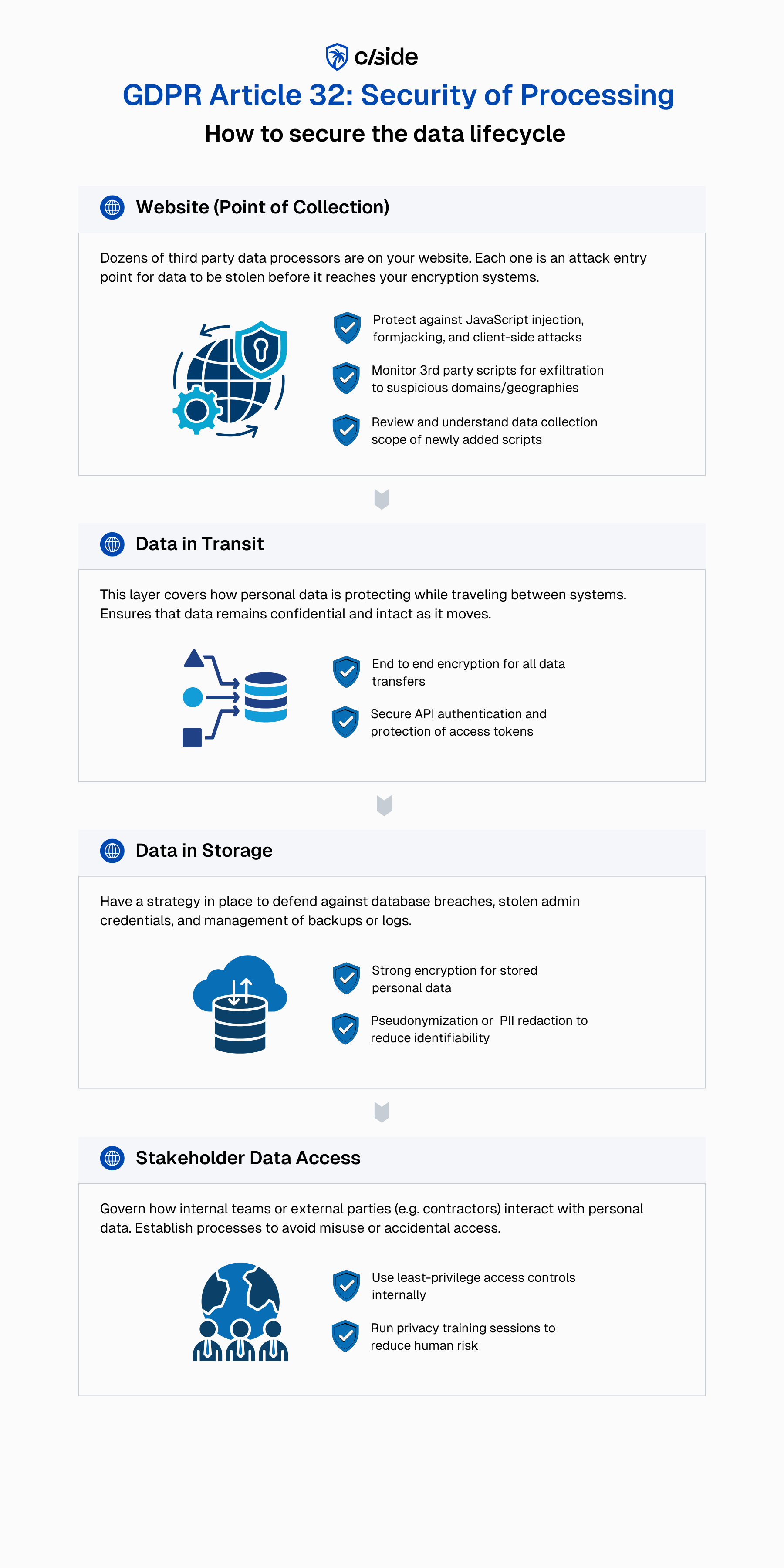
Lo que exige el Artículo:
Las organizaciones deben implementar medidas técnicas y organizativas para garantizar la confidencialidad y disponibilidad de los datos personales. Estas incluyen, entre otras, el cifrado, el control de acceso de empleados y contratistas, las pruebas periódicas y los procesos para detectar, responder y recuperarse de incidentes de seguridad.
En la práctica:
Necesitas demostrar que tus sistemas (a lo largo de todo el ciclo de vida de los datos) están diseñados para prevenir la exposición no autorizada de datos.
Proteger tu sitio web (el punto de recopilación):
- Asegúrate de que los campos de formulario, las páginas de pago y los flujos KYC (licencias de conducir, escaneos de pasaportes) estén protegidos contra la inyección de JavaScript o el keylogging.
- Monitorea los scripts de terceros para detectar cualquier signo de exfiltración de datos o solicitudes de red no autorizadas. Especialmente los que se cargan desde dominios recién añadidos o desconocidos.
- Aplica controles básicos con CSP y SRI para permitir la ejecución de scripts aprobados. Para sitios web más grandes, utiliza una herramienta de monitoreo continuo que inspeccione la ejecución de JavaScript y las manipulaciones del DOM en tiempo real.
- Mantén versiones con hash de los scripts aprobados para poder revertir a una versión segura si se detecta manipulación o actividad de red sospechosa.
Proteger los datos en tránsito:
- Usa cifrado de extremo a extremo para garantizar que los datos no puedan leerse mientras viajan entre sistemas.
- Protege tus APIs y la autenticación. Cada vez más sitios web despliegan código generado por LLMs que gestiona incorrectamente las claves de API y los tokens de acceso.
Proteger los datos en almacenamiento:
- Reduce la identificabilidad donde sea posible mediante seudonimización o redacción de PII.
- Usa cifrado robusto para todos los datos personales almacenados.
Proteger el acceso a los datos por parte de partes interesadas internas:
- Aplica permisos de mínimo privilegio para el acceso a datos personales.
- Realiza formación en seguridad y privacidad para educar al personal sobre phishing e higiene de credenciales.
En cuanto a la respuesta a incidentes:
- Detectar: Integra plataformas SIEM para la correlación de eventos y alertas en tiempo real. Despliega herramientas de monitoreo en tiempo de ejecución para sistemas del lado del cliente para detectar señales sospechosas y alertar a tu equipo antes de que se produzca una brecha.
- Alertar: Prueba regularmente tus mecanismos de alerta para garantizar que las integraciones funcionan como se espera. Realiza pruebas de penetración del lado del cliente ocasionales para verificar que los mecanismos de alerta no puedan ser suprimidos.
Bajo el Artículo 33 del GDPR, los responsables del tratamiento deben notificar a las autoridades en un plazo de 72 horas desde que tengan conocimiento de una brecha.
Cómo ayuda cside con la seguridad del tratamiento del GDPR
- Protege los formularios sensibles detectando inyecciones de JavaScript, intentos de keylogging o captura de datos no autorizada
- Monitorea los scripts de terceros en busca de señales de actividad sospechosa, señalando automáticamente dominios recién añadidos y no aprobados, o código de proveedores modificado que suponga riesgos para el GDPR
- Supervisa la ejecución de JavaScript y los cambios del DOM que podrían filtrar datos personales
- Genera registros detallados que demuestran que las medidas de seguridad del lado del cliente están en vigor para las obligaciones del Artículo 32 en torno a la "exposición no autorizada" de datos personales.
- Defiende contra ataques del lado del cliente que suprimen las alertas de seguridad web
Con más de 380.000 ataques del lado del cliente en 2025, el código de terceros se ha convertido en una de las mayores superficies de ataque para los datos personales. Una de las brechas GDPR más significativas (incidente de British Airways, multa de €20M) se ejecutó a través de una inyección de script en su sitio web.
Cuando los usuarios rellenan formularios o interactúan con tus widgets de chat, sus datos personales pueden ser robados antes de que lleguen a tus herramientas de cifrado o a los sistemas backend seguros. Por eso la seguridad del lado del cliente es una parte fundamental del cumplimiento moderno del GDPR.
¿Qué herramientas debo usar para el cumplimiento del GDPR?
El cumplimiento del GDPR no se gestiona con una sola herramienta. Requiere múltiples capas de controles, cada una diseñada para abordar una parte diferente del ciclo de vida de los datos. Muchas de estas herramientas están diseñadas para soportar múltiples marcos de privacidad y seguridad (p. ej., GDPR, SOC 2, ISO 27001, PCI DSS), por lo que la mayoría de las organizaciones ya tienen partes de este conjunto en su lugar.
<compare-table data='{ "head_class": "!font-normal !bg-white", "cols": { "layer": { "title": "Capa de cumplimiento" }, "covers": { "title": "Qué cubre esta capa" }, "tools": { "title": "Herramientas de ejemplo" }, "frameworks": { "title": "Marcos relevantes" } }, "rows": [ { "layer": "Capa 1: Seguridad e infraestructura de cumplimiento", "covers": "Protege los sistemas de back-end, la infraestructura en la nube, los controles de acceso y los procesos internos", "tools": "Vanta, Drata, Sprinto", "frameworks": "SOC 2, ISO 27001, controles internos" }, { "layer": "Capa 2: Gestión del consentimiento", "covers": "Captura el consentimiento del usuario, gestiona las preferencias y soporta los flujos de trabajo de DSAR y los requisitos de transparencia", "tools": "OneTrust, Transcend, Ketch", "frameworks": "Consentimiento GDPR, DSARs, CPRA, otras leyes de privacidad" }, { "layer": "Capa 3: Cumplimiento del lado del cliente del sitio web", "covers": "Protege contra brechas de datos en el sitio web y monitorea cómo se ejecutan los scripts, qué datos recopilan y si el código de terceros se comporta como se espera.", "tools": "cside Privacy Watch", "frameworks": "GDPR Art. 28, 30, 32, PCI DSS 6.4.3 / 11.6.1, CCPA, leyes estatales de EE.UU." } ] }'
¿Es suficiente un banner de cookies para cumplir con el GDPR? (no)
Limitaciones de los banners de cookies
Un banner de cookies o CMP ayuda a capturar y gestionar las preferencias de los usuarios, pero no garantiza que esas preferencias se respeten ni que los datos personales estén completamente protegidos. Para ser claros, los CMPs son una herramienta importante que debe estar presente en un conjunto de cumplimiento GDPR. Pero un CMP por sí solo no cubre todas las capas del cumplimiento GDPR de un sitio web.
Limitaciones de los banners de cookies:
- Las configuraciones incorrectas del código pueden hacer que las preferencias del banner de cookies sean ignoradas (como integraciones incorrectas con Google Tag Manager)
- La recopilación de datos puede seguir activándose debido a disparadores codificados de forma fija o scripts desplegados fuera del control del CMP
- Los CMPs no protegen contra ataques del lado del cliente (inyección de JavaScript, formjacking) que roban datos personales, por lo que las empresas pueden ser multadas bajo el Artículo 32
- Los scripts de terceros actualizan el código con frecuencia. En algunos casos, la recopilación de datos se amplía más allá de lo que los usuarios "aceptaron".
Cómo cside Privacy Watch elimina los riesgos GDPR en sitios web
1. Visibilidad continua del tratamiento de datos en el sitio web
Los equipos de privacidad no pueden justificar ni documentar el tratamiento que no pueden ver. cside observa cómo se comportan los scripts propios y de terceros en el navegador a través de las páginas.
- Descubre todos los scripts, rastreadores y terceros integrados que se ejecutan en tu sitio
- Muestra a qué datos personales se accede, se transmiten o se exponen en tiempo de ejecución
- Alerta a los equipos cuando se introducen nuevos scripts o proveedores que pueden requerir revisión, cambios en el DPA o cambios en el ROPA
2. Aplicación del consentimiento y el tratamiento lícito
El consentimiento solo importa si se aplica en tiempo de ejecución. cside verifica que los scripts respetan las opciones de consentimiento y las bases jurídicas a medida que tu sitio web evoluciona.
- Detecta scripts que se activan antes del consentimiento o fuera de las categorías aprobadas
- Señala la recopilación excesiva de datos por parte de scripts, plugins o código de terceros
- Valida que el tratamiento opera dentro del consentimiento declarado y las finalidades lícitas
3. Supervisión y documentación de procesadores de terceros
Los scripts de terceros actúan como procesadores bajo el GDPR. Los scripts son dinámicos por naturaleza, por lo que su comportamiento puede cambiar sin previo aviso. cside ayuda a los equipos a mantener una supervisión lista para auditoría.
- Monitorea los cambios de código de los proveedores que amplían la recopilación de datos
- Identifica subprocesadores (scripts de cuartos) y transferencias de datos inesperadas
- Respalda la documentación del RoPA y el DPA con datos verificados y en tiempo real
- Visualiza las transferencias de datos entre regiones para agilizar la documentación.
4. Seguridad del lado del cliente y protección del Artículo 32
Las obligaciones de seguridad del GDPR también aplican en el punto de recopilación de datos: el navegador. cside protege contra amenazas que la seguridad del servidor, los escáneres de sitios web y las herramientas de infraestructura no detectan.
- Detecta inyecciones de JavaScript, formjacking y captura de datos no autorizada
- Monitorea los cambios del DOM y las solicitudes de red sospechosas
Genera evidencia de que las salvaguardas están en vigor para prevenir la exposición no autorizada
La lista de verificación de cumplimiento del RGPD para 2026
Usa esta lista de verificación de cumplimiento del RGPD como un documento de trabajo para cualquier sitio web que opere en la UE o atienda a visitantes de la UE.
- Publica un aviso de privacidad que nombre a tu responsable del tratamiento, base legal para cada actividad de tratamiento, períodos de retención y derechos del interesado bajo los Artículos 15-22.
- Implementa una plataforma de gestión de consentimiento que soporte consentimiento opt-in (no implícito), con una opción "rechazar todo" igualmente fácil según la guía EDPB 2024.
- Mantén un registro de actividades de tratamiento (Artículo 30), requerido si tienes 250+ empleados o procesas datos personales a escala.
- Firma Acuerdos de Tratamiento de Datos con cada procesador (analítica, marketing, hosting, CDN, tag manager).
- Registra y responde a solicitudes del interesado dentro de un mes calendario.
- Notifica a la autoridad supervisora dentro de 72 horas de una brecha de datos personales con riesgo significativo.
- Monitorea los scripts de terceros en tu sitio, el Privacy Watch de cside detecta cuando un script comienza a recopilar datos personales sin consentimiento, capturando violaciones que un banner de consentimiento por sí solo no puede hacer cumplir.



